Why migrated configurations (upgrade from 7.12.x to 7.13) has setup non default values for port-cost-mode=short at the bridge, as well as defining internal-path-cost + path-cost at ports?
Thanks!
Why migrated configurations (upgrade from 7.12.x to 7.13) has setup non default values for port-cost-mode=short at the bridge, as well as defining internal-path-cost + path-cost at ports?
Thanks!
The fetch command has incorporated new features, check the parameters of your “tool/fetch…” script.
https://help.mikrotik.com/docs/display/ROS/Fetch
I have RB4011iGS+5HacQ2Hnd and cAp ac at one building.
I’d upgraded both to v7.13. CAPSMAN was installed at 4011. The problem is that wireless interfaces at cAP connected successfully to 4011, but 4011 cannot manage its own interfaces.
The same issue with the standalone router RB2011UiAS-2HnD - it cannot manage own wireless interfaces as well.
Tells me: CAP did not find suitable CAPsMAN
CapsMAN setup:
/interface wireless cap
#
set bridge=bridge-lan caps-man-addresses="" caps-man-certificate-common-names="" \
    caps-man-names="" certificate=none discovery-interfaces=bridge-lan enabled=yes \
    interfaces=wlan1,wlan2 lock-to-caps-man=no static-virtual=no

/caps-man manager
set ca-certificate=none certificate=none enabled=yes package-path="" \
    require-peer-certificate=no upgrade-policy=none
/caps-man manager interface
set [ find default=yes ] disabled=no forbid=no interface=all
add disabled=no forbid=yes interface=bridge-wan
add disabled=no forbid=yes interface=sfp-sfpplus1
add disabled=no forbid=yes interface=ether1
add disabled=no forbid=yes interface=ether2
I had to set up 127.0.0.1 as a CAPsMAN address at the router which should manage itself. It had been worked for years before without that.
I upgraded my HAP AC2 from 7.12.1 to 7.13.
Also upgraded the routerboard to the same version.
Removed wireless from packages
Downloaded the 7.13 ARM Extra packages
Uploaded the wifi-qcom-ac
Rebooted
Neither my 2.4 nor 5 GHz interfaces are visible in the Wifi / Menu.
From the Youtube Video (2:39) https://www.youtube.com/watch?v=AkBIQxi-VKs the interfaces should be there, just need to be enabled and configured
However, mine is blank (No interfaces)
I tried with 7.13rc4, and the same situation.
As a last resort I can try to do a facory reset, but I am travelling, and will only be physically close to the router in a week if something goes wrong.
Just to get everyone being able to use the wireless again, I uploaded the wireless-arm.npk, and rebooted. Everything is at least working for the time being.
Any ideas welcome.
hAP AC2 is quite tight on storage, so check first, if wifi-qcom-ac module is successfully installed and listed in System->Packages? There should be 2: routeros and wifi-qcom-ac.
After getting wifi-qcom-ac installed, by default both wifi interfaces are without configuration and disabled, so use oneliner configuration available in WiFi wikipage.
Hello guys,
after i upgraded my LTE6 LHG from 7.12 to 7.13 i have problems deleting the sms.
When i click delete in winbox or via command line, my lte connection drops and reconnects.
This happens every time when i delete sms.
I guess it is some kind of bug.
Hello,
Bonding does not work on our Wireless Wire Cube Pro device after 7.13. Those who use this product should be careful. The solution is to disable bonding and add WLAN1 bridge network directly.
Thx it worked
*) fetch - added “http-auth-scheme” parameter, allows to select HTTP basic or digest authentication;
*) fetch - added “http-content-encoding” setting;
*) fetch - added raw logging;
*) fetch - allow to receive HTTP response headers;
*) fetch - require “ftp” user policy;
Upgrade sucess in RB750Gr3
My backup script work only for .backup file but dont work with .rsc file, i am confused which part is doesnt work, the rsc file show in sdcard but i cannot see in FTP server, only .backup file and no .rsc file
# script settings
:local saveConfigBackup         true
:local saveSystemBackup         true
:local encryptSystemBackup      false
:local keepRecentLocalBackup    true

# ftp settings
:local ftpUpload                true
:local ftpAddress               "192.168.0.100"
:local ftpPort                  "990"
:local ftpUser                  "****"
:local ftpPassword              "****"
:local ftpDestination           "/NAS/Mikrotik"

# destination directory for local system backup file (.backup)
:local systemBackupDir "/sd1-part1/"

# destination directory for local config backup file (.rsc)
:local configBackupDir "/sd1-part1/"

# filename prefix
:local filePrefix "MikroTik"

#-------------------------------------------------------------------------------------------------------------------------

:log warning message="START: Backup Script"

# system identity
:local systemIdentity ([/system identity get name])

# router os version
:local routerOSVersion ("RouterOS v".[/system package get number=0 value-name=version])

# months array
:local months ("jan","feb","mar","apr","may","jun","jul","aug","sep","oct","nov","dec")

# get current time
:local currentTime [/system clock get time]
:set currentTime ([:pick $currentTime 0 2].[:pick $currentTime 3 5].[:pick $currentTime 6 8])

# get current Date
:local currentDate [/system clock get date]

# convert name of month to number
:local month [ :pick $currentDate 0 3 ]
:local monthNumber ([ :find $months $month -1 ] + 1)
:if ($monthNumber < 10) do={
    :set monthNumber ("0" . $monthNumber)
}

# set $currentDate to format YYYY-MM-DD
:set currentDate ([:pick $currentDate 7 11] .".". $monthNumber .".". [:pick $currentDate 4 6])

# filename for system backup
:local backupFilename ($filePrefix."_".$systemIdentity."_".$routerOSVersion."_".$currentDate."_".$currentTime.".backup")

# filename for config backup
:local configFilename ($filePrefix."_".$systemIdentity."_".$routerOSVersion."_".$currentDate."_".$currentTime.".rsc")

# filename for wildcard filename search
:local wildcardFilename ($filePrefix."_".$systemIdentity."_".$routerOSVersion."_")

# store various error messages
:local errorMessage

# do not modify - this variable is used for error handling
:local scriptError false

# do not modify - this variable is used for error handling
:local exitBackupScript false

# remove all previous local backups
    :foreach backupFile in=[/file find name~"$wildcardFilename"] do={
        :do {
            /file remove $backupFile
        }   on-error={
                :set errorMessage "Backup Script: Error removing/clearing backups"
                :log error message="$errorMessage"
                :set scriptError true
                :set exitBackupScript true
            }
}

# save new system backup
:if (($saveSystemBackup = true) && ($scriptError = false)) do={
    :if (($encryptSystemBackup = true) && ($scriptError = true)) do={
        :do {
            /system backup save name="$systemBackupDir/$backupFilename"
        }   on-error={
                :set errorMessage "Backup Script: Error saving system backup (.backup file)"
                :log error "$errorMessage"
                :set scriptError true
                :set exitBackupScript true
            }
    }
    :if (($encryptSystemBackup = false) && ($scriptError = false)) do={
        :do {
            /system backup save dont-encrypt=yes name="$systemBackupDir/$backupFilename"
        }   on-error={
                :set errorMessage "Backup Script: Error saving encrypted system backup (.backup file)"
                :log error "$errorMessage"
                :set scriptError true
                :set exitBackupScript true
            }
    }
    :log info message="Backup Script: Finished system backup $systemBackupDir/$backupFilename"
}

# save new config backup
:if (($saveConfigBackup = true) && ($scriptError = false)) do={
    :do {
        /export show-sensitive compact file="/$configBackupDir/$configFilename"
        :log info message="Backup Script: Finished config backup $configBackupDir/$configFilename"
    }   on-error={
            :set errorMessage "Backup Script: Error saving config backup (.rsc file)"
            :log error "$errorMessage"
            :set scriptError true
            :set exitBackupScript true
        }
}

# upload to ftp
:if ($ftpUpload = true) do={

    :delay 5

    :if (($saveSystemBackup = true) && ($scriptError = false)) do={
        :if ([:len [/file find name~"$backupFilename"]] > 0) do={
            :do {
                /tool fetch mode=ftp address="$ftpAddress" port="$ftpPort" user="$ftpUser" password="$ftpPassword"\
                src-path="$systemBackupDir/$backupFilename" dst-path="$ftpDestination/$backupFilename" upload=yes
                :log info message="Backup Script: Finished uploading system backup via FTP to $ftpAddress$ftpDestination/$backupFilename"
            }   on-error={
                    :set errorMessage "Backup Script: Error uploading system backup $systemBackupDir/$backupFilename via FTP to $ftpAddress$ftpDestination/$backupFilename"
                    :log error "$errorMessage"
                    :set scriptError true
                    :local exitBackupScript true
                }
        }
    }

    :delay 5

    :if (($saveConfigBackup = true) && ($scriptError = false)) do={
        :if ([:len [/file find name~"$configFilename"]] > 0) do={
            :do {
                /tool fetch mode=ftp address="$ftpAddress" port="$ftpPort" user="$ftpUser" password="$ftpPassword"\
                src-path="$configBackupDir/$configFilename" dst-path="$ftpDestination/$configFilename" upload=yes
                :log info message="Backup Script: Finished uploading config backup via FTP to $ftpAddress$ftpDestination/$configFilename"
            }   on-error={
                    :set errorMessage "Backup Script: Error uploading config backup $configBackupDir/$configFilename via FTP to $ftpAddress$ftpDestination/$configFilename"
                    :log error "$errorMessage"
                    :set scriptError true
                    :set exitBackupScript true
                }
        }
    }
}
:log warning message="END: Backup Script"
###################################
This is the second script for upload to gmail
######## The destination email address #########
:local mailTo "****@gmail.com"

######## File Preferences #########
:local saveUserDb false
:local saveSysBackup true
:local encryptSysBackup false
:local saveRawExport true

########### Change not anything below this line or shit will break ###########

:local ts [/system clock get time]
:set ts ([:pick $ts 0 2].[:pick $ts 3 5].[:pick $ts 6 8])

:local ds [/system clock get date]
:set ds ([:pick $ds 7 11].[:pick $ds 0 3].[:pick $ds 4 6])

:local identity [/system identity get name]
:local version [/system resource get version]
:local serial [/system routerboard get serial-number]
:local model [/system routerboard get model]

# Extract the RouterBoard model series (up to the first space)
:local modelSeries [:pick $model 0 ([:find $model " "])]

:local fname ("BACKUP-" . $identity . "-" . $version . "-" . $model . "-" . $serial . "-" . $ds . "-" . $ts)
:local sfname ("/" . $fname)

:if ($saveUserDb) do={
  /tool user-manager database save name=($sfname.".umb")
  :log info message="User Manager DB Backup Finished"
}

:if ($saveSysBackup) do={
  :if ($encryptSysBackup) do={
    /system backup save name=($sfname.".backup")
  } else={
    /system backup save dont-encrypt=yes name=($sfname.".backup")
  }
  :log info message="System Backup Finished"
}

if ($saveRawExport) do={
  /export show-sensitive file=($sfname.".rsc")
  :log info message="Raw configuration script export Finished"
}

:local backupFileName

#delay between export (sync). If this is too short backup will not exist for email.
:delay 5s

:foreach backupFile in=[/file find] do={
  :set backupFileName ("/" . [/file get $backupFile name])
  :if ([:typeof [:find $backupFileName $sfname]] != "nil") do={
       :log info message="Sending email of Backup Files"
       :put "Sending email of Backup File - $backupFileName"
       #FML!
       :local pathFileFix
       :for i from=0 to=([:len $backupFileName] - 1) do={
          :local char [:pick $backupFileName $i]
          :if ($char = "/") do={
            :set $char ""
          }
          :set pathFileFix ($pathFileFix . $char)
        }

       /tool e-mail send to=$mailTo subject="$pathFileFix" file="$pathFileFix"

       #delay between message send (sync) and file being deleted. If this is too short, the file will be deleted BEFORE the email is sent. Default 5s
       :delay 10s
       /file remove $backupFile
    }
  }
}
can anyone tell me which part should i change from this script

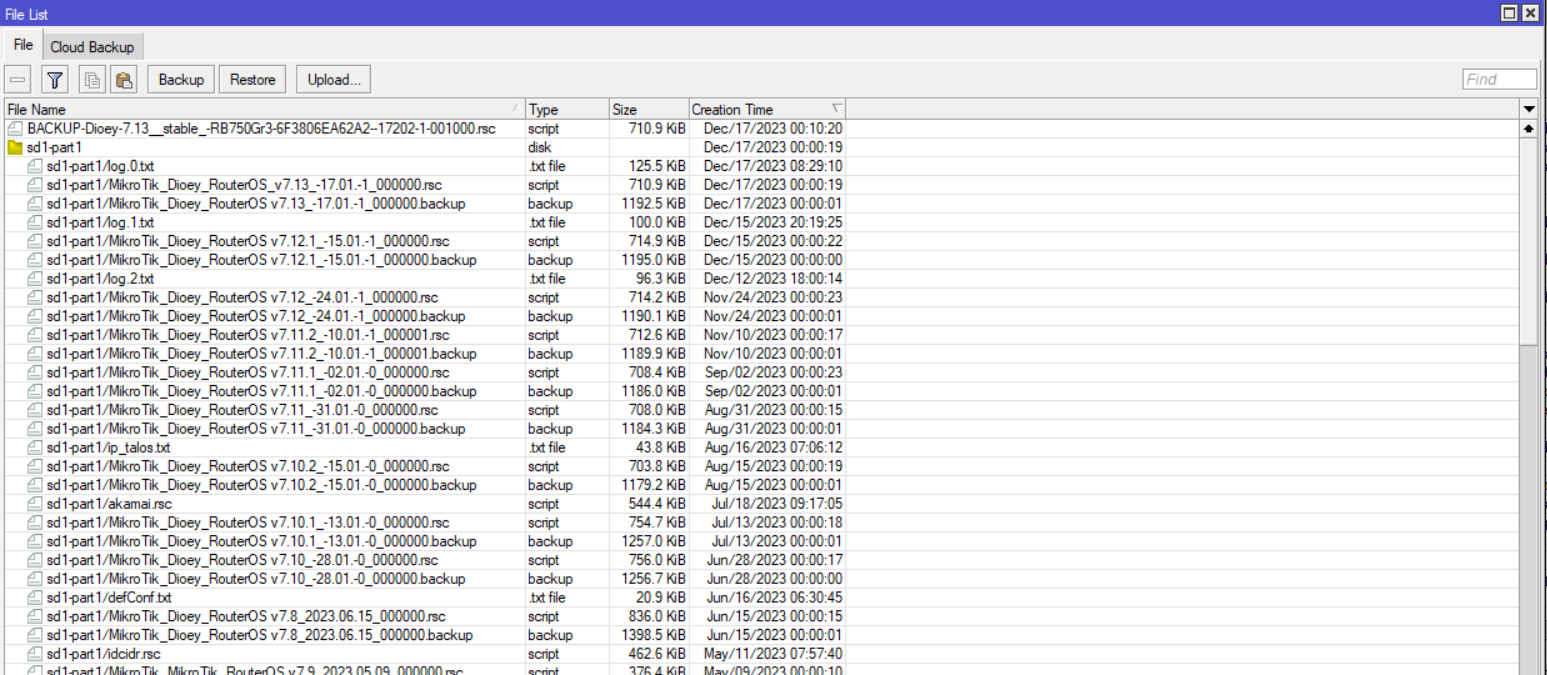
Awsome Mikrotik Team!!!
Waiting for ISIS Features and Documents Update…
I’m talking about old devices connected to the new ones or with new wave2 drivers. For me work station pseudobridge mode, but in the stationbridge mode does not pass traffic, in station mode pass only L2.
where can I find this one liner?
And another OT question because the wifi doc is very cryptic about this command functionality:
/interface/wifi reset wifi1
What is being reset? What can I expect to be reset? I am afraid calling this and then being screwed with an invalid config state…
Thank you very much for new wifi-qcom-ac package and it’s included support for cAP ac. Is airtime fairness feature (ATF) enabled by default for IPQ40xx devices? Or is it disabled?
It is possible that the wifi-qcom-ac is not installing. I only have routeros and zerotier (which I use to remotely manage the router).
Nothing else in files…
Has anyone done it with zerotier still installed on HAP AC2?
It does not work with Zerotier on Hap Ac2. To little storage for qcom and zerotier together.
I think it’s missing around 300 - 500 kB of space.
It doesn’t fit with any extra packages, you have to remove zerotier before installing wifi-qcom-ac.
Hmm, now i tested 3 modes - station, station bridge and station pseudobridge. I have basebox2 with second 5ghz radio and cAPac, both with last stable 7.13 version.
Basebox2 is connected to the cAPac on main 2ghz radio to cAPac and second 5ghz radio work in AP mode. The two radios /4 gen/ are in the bridge.My laptop is connected to the 5ghz second radio on basebox2.
Station mode - the radio is connected, but no traffic is passing through.
Station bridge mode - the radio does not connect
Station pseudobridge mode - the radio is connected, but no traffic is passing through.
Has MT an air time fairness implementation at all? Isn’t that something off-standards?