Sure thing … because wifi-qcom-ac doesn’t replace wireless. And since configuration structure is significantly different, I’m sure there isn’t a good config translator from legacy to wifi syntax. Which means that automatic replacement of wireless with wifi-qcom-ac would mean those people would be wireless-less. So IMO it’s good that bundled legacy wireless is replaced by separate wireless package, which enabled users to perform further steps when ad as they see fit.
Hi support & Dev team
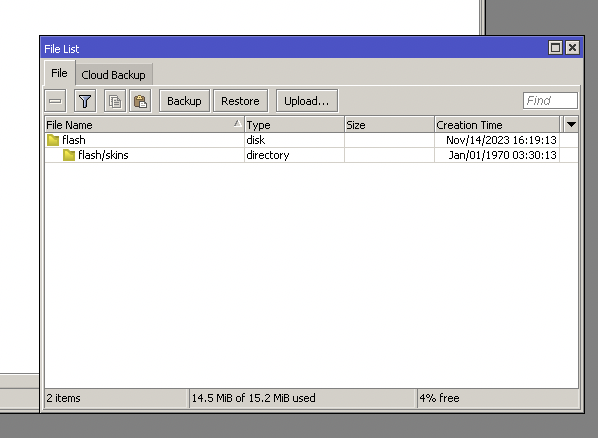
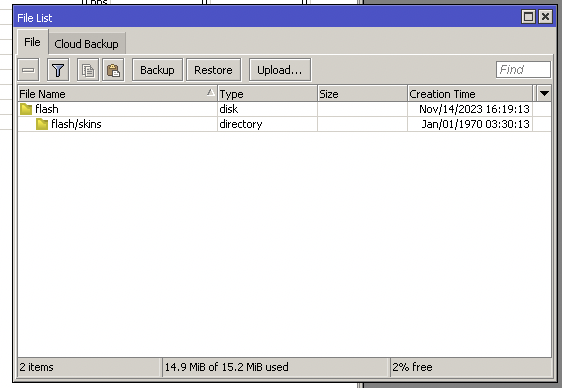
I was hope to have more free space with 7.13 but its less.
check the before and after, I use WAP R AC with R11e-4G.
before update 14.5MB of 15.2MB 4% free
after update 14.9MB of 15.2MB 2% free
As a side note, I have dead mikrotik when I was installed Zerotier after few reboot since 7.6 to 7.12
OMG, Now I can’t even install Zerotier

Thanks
Parham
This upgrade does not in any way free disk space. However, on a device which does not need to have wireless package, for example, CRS which do not run CAPsMAN, you know have separate wireless package. It is not a part of bundle any more. You can now uninstall it, and you will not only save disk space, but also a little bit of RAM.
Did you uninstall wireless package and install qcom-ac ?
You need to do this manually on ac devices in order to be able to use qcom-ac driver.
If anyone else has ADHD, take your meds and then try and understand the new wifi, lol.
Side note: Trying to understand it before going ahead with the firmware upgrade.
Yes, I now see the CAP in CAPSMAN but for some reason the configuration isn’t applied. Do I need to define separate configuration for AC and AX?
If your provisioning rules are specific enough so it ends up only using AX, yes you need new rules for AC.
Is there a way to define provisioning in such a way to use the best available? I only need to define which SSID-s go on 2.4GHZ and which ones to 5GHZ but I have no need to specify AC or AX - also I want fast transition if possible.
So the WAP R AC has a both band WiFi however I don’t need CAPSMAN maybe the CAPSMAN should have own package and Im sure lots of people not using it.
Yes. In 16 MB Hap Ac2 does not put two packages at the same time. Only one: Wireless or Wi-Fi.
updated a CCR2004 to 7.13beta1. Moved some hapac2 w/ wifi-qcom-ac package over to the new “WiFi capsman”. The remaining devices lost connection to old capsman v1. Is it not possible to have both capsman versions running on the same device? I don’t see any other reason why capsmanv1 should’ve stopped working.. I see incoming traffic from caps on port 5246/udp but capsman ignores it or discards the packet. Are they even using different ports for communication? I couldn’t find it in the provided docs.
Let’s start from the beginning again. Hope this helps:
New Wireless packages
From 7.13 we are separating the older wireless package out from routeros.npk bundle and renaming wifiwave2 package to wifi. The new wifi package is now part of the routeros.npk bundle, beginning a new and exciting era for wifi features.
We are also separating core wifi features from the drivers, reducing used space on the router. Note that upgrade will take care of the new packages automatically, you do not need to worry about anything, if you use “check for updates” feature. Technically the bundle only includes the core wifi package with capsman, so devices that don’t have any wireless cards, but are only used for capsman, will not use space unnecessarily if you don’t install the separately available driver packages.
Due to this, you will now see the wifi menu even on devices that don’t have any wireless interfaces. The new wifi package is also now compatible with more devices than before - you can install the new wifi package even on 802.11AC devices that have the ARM CPU type.* This opens up more compatibility options with the new 802.11AX devices and even allows devices to use both wireless packages (old/integrated + new wifi package) in the same device, which means you can now use a single router to run both old and new CAPsMAN.
(* more details about supported devices and exceptions are in the documentation https://help.mikrotik.com/docs/pages/viewpage.action?pageId=46759946 )
Software upgrade PSA
Because of the introduction of a new wireless package, we would like to bring your attention, that RouterOS will now show upgrade only up to 7.12 if using an older version of software. You will have to first upgrade to 7.12 and only then newer RouterOS versions will become available to you.
See 1 post above yours (and normis' post in between ours).
Space issue on ac2 will prevent both packages from being present.
You need both if you want old and new environment to be controlled on the same device.
There are skins to remove it from UI: https://help.mikrotik.com/docs/display/ROS/Webfig#Webfig-Skins
Compared with alternative of not being able to run BOTH legacy and AX capsman, which was previously annoying, seems like fair trade.
I am having probelm with “assocation rejected, can’t find PMKSA” with CAPsMAN on ax3
16:04:11 wireless,debug 12:**:**:**:78:91@wifi1 assocation rejected, can't find PMKSA
16:04:13 wireless,debug 12:**:**:**:9E:78:91@wifi1 assocation rejected, can't find PMKSA
16:05:11 wireless,debug BE:**:**:**:AE:CF:03@2Ghz-2Stavs_TV2 assocation rejected, can't find PMKSA
16:05:52 wireless,debug E6:**:**:**:3C:C5@2Ghz-Lampina-ac31 assocation rejected, can't find PMKSA
And device jumping arround till finally find where to connect and quite ofter then it is far away CAP and i have fealing that e.g. PC start to awoid that CAP next time.
In this extract is Android (Samsung S22), iOS (iPhone14) and win10.
CAPsMAN and CAP is on 7.13beta1
And somewhere i found that that is something to do with pmkid, this is what i have there:
/interface wifi security add authentication-types=wpa2-psk,wpa3-psk connect-priority=0/1 disable-pmkid=yes disabled=no ft=yes ft-over-ds=yes name=Sec_01
It’s not working here, at least not in parallel, since both capsman daemons try to bind to the same port 5246/udp, and the one that boots up first, wins.
On my device it’s either A or B, and I don’t see an option to bind either version to a specific ip or interface.
I have a question, if I upload an hAP ac2 to version 7.13b1 and install the “wifi-qcom-ac” package, can I join its wireless interfaces to a capsman server that is on an hAP ax3 that is in version 7.12?
Have the two capsmanagers listen on different interfaces/VLANs:
Legacy:
/caps-man/manager/interface> print
Flags: * - DEFAULT
Columns: INTERFACE, FORBID
#   INTERFACE       FORBID
0 * all             yes
1   [capsman-interface]  no
qcom:
 /interface/wifi/capsman> print
                   enabled: yes
                interfaces: [other-capsman-interface]
@alibloke, Although this solution might work, I don’t believe it’s optimal. I’ve always understood this to be a list of interfaces from which connections from caps are permitted, rather than capsman binding to these interfaces; instead of 0.0.0.0.
Even if it works, I’d consider this bad practice. Two separate management networks or VLANs would be required. This could be avoided if capsman could bind to IP addresses instead of interfaces, so you would only need to assign two IPs to the same management network: one for the old capsman and the other for the new one.
A better option would have been to use another port for the new capsman and a multicast-based service discovery protocol to locate a compatible capsman. Maybe in ROS8..
I do think that the wording here are messing with people. There are no “wifi package” as in a separated package. The new “wifi” are part og the standard routeros package.
Since its a part of a default package, all routers will see the new Wifi menu. Also it not clearly written when your need the old wireless package, type a list of devices (or type of devises) that need the wirelses package.
But if all you need to do is to upgrade to 7.12, then 7.13 and all should be taken care of, we should not worry about the naming of stuff.