Hmmm … there HAS to be a way to SHUT DOWN the verbosity of those logs.
This is NOT practical like it is now.
On hapAC2 with wifi-qcom-ac i have 164KiB left. That is very bad  but it works for now.
I’ve upgraded a couple of lab routers and I’m getting the exact same status flooding from all passive WireGuard peers, ie those defined without endpoint addresses. This applies to both IPv6 and IPv4 peers. And yeah, I know how to mute it but that is beside the point.
Handshake for peer did not complete after 5 seconds, retrying (try 2)
Handshake for peer did not complete after 5 seconds, retrying (try 2)
Handshake for peer did not complete after 5 seconds, retrying (try 2)
+1, the same by me
Something fishy is going on with passive WireGuard peers since it seems they are all trying to establish an active connection to the destination address 0.0.0.0, port 0. The WireGuard debug log is flooded with entries like: “wireguard, debug: WG-xxxx: … Sending handshake initiation to peer (0.0.0.0:0)”
You have packets flying towards those peers.
Stop the packets, the flooding will stop. Or hide the messages.
The comment from w0lt was correct. In order to disable specific topic logs, go to System/Logging and open, for example, “info” topic. Add “!wireguard” to it. All info logs, except WireGuard, will be logged now.
Yes, these are new logs, nothing changed in the WireGuard behavior. Same actions simply were not logged before.
@strods, what about “Sending handshake initiation to peer (0.0.0.0:0)” from passive peers? Btw, IMO flooding standard “info” with misleading error messages sends wrong signals.
@Znevna: You have packets flying towards those peers. Stop the packets, the flooding will stop. Or hide the messages.
Nope, totally silent according to the packet sniffer. Also, it logs ‘initial handshake,’ not 'handshake reply.
In addition to the logs issue, one of a few WG peers lost its public key. The one I found when I started to investigate the loss of connection was not the same one I put there about a week ago.
Thx, It worked nicely.
D53G-5HacD2HnD
After updating from 7.13.5 to 7.14, “Loopback” interface appeared in the interface list. I don’t see anything about this in changelog…
What is that loopback?
*) system - expose “lo” and “vrf” interfaces;
in http://forum.mikrotik.com/t/v7-14rc-testing-is-released/173569/1 you wrote:
What’s new in 7.14rc4 (2024-Feb-28 13:38):
*) route - use correct routing table for addresses on VRF interface (introduced in v7.14beta3);
*) smb - fixed export with default configuration (introduced in v7.14beta7);
Why is it that this changelog line, highlighted in bold is nowhere to be found in this v7.14 stable release changelog?
Is this not the same release as v7.14rc4, which was prior to this v7.14 release?
Regarding “wireguard, debug: Sending handshake initiation to peer (0.0.0.0:0)” on passive peers.
This is just pure speculation and I might be completely wrong; but after some troubleshooting it seems that MNDP might trigger passive WireGuard peers to attempt to establish a connection despite the absence of an endpoint address, hence why the dest-addr is set to 0.0.0.0:0.
EDIT:
IMO if it turns out to be the issue, the root cause should be addressed to avoid these (potentially misleading) error messages in the info and debug channels.
I’d like to know, is v7.14rc4 testing and v7.14 stable the same release, except maybe changing the version number and channel? Should I upgrade from v7.14rc4 to this?
Same problem here. I lost all ethernet devices on one of our CHR after upgrading to 7.14. Provider is running virtualizor
I tested, and v7.13.5 works. 7.14rc1 was the last revision of 7.14rc that sees the nic.
To recover, I had to mount linux livecd and mount /dev/vda2, then create a downgrade directory (mountpoint/disk/downgrade), copy routeros,wireless,container packages to this directory, and then boot back into routeros, enable ftp server, then fetch from download directory to root directory, and finally /system/package/downgrade
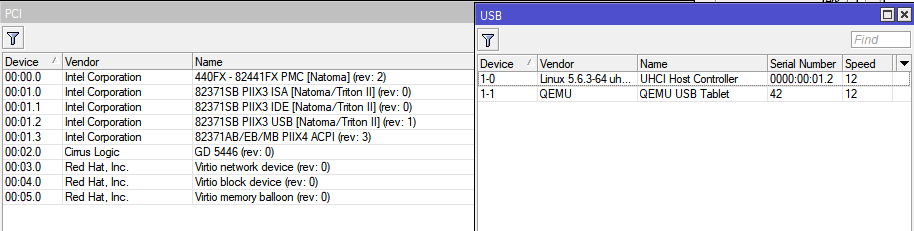
I presume it’s this “RedHat VirtIO Network device”
I’m just glad I found a way to recover this vm…thanks to a combination of my vps provider having the right recovery/console tools, and routeros being linux based and supporting ftpd+fetch
So this one’s stuck on 7.14rc1 until we get a fix, hopefully soon 
Simple answer yes. RC are not ment for production, do upgrade.
I have noticed an issue with IP tunnel interfaces and VRF.
When creating such interface it does not get instantiated in the proper VRF.
At startup I get an error in the log: failed to set vrf for interface , please check if selected vrf instance is enabled.
VRF is enabled and I have also a VLAN and a L2TP interfaces that are properly working in the same VRF, so it seems more an issue with IP tunnel interfaces and VRF with new Ros 7.14.
Switching back to 7.13.5 solves the issue, all interfaces work fine with the VRF.
sorry, RB960PGS (hEX PoE) r2.
No immediate problems noticed after upgrading the following from 7.13 (no patch version upgrades applied):
- RBmAP2n (“mAP 2n”) x2
- RBD25G-5HPacQD2HPnD (“Audience”)
- 2011UiAS-2HnD
- hAP RB951Ui-2nD (“hAP”)
- RB4011iGS
- hEX 750G r3 (“hEX”)