But many change descriptions are pretty useless: “Improve something with something”
No description of the actual problem solved, no description of potential impact on existing configs, backward compatibility, no updates of related documentation etc.
We need more details to assess for our setups if the issue at hand is worth to risk an upgrade or if we can wait until other users have tested it.
-
You shouldn’t be running RC or beta in production else you assume the risk.
-
Rushing to upgrade latest stable on day 1 of release is equally as insane.
Mikrotik cannot possibly tailor their release notes to every set up and configuration. So they hit high points and it is on the responsibile network admin or home enthusiast to consider and test on their configuration.
That is why we see so many responsible admins asking questions for elaboration on these terse and often cryptic release notes, is it not? Or sharing their experience on the new software so that other responsible admins can discuss and share knowledge?
I’m not sure what’s meant with “tailor”.
It’s just about the usual release notes. Something like limitations, resolved issues, known issues, precautions (for ex a warning for configs with non default bridge port MTU in 7.14 to wait for 7.15).
With issues having unique IDs so they can be tracked among versions and can be referenced in communication with support and also here.
Nowadays, this is usually mostly auto generated from the SW release/bug/feature tracking and planning system. Gittea, JIRA, TFS, private github or whatever MT is using.
Yes, hopefully EdPa isn’t typing these out every time with his(?) poor little fingers.
Obviously they have JIRA for individual user support, and you wouldn’t want all of that exposed to the internet, but is there some kind of middleware or feature already in JIRA that could act as a public bug tracker where more detail than just 1 line could be placed?
It is impossible to provide precise release notes for everyone’s needs. As we have described in many topics before - we do write in release notes what did we fix, not how the problem might have appeared for the user. We do write what was changed under the hood, not on “user experience”.
In most cases, “improved stability” means that some service (or router itself) will not crash under specific circumstances or simply some code was re-written to be more “faster/better/modern/etc.”.
From our point of view, changelog should tell you either you should or should not upgrade. So, if you do not have any problems at all, there is no need for an upgrade, if there are no new features or security fixes for your needs. If you have, for example, issues with OVPN and you see changes in changelog about OVPN or PPP generic service, then you should try the upgrade.
However, of course, non-stable versions should be used only if you are willing to risk that you might experience some issues due to new features introduced since testing releases are indeed - “testing releases”.
Hello to the community,
I´ve updated some of my Lab MPLS BGP-free core routers to v7.14rc1 and now rc4. Because in v7.14rc1 or maybe before that were introduced route-leaking between local VRFs → The route leaking itself works but in this version v7.14rc1 the connected routes of interfaces in a VRF don´t install in the routing table of the VRF. Now in v7.14rc4 there stands something of “route - use correct routing table for addresses on VRF interfaces (introduced in v7.14beta3)” in the release notes. So I think I update to rc4 and then it will work. But it still doesn´t work.
Can someone of you help me with that and can explain me why advertised fixes aren´t there?
Is this an issue introduced in 7.14? I see heavy discussion in this thread but no mention in 7.13 topic.
And something more: I don´t found in any release notes the introduction of a default loopback interface on the mikrotiks? In which version that came in ROS?
*) system - expose “lo” interface;
To filter through changelogs easily, you can go here: https://mikrotik.com/download/changelogs/testing-release-tree press expand and then use “ctrl+f”
I mean I did that but I didn´t find something about loopback
In my case, I’ve experimented with the “WAN under Bridge” configuration in the past week on my RB5009. My WAN is a PPPoE connection over a SFP GPON module, which requires no VLAN tagging, so when I put sfp-sfpplus1 under the Bridge I set a dummy PVID 1000 for it with frame-types=admit-only-untagged-and-priority-tagged and configured th PPPoE connection to use the interface vlan1000 under bridge, everything seems to work fine. The bridge ports are all shown with the H-flag active and bridge-fast-path-active is on. My LAN only uses VLAN, the bridge interface with PVID 1 is not used (no IP address and DHCP). The router has no problem with WAN speedtest around 2-2.2Gbps (the limit of my line) for both IPv4 and IPv6.
However, I noticed that IPv4 Fasttrack doesn’t work anymore. All the dummy fasttrack rules are still listed under the tabs of the IPv4 firewall window in WinBox, but they all have counter == 0. Most of the IPv4 connections listed under the Connections tab do have the F flag active (fasttrack not greyed out in the status bar). But the counters are all 0:
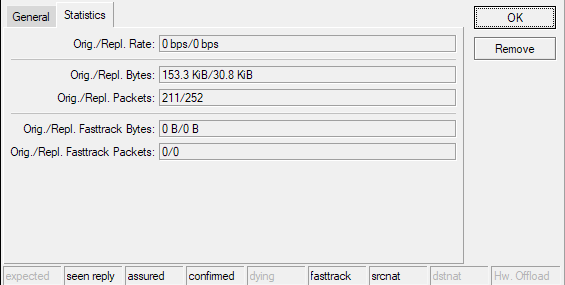

Using “Profile” I could see that the “firewall” task now use about 3-4x more CPU, but the RB5009 can still handle everything without a problem. If I pull sfp-sfpplus1 out of the bridge and set PPPoE to use it, the fasttrack counters increase normally and the CPU usage for “firewall” drops.
Is this the Fasttrack inactive the intended behavior? According to http://forum.mikrotik.com/t/fastpath-fasttrack-l2hw-l3hw-clarification/155333/1 FastPath should be supported with VLAN filtering since 7.2 so this condition should still be met for Fasttrack, shouldn’t it?
Loopback is a word frequently used for those virtual interfaces, but it is not really meaningful. Because those interfaces are not really used for loopback but more to simplify routing or setup (router address, unnumbered IP, some IPsec setup, and so on).
It is “lo” in the Mikrotik world.
I know what a loopback interface is but it was suddenly there in the interface list 
I have VLAN/MTU/Bridge related problems since 7.13
This has been a problem for me for a long time; it’s not recent. I reported this back with 7.10, and then again with 7.12/7.13 in just the last couple of weeks. Both times I was told it would be fixed in a future release, but it sounds like they finally have enough data to put a fix into 7.15 (as mentioned above).
RB5009 doesn’t qualify for hardware-offloaded routing, just bridging/switching. Since you’re adding PPPoE and firewall rules, it’s all punted to the CPU anyway.
Keeping your WAN interface out of the LAN bridge is best practice for non-L3HW-offloaded devices (anything that’s not a CRS3xx, CRS5xx, or CCR2x16), unless you’re passing VLANs through from the WAN to the LAN.
RouterOS v7.14 has been released
http://forum.mikrotik.com/t/v7-14-3-stable-is-released/174007/1