It may have something to do with you config. You can post it here.
Since upgrading to 7.14.3 (from either 7.12 or 6.49) we’ve noticed some of our CCR1036/1072 rebooting due to kernel failure. From initial analysis this seems to coincide with IGP/LDP instability on the network casued by mmwave radio backhauls flapping.
Support has advised from our supout file that the router received a packet of 65534 bytes length. This is impressive since our network is L2 transport only so frame size should be limited by the ingress interface MTU.
After further inspection, CRS300’s (CRS310, NetPower16/CRS318) that are participating in OSPF/BGP had really low RAM available numbers, related to the number of days of uptime (4 days = 64MB of RAM left, 8 days uptime = only 22MB of RAM left), whereas those acting as switches are fine (160-170MB of RAM free). Routers with 1GB of RAM (AX3, 4011, 5009) had less than half of their RAM available after 25 days of uptime. The 2116’s that haven’t rebooted didn’t really show any noticeable depletion because they have 16GB of RAM.
All of the above were running 7.15.3 and have been moved to 7.16rc4 for now. Prior to upgrading them to 7.15.3 three weeks ago, they had been running 7.11.2, and one had an uptime of 258 days before needing a reboot due to resource exhaustion of some kind (got laggy and unresponsive; had to power-cycle it).
I have problem-issue on RB5009UG+S+, when using usb flash disk Kingston Data Traveler 3.0 (USB3.20 5000Mbps).
When I reboot the router the disk gets disconnected on Diks Lists shows as not recognized.
I must manually pull it out and push it back into usb port.
I have tested it on two usb flash disk same model one 32GB second 64GB, all were formatted ext4 file system.
Does anyone have a similar problem?
I have found a second problem, when using smb shares with Require Encryption enabled. After accessing the share from windows device the router reboots !!!
Thanks.
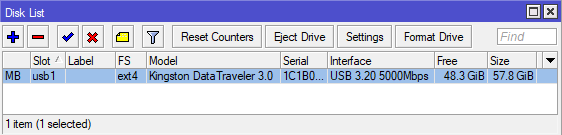
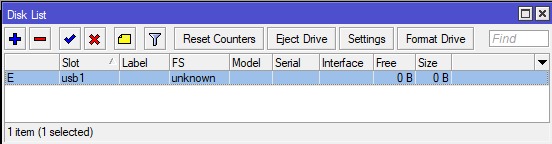
It might be a known issue.
Are you sure the disk has not been mounted as USB2 (and different label, e.g. disk2) ?
If so, USB reset should solve this issue.
Support is aware of the issue, it happens with some brands of USB disks.
No ETA yet on the solution.
Maybe this is because, how the ext4 drive partitioned gpt mbr ?
My suggestion to try to wipefs (linux-command) or even use windows diskpart and do “clean” first and the try to format the drive in Mikrotik device.
So the partition will be created on the Microtik device, not any another equipment like Linux computer.
I don’t know if the Mikrotik device use any partitions.
I think I have a reason for this. I may be wrong, I am waiting on support to confirm this.
It seems that leaving the wireless channel on auto will make the device try to scan for the channels every 3 hours or so. And either that process kicks all the clients or it re-sets the same channel and it kicks all the clients.
This doesn’t seem to happen if you set a specific channel to the wireless device.
I did not test it but it may also be that setting the interval for the channel check may prevent it from doing the test so often or outside of that interval.
So far I have only seen this behavior on the AX^2. Could extend to all wifiwave2 devices but I have not tested the AX^3 nor the hap ax.lite
Hi,
I’m not able to get work Netwatch/ fetch to send any notification. I had fetch thorough Teams I did not touch the config but it is not working anymore after package upgrade to version 7.15.3. Today I tried set it up with Telegram and there is info Fetch failed with status 400 or Mode not specify.
Is here anyone with working Netwatch/Fetch? Anyone know how to solve it?
I do send Telegram notifications using /tool/fetch in 7.15.3 and I do not suffer from this kind of problems:
/tool fetch url=“https://api.telegram.org/$botId:$botPwd/sendMessage?chat_id=$chatId&text=$message&parse_mode=MarkdownV2” output=none check-certificate=yes-without-crl
To stay on topic here, please open a new topic for further discussion regarding this.
Hi,
your fetch command is not working for me…I have only changed the chat:id. What else should I change?
Thank you
The topic, please. This one is not the right place for discussing this, create a new one.
Very true. Just to close this out… since the permission have changed somewhat recently (but NOT in this release). Poster with fetch is using netwatch, which has restricted permissions. It also may not be the fetch per se but another restricted operation too.
Anyway. The answer lies in the docs netwatch docs (Netwatch - RouterOS - MikroTik Documentation) and searching forum for “netwatch fetch” - or as noted SEVERAL times as a NEW post.
There is also another process that seem to be running every 40 hours (give or take) and I am not sure what that could possibly be now. But this also resets the wireless interface.
RouterOS v7.16 has been released
http://forum.mikrotik.com/t/v7-16-2-stable-is-released/178911/1