v7.16.2 [stable] is released!

@mszru nothing wrong here. It’s the Intel issue apparently. In order to get rid of SA query timeouts disable management frame protection on AP. WPA2 alone is not sufficient.

We don’t know what happens here. I rarely get SA query timeouts - but they are legit. E.g. when I get out of signal reach or something. Sometimes my Linux AX200 notebook initiates a roam to another station with weaker signal (no idea why it does that). Lets say from wifi1 to wifi2. This results in a connection loss of course. Then I have to re-connect manually and before it connects successfully I see SQ query timeout messages for wifi2 in log. But that’s to be intended. It now connects on wifi1 again and not responds to SA queries on wifi2 anymore.

MLAG on 2 x CRS354-48G-2S+2Q+ switches continues to be a problem. MLAG peer link is a 802.3ad (LACP) bond interface utilising two Q+ (40G) ports with MikroTik DACs. We’ve tried swapping the DACs which made no difference.

Bond and slave interface status shows zero ‘link down’ events but MLAG peer status is reported as flapping regularly:

 09:28:26 bridge,warning "bridge" peer disconnected
 09:28:26 bridge,warning "bridge" peer link down
 09:28:26 bridge,info "bridge" peer link up
 09:28:26 bridge,info "bridge" peer connected
 09:28:26 bridge,info "bridge" peer becomes secondary DC:2C:6E:D2:AF:4B

I’ve sent numerous supout.rif files, for all 7.15 versions of the firmware and now 7.16; never hear anything back from support@mikrotik.com. Also no response or acknowledgement when I log a support case in the support portal.


PS: Works perfectly 99.9% of the time, but these frequent peer link flaps interrupt Teams calls for 2-3 seconds each time they occur and the result is that we can’t recommend this for client networks as a result.

PS: Also makes no difference when I temporarily use a 10G DAC and reconfigure the bond-peer interface to use sfp-sfpplus4 instead of the 2 x QSFP+ interfaces (not a QSFP+ (40G) issue).

NB: Only happens during office hours, never over weekends or evenings. Network utilisation is actually higher at night when backups run.

Herewith the MLAG configuration:
switch1a:

/interface bridge
add admin-mac=DE:AD:BE:EF:DE:A0 auto-mac=no name=bridge port-cost-mode=short priority=0x5000 vlan-filtering=yes
/interface ethernet
set [ find default-name=sfp-sfpplus4 ] comment="Partner Switch sfp-sfpplus4:" l2mtu=10218
/interface bonding
add lacp-rate=1sec mode=802.3ad name=bond-peer slaves=sfp-sfpplus4 transmit-hash-policy=layer-3-and-4
add lacp-rate=1sec mlag-id=39 mode=802.3ad name=bonde39 slaves=ether39 transmit-hash-policy=layer-3-and-4
add lacp-rate=1sec mlag-id=40 mode=802.3ad name=bonde40 slaves=ether40 transmit-hash-policy=layer-3-and-4
add lacp-rate=1sec mlag-id=41 mode=802.3ad name=bonde41 slaves=ether41 transmit-hash-policy=layer-3-and-4
add lacp-rate=1sec mlag-id=42 mode=802.3ad name=bonde42 slaves=ether42 transmit-hash-policy=layer-3-and-4
add lacp-rate=1sec mlag-id=43 mode=802.3ad name=bonde43 slaves=ether43 transmit-hash-policy=layer-3-and-4
add lacp-rate=1sec mlag-id=44 mode=802.3ad name=bonde44 slaves=ether44 transmit-hash-policy=layer-3-and-4
add lacp-rate=1sec mlag-id=45 mode=802.3ad name=bonde45 slaves=ether45 transmit-hash-policy=layer-3-and-4
add lacp-rate=1sec mlag-id=46 mode=802.3ad name=bonde46 slaves=ether46 transmit-hash-policy=layer-3-and-4
add lacp-rate=1sec mlag-id=47 mode=802.3ad name=bonde47 slaves=ether47 transmit-hash-policy=layer-3-and-4
add lacp-rate=1sec mlag-id=48 mode=802.3ad name=bonde48 slaves=ether48 transmit-hash-policy=layer-3-and-4
add lacp-rate=1sec mlag-id=101 mode=802.3ad name=bondsfp1 slaves=sfp-sfpplus1 transmit-hash-policy=layer-3-and-4
add lacp-rate=1sec mlag-id=102 mode=802.3ad name=bondsfp2 slaves=sfp-sfpplus2 transmit-hash-policy=layer-3-and-4
add lacp-rate=1sec mlag-id=103 mode=802.3ad name=bondsfp3 slaves=sfp-sfpplus3 transmit-hash-policy=layer-3-and-4
/interface bridge mlag
set bridge=bridge peer-port=bond-peer
/interface bridge port
add bridge=bridge comment="MLAG Peer:" interface=bond-peer pvid=99 trusted=yes
add bridge=bridge interface=bonde38 restricted-role=yes
add bridge=bridge interface=bonde39 restricted-role=yes
add bridge=bridge interface=bonde40 restricted-role=yes
add bridge=bridge interface=bonde41 restricted-role=yes
add bridge=bridge interface=bonde42 restricted-role=yes
add bridge=bridge interface=bonde43 restricted-role=yes
add bridge=bridge interface=bonde44 restricted-role=yes
add bridge=bridge interface=bonde45 restricted-role=yes
add bridge=bridge interface=bonde46 restricted-role=yes
add bridge=bridge interface=bonde47 restricted-role=yes
add bridge=bridge interface=bonde48 restricted-role=yes
add bridge=bridge edge=no-discover interface=bondsfp1 restricted-role=yes trusted=yes
add bridge=bridge edge=no-discover interface=bondsfp2 restricted-role=yes trusted=yes
add bridge=bridge interface=bondsfp3 restricted-role=yes
/interface bridge vlan
add bridge=bridge tagged=bond-peer vlan-ids=1
add bridge=bridge tagged=bridge,bond-peer,bondsfp1,bondsfp2 vlan-ids=10
add bridge=bridge tagged=bridge,bond-peer,bondsfp1,bondsfp2 vlan-ids=11
add bridge=bridge tagged=bridge,bond-peer,bondsfp1,bondsfp2 vlan-ids=21
add bridge=bridge tagged=bridge,bond-peer,bondsfp1,bondsfp2 vlan-ids=22
add bridge=bridge tagged=bridge,bond-peer,bondsfp1,bondsfp2 vlan-ids=23
add bridge=bridge tagged="bridge,bond-peer,bondsfp1,bondsfp2,bondsfp3,bonde38,bonde39,bonde40,bonde41,bonde42,bonde43,bonde44,bonde45,\
    bonde46,bonde47,bonde48" vlan-ids=50
add bridge=bridge tagged="bridge,bond-peer,bondsfp1,bondsfp2,bondsfp3,bonde38,bonde39,bonde40,bonde41,bonde42,bonde43,bonde44,bonde45,\
    bonde46,bonde47,bonde48" vlan-ids=52
switch1b:

/interface bridge
add admin-mac=DE:AD:BE:EF:DE:A1 auto-mac=no name=bridge port-cost-mode=short priority=0x5000 vlan-filtering=yes
/interface ethernet
set [ find default-name=sfp-sfpplus4 ] comment="Partner Switch sfp-sfpplus4:" l2mtu=10218
/interface bonding
add lacp-rate=1sec mode=802.3ad name=bond-peer slaves=sfp-sfpplus4 transmit-hash-policy=layer-3-and-4
add lacp-rate=1sec mlag-id=39 mode=802.3ad name=bonde39 slaves=ether39 transmit-hash-policy=layer-3-and-4
add lacp-rate=1sec mlag-id=40 mode=802.3ad name=bonde40 slaves=ether40 transmit-hash-policy=layer-3-and-4
add lacp-rate=1sec mlag-id=41 mode=802.3ad name=bonde41 slaves=ether41 transmit-hash-policy=layer-3-and-4
add lacp-rate=1sec mlag-id=42 mode=802.3ad name=bonde42 slaves=ether42 transmit-hash-policy=layer-3-and-4
add lacp-rate=1sec mlag-id=43 mode=802.3ad name=bonde43 slaves=ether43 transmit-hash-policy=layer-3-and-4
add lacp-rate=1sec mlag-id=44 mode=802.3ad name=bonde44 slaves=ether44 transmit-hash-policy=layer-3-and-4
add lacp-rate=1sec mlag-id=45 mode=802.3ad name=bonde45 slaves=ether45 transmit-hash-policy=layer-3-and-4
add lacp-rate=1sec mlag-id=46 mode=802.3ad name=bonde46 slaves=ether46 transmit-hash-policy=layer-3-and-4
add lacp-rate=1sec mlag-id=47 mode=802.3ad name=bonde47 slaves=ether47 transmit-hash-policy=layer-3-and-4
add lacp-rate=1sec mlag-id=48 mode=802.3ad name=bonde48 slaves=ether48 transmit-hash-policy=layer-3-and-4
add lacp-rate=1sec mlag-id=101 mode=802.3ad name=bondsfp1 slaves=sfp-sfpplus1 transmit-hash-policy=layer-3-and-4
add lacp-rate=1sec mlag-id=102 mode=802.3ad name=bondsfp2 slaves=sfp-sfpplus2 transmit-hash-policy=layer-3-and-4
add lacp-rate=1sec mlag-id=103 mode=802.3ad name=bondsfp3 slaves=sfp-sfpplus3 transmit-hash-policy=layer-3-and-4
/interface bridge mlag
set bridge=bridge peer-port=bond-peer
/interface bridge port
add bridge=bridge comment="MLAG Peer:" interface=bond-peer pvid=99 trusted=yes
add bridge=bridge interface=bonde39 restricted-role=yes
add bridge=bridge interface=bonde40 restricted-role=yes
add bridge=bridge interface=bonde41 restricted-role=yes
add bridge=bridge interface=bonde42 restricted-role=yes
add bridge=bridge interface=bonde43 restricted-role=yes
add bridge=bridge interface=bonde44 restricted-role=yes
add bridge=bridge interface=bonde45 restricted-role=yes
add bridge=bridge interface=bonde46 restricted-role=yes
add bridge=bridge interface=bonde47 restricted-role=yes
add bridge=bridge interface=bonde48 restricted-role=yes
add bridge=bridge edge=no-discover interface=bondsfp1 restricted-role=yes trusted=yes
add bridge=bridge edge=no-discover interface=bondsfp2 restricted-role=yes trusted=yes
add bridge=bridge interface=bondsfp3 restricted-role=yes
/interface bridge vlan
add bridge=bridge tagged=bond-peer vlan-ids=1
add bridge=bridge tagged=bridge,bond-peer,bondsfp1,bondsfp2 vlan-ids=10
add bridge=bridge tagged=bridge,bond-peer,bondsfp1,bondsfp2 vlan-ids=11
add bridge=bridge tagged=bridge,bond-peer,bondsfp1,bondsfp2 vlan-ids=21
add bridge=bridge tagged=bridge,bond-peer,bondsfp1,bondsfp2 vlan-ids=22
add bridge=bridge tagged=bridge,bond-peer,bondsfp1,bondsfp2 vlan-ids=23
add bridge=bridge tagged="bridge,bond-peer,bondsfp1,bondsfp2,bondsfp3,bonde38,bonde39,bonde40,bonde41,bonde42,bonde43,bonde44,bonde45,\
    bonde46,bonde47,bonde48" vlan-ids=50
add bridge=bridge tagged="bridge,bond-peer,bondsfp1,bondsfp2,bondsfp3,bonde38,bonde39,bonde40,bonde41,bonde42,bonde43,bonde44,bonde45,\
    bonde46,bonde47,bonde48" vlan-ids=52

a quick thought … is auto-negotiation enabled on those 40G links? is FEC configured on the 40G links on both sides?
i’d try to set the link speeds to fixed on both ends and configure FEC accordingly (“fec74” on 40G)

It's using direct attach copper cables so there, IMHO, wouldn't be forwarding error correction capabilities as this would need to be provided by a transceiver. The problem unfortunately continues when we swap the QSFP (40G) ports for a standard 10 Gbps SFP+ DAC and move bond-peer to utilise eg sfp-sfpplus4.

PS: Thanks for your feedback though!


Edit: I see FEC74 doesn't have anything to do with forward error correction. Will read up about it and experiment, the interface itself nor the bond register drops or breaks in communication though. Only the MLAG peer link reports disconnecting and then re-establishing connectivity.

hm maybe i misinterpreted something on the FEC part. but maybe you get some results on that end.
as for auto-negotiation - tried to set both ends to fixed link speeds and duplex?

I think that the default config of v7.16 is missing the correct settings for the LEDs on the RB951Ui-2HnD.
Can anyone confirm that?

@bbs2web MLAG Config:

Just some quick observations, may or may not help:
I see you are tagging the bridge with every vlan, unless you are creating vlans under the bridge to add IPs for routing (not supported with MLAG) I am not sure why you are doing that. My MLAG switch is purely L2 with the exception of a management IP which is added to the bridge itself, with the bridge pvid being my management network. You should remove the tagged=“bridge,bond-peer,…” and replace with tagged=“bond-peer,…” otherwise at a guess you are potentially driving additional traffic to the CPU. This may or may not help, it is just an observation. I do not tag the bridge under /interface/bridge/vlan in any entries (it ends up being dynamically tagged in the vlan I set the bridge pvid to).

Looks like you are correctly setting aside a vlan for the peerlink, and have untagged that vlan on the peerlink, and tagged vlan 1 on the peerlink, so that looks good.

I don’t think a port like spf-sfpplus4 (a straight 10G interface) would have any FEC settings (looks like that is for 25G+ ports), I have not set any for my interface an it works.

I would also wonder (like you have in the past), if this is something to do with the chipset in the CRS358, it does work on the CRS317. You have removed qsfp from the equation, and it is still failing, and that eliminates the port, and DAC cable, since you had to use another port and DAC. Carefully remove your bridge from being tagged under interface/bridge/vlan (have a console cable at hand if you drop L3 to the switch). I am assuming you are not trying to use this for L3 (Since you can’t with MLAG anyway).

ps. Only other difference I can see is you have set a static mac address, in mine the bridge has an automatic mac address.

pps. Just looked at your bridge definition and you are not specifying a spanning tree protocol. Spanning tree is a requirement for MLAG I thought, mine is set to rstp.

Hope you find something in this that helps.

@3dfx:
Install two packages: routeros & wireless & reset the configurations

I just found out that I missed to install the wireless package and came to delete my post…
Thanks!

Hi All!
I have a RB5009, a CRS309 (connected via SFP+ to the RB5009) and a cAPax (connected via ethernet to the RB5009).
They were on 7.15.3 working perfectly till yesterday when I decided to upgrade to 7.16 all of them.
First of all something strange happened to the CRS309. Downloaded and installed the fw, rebooted, upgraded from routerboard window, rebooted again => DEAD. I had to flash fw back with netinstall.
After this something strange happened: I had more or less no issues with the RB5009 and cAPax, but the devices connected to the CRS309 were no more able to get a IP (DHCP server is on RB5009, it assigns IPs to the switch and AP too, this two have DHCP client set on bridge interface).
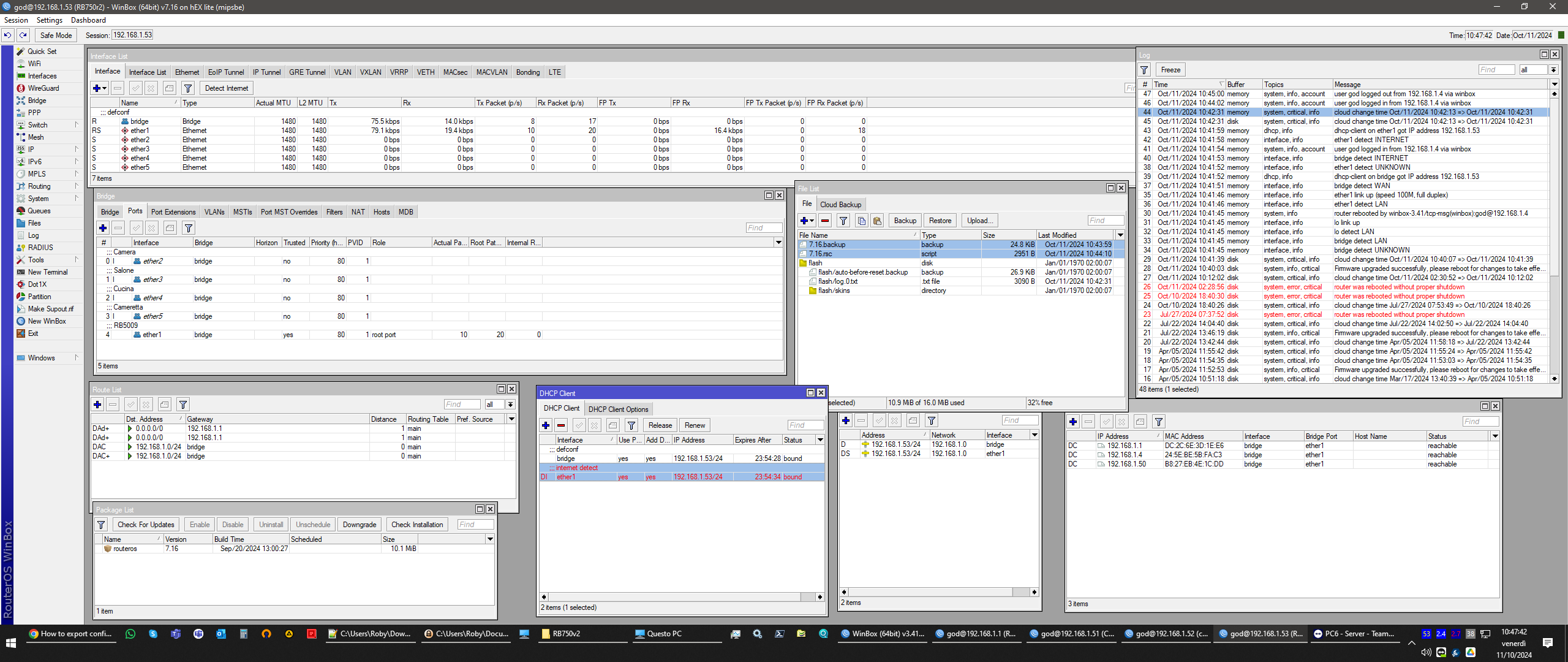
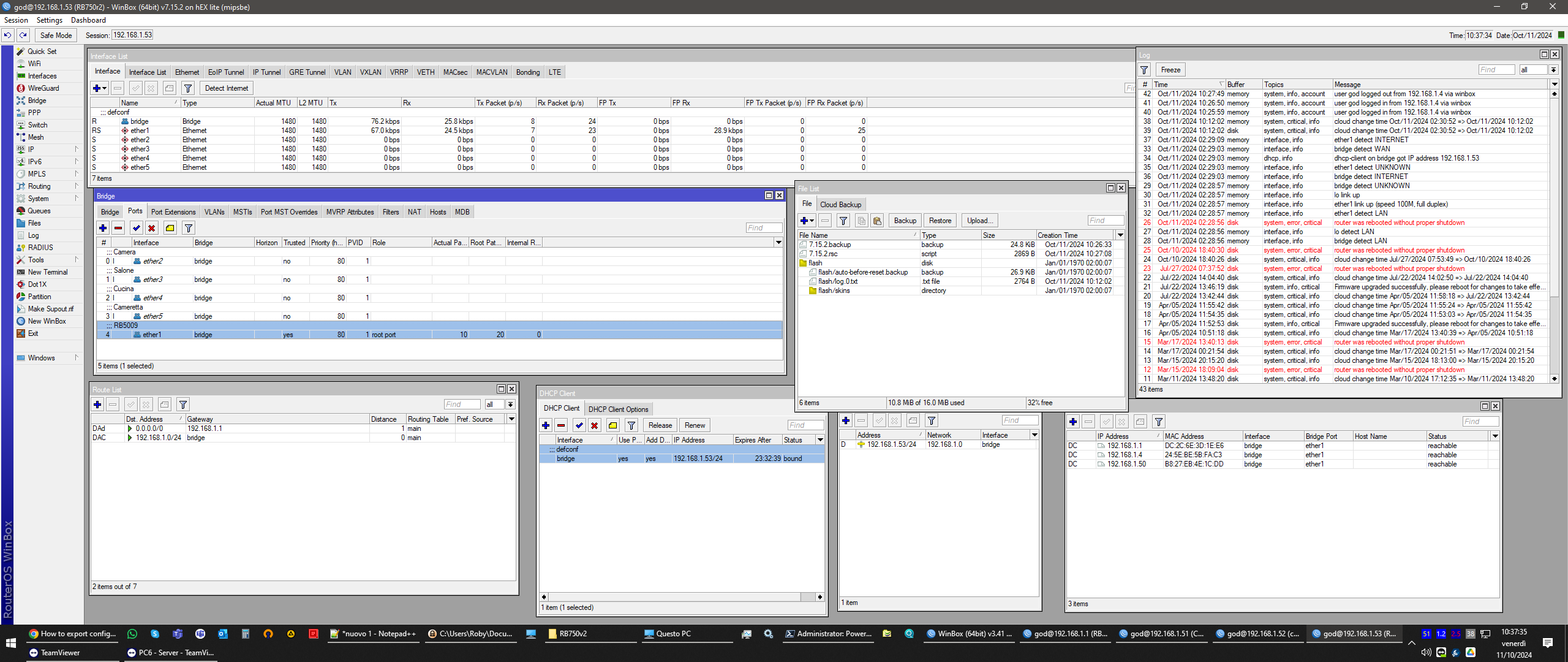
So looking under DHCP client on the CRS309 I found two entries, both of them dynamic, one from bridge and one from sfp-sfpplus1 (it goes to the RB5009), with the same IP, one of them was marked as “invalid”. Can’t delete, disable or modify those 2 entries and clearly there was a mess in the route list (everything duplicate).
After downgrading everything to 7.15.3 and applying the old settings (just leaving as it is was not enough) it worked again.

At this point it might just be something I had previously misconfigured that didn’t was important on previous fw, but can’t imagine what.

I had a RB750v2 too that I use for some testing and wanted to replicate the procedure (I’m now a bit afraid of doing random things on my daily devices), despite beeing a router is configured to act just like a normal switch (a very simple config I’d say).
So I exported the config and did a screenshot of what I think is important before and after upgrading it to 7.16 and I experienced the same behaviour: two DHCP client entries, everything duplicates, conflicts, etc.

I’ll post them here.

Can you spot something really wrong I did that could cause the issue?
thank you
7.16.png
7.16.rsc (2.88 KB)
7.15.2.png
7.15.2.rsc (2.8 KB)

/interface detect-internet
set detect-interface-list=all

That’s where your dynamic DHCP clients come from. And your mess in the routes. Please do yourself a favor and disable detect-internet.

/interface/detect-internet/set detect-interface-list=none

I remember that I enabled it because otherwise something didn’t work, but cannot remember exactly what…
Anyway just did it on the testing devices and it worked…now I’m a bit afraid of repeating the process on the “production” devices :smiley:
I’m going to keep you updated

PS: I only now red the notice on the documentation: “Note that Detect Internet can install DHCP clients, default routes, DNS servers and affect other facilities. Use with precaution, and after enabling the service, check how it interferes with your other configuration.” :smiley: :smiley: :smiley:

Question: It shouldn’t cause issues if I keep it enabled on the main router, right?

thank you

Most here will keep it disabled.

Hi All,

I use my hAP ac3 as a Home gw and I use PPPOE client to connect to Internet. From my side there is a default VRF only ID 0 to all interface and not use BGP.

Based on previous comments I guess the BGP and /or custom VRF config may cause issue to connect Internet (via PPPOE ?)

Should I expect any problem with Internet access if I upgrade my router to 7.16?

Currently I’m running 7.15.3.

Thank you for your help in advance

I think many “accidentally” enabled it because the mobile MikroTik app requires “Detect Internet” in order to show the traffic graphs on its home screen.

What’s new in 7.16.1 (2024-Oct-10 17:03):
*) defconf - changed wireless installation from “indoor” to “any”;
*) defconf - disable 5GHz secondary channel on RB4011;
*) dns - do not look up local cache when executing “:resolve” command with specified “server” parameter (introduced in v7.16);
*) sfp - improved initialization for certain SFP modules on CRS309 and CRS317 devices (“/system routerboard upgrade” required);

mh no, it was more something related to the ability of finding and downloading updates or that had to do with DDNS or time update…but I tested these 3 things and seems to work even if detect internet is disabled. maybe a old bug?
anyway I can’t find an explanation to why it became a problem in 7.16. it’s years I have that option enabled and did tons of fw updates

:exploding_head::exploding_head::exploding_head::exploding_head::exploding_head::exploding_head:

How can this be a change in 7.16.1?

“configuration.installation” was introduced in 7.17beta2:

What's new in 7.17beta2 (2024-Sep-27 10:07):

*) wifi - added configuration.installation property to limit use of indoor-only channels;