The change is for “wireless” not “wifi”.
Thanks for clarification!
Already updated my devices. up and running.
[quote=wfburton post_id=1102818 time=1728705619 user_id=215408]
Is there a list of supported SFP modules and has it been updated?
[/quote]
I presume you could have find this yourself, the link is listed in all devices specs that have SFP interfaces:
<LINK_TEXT text=“https://help.mikrotik.com/docs/display/ … patibility”>https://help.mikrotik.com/docs/display/ROS/MikroTik+wired+interface+compatibility</LINK_TEXT>
And it is updated from time to time…
Unless you are talking about 3rd parties modules in which case I just don’t see why would Mikrotik waste time to check some other company product, that should be done by the OEM…
Did anyone notice any problems with attached USB sticks?
Mine got removed and added again. All containers show up as “running” but not longer responsive.
The USB stick (Kingston DTKN/64) and the 4G modem (Alcatel IK41VE1) are connected to my hAP ax3 via USB 3 hub (Gembird UHB-U3P4-03). The router is powered by the mini-UPS that delivers up to 42W (12V, 3.5A) which should be sufficient given the max power consumption of hAP ax3 (38W).
 10:37:28 disk,info remove usb1
 10:37:29 disk,info add usb1 model:Kingston DataTraveler 3.0 interface:USB 3.20 5000Mbps size:62.0G fs:ext4
 . . .
 10:45:42 interface,info lte1 detect WAN
 10:45:44 disk,info remove usb1
 10:45:46 disk,info add usb1 model:Kingston DataTraveler 3.0 interface:USB 3.20 5000Mbps size:62.0G fs:ext4
 10:45:49 interface,info lte1 detect INTERNET
I think it started since the upgrade to 7.16 as I don’t remember having such problems at 7.15.3
Shall I try enabling logging for “disk,debug” topics to find out the reason or submit the SUP ticket? 
UPDATE:
The filesystem on the USB stick got corrupted and that was likely the cause of the problem. After fixing filesystem errors (and connecting the USB stick to a different port of the hub) the disk is no longer removed and re-added.
Is it startup script which does this ?
Could be to assure usb3 devices are properly recognized as such after startup.
Long standing issue with some brands especially on rb5009.
Curious too where this comes from otherwise.
No, the only startup script I have is the one that turns on/off the leds depending on the time of the day.
And just before the disk removal there was some abnormal activity of the Chinese air monitor device. I don’t think these events are related, but who knows…
 07:00:00 system,info led settings changed by scheduler:leds-on (/system leds settings set all-leds-off=never)
 09:37:52 wireless,info 54:5A:A6:**:**:**@wifi4 disconnected, connection lost, signal strength -45
 09:38:05 wireless,info 54:5A:A6:**:**:**@wifi4 connected, signal strength -46
 09:38:05 dhcp,info iot-dhcp4 deassigned 192.168.22.249 for 54:5A:A6:**:**:** cgllc-airmonitor-b1_miio32732741
 09:38:06 dhcp,info iot-dhcp4 assigned 192.168.22.249 for 54:5A:A6:**:**:** cgllc-airmonitor-b1_miio32732741
 09:39:40 wireless,info 54:5A:A6:**:**:**@wifi4 disconnected, connection lost, signal strength -46
 09:39:41 wireless,info 54:5A:A6:**:**:**@wifi4 connected, signal strength -46
 09:39:41 dhcp,info iot-dhcp4 deassigned 192.168.22.249 for 54:5A:A6:**:**:** cgllc-airmonitor-b1_miio32732741
 09:39:41 dhcp,info iot-dhcp4 assigned 192.168.22.249 for 54:5A:A6:**:**:** cgllc-airmonitor-b1_miio32732741
 09:48:46 wireless,info 54:5A:A6:**:**:**@wifi4 disconnected, connection lost, signal strength -45
 09:48:49 wireless,info 54:5A:A6:**:**:**@wifi4 connected, signal strength -46
 09:48:50 dhcp,info iot-dhcp4 deassigned 192.168.22.249 for 54:5A:A6:**:**:** cgllc-airmonitor-b1_miio32732741
 09:48:50 dhcp,info iot-dhcp4 assigned 192.168.22.249 for 54:5A:A6:**:**:** cgllc-airmonitor-b1_miio32732741
 09:50:05 wireless,info 54:5A:A6:**:**:**@wifi4 disconnected, connection lost, signal strength -45
 09:50:20 wireless,info 54:5A:A6:**:**:**@wifi4 connected, signal strength -46
 09:50:20 dhcp,info iot-dhcp4 deassigned 192.168.22.249 for 54:5A:A6:**:**:** cgllc-airmonitor-b1_miio32732741
 09:50:21 dhcp,info iot-dhcp4 assigned 192.168.22.249 for 54:5A:A6:**:**:** cgllc-airmonitor-b1_miio32732741
 09:53:01 wireless,info 54:5A:A6:**:**:**@wifi4 disconnected, connection lost, signal strength -41
 09:53:16 wireless,info 54:5A:A6:**:**:**@wifi4 connected, signal strength -41
 09:53:16 dhcp,info iot-dhcp4 deassigned 192.168.22.249 for 54:5A:A6:**:**:** cgllc-airmonitor-b1_miio32732741
 09:53:19 dhcp,info iot-dhcp4 assigned 192.168.22.249 for 54:5A:A6:**:**:** cgllc-airmonitor-b1_miio32732741
 09:59:21 wireless,info 54:5A:A6:**:**:**@wifi4 disconnected, connection lost, signal strength -46
 09:59:22 wireless,info 54:5A:A6:**:**:**@wifi4 connected, signal strength -47
 09:59:22 dhcp,info iot-dhcp4 deassigned 192.168.22.249 for 54:5A:A6:**:**:** cgllc-airmonitor-b1_miio32732741
 09:59:22 dhcp,info iot-dhcp4 assigned 192.168.22.249 for 54:5A:A6:**:**:** cgllc-airmonitor-b1_miio32732741
 10:37:15 wireless,info 54:5A:A6:**:**:**@wifi4 disconnected, connection lost, signal strength -45
 10:37:28 disk,info remove usb1
 10:37:29 disk,info add usb1 model:Kingston DataTraveler 3.0 interface:USB 3.20 5000Mbps size:62.0G fs:ext4
 10:38:01 wireless,info 54:5A:A6:**:**:**@wifi4 connected, signal strength -46
 10:38:02 dhcp,info iot-dhcp4 deassigned 192.168.22.249 for 54:5A:A6:**:**:** cgllc-airmonitor-b1_miio32732741
 10:38:02 dhcp,info iot-dhcp4 assigned 192.168.22.249 for 54:5A:A6:**:**:** cgllc-airmonitor-b1_miio32732741
 10:45:37 wireless,info 54:5A:A6:**:**:**@wifi4 disconnected, connection lost, signal strength -46
 10:45:42 interface,info lte1 detect WAN
 10:45:44 disk,info remove usb1
 10:45:46 disk,info add usb1 model:Kingston DataTraveler 3.0 interface:USB 3.20 5000Mbps size:62.0G fs:ext4
 10:45:49 interface,info lte1 detect INTERNET
No immediate problems noticed after upgrading the following from 7.15.3:
- RBmAP2n (“mAP 2n”) x2
- RBD25G-5HPacQD2HPnD (“Audience”)
- 2011UiAS-2HnD
- hAP RB951Ui-2nD (“hAP”)
- RB4011iGS
- hEX 750G r3 (“hEX”)
I also made a firmware upgrade on all these devices, all the firmwares were still at 7.2.
Have been running for a couple of hours without problems.
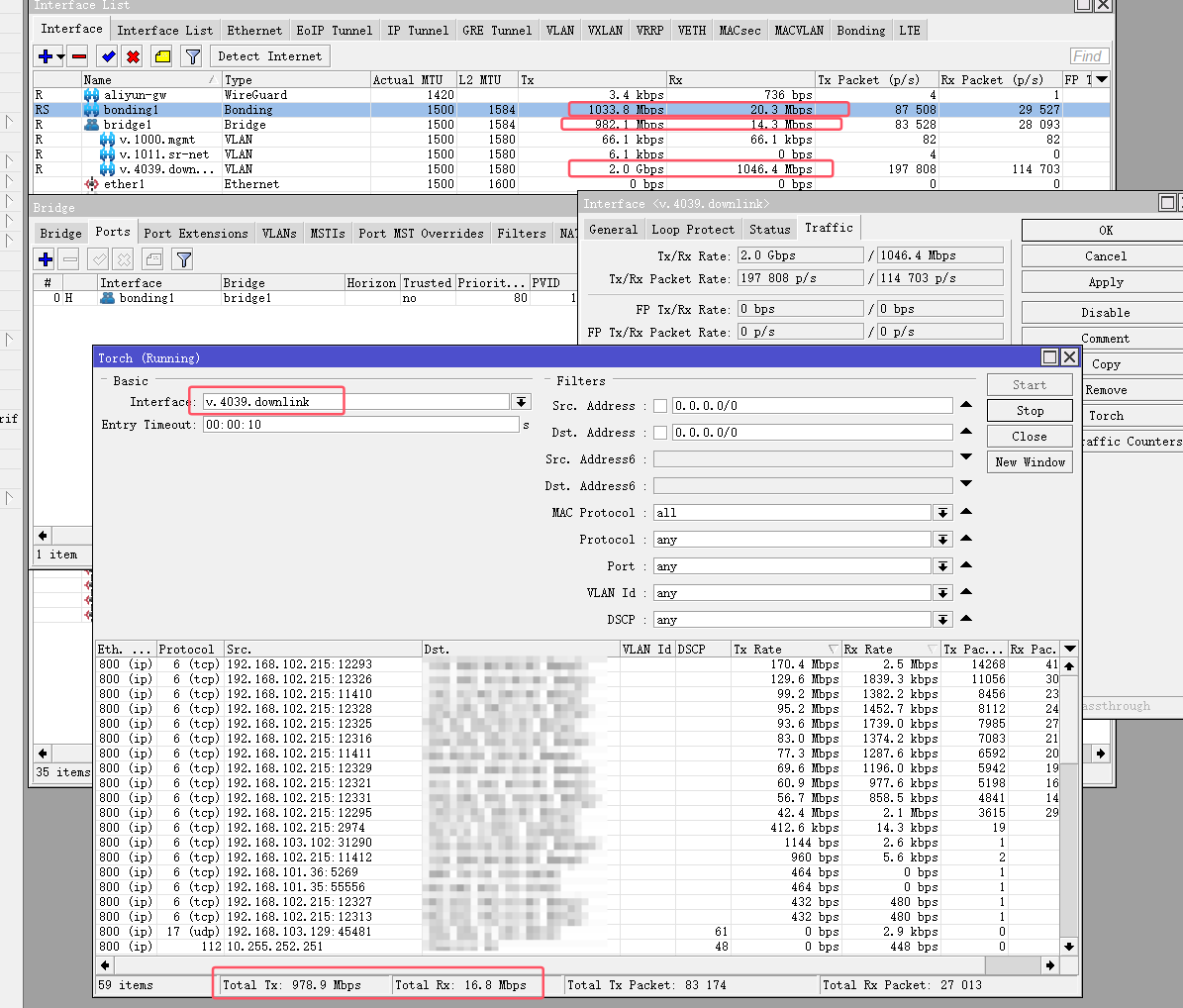
Counter is wrong ? Do you know why ?
Works for my Zaram XGSPON module. Thanks for the update
I recently upgraded my hAP ax2, RB5009UG+S+IN, and mAP Lite from version 7.12.1 to 7.16.1. The RB5009UG+S+IN is handling OVPN, WireGuard, DNS, VLANs, CapsMan (for two hAP ax2 devices), and Containers. => After 24 hours, everything is running smoothly with no issues.
I have a suggestion regarding the v7 stable releases: could it be beneficial to adopt an odd-even release cycle, similar to how the Linux kernel used to be released?
For example:
- Odd-numbered releases could focus on introducing new features, even if they might bring heavy breaking changes. This requires extensive testing and broad customer feedback.
- Even-numbered releases could prioritize stability and refinements, addressing feature reliability and minimizing impact.
This approach might be a good compromise for customers who are currently missing a long-term v7 release.
*) bgp - fixed corrupted as-path when received update with empty AS_PATH attribute (introduced in v7.15);
Are you sure this problem has been completely fixed?
I am still seeing corrupted AS-PATH in a setup with mixed iBGP and eBGP… probably will try to switch to exclusive use of eBGP.
How would that be different than having STABLE and LONG-TERM releases… except it would probably be more confusing having 2 stable releases with different version numbers…
The issue is probably not the naming but the lack of resources for maintaining separate 2 code trees…
Believe that v7.12 should be moved to long-term support, as it is stable for devices with limited resources, such as hAP ac2, hAP lite, SXTsq and others
Many users in our situation face similar issues with updates
MikroTik web indicates that these devices receive update support, but their functionality in the long-term will be limited, highlighting the need to use a more stable version
It’s as folks think Mikrotik just declaring something makes it so. A bug-free version is not solved by nomenclature. There thousands of fix from say 7.12.x to 7.16.1 - each one of those made something “unstable”/“buggy”/etc for someone. Nothing stops anyone from stopping at 7.12 - I do in fact, until 16MB can be replace or netinstall’ed. I’d imagine when the length gets shorter may be best indicate when a long-term is coming. Now I do think they should add a new channel, “previous-stable” the just floats.
As I’ve long advocated, some new channels like “previous-major” and “previous-minor” would really help to deal with the “uncertainty” in new releases. Bridging the “gap” between all the work that goes into “declaring long-term” - while still allow folks to rollback just one version prior as a “pseudo-long-term” solution. Without all the overloaded meaning in “stable” and “long-term”.
anyone having mikrotik routing policy issue like this: http://forum.mikrotik.com/t/routing-policy-issue-not-working-as-expected/179371/1
The suggestion to alternate odd/even release numbers with specific purposes is based on user feedback from forum comments on each release. Simplifying these comments, there seem to be two main groups of users:
- Users requesting more features as quickly as possible to cover a broader range of business scenarios.
- Users seeking a well-tested, stable release suitable for production deployment to cutomers with minimal risk.
In one thread, I read a helpful explanation about why v7 cannot yet be promoted to long-term status. It involves feature parity (or at least some compatibility) with v6 features, among other reasons I can’t fully recall.
I’m suggesting that this odd/even approach could serve as a temporary solution until v7 reaches long-term status, addressing both user groups’ needs without requiring changes to development processes, as it would be controled by product management.
- Even releases would focus on stability, reliability, and performance, while
- odd releases would emphasize new features and potentially introduce breaking changes.
I’m suggesting that this odd/even approach could serve as a temporary solution until v7 reaches long-term status, addressing both user groups’ needs without requiring changes to development processes, as it would be controled by product management.
- even releases would focus on stability, reliability, and performance, while
- odd releases would emphasize new features and potentially introduce breaking changes.
If you search through the forum history, you will find many discussions like this. But Mikrotik version numbers are just usable to distinguish releases, but have not much further meaning.
They introduce new feature from RC to the next RC release (including new bugs), new features in .1 releases and just turn RC builds overnight into official releases despite known bugs. All of this with release notes full of “fixed something with something” entries without further details.
We had MT officials here claiming several time it’s to much effort for them to improve on this. So that’s how it is and it will hardly change.
Pretty accurate summary. 
On existing devices, yes. But when you buy new stuff, at some point it will come with a higher version and not allow downgrade.
Of course you should no longer buy devices that have only 16MB, it will be a dead-end.
I bought and I have the same “dead end” (shipping Latvia)