It would be awesome if someone could elaborate.
What’s new in 7.16rc2 (2024-Aug-13 10:05):
*) ovpn - improved system stability (additional fixes);
It would be awesome if someone could elaborate.
What’s new in 7.16rc2 (2024-Aug-13 10:05):
*) ovpn - improved system stability (additional fixes);
There was a possibility that OVPN router can get a “Kernel Failure”. If you have a router running OVPN and it sometimes reboots due to a Kernel Failure, then upgrade and see how it goes. If the problem remains, then of course contact support@mikrotik.com and send supout file.
FYI: MLAG issue: two CRS317 in MLAG, with ESX hosts dual connected to CRS317 (not LACP, but having ESX decide which switch to send traffic based on the port up status, and the MAC address of the VM). When switch 1 goes down for firmware upgrade, all is ok, ESX starts using switch 2 for all VMs. When switch 1 comes back on line, ESX switches back to using switch 1 for some VMs. But I can’t access half of my VMs for around 15 minutes. Then all is well again. Frustrating. I also cannot ping switch 1 for that period of time even though it is up (so it is not just the ESX hosts having an issue with the MLAG mac cache). The CRS317s are connected LACP to a CRS328P floor switch, which I am connected to. Since I can’t ping switch 1, I assume the floor switch has learnt that its path is via switch 2, and something is going wrong there.
Perfect extended version of changelog you have been asked for for years. Keep going … please, please, please
I would not call it “perfect” as it is still very vague. “there was a possibility” and “sometimes” does not tell one anything more than the original “improved stability” entry.
This is the first time I’ve seen an “official” recommendation to use automatic frequency selection instead of manually setting values.
As one-liner, two short sentences long … please do not kill my motivation speach 
@BrateloSlava,
Guess it’s time to let the robots handle the frequencies while we handle the snacks :-)))
BrateloSlava “This is the first time I’ve seen an “official” recommendation to use automatic frequency selection instead of manually setting values.”
Planned and monitored manually set frequencies are of course better than all left on auto.
To re-iterate, reselect-interval does use background scan, it will not go into CAC unless it chose to change the channel, using background scan doesn’t mean that the new frequency won’t have to be monitored for radar, if reselect-interval finds a better frequency and actually changes to that channel. It is also true that there is no dedicated radio for scanning.
Similar as with station-roaming feature in Wireless https://wiki.mikrotik.com/wiki/Manual:Interface/Wireless#Station-Roaming although it is done in background and doesn’t immediately disconnect all users, but there can be cases where it affects the stations, given that there is no dedicated radio, it is not recommended to set low interval.
But as I already proofed by experimental setup:
Any thoughts on this?
While in some cases clients might get disconnected, it is not the rule, we have tested it locally on both 2.4GHz and 5GHz, and generally clients stay connected, and it is implemented as background scan. If it causes issues in your environment, use a larger interval or plan out frequencies manually.
That being said, this discussion should be in a separate topic.
Please keep this forum topic strictly related to this particular RouterOS release.
IMHO, you should limit the minimum value for the “reselect interval” parameter anyway. For example, set it to 30 minutes. So that end users cannot “force” the devices to be in the “permanent” selection state.
The “Link Down” counter increases ever time a reselect happens. Why does that happen? It should not go down on a background scan. I mean, as links go down if no clients connected also. But the time between down/up is so minimal I cant believe in coincidence.
I can only report what I see in Winbox: 3 connected/active clients. State changes from “running” to “reselecting channel”. State changes to “running”. 0 connected/active clients. They all went to another CAP 2ghz BSSID. And this must be some huge coincidence when 3 clients leave at the same time without a specific reason.
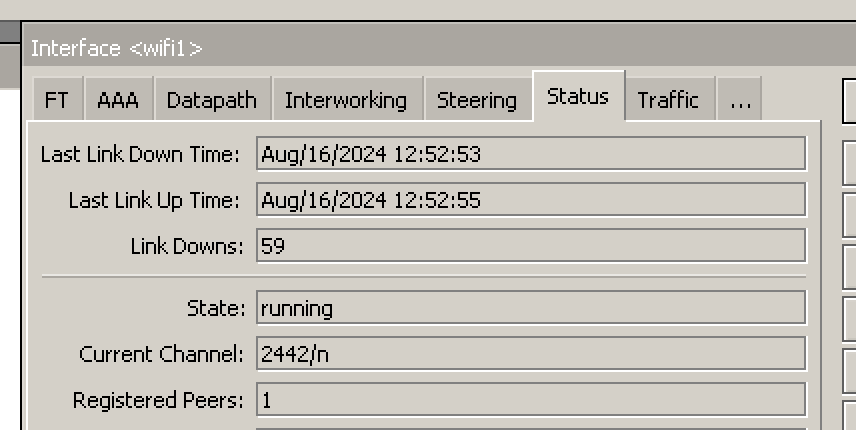
In another topic we/I dont have the attention of Mikrotik staff. Separate topics are more like community-only discussions.
If different channel is selected, as result of reselect-interval, the state will change and clients will be disconnected - as they need to use different channel.
When reselect-interval is ran (the background scan is being performed), the “state” won’t change from “running”. It will only change in the event of actual channel change.
Why the clients got disconnected in your tests, we can only speculate, perhaps they were more sensitive to changes in RF, perhaps slightly increased latency during scan. In our lab tests, we can confirm that both wifi-qcom and wifi-qcom-ac can keep client’s connected during the reselect-interval, and for simple test, ping to connected station is not dropped either during it, both on 2.4GHz and 5GHz interfaces, on DFS and on non-DFS channels. Of course, this is only in the event that the channel is not actually changed.
If you believe that there is something we can improve, please feel free to write to suppport@mikrotik.com, let’s keep this topic specific to this release.
I feel MikroTik needs to do futher testing in their lab, or we continue to send supout files. Clients are being disconnected during reselect-interval; there is no real background scan being performed…
Also. wifi-qcom-ac driver package we feel is not as stable as the regular wireless package [WiFi5]. We’re seeing ALOT of client disconnects / re-connects, without any real reason. This was after “uprade” to qcom-ac.
Lastly. MikroTik – Please update documentation or release a statement about the CAPsMAN “Provision” functionality. There are times were config changes are NOT immediately pushed to CAPs and we see the “Provision” option, and we assume this does what states… provision the CAP(s)… But no, it instead re-creates the WLAN interfaces on the CAPS. Which in turn, breaks the interfaces in bridge for VLAN assignment when using qcom-ac.
Thank you very much.
One problem that has been in RouterOS v7 for some time and is still in 7.16rc2 is that when a BGP session is established, the routes are not exchanged until after one “keepalive” time.
(initially there is the Open message received and sent, but no routes are established, then after the keepalive time, 60s by default, the route updates are sent)
Does it work fine on earlier versions? (I’m asking because I’m considering a similar setup in the future. I have three MLAG stacks, just not using them for ESXi yet)
I have seen behavior similar to this when my bridge and RSTP settings on the switches weren’t exactly identical.
Are you sure you want to configure MLAG for that? I think in this config you should just plug the two ESXi ethernet ports into two switchports without any special config on the switch…
MLAG is configured to support the top of rack switches and floor switches which connect to both fabric switches using LACP. Yes ESXi will happily work without mlag across two switches.
The issue is the floor switch losing connectivity to half the VMs and one of the fabric switch management IPS when the fabric switch comes back up, after a period of time this resolves (5-15 mins) and everything works again. Rapid Spanning tree is not blocking. But I’ll do more looking into that. The mlag switches are connected together with two dac cables in lag for the peerlink.
The issue looks like some L2 Mac forwarding table issue, the other fabric switch possibly thinks it owns those macs still, and eventually they expire and things start working again.
Possibly mlag not synchronising these with its peer for some reason. I’m not sure.