Yes, it looks like there is some issue with updating of the MAC table. Probably the switches do not send MAC table updates around when they observe a new MAC incoming on some port, and it had seen before on another port, without link down/up event.
Only after the MAC entry times out, it is being refreshed and everything works again.
Maybe things would be better when ESXi would support a port aggregation protocol like LACP, but it does not.
(at least not without buying extra products)
ESXi is just the obvious user facing issue. Ignoring that, I still have the obvious problem of not being able to ping one of the switch management interfaces for this period of time also, indicating the problem is to do with the L2 Mac table, not ESXi. At a guess the mlag switches are not synchronising L2 information regularly enough, especially on restart.
IP / SMB / SHARES - required-encryption option leads to hard restart of RB5009 in 7.15, is it already solved in this version, or in what version is planned? Some info?
It seems that for DHCPv6 the Acct-Session-Time field in Radius Interim-Update packages is not calculated correctly. There are two sessions on the screenshot: one DHCPv4 and one DHCPv6. For DHCPv4 in Radius packets, Interim-Update is correct and increases from packet to packet. For DHCPv6 in Interim-Update packet, it is a random number. Please check.
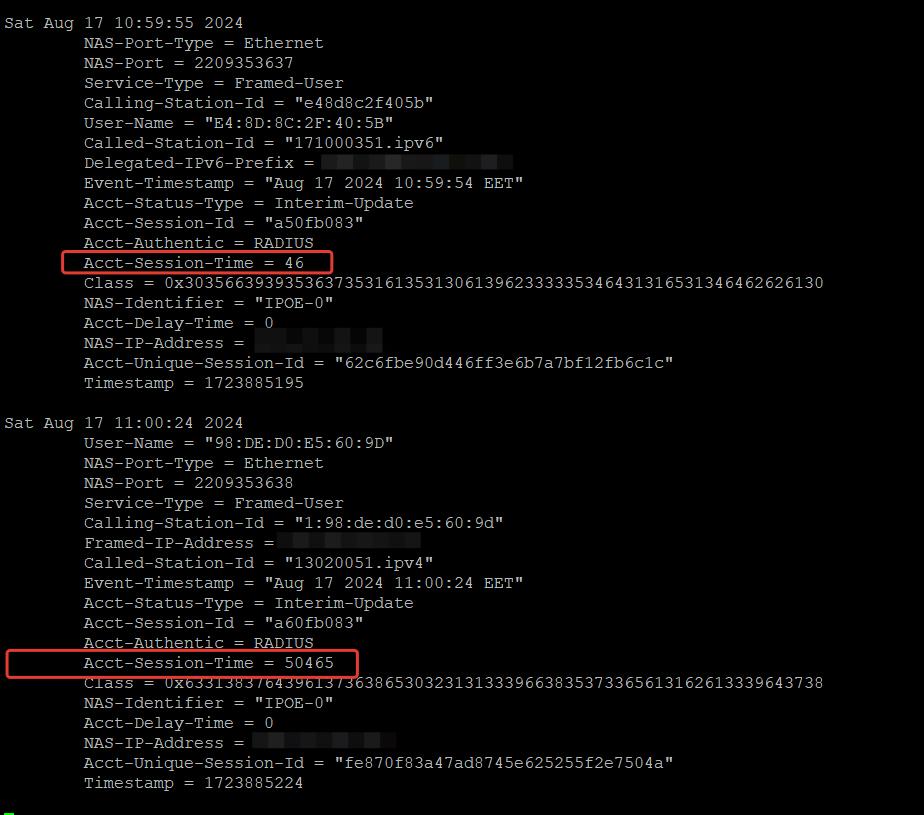
Hardware: CCR1016-12G
Firmware: 7.16rc2
We observe an oddity in the Radius: Interim-Update packets from the DHCPv6 north. The session time is reset even if no STOP packet has arrived.
Let’s try to describe in detail:
- The user obtained IPV6 using DHCPv6. The session has started.
Fri Aug 16 18:12:25 2024
	NAS-Port-Type = Ethernet
	NAS-Port = 2209353285
	Service-Type = Framed-User
	Calling-Station-Id = "e48d8c2f405b"
	User-Name = "E4:8D:8C:2F:40:5B"
	Called-Station-Id = "171000351.ipv6"
	Delegated-IPv6-Prefix = <removed>
	Event-Timestamp = "Aug 16 2024 18:12:25 EET"
	Acct-Status-Type = Start
	Acct-Session-Id = "450eb083"
	Acct-Authentic = RADIUS
	Class = 0x3238393838646232383939323239303264623134646436613364383636373965
	NAS-Identifier = "IPOE-0"
	Acct-Delay-Time = 0
	NAS-IP-Address = <removed>
	Acct-Unique-Session-Id = "40b7eea37b07aa4543e826c0a80b737b"
	Timestamp = 1723824745
- Interim-Update packages arrive and the Acct-Session-Time in them increases as it should.
Fri Aug 16 18:17:05 2024
	NAS-Port-Type = Ethernet
	NAS-Port = 2209353318
	Service-Type = Framed-User
	Calling-Station-Id = "e48d8c2f405b"
	User-Name = "E4:8D:8C:2F:40:5B"
	Called-Station-Id = "171000351.ipv6"
	Delegated-IPv6-Prefix = <removed>
	Event-Timestamp = "Aug 16 2024 18:17:05 EET"
	Acct-Status-Type = Interim-Update
	Acct-Session-Id = "660eb083"
	Acct-Authentic = RADIUS
	Acct-Session-Time = 60
	Class = 0x3238393838646232383939323239303264623134646436613364383636373965
	NAS-Identifier = "IPOE-0"
	Acct-Delay-Time = 0
	NAS-IP-Address = <removed>
	Acct-Unique-Session-Id = "33ab053815a4fd07179d97876cb508c3"
	Timestamp = 1723825025

Fri Aug 16 18:18:05 2024
	NAS-Port-Type = Ethernet
	NAS-Port = 2209353318
	Service-Type = Framed-User
	Calling-Station-Id = "e48d8c2f405b"
	User-Name = "E4:8D:8C:2F:40:5B"
	Called-Station-Id = "171000351.ipv6"
	Delegated-IPv6-Prefix = <removed>
	Event-Timestamp = "Aug 16 2024 18:18:05 EET"
	Acct-Status-Type = Interim-Update
	Acct-Session-Id = "660eb083"
	Acct-Authentic = RADIUS
	Acct-Session-Time = 120
	Class = 0x3238393838646232383939323239303264623134646436613364383636373965
	NAS-Identifier = "IPOE-0"
	Acct-Delay-Time = 0
	NAS-IP-Address = <removed>
	Acct-Unique-Session-Id = "33ab053815a4fd07179d97876cb508c3"
	Timestamp = 1723825085
- The user requested an ipv6 update from DHCPv6. The address has been updated. No radius stop packet from the hardware as expected. Acct-Session-Time reset and started counting down from some arbitrary value of its own. Why is this happening? Acct-Session-Time should not reset unless there is no STOP packet.
Fri Aug 16 18:19:05 2024
	NAS-Port-Type = Ethernet
	NAS-Port = 2209353318
	Service-Type = Framed-User
	Calling-Station-Id = "e48d8c2f405b"
	User-Name = "E4:8D:8C:2F:40:5B"
	Called-Station-Id = "171000351.ipv6"
	Delegated-IPv6-Prefix = <removed>
	Event-Timestamp = "Aug 16 2024 18:19:05 EET"
	Acct-Status-Type = Interim-Update
	Acct-Session-Id = "660eb083"
	Acct-Authentic = RADIUS
	Acct-Session-Time = 30
	Class = 0x3238393838646232383939323239303264623134646436613364383636373965
	NAS-Identifier = "IPOE-0"
	Acct-Delay-Time = 0
	NAS-IP-Address = <removed>
	Acct-Unique-Session-Id = "33ab053815a4fd07179d97876cb508c3"
	Timestamp = 1723825145

Fri Aug 16 18:20:06 2024
	NAS-Port-Type = Ethernet
	NAS-Port = 2209353318
	Service-Type = Framed-User
	Calling-Station-Id = "e48d8c2f405b"
	User-Name = "E4:8D:8C:2F:40:5B"
	Called-Station-Id = "171000351.ipv6"
	Delegated-IPv6-Prefix = <removed>
	Event-Timestamp = "Aug 16 2024 18:20:05 EET"
	Acct-Status-Type = Interim-Update
	Acct-Session-Id = "660eb083"
	Acct-Authentic = RADIUS
	Acct-Session-Time = 90
	Class = 0x3238393838646232383939323239303264623134646436613364383636373965
	NAS-Identifier = "IPOE-0"
	Acct-Delay-Time = 0
	NAS-IP-Address = <removed>
	Acct-Unique-Session-Id = "33ab053815a4fd07179d97876cb508c3"
	Timestamp = 1723825206
Is this a bug or normal behavior?
Please check this point. It is important for us, because of this kind of work the accounting in Freeradius is incorrect.
Meanwhile, in the Interim-Update radius packages from DHCPv4, everything is fine and works as it should.
Thnx.
On my hEX s the smb with encryption is stable on 7.16rc2, but this device uses an other CPU architecture.
I would suggest to create a supout after your device crashed and send it to the support.
It is, its confirmed bug, which will be corrected in some new RouteOS version. Im just interested, if in this version problem still exists, or is solved.
Usually when a bug like that is solved, you will see a line like “improved system stability when smb is used with encryption”.
As long as it is not there, it is safest to assume it has not yet been solved.
vSphere supports LACP on distributed switches which are available with Enterprise license and not as a separate extra product…
The issue is not ESX, that is just a highly visible victim. The floor switch (crs328p) connected lacp across both crs317 (mlag) switches also loses the ability to ping one of the mlag switches for a period of time 5-15mins after the switch has actually finished rebooting. It seems like the mlag is not flushing its L2 mac cache when it’s peer comes back online, or the two are not synchronising their L2 mac caches. That is a guess. Let’s leave ESX out of it. MT issue.
I was replying to the claim that ESX lacks LACP which may be the issue, on the other hand I do have environment with ESX hosts without LACP support configured and switches that do use LACP (some not Mikrotik ) with 2 CRS309-1G-8S+ in MLAG setup and I don’t experience any communication issues when restarting either one of them…
I do have dedicated peer interface (2 DACs in 802.3ad bond) and with dedicated PVID and once it is up MLAG goes up too and MAC tables are synced… and everything works fine… at least for me it does… so it may not be MT issue after all…
I ran into a problem with VLAN’s: wireless clients got MGT VLAN addresses assigned as well as HOME VLAN addresses. Found out from looking at the DHCP leases and IP ARP entries. After downgrading to 7.15.3 the problem was solved.
Yes, all information was supplied to support.
Standalone AP or using CAPsMan?
@bratislav, interesting, as I have the same setup, including 2 DACs in 802.3ad bond for peer link with dedicated PVID. All VLANs are tagged on the LAG-PeerLink except for the PVID (3999) for the peerlink, which is untagged on LAG-PeerLink. Multiple LACP bonds to fabric switches (some MT some not), and yet I have this problem. Bridge shows both MLAG peers are connected one as primary, the other as secondary with the same system id.
LACP bonds from remote switches across the fabric are working, with traffic on both ports. Rapid spanning tree setup is identical on both MAG switches with their priority set to ensure they are the root (2000 hex).
Only thing I can think of is how are you managing the switches (assigning the L3 IP address). In my case I create a VLAN interface under my br-trunk and add an IP address to that VLAN interface. Bridge is set with vlan filtering enabled, each interface ethernet switch port is set to l3-hw-offloading=no. Any differences (I am using CRS-317 vs you using CRS-309 but that should not be an issue).
CAPsMAN:
RB4011, 2x RB960 (v6.49.13), 1x Powerbox Pro (v6.49.13), 2x cAP AX, 1x wAP ac
Peer link seems to be the same as mine, just to mention that it shouldn’t have MLAG ID assigned…
I am using MSTP since it is VLAN aware unlike RSTP, but my MLAG switches are not the root on any MSTI…
IP address is assigned to Bridge (using bridge PVID for management), although I should have probably used management interface ether1 which is not part of the switch/bridge…
Not to mess with every single interface L3 offloading is set to no globally, the default actually, with:
interface/ethernet/switch/set switch1 l3-hw-offloading=no
hello,
is it possible to add the following features (security reasons) for users who log-in into router ?
- max active session on the same time for each apps; winbox, telnet, ssh, etc
- automatic logged out if inactive during certain duration
also, please fix the DIH flag on /ip arp for the interface with arp=reply-only and hotspot active on it - [SUP-136090]
i understand ros v6 having different behaviour with ros v7. but if this method can run on v6, why this can not be done on v7 ?
thank you
These cards cost around 20eur. Make the investment and do investigation. It is easier and more efficient than analyzing supout files from customers. 
It’s also one of the most prolific cards in use today, generally considered one of the best options available, at least in the US.
Only taking that part to respond to: ESXi works perfectly fine without bonding (LACP, etc). It has an internal mechanism in it’s switching technology (mainly distributed switches) that handles this for you. At work we have a lot of these hosts connected to regular downlink ports (more or less) and ar enot using LACP. If you face issues it is (in a normal configuration) not ESXi’s problem but upstream (switches etc.).
Edited: got complaints to make it a more normal post.. here it is Master Onno