Normis, many people are trying to convey a simple idea to you — we bought a device, and we want to manage it the way we need, without waiting for explanations from MikroTik. When we bought these devices, these restrictions didn’t exist. Why do you think you can degrade the functionality of the devices? Why do you think you can force so many people to spend their time and money solving a problem they didn’t have before and that you’re now creating for them?
I feel there should be a line in sand drawn – more advance notice to community. I suppose, this is their advanced notice - by placing it in a Beta release.
Or, they draw the line to hAP level devices for this type of default “advance-mode”. Then Put “enterprise-mode” on the Pro/enterprise level devices for those that need full-features… Perhaps writing has been on the wall with the RouterOS Enterprise [ROSE].
We all know how the hAP line and the lower cost devices, new entry-level buyers will purchase and then complain they cant configure because they dont know networking.
MikroTik saying the new release will default to “advance-mode”. We will have to go in and modify our config to enterprise-mode before we can downgrade or change boot loader settings? This should be new default for re-install or newly purchased devices.
also to MikroTik – Given the backup partition. All this new work been done in release and Winbox4.
Why hasnt more work been done on CAPsMAN? IE: Config sync to secondary/failover CAPsMAN “controllers”. I hope there is now concurrent development teams within.
Application team: Winbox, containers
OS Level
Wireless
WebFig / Userman [Userman is still garbage in rOS 7.0]. Having to resort to third-party for voucher creation.
I read the update as anything you currently have configured/is running won’t change, but your ability to configure things that require the advanced mode functionality will no longer be possible. Is that a misunderstanding on my part? I’m suggesting that the default behavior can be to lock down new configuration of those options, but that an upgrade should have the option to choose not to lock these things down for new configuration on existing devices that were pre-7.17. This would remove the need for any physical visits for those who choose to opt out of the new default mode, as long as the option was selected properly on update.
This also should be a very clear, and VERY bold note at the top of the release notes/upgrade instructions. Give people the option to opt-out of this new behavior if they know they need to, even if you want to make the defaults more “secure” for those who don’t know better.
I think about 90% of the heat from this future change comes from people that DO use partitioning. Because we DO use it: the ability to have more than one partition, and do either a failover or a manual switch, is a godsend blessing. I really can’t imagine how Mikrotik would downplay something SO vital to a basic networking block as a router.
Me and several others have always complained about the 16MB devices - not because we want to put movies on the storage, but because it can’t be partitioned. I really think Mikrotik is missing one trick here: EVERY device (minus some very few weird cases?) should have flash enough to be partitioned in two, with enough space left to do a normal upgrade and then some more (future proofing is always good). I’m not talking about 1GiB storage here. I’m talking about 64MB for routers/switches without wireless, and 128MB for whatever comes with wireless. This way we can use partitions and upgrade them with peace of mind.
Now, about the use cases:
- Production partition and failover partition. Not a backup (those are external), but a fail over. We just copy the production one into the fail over, do the upgrade and reboot. If we have problems, it’s always possible to roll back. Yes, a catastrophic problem would boot the fail over partition anyway. But it doesn’t help if the router boots, is accessible and get some new blocking bug that didn’t exist before. In these cases we would just change the partitions and restore service. This can’t be done (at least if I understood right) after we upgrade from 7.16 to 7.17 - because we would need to enable it for the first time.
- Testing new versions. Yes, yes, one should do it on the lab. True, but at some point it will be put in production - and we never know if some distant site will brake in weird ways. Using some units as a coal canary save a lot of problems. A new 7.17 device would have to be configured to allow this - not a problem. But - again - an upgrade from 7.16 to 7.17 would require physical intervention. And it isn’t always easy to do.
- Sometimes a stable version has a blocking bug, and the (still beta) one solves it. In these situations it may be reasonable to put a beta version on this specific site. If it is across the street, no big deal having to press the button and rollback if necessary. If we are talking about something in the middle of nowhere, meaning a 3 hour drive plus a 2 hour hiking… well, thinks start getting problematic.
- Even with easy accessible devices. If we need to reset 3 of them, no one will think about. Try do this in a bigger environment, with hundreds of places to go. At each place it will cause an interruption - it have to be negotiated too. Users get angry, management gets angry. Corporate metrics get angry. SLAs get thrown out (they won’t because of one reset - but 200 resets later…)
So, these are some general (and very real) situations that would be negatively impacted by this change. Please understand that we aren’t complaining about the device-mode on new routers: I really like this idea. What we are complaining about is the fact that - if we understood right - the way Mikrotik intends to implement it on production devices can have a very real and detrimental impact on us.
Give us a way to set this without reboot, before we reach 7.17
Do like was done on 7.12 (was 7.12, wasn’t ?): we had to upgrade to that version, before going to the next. Say, one should upgrade first to 7.16., before going to 7.17 - and on this last 7.16 we could set everything without the physical part. This way we can prepare for the change, we all get the benefits of the higher security later and everybody is happy.
@normis
Sorry for my not perfect English
I think you are not getting the point…
Tô be very honest mkt don’t have a very quality control at all,
I can’t remember how many times..
After you guys release a stable version that was OK in the beta but make a lot of kernel panic.. Or reboots loops..and before you say.. But if boot loop or kernel panic schedule or some script won’t help…
Sorry to inform you that is not always the case..
I remember one or 2 times that after the upgrade..
Because of some issue with the wifi driver it cause device to boot loop, every 30,40 seconds.. So if you was the flash you could login and disable wifi /cappsman and will stop boot loop so…
There is a real case where schedule to revert to backup partition came handly..
And because device boot “normally” it won’t trigger the auto fall back partition…
Using CLI/scripting – say from defconf or netinstall script – how do you check if a particular “device-mode” is activate?
All the usual CLI/scripting things cannot get that information from “device-mode”:
/system/device-mode/print
#       mode: advanced
#       container: yes
/system/device-mode/print <tab>
# as-value     file     interval     without-paging
:put [/system/device-mode/get]
# container=true;mode=advanced
The core issue being that “/system/device-mode/get ” returns “nil”, and does not “resolve” the “mode=advanced”. i.e. A script has no idea WTF “mode=” means, and config code like know if “traffic-gen” (or whatever) was active before doing something.
In what I thought be a simple loop, that shows the problem, or perhaps, nil:
:foreach i in=[/console/inspect request=self path=system,device-mode,update as-value] do={:if ($i->“type” != “self” && !(($i->“name”)~“activation-timeout|append|as-value|duration|file|interval|once|without-paging”)) do={:local k ($i->“name”); :local v [/system device-mode get $k]; :put “$k = $v (type: $[:typeof $v])”}}
authorized-public-key-hash = (type: nil)
bandwidth-test = (type: nil)
bootloader = (type: nil)
container = true (type: bool)
do = (type: nil)
downgrade = (type: nil)
email = (type: nil)
fetch = (type: nil)
flagged = (type: nil)
flagging-enabled = (type: nil)
hotspot = (type: nil)
ipsec = (type: nil)
l2tp = (type: nil)
mode = advanced (type: str)
partitions = (type: nil)
pptp = (type: nil)
proxy = (type: nil)
romon = (type: nil)
scheduler = (type: nil)
smb = (type: nil)
sniffer = (type: nil)
socks = (type: nil)
traffic-gen = (type: nil)
zerotier = (type: nil)
On Audience running 7.16:
[andrew@MikroTik] > /system/device-mode/update partitions=yes
expected end of command (line 1 column 28)
[andrew@MikroTik] > /system/device-mode/update downgrade=yes
expected end of command (line 1 column 28)
[andrew@MikroTik] > /system/device-mode/update bootloader=yes
expected end of command (line 1 column 28)
I.e., none of the above existed prior to 7.17.
We absolutely need a way to set them remotely on the already deployed devices before you enforce them on a RouterOS upgrade.
There have been a couple of case in my experience with RouterOS, when after a version upgrade some services did not work as expected, and no change in configuration could fix that. The exact same configuration then worked as expected after being applied to the same device after the configuration reset.
fischerdouglas compilation
Lets talk about Hardware Offload?

No news about BGP Flowspec progress on this 7.17?

What about TR-101 on PPPoE/IPoE support?
Any ETA to adding the possibility to do the Username Replacement for the string that comes on Circuit-ID ou Remote-ID?

I reiterate my suggestion that RouterOS should start exporting some Hooks that allow triggers to be triggered.

Perhaps an Intra-RouterOS Hook management tool?
Where events that have a hook would start asking this tool: "I'm doing this, I'm doing that, is there a hook here or can I go straight ahead?"

A DHCP request becoming a Radius Query is exactly an example of how this could be used.

A DHCP event asks this question to the Hooks Center:
- If it receives a "Nothing here! You can go ahead" the DHCP event sends it to the Radius-Client Process as is.
- If it doesn't receive a response in 500ms, the DHCP event sends it to the Radius-Client process as is.
- If it receives a "run this script", it executes it, reprocesses it, and then sends it to the Radius-Client process after having changed it.


When do MikroTik team intend to start showing that:
/ip/route/print
/ipv6/route/print
/routing/route/print
They all deal with the same route table?

I feel like the effort they make to separate this in Winbox and in the CLI is hindering more than helping.


When will all RouterOS processes be placed inside their respective containers (behind the scenes), and thus allow these processes to be easily controlled by Cgroups, limiting the maximum resource usage for each container, and at the same time ensuring that each resource has its respective priority?

This would prevent processes that get out of control from affecting other processes and also the forwarding plane. At the same time, it would prevent grotesque things like a BGP/OSPF/BFD process from crashing when there is such a large amount of packets that it takes up all the computational resources of the box.


When will we be able to enable uRPF per interface?

When will it be possible to use VRF without losing Fast-Path and Hardware Offload features?

Have you MikroTik guys considered splitting the DNS service as was done with the Wifi packages?
Separating different things of different interest into Packages?
Embedded in RouterOS DNS being just a regular AND SIMPLE DNS relay/recursive.
Focused on attending to the requirements of scenarios of home and basic device-modes.
An extra dns.npk designed to be a more complex DNS service, with all the more advanced features that already exist on actual DNS, and other ones that were not included because it complicates much of the basic.
It would reduce the probability of simple issues affecting a huge number of devices.
Would make it easier to do some demands that are a pain to deploy in the current scenario(like VRF on outgoing queries).
It would also prevent less experienced users from getting into trouble by messing with settings that don't need to exist in more basic scenarios.

About User-Manager:

Any plans to allow it to be configured to query LDAP databases?

What about allowing the UserManager Radius to be configured to act as a Radius-Proxy for other Radius-Servers?


Any chance of DHCPv6 Circuit-ID(Option18) and Remote-ID(Option37) start to be forwarded as AVP in Radius Requests of DHCPv6 server?

And what about Vlan Demuxing?
Equivalent to "stacked-vlan-ranges dynamic-profile" in Junos.

Can we expect that to be earlier than 12 months?
Not theoretical - related to “downgrade” device mode
3rd party LTE modems breaking after a version upgrade
While rare (and good work by LTE folks)… but with 1000++'s modem+variant/carrier/tower combo… There is non-zero chance some upgrade will break support for some modem+variants/carrier/tower combos - it happens. If it does… “downgrade” be needed. And to not look like a fool…you’d go back to whatever exact version was just working/running.
So… if LTE was the only source (which happens, but rare is most our cases)… how do you download the packages from a channel= since that requires the internet (and LTE was the only source - that’s broken by upgrade)? All the “offline cases” with “downgrade” device-mode… is very unclear to me.
yeah, the day I learned it’s the same list - just filtered…
Winbox total count not matching amount of items in list. such a awkward thing to scatter over places…
Type “nil” is the default. If you know that you can use it:
https://git.eworm.de/cgit/routeros-scripts/commit/?id=1776b8f50b173b49ca7ce3ab917de4493ae36ff6
Can anyone else confirm that the packet loss has increased in 7.17beta2 by comparision to 7.16. I noticed websites failing to load on 7.17beta2 and tested using https://speed.cloudflare.com/. I saw in “Packet Loss Measurements” between 1% to 10% lost packets and never 0% of lost packets. I downgraded to 7.16 and most are 0% of lost packets and the highest lost packets was 0.5% of lost packets.
To me its obvious that 7.17beta2 is loosing packets. I turned off all queues and same results.
[quote=fischerdouglas post_id=1101557 time=1728068575 user_id=139874]
When will all RouterOS processes be placed inside their respective containers (behind the scenes), and thus allow these processes to be easily controlled by Cgroups, limiting the maximum resource usage for each container, and at the same time ensuring that each resource has its respective priority?
This would prevent processes that get out of control from affecting other processes and also the forwarding plane. At the same time, it would prevent grotesque things like a BGP/OSPF/BFD process from crashing when there is such a large amount of packets that it takes up all the computational resources of the box.
[/quote]
I’ve actually have seen 802.3 LAG interfaces die , because some other process was hogging the CPU, and the system could not honor the “hardware keepalive” messages
so, hierarchical prioritization / resource reservation would be very nice to have
Upgrading from 7.13.4 to 7.17beta2 on one X86 router resulted in some sort of malfunction in routing that could not even print nor export /ip route of the router and previous configs in this section were not working where as reboot or shutdown didn’t help either however a reset configuration did sorta bring it back to normal behavior at the cost of losing those configurations.
Upgrading from 7.13.5 to 7.17beta2 on another X86 router did worked as expected and did not result in former strange behavior in route.
P.S. both routers configurations are almost identical.
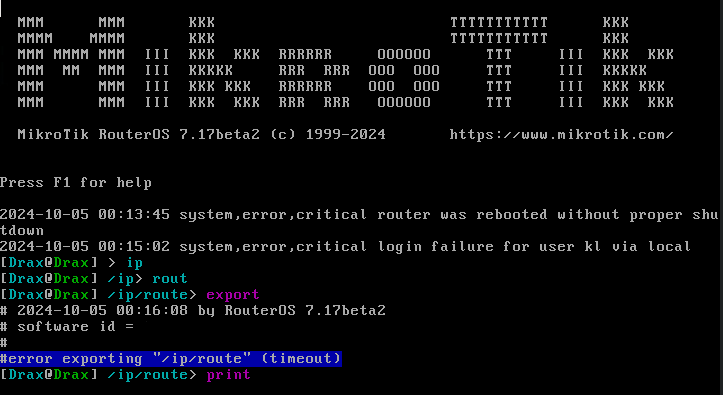
Is there a specific reason why
multi-passphrase is not supported for the WPA3-PSK authentication type.
Will it be supported in future releases?
That’s because PPSK probably doesn’t support management frame protection which is I think needed for WPA3.
I appreciate MikroTik here [normis] taking the time to provide detailed replies, taking time to try to answer question and make points. Obviously there is passion here and defending.
I mentioned this before in another general topic/thread. I FEEL MikroTik SHOULD shift to soho/pro/enterprise product models. This new security “feature” of device-mode fits that model.
Further, if this new device-mode and concern of locking features and or requiring remote power-cycle. This should be more for “enterprise” level devices - where most deployments should have OOB management means, or a power control PDU to remotely power cycle power ports in real environments.
Otherwise, for soho devices - it is easy for end-user to power-cycle a device.
What about us that operate as WISP, ISP or consultants deploying devices and are soon ready to upgrade past 7.17+. Would we then need to schedule maintenance AND truck rolls to touch EACH device in order to properly change device-mode? Or we have to instruct the customers / end-users we need them to perform XYZ steps due to a security rollout? Otherwise, we decide to stay away from 7.17. Hard to stay away, especially when have future wireless enhancements – AX is broken. [mANTBox 15 ax]
However, this might be a MOOT issue, given MikroTik will change the default to “advanced”. It would be for those “soho/consumer”. COUGH hAP type devices – need to be set to device-mode=HOME. for HOME users that do not need said features…
Distinctive product lines that properly align with RouterOS functionality makes more sense. Default hAP to ‘device-mode=home’, and then if we CHOOSE as professionals / enthusiasts to use the hAP type device in other means and function, we can configure for advanced/enterprise and physically power cycle…
need moons ,too