is SUPERCHANNEL actually working for anyone with ax boards?
why is it even there if it’s not working?
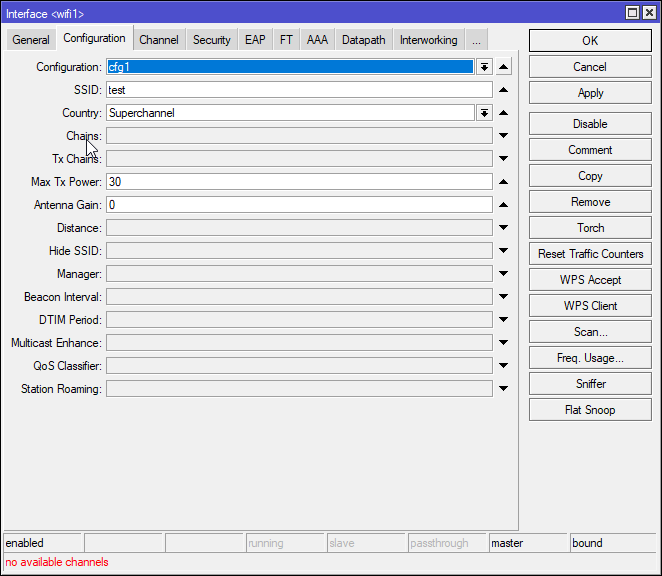
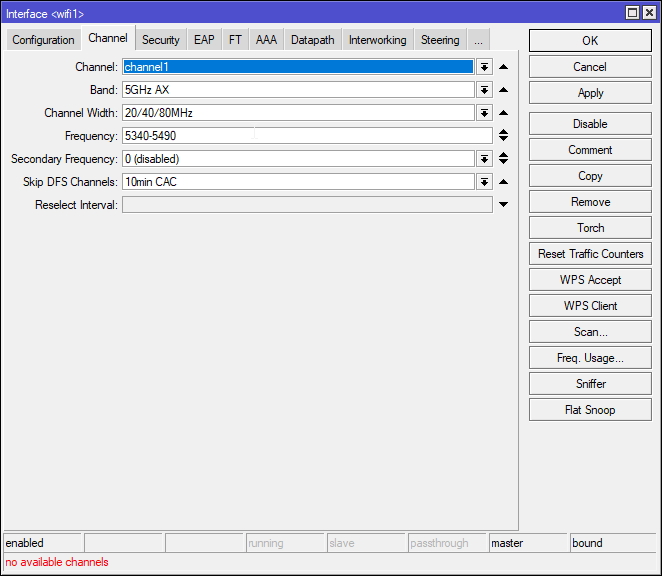
it should work:

check your logs if you have dude installed i just got a warning that IP 172.169.6.6 tried to log into my dude via winbox
now thats in amsterdam so the hackers are out and about
lucky the firewall did its job and denied that but WHY what is happening mikrotik i have never had syn flooding from ros before why now
and this new attempt to enter my mikrotik mmm
might have to uninstall dude if this keeps up

etRange: 172.160.0.0 - 172.191.255.255
CIDR: 172.160.0.0/11
NetName: RIPE
NetHandle: NET-172-160-0-0-1
Parent: NET172 (NET-172-0-0-0-0)
OrgName: RIPE Network Coordination Centre
OrgId: RIPE
Address: P.O. Box 10096
City: Amsterdam
+1
WPA3 will never support PPSK as currently implemented. A simple Google query for WPA3 and PPSK will get you all sorts of information from a variety of networking resources.

So there any option to do the vlan separation based on PSK or similar?
Wondering how to deal with the headless devices which can be assigned to an VLAN easily now (with PPSK).
You are doing VLAN separation. Every smart device must have some kind of app or a way to select SSID and input password. So just input password you specified for that VLAN and thats it
I want only broadcast two SSIDs guest and locals (locals has several VLANs and assignment is according to MAC, now PPSK).
Are we talking about the same setup?
Why two ssids ? Just put guest on separate VLAN, assign them password and that’s it.
Easier for the user, what they are used to.
GUEST and PRIVATE
There are several flats in the building, each flat has his own VLAN-I’d. Assignment is based on Hotspot login (using eworm’s scripts), PPSK in the future.
One thing that came to my mind is to create virtual AP just for guests, without PPSK, and give them one password.
But how to deal with the PRIVATE ssid, which requires VLAN assignment based on device, password used
For private SSID use PPSK. Works like a charm for now.
PPSK gets me back to here, WPA3 and alternative way doing PPSK
[…]
I believe you can do WPA3 and EAP using the user-manager package. You’d have to enable EAP in Wi-Fi, but you’d can keep WPA3. Since user manager let you set a VLAN (excluding wifi-qcom-ac), it be based on the “user” & “password” in EAP & those could map to in similar PPSK scheme (one user per vlan). As bonus, you’d have more control down to a specific user-level if desired, and without more SSIDs broadcasting.
would that a mix if WPA2 and WPA3?
Shouldn’t be it WPA3-SAE?
Has anyone tried this approach?
I’m far from home for some time and cannot test that.
Bug introduced in ROS 7.16 with :resolve still persists.
If you have a static dns entry for example.com you run:
:resolve example.com server=1.1.1.1
The server is never queried and the static dns entry is returned instead.
I have to report that the Wi-Fi disable issue is still not resolved… currently the stable version is still 7.14.3
We continue to discuss this in detail here - link
+1 this request. Is this newly broken, or has it never worked?
Pretty please, Mikrotik, this is such an important feature.
From mikrotik help
Only the main routing table gets offloaded. If VRF is used together with L3HW and packets arrive on a switch port with l3-hw-offloading=yes, packets can be incorrectly routed through the main routing table. To avoid this, disable L3HW on needed switch ports or use ACL rules to redirect specific traffic to the CPU.
From my perspective, VRF Hardware Offload in conjunction with MPLS (i.e. MPLS VPNv4) is the most important functionality that should be added.