Its totally basic setup in labs, both CHR and physical routerboards. There is a P router in the middle and 3 PE on that.
This is the MPLS and Routing config from first PE router (RB750Gr3):
What’s new in 7.18rc2 (2025-Feb-21 12:50):
*) cloud - added “Back To Home Files” feature (additional fixes);
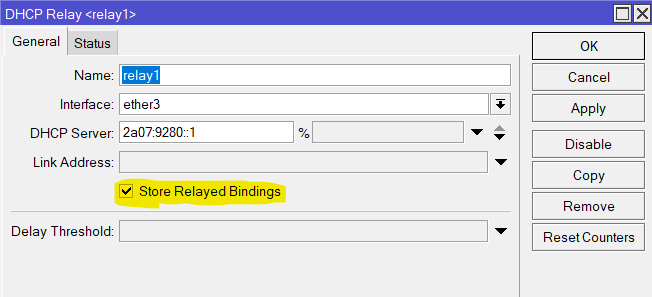
*) dhcpv6-relay - added option to create routes for bindings passing through relay (additional fixes);
*) disk - do not allow adding device in raid when major settings mismatch in superblock and config;
*) disk - fixed removing device from raid while resyncing;
*) ethernet - fixed issue with default-names for RB4011, RB1100Dx4, RB800 devices (additional fixes);
*) ethernet - fixed link-down on startup for ARM64 devices (introduced in v7.16);
*) l3hw - added initial HW offloading for VXLAN on compatible switches (additional fixes);
*) lte - added initial eSIM management support (additional fixes);
*) lte - fix R11e-4G modem initialization (introduced in v7.18beta4);
*) lte - fixed cases where the MBIM dialer could get stuck;
*) lte - fixed interface recovery in mixed multiapn setup for MBIM modems (additional fixes);
*) lte - improved initialization for external USB modems;
*) ptp - improved system stability;
*) qos-hw - fixed wred-threshold (introduced in v7.18beta2);
*) ssh - improved channel resumption after rekey and eof handling;
*) wifi-qcom - prevent AP from transmitting broadcast data unencrypted during authentication of first client;
*) winbox - added missing options under “System/Disk” menu (additional fixes);
It’s a blank install of CHR, so no rules, no filters, nothing. Simply doing bandwidth tests from the VM’s to my 2116 and to each other. I’ll have to see if I can get 7.16 or 7.15 to work, just for fun.
RPi5 is a Broadcom BCM2712 quad-core Arm Cortex A76 processor @ 2.4GHz. That’s better than the 1.4GHz quad-core processor in RB4011 and RB5009, the 1.7GHz processor in CCR2004, and the 2GHz processor in CRS526. The 2004 can bridge and route (fast path) 19Gbps (it obviously has more PCIe lanes to the switch from the CPU), so I would hope to get at least the full 6Gbps out of the CHR on the Pi and 10Gbps out of the Intel processor (4 cores at 3GHz).
Of course not… until you plug in a LTE USB stick (when your CCR has an USB port).
Unfortunately there is no line with “*) bgp - improved stability;” in sight… that is what CCR users are hoping for.
@Mikrotik - since you just restored in this version the forgotten “/ip/route/check” feature for ipv4 (similar to “ip route get” in linux), why not complete the task and give ipv6 the same love ?
Thanks.
If only Mikrotik would actually write in more than partial sentence or have a proper KB-like system for these questions… My only guess is the API changed are for internal use with REST API. I think REST API just proxies to API, but uses cached/pipelined connection (based on login in log)… in which case knowing a tagged API request was !empty might be useful. But just guessing.
I have ask several times about what modems this works with, no response, now half-dozen times. The lack of clarity around eSIM is quite annoying. From reading the docs, it seems like a working feature on something. If it’s nothing, then say that in docs! Since I read the docs, and eSIM came up in another thread, the eSIM docs don’t mention if the QR code had a $$1 at the end. Which, I think, means the
confirmation-code=
be required… and the $$1 part should NOT be in the
matching-id=
but it wasn’t clear at all… And working in theory here…
Now the bright spot is the new scripting changes are just wonderful. They made quick work of the theoretical problem eSIM activation codes use the $ dollar as the delimiter. So on the theoretical modem that support eSIM, you can cut-and-paste the eSIM code to CLI. This is possible by the new :deserialize delimiter=“$” specifically to deal with eSIM LPA format (with the new-ish /terminal/ask allowing cut-and-paste). See Interactively parsing eSIM Activation from LPA in QRCode... for example.
But there should be something like /ip/dhcp-server/setup for the eSIM. Or, Winbox4 could natively use camera to capture the QR code, too.
Looks like this actually was a configuration error.
The “defconf: fasttrack” rule somehow ended up above the “defconf: accept in ipsec policy” and “defconf: accept out ipsec policy” rules. When I moved the fasttrack rule below those two rules (like they are in defconf) it started working again. Not sure if this is documented anywhere, but that’s what is required.