is ospf working properly now? can anyone confirm?
hi, how many nat rules can we add with hardware offload? Is there a limitation?
CRS317 supports up to 4096 NAT entries. To clarify it is not about how many rules you have, but how many connections can be offloaded.
These devices already have problems updating RouterOS v6 from the device itself… There is simply not enough space on the flash and not enough RAM to upload a second version so it can update it in-place.
(other devices with 16MB flash but with 256MB RAM usually have no problem because they can upload the new version in RAM for installation)
Given that v7 will of course grow, and that it now is all in a single package so you can no longer trim down the size by using separate packages and installing only what you need, I guess these devices in the long run will not be able to run v7 realistically…
For now of course you can use netinstall to install a v7 beta, but likely when the next beta appears you again face the same issue and have to use netinstall every time you want to update.
@notToNew - Please create a support ticket at support@mikrotik.com with all the information about this issue so we can troubleshoot it.
How is HW-offloaded NAT configured?
Does it kick in automatically?
How do I notice that the 4096 connection limit is reached?
Is it shown, which connections aren’t HW-offloaded anymore?
routes learnt from ibgp becomes invalid.
[admin@MikroTik] /routing/bgp/connection> add remote.address=2a0f:9400:8017:32::2 local.address=2a0f:9400:8017:32::1 local.role=ibgp-rr template=ipv6-ibg connect=yes listen=yes
[admin@MikroTik] /routing/bgp/connection> add remote.address=2a0f:9400:8017:20::2 local.address=2a0f:9400:8017:20::1 local.role=ibgp-rr template=ipv6-ibg connect=yes listen=yes
[admin@MikroTik] /routing/bgp/connection> ..
[admin@MikroTik] /routing/bgp> peer-cache/
[admin@MikroTik] /routing/bgp/peer-cache> print
Flags: E - established
0 E remote.address=192.168.168.46 .as=213196 .id=192.168.40.2 .refused-cap-opt=no .capabilities=mp,rr,as4 .messages=161 .bytes=3179 .eor=“”
local.address=192.168.168.45 .as=213326 .id=10.28.115.18 .capabilities=mp,rr,gr,as4 .messages=148 .bytes=3106 .eor=“”
output.procid=22
input.procid=22 ebgp
hold-time=3m keepalive-time=1m
1 E remote.address=192.168.168.2 .as=213326 .id=192.168.254.2 .refused-cap-opt=no .capabilities=mp,rr,as4 .messages=23 .bytes=467 .eor=“”
local.role=ibgp-rr .address=192.168.168.1 .as=213326 .id=10.28.115.18 .capabilities=mp,rr,gr,as4 .messages=24 .bytes=638 .eor=“”
output.procid=24
input.procid=24 ibgp
multihop=yes hold-time=3m keepalive-time=1m
2 E remote.address=192.168.168.22 .as=213326 .id=192.168.254.10 .refused-cap-opt=no .capabilities=mp,rr,as4 .messages=22 .bytes=476 .eor=“”
local.role=ibgp-rr .address=192.168.168.21 .as=213326 .id=10.28.115.18 .capabilities=mp,rr,gr,as4 .messages=22 .bytes=600 .eor=“”
output.procid=25
input.procid=25 ibgp
multihop=yes hold-time=3m keepalive-time=1m
3 E remote.address=2a0f:9400:8017:69::2 .as=213326 .id=115.187.62.14 .refused-cap-opt=no .capabilities=mp,rr,as4 .afi=ipv6 .messages=16 .bytes=390 .eor=“”
local.role=ibgp-rr .address=2a0f:9400:8017:69::1 .as=213326 .id=10.28.115.18 .capabilities=mp,rr,gr,as4 .afi=ipv6 .messages=16 .bytes=550 .eor=“”
output.procid=26
input.procid=26 ibgp
multihop=yes hold-time=3m keepalive-time=1m
4 E remote.address=2a0f:9400:8017:32::2 .as=213326 .id=192.168.254.2 .refused-cap-opt=no .capabilities=mp,rr,as4 .afi=ipv6 .messages=11 .bytes=288 .eor=“”
local.role=ibgp-rr .address=2a0f:9400:8017:32::1 .as=213326 .id=10.28.115.18 .capabilities=mp,rr,gr,as4 .afi=ipv6 .messages=11 .bytes=411 .eor=“”
output.procid=27
input.procid=27 ibgp
multihop=yes hold-time=3m keepalive-time=1m
Routes learnt from ibgp are getting marked as invalid.
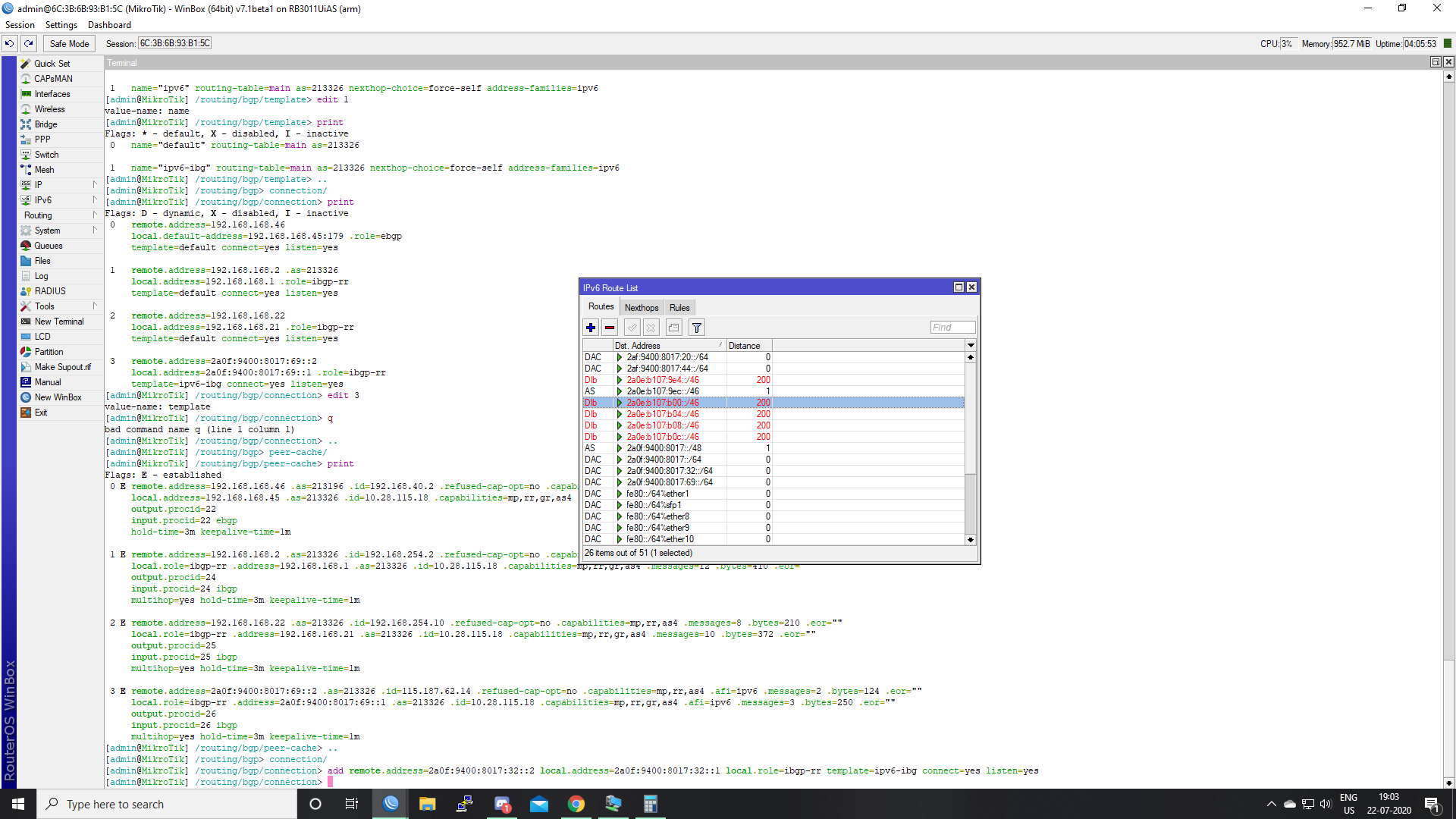
Show output of
/routing/route/print detail
[admin@MikroTik] > /routing/route/print detail
Flags: X - disabled, I - inactive, F - filtered, U - unreachable, A - active; c - connect, s - static, r - rip, b - bgp, o - ospf, d - dhcp, v - vpn, m - modem, a - ldp-address, l - ldp-mapping; + - ecmp
As afi=ip4 contribution=active dst-address=0.0.0.0/0 routing-table=main pref-src=“” gateway=10.28.115.17 immediate-gw=10.28.115.17%WAN check-gateway=ping distance=1 scope=30 target-scope=10 belongs-to=“Static route”
debug.fwp-ptr=0x20202190
Ac afi=ip4 contribution=active dst-address=10.28.115.16/30 routing-table=main gateway=WAN immediate-gw=WAN distance=0 scope=10 belongs-to=“Connected route” local-address=10.28.115.18%WAN
debug.fwp-ptr=0x202020C8
Ab afi=ip4 contribution=active dst-address=172.22.146.0/25 routing-table=main gateway=192.168.168.2 immediate-gw=192.168.168.2%ether10 distance=200 scope=40 target-scope=30 belongs-to=“BGP IP routes from 192.168.168.2”
bgp.peer-cache-id=*B000005 .local-pref=100 .atomic-aggregate=yes .origin=igp
debug.fwp-ptr=0x202024B0
Ac afi=ip4 contribution=active dst-address=172.22.146.0/27 routing-table=main gateway=ether9 immediate-gw=ether9 distance=0 scope=10 belongs-to=“Connected route” local-address=172.22.146.1%ether9
debug.fwp-ptr=0x2020212C
Ac afi=ip4 contribution=active dst-address=172.22.146.32/27 routing-table=main gateway=LAN immediate-gw=LAN distance=0 scope=10 belongs-to=“Connected route” local-address=172.22.146.33%LAN
debug.fwp-ptr=0x202021F4
As afi=ip4 contribution=active dst-address=172.22.146.64/26 routing-table=main pref-src=“” gateway=192.168.168.2 immediate-gw=192.168.168.2%ether10 distance=1 scope=30 target-scope=10 belongs-to=“Static route”
debug.fwp-ptr=0x202025DC
Ab afi=ip4 contribution=active dst-address=192.168.30.0/24 routing-table=main gateway=192.168.168.46 immediate-gw=Peer-Burdwan distance=20 scope=40 target-scope=10 belongs-to=“BGP IP routes from 192.168.168.46”
bgp.peer-cache-id=*B000003 .as-path=“213196” .atomic-aggregate=yes .origin=igp
debug.fwp-ptr=0x20202640
Ab afi=ip4 contribution=active dst-address=192.168.50.0/24 routing-table=main gateway=192.168.168.46 immediate-gw=Peer-Burdwan distance=20 scope=40 target-scope=10 belongs-to=“BGP IP routes from 192.168.168.46”
bgp.peer-cache-id=*B000003 .as-path=“213196” .atomic-aggregate=yes .origin=igp
debug.fwp-ptr=0x20202640
Ab afi=ip4 contribution=active dst-address=192.168.108.0/24 routing-table=main gateway=192.168.168.22 immediate-gw=Dumdum-PoP distance=200 scope=40 target-scope=30 belongs-to=“BGP IP routes from 192.168.168.22”
bgp.peer-cache-id=*B000009 .local-pref=100 .atomic-aggregate=yes .origin=igp
debug.fwp-ptr=0x20202514
Ac afi=ip4 contribution=active dst-address=192.168.168.0/30 routing-table=main gateway=ether10 immediate-gw=ether10 distance=0 scope=10 belongs-to=“Connected route” local-address=192.168.168.1%ether10
debug.fwp-ptr=0x20202064
Ac afi=ip4 contribution=active dst-address=192.168.168.4/30 routing-table=main gateway=Madhyamgram-PoP immediate-gw=Madhyamgram-PoP distance=0 scope=10 belongs-to=“Connected route” local-address=192.168.168.5%Madhyamgram-PoP
debug.fwp-ptr=0x202023E8
Ac afi=ip4 contribution=active dst-address=192.168.168.20/30 routing-table=main gateway=Dumdum-PoP immediate-gw=Dumdum-PoP distance=0 scope=10 belongs-to=“Connected route” local-address=192.168.168.21%Dumdum-PoP
debug.fwp-ptr=0x20202384
Ac afi=ip4 contribution=active dst-address=192.168.168.44/30 routing-table=main gateway=Peer-Burdwan immediate-gw=Peer-Burdwan distance=0 scope=10 belongs-to=“Connected route” local-address=192.168.168.45%Peer-Burdwan
debug.fwp-ptr=0x2020244C
Ac afi=ip4 contribution=active dst-address=192.168.254.1 routing-table=main gateway=loopback immediate-gw=loopback distance=0 scope=10 belongs-to=“Connected route” local-address=192.168.254.1%loopback
debug.fwp-ptr=0x20202000
Ac afi=ip6 contribution=active dst-address=2af:9400:8017:20::/64 routing-table=main gateway=Dumdum-PoP immediate-gw=Dumdum-PoP distance=0 scope=10 belongs-to=“Connected route” local-address=2af:9400:8017:20::1%Dumdum-PoP
debug.fwp-ptr=0x20202384
Ac afi=ip6 contribution=active dst-address=2af:9400:8017:44::/64 routing-table=main gateway=Peer-Burdwan immediate-gw=Peer-Burdwan distance=0 scope=10 belongs-to=“Connected route” local-address=2af:9400:8017:44::1%Peer-Burdwan
debug.fwp-ptr=0x2020244C
Ac afi=ip6 contribution=active dst-address=2a0e:46c5:f012::/64 routing-table=main gateway=UL-Redpanda immediate-gw=UL-Redpanda distance=0 scope=10 belongs-to=“Connected route” local-address=2a0e:46c5:f012::2%UL-Redpanda
debug.fwp-ptr=0x202026A4
Ib afi=ip6 contribution=unreachable dst-address=2a0e:b107:9e4::/46 routing-table=main gateway=:: distance=200 scope=40 target-scope=30 belongs-to=“BGP IP6 routes from 2a0f:9400:8017:32::2”
bgp.peer-cache-id=*B00000C .aggregator=“213326:192.168.254.2” .local-pref=100 .atomic-aggregate=yes .origin=incomplete
debug.fwp-ptr=0x20202578
As afi=ip6 contribution=active dst-address=2a0e:b107:9ec::/46 routing-table=main pref-src=“” gateway=blackhole immediate-gw=“” distance=1 scope=250 target-scope=10 belongs-to=“Static route”
debug.fwp-ptr=0x20202708
Ib afi=ip6 contribution=unreachable dst-address=2a0e:b107:b00::/46 routing-table=main gateway=:: distance=200 scope=40 target-scope=30 belongs-to=“BGP IP6 routes from 2a0f:9400:8017:69::2”
bgp.peer-cache-id=*B00000A .local-pref=100 .atomic-aggregate=yes .origin=igp
debug.fwp-ptr=0x20202578
Ib afi=ip6 contribution=unreachable dst-address=2a0e:b107:b04::/46 routing-table=main gateway=:: distance=200 scope=40 target-scope=30 belongs-to=“BGP IP6 routes from 2a0f:9400:8017:69::2”
bgp.peer-cache-id=*B00000A .local-pref=100 .atomic-aggregate=yes .origin=igp
debug.fwp-ptr=0x20202578
Ib afi=ip6 contribution=unreachable dst-address=2a0e:b107:b08::/46 routing-table=main gateway=:: distance=200 scope=40 target-scope=30 belongs-to=“BGP IP6 routes from 2a0f:9400:8017:69::2”
bgp.peer-cache-id=*B00000A .local-pref=100 .atomic-aggregate=yes .origin=igp
debug.fwp-ptr=0x20202578
Ib afi=ip6 contribution=unreachable dst-address=2a0e:b107:b0c::/46 routing-table=main gateway=:: distance=200 scope=40 target-scope=30 belongs-to=“BGP IP6 routes from 2a0f:9400:8017:69::2”
bgp.peer-cache-id=*B00000A .local-pref=100 .atomic-aggregate=yes .origin=igp
debug.fwp-ptr=0x20202578
As afi=ip6 contribution=active dst-address=2a0f:9400:8017::/48 routing-table=main pref-src=“” gateway=blackhole immediate-gw=“” distance=1 scope=250 target-scope=10 belongs-to=“Static route”
debug.fwp-ptr=0x20202708
Ac afi=ip6 contribution=active dst-address=2a0f:9400:8017::/64 routing-table=main gateway=loopback immediate-gw=loopback distance=0 scope=10 belongs-to=“Connected route” local-address=2a0f:9400:8017::1%loopback
debug.fwp-ptr=0x20202000
Ac afi=ip6 contribution=active dst-address=2a0f:9400:8017:32::/64 routing-table=main gateway=ether10 immediate-gw=ether10 distance=0 scope=10 belongs-to=“Connected route” local-address=2a0f:9400:8017:32::1%ether10
debug.fwp-ptr=0x20202064
Ac afi=ip6 contribution=active dst-address=2a0f:9400:8017:69::/64 routing-table=main gateway=Madhyamgram-PoP immediate-gw=Madhyamgram-PoP distance=0 scope=10 belongs-to=“Connected route” local-address=2a0f:9400:8017:69::1%Madhyamgram-PoP
debug.fwp-ptr=0x202023E8
Ac afi=ip6 contribution=active dst-address=fe80::%ether1/64 routing-table=main gateway=ether1 immediate-gw=ether1 distance=0 scope=10 belongs-to=“Connected route” local-address=fe80::6e3b:6bff:fe93:b153%ether1
debug.fwp-ptr=0x20202320
Ac afi=ip6 contribution=active dst-address=fe80::%sfp1/64 routing-table=main gateway=sfp1 immediate-gw=sfp1 distance=0 scope=10 belongs-to=“Connected route” local-address=fe80::6e3b:6bff:fe93:b158%sfp1
debug.fwp-ptr=0x202022BC
Ac afi=ip6 contribution=active dst-address=fe80::%ether8/64 routing-table=main gateway=ether8 immediate-gw=ether8 distance=0 scope=10 belongs-to=“Connected route” local-address=fe80::6e3b:6bff:fe93:b15b%ether8
debug.fwp-ptr=0x20202258
Ac afi=ip6 contribution=active dst-address=fe80::%ether9/64 routing-table=main gateway=ether9 immediate-gw=ether9 distance=0 scope=10 belongs-to=“Connected route” local-address=fe80::6e3b:6bff:fe93:b15c%ether9
debug.fwp-ptr=0x2020212C
Ac afi=ip6 contribution=active dst-address=fe80::%ether10/64 routing-table=main gateway=ether10 immediate-gw=ether10 distance=0 scope=10 belongs-to=“Connected route” local-address=fe80::6e3b:6bff:fe93:b15d%ether10
debug.fwp-ptr=0x20202064
Ac afi=ip6 contribution=active dst-address=fe80::%WAN/64 routing-table=main gateway=WAN immediate-gw=WAN distance=0 scope=10 belongs-to=“Connected route” local-address=fe80::6e3b:6bff:fe69:6969%WAN
debug.fwp-ptr=0x202020C8
Ac afi=ip6 contribution=active dst-address=fe80::%loopback/64 routing-table=main gateway=loopback immediate-gw=loopback distance=0 scope=10 belongs-to=“Connected route” local-address=fe80::28bc:deff:fe69:55ec%loopback
debug.fwp-ptr=0x20202000
Ac afi=ip6 contribution=active dst-address=fe80::%LAN/64 routing-table=main gateway=LAN immediate-gw=LAN distance=0 scope=10 belongs-to=“Connected route” local-address=fe80::6e3b:6bff:fe93:b155%LAN
debug.fwp-ptr=0x202021F4
Ac+ afi=ip6 contribution=active dst-address=fe80::%Dumdum-PoP/64 routing-table=main gateway=Dumdum-PoP immediate-gw=Dumdum-PoP distance=0 scope=10 belongs-to=“Connected route” local-address=fe80::5efe:a1c:7312%Dumdum-PoP
debug.fwp-ptr=0x20202384
Ac+ afi=ip6 contribution=active dst-address=fe80::%Dumdum-PoP/64 routing-table=main gateway=Dumdum-PoP immediate-gw=Dumdum-PoP distance=0 scope=10 belongs-to=“Connected route” local-address=fe80::2:a0e:5ee8%Dumdum-PoP
debug.fwp-ptr=0x20202384
Ac+ afi=ip6 contribution=active dst-address=fe80::%Madhyamgram-PoP/64 routing-table=main gateway=Madhyamgram-PoP immediate-gw=Madhyamgram-PoP distance=0 scope=10 belongs-to=“Connected route” local-address=fe80::5efe:a1c:7312%Madhyamgram-PoP
debug.fwp-ptr=0x202023E8
Ac+ afi=ip6 contribution=active dst-address=fe80::%Madhyamgram-PoP/64 routing-table=main gateway=Madhyamgram-PoP immediate-gw=Madhyamgram-PoP distance=0 scope=10 belongs-to=“Connected route” local-address=fe80::2:a0e:606d%Madhyamgram-PoP
debug.fwp-ptr=0x202023E8
Ac+ afi=ip6 contribution=active dst-address=fe80::%Peer-Burdwan/64 routing-table=main gateway=Peer-Burdwan immediate-gw=Peer-Burdwan distance=0 scope=10 belongs-to=“Connected route” local-address=fe80::5efe:a1c:7312%Peer-Burdwan
debug.fwp-ptr=0x2020244C
Ac+ afi=ip6 contribution=active dst-address=fe80::%Peer-Burdwan/64 routing-table=main gateway=Peer-Burdwan immediate-gw=Peer-Burdwan distance=0 scope=10 belongs-to=“Connected route” local-address=fe80::2:6702:8462%Peer-Burdwan
debug.fwp-ptr=0x2020244C
Ac+ afi=ip6 contribution=active dst-address=fe80::%UL-Redpanda/64 routing-table=main gateway=UL-Redpanda immediate-gw=UL-Redpanda distance=0 scope=10 belongs-to=“Connected route” local-address=fe80::5efe:a1c:7312%UL-Redpanda
debug.fwp-ptr=0x202026A4
Ac+ afi=ip6 contribution=active dst-address=fe80::%UL-Redpanda/64 routing-table=main gateway=UL-Redpanda immediate-gw=UL-Redpanda distance=0 scope=10 belongs-to=“Connected route” local-address=fe80::3:a1c:7312%UL-Redpanda
debug.fwp-ptr=0x202026A4
A afi=link contribution=active dst-address=ether1 routing-table=main distance=0 belongs-to=“Interface”
A afi=link contribution=active dst-address=sfp1 routing-table=main distance=0 belongs-to=“Interface”
A afi=link contribution=active dst-address=ether8 routing-table=main distance=0 belongs-to=“Interface”
A afi=link contribution=active dst-address=ether9 routing-table=main distance=0 belongs-to=“Interface”
A afi=link contribution=active dst-address=ether10 routing-table=main distance=0 belongs-to=“Interface”
A afi=link contribution=active dst-address=WAN routing-table=main distance=0 belongs-to=“Interface”
A afi=link contribution=active dst-address=loopback routing-table=main distance=0 belongs-to=“Interface”
A afi=link contribution=active dst-address=LAN routing-table=main distance=0 belongs-to=“Interface”
A afi=link contribution=active dst-address=Dumdum-PoP routing-table=main distance=0 belongs-to=“Interface”
A afi=link contribution=active dst-address=Madhyamgram-PoP routing-table=main distance=0 belongs-to=“Interface”
A afi=link contribution=active dst-address=Peer-Burdwan routing-table=main distance=0 belongs-to=“Interface”
A afi=link contribution=active dst-address=UL-Redpanda routing-table=main distance=0 belongs-to=“Interface”
hgh cpu show in profile.(CCR1009)
so many unclassified 100% cpu
[admin@MikroTik-Lab-01] > /tool/profile freeze-frame-interval=1 cpu=all
Columns: NAME, CPU, USAGE
NAME C USAGE
unclassified 0 100%
cpu0 100%
console 1 0%
networking 1 0.5%
winbox 1 0%
management 1 1%
telnet 1 0%
unclassified 1 98.5%
cpu1 100%
management 2 0%
unclassified 2 100%
cpu2 100%
winbox 3 0%
management 3 0%
unclassified 3 100%
cpu3 100%
networking 4 0%
unclassified 4 100%
cpu4 100%
console 5 0.5%
management 5 0.5%
unclassified 5 99%
cpu5 100%
management 6 0%
unclassified 6 100%
cpu6 100%
networking 7 0%
profiling 7 0%
unclassified 7 100%
cpu7 100%
networking 8 0%
unclassified 8 100%
cpu8 100%
IDK why Mikrotik haven’t implemented fq_codel or CAKE qdiscs since they’re already present in Linux 5.6, leave the classic mangle based traffic classification and prioritization for the enterprise but home users just need a simpler way to get rid of the bufferbloat caused by ISP misconfiguration. Even if you get to create lots of mangle rules for each kind of traffic you have inside your home network and create queue trees, PCQ/SFQ is a dumb shaper (round robbin algorithm as a fancier term) that adds extra latency + packet loss during load.
Can not able to call /routing/filter/rule as output.filter in bgp template…
Note: In attachment image it is manually written not auto-complete by pressing “Tab”
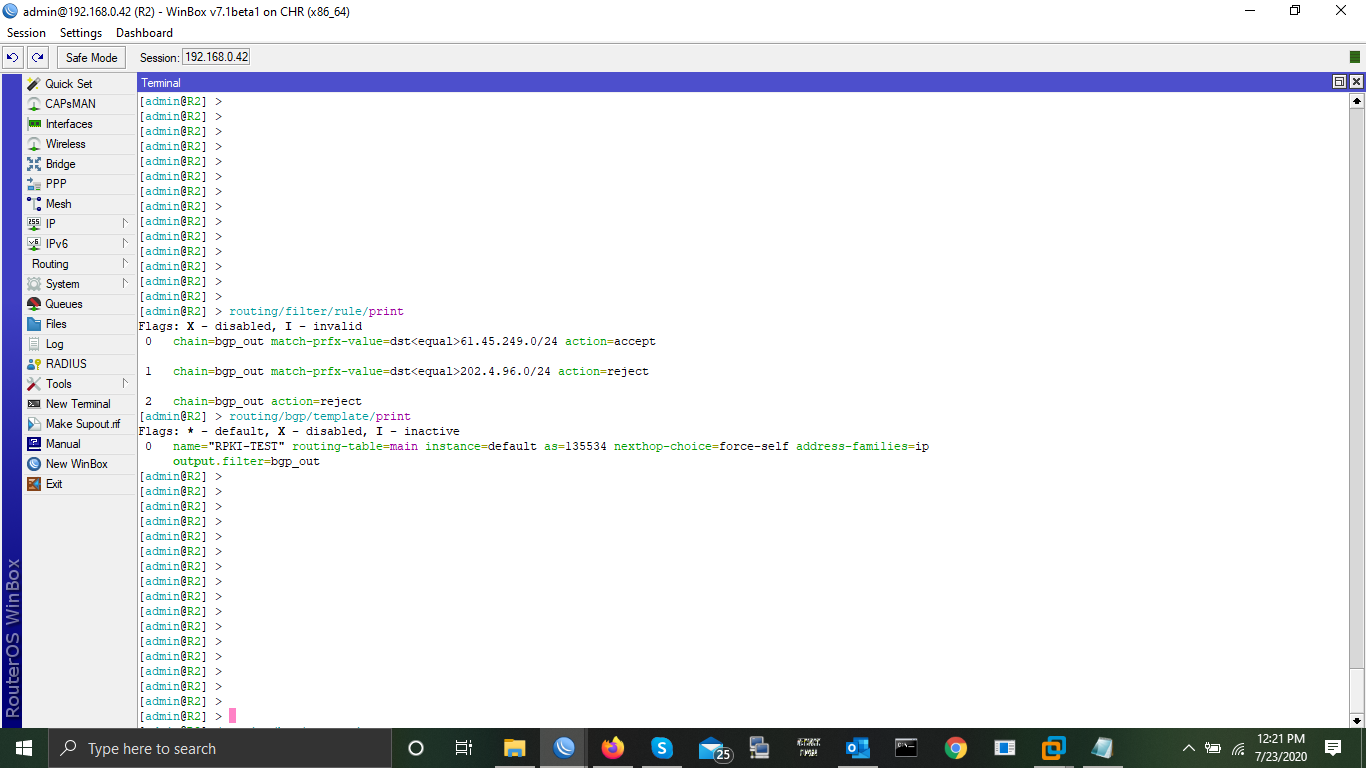
RPKI check is working fine but while filtering it block valid Routes also..
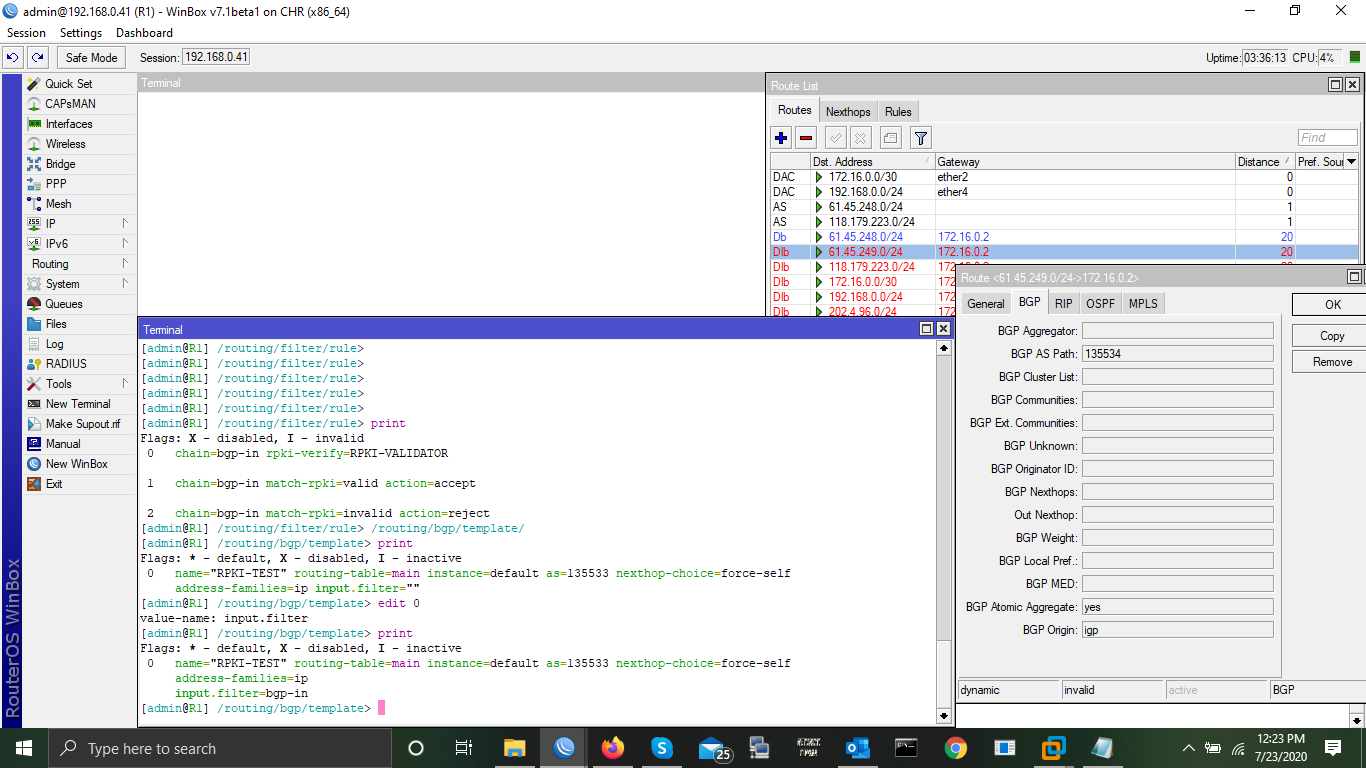
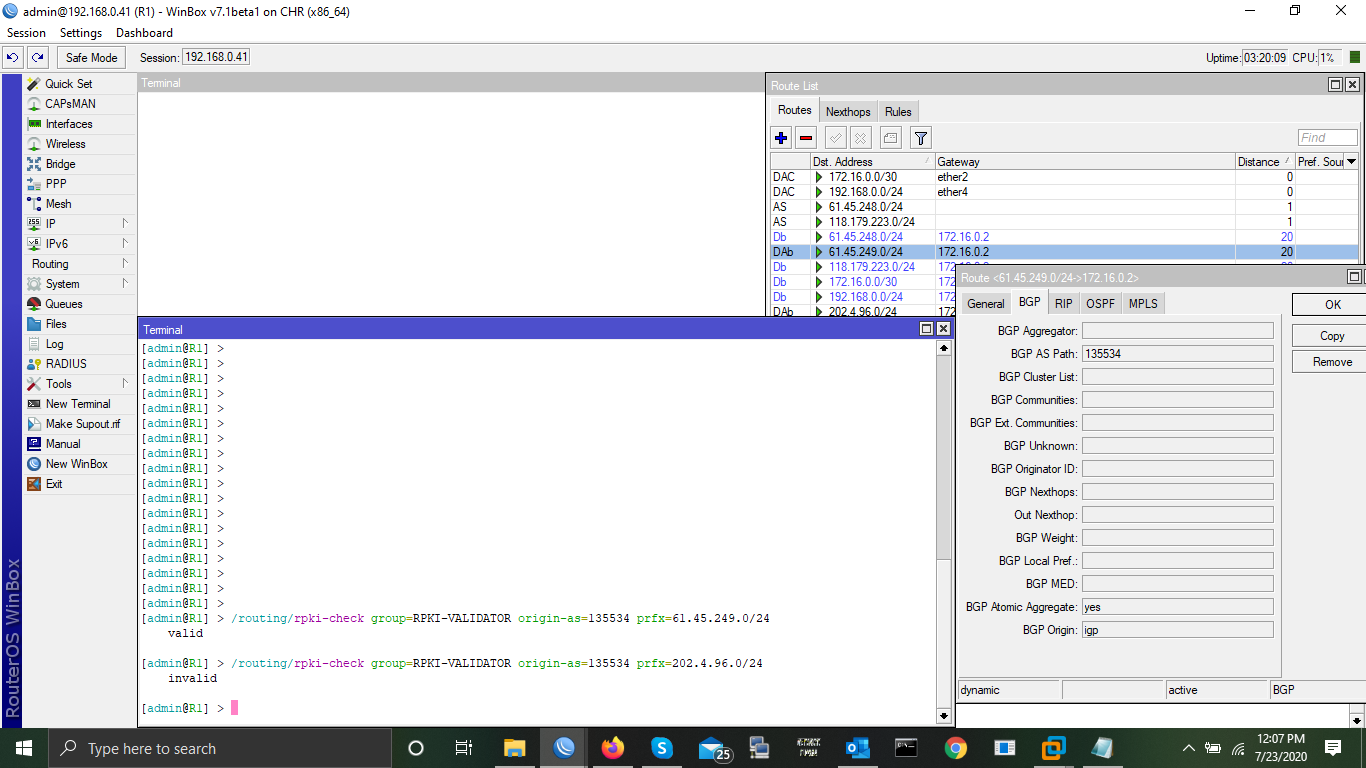
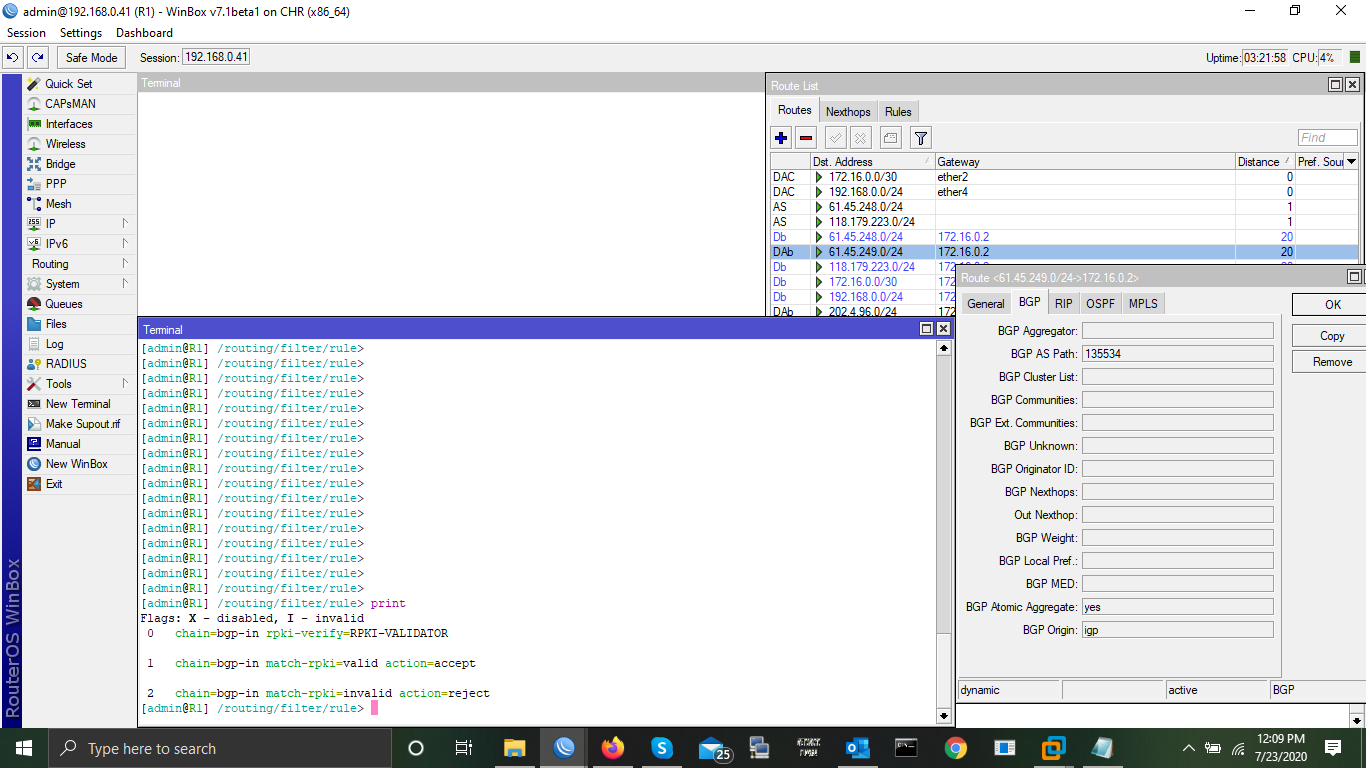
Hello,
Output requires selection rules:
/routing filter rule
add action=accept chain=xx
/routing filter select-rule
add chain=xx-select do-where=xx
/routing bgp template
set 0 output.filter=xx-select
regards
Ros
Is the problem about ignoring MTU settings still happening in 7.1beta? ( http://forum.mikrotik.com/t/interface-mtu-has-no-effect/137431/1 )
no, jumbo frame is working fine at least on mellanox board.
refards
ros
Thanks for sharing the information. Now RPKI filtering remains…
- Will this be backported to RouterOS 6.x?
- Only b/g/n and a/n, but not ac?
The specific issue was with version 7 only. If you have issues with v6, please feel free to open a ticket in support system.
Tried to install .iso image into KVM on Proxmox, but after install it reboots and is stuck at “Booting from hard disk…”
Same procedure works fine on the same KVM setup with 6.47.1… any idea?
Cheers, Jan