Well, I have Unifi gateway and APs at my parents house and I have Unifi IP cameras and UNVR at my house. And I never allowed them to update automatically. I always check the forum first for any potential bugs. I only update when I'm sure that features I need work.
Same thing with Mikrotik. I have some test equipment which is constantly updated but all equipment that's in production is currently on 7.19.6 as it seems most stable for now. In the future I will update everything to LTS and will stay there unless there will be some feature I need that's not in LTS
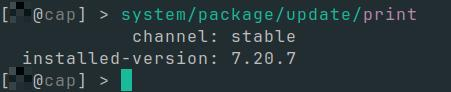
I have switched to channel=long-term on CAPsMAN. After reboot CAP joined and was auto-upgraded to 7.20.7 as well. CAPsMAN has upgrade-policy: suggest-same-version. But CAP has still channel=stable. Is this expected behavior? I would have expected the CAP to stay on 7.20.6 (as it was running before), because of channel mismatch.
It’s interesting how opinions change over time. Just a few years ago there would be riots against auto upgrades, as the argument then was “it could auto brick masses of devices!”, but people are used to software doing that.
But I can already see that someone enables auto update, leave channel set to development or testing, auto update does it’s thing and because of some bug in beta or RC version device stop working and then we will have a lot of topics about how auto update bricks your device.
After auto-update ends up breaking working configuration, interest in it will cool down noticeably. If this option would appear, it should only be available for stable and long-term channels - and definitely as opt-in for “stable” channel.
Still if this option will appear, there’s no way to be sure if it would be enabled “unintentionally” by a “bug” in some release…
Is this long-term derived from an exisiting “stable” version? Like it was with the v6 long-terms?
I ask, because will I get downgraded with this LTS to some “good brew” v7.xx.x and they called ist 7.20.7 because it is just the next number? Is MT now the YOLO-Vendor which releases a long-term without a stable first?!
Muchas gracias , sera saldran mas equipos con ese chip ?, tenemos algunos netbox Ax y Netmetal AX pero estan muy lejos de lo que fue el desempeño de los antiguos equipos wifi 5, netmetal 5 con nv2 es impresionantemente estable como PTMP
MOD EDIT: Please post in English, makes it a bit easier for other users.
Translated using Google Translate:
Thank you very much. Will more devices be released with that chip? We have some Netbox AX and Netmetal AX units, but they're far from the performance of the old WiFi 5 devices. The Netmetal 5 with NV2 is impressively stable as a PTMP.
There is a significant difference between home users who don’t want to be bothered with managing 3-5 devices and businesses and service-providers who have dozens, hundreds, or thousands of devices and need to know what’s happening on their network.
I’d be comfortable turning a MikroTIk auto-update feature on for my end users’ hAP’s with an LTS release.* I would never enable it for my CCR’s and CRS’s.
(*I find it odd releasing 7.20.7, a new release, as LTS, as opposed to pushing something that’s been out and running for months, like 7.19.6. But then, LTS just means “long term support,” which could imply that 7.20.x will be the version that gets important fixes for a “long” time, where “long” has 2-5x the duration of “soon.”)
In ROS v6 times "long term" meant that that minor version (e.g. 6.47) does get an update if there is some stability or security issue (but not for bug fixes). The same fixes (plus bug fixes) were applied (at the same time) to "stable" minor version (e.g. 6.48).
But unlike in some other "software projects" (e.g. linux kernel or ubuntu linux distribution), where there's one LTS "minor version" every N-th "minor version", in ROS v6 times every stable version became long-term version automatically.
Which in turn means that duration of "long" means almost exactly 2x the duration of "soon" (whereas in those other projects it might mean 5x or even larger factor).
And it's yet to be seen if the newly introduced v7 "long term" will follow the v6 release cycle or will be somehow different.