V7.21 [stable] is released!

RPS is about the kernel spreading interrupt requests across all CPU cores. It doesn’t know/care about how you’ve configured the ports.

You can try enabling it for all ports, but I don’t know that it’ll make a huge difference unless you’re saturating them all the time.

I tested On-Capsman last night between my RB4011 and a HAP AX2, and when I activate On-Capsman, I lose wireless speed. Have you experienced this with your HAP AX2?

To get full speed, I have to switch back to On-Cap.

Thank you

I’m having the same issue as well. Setup worked just fine previously all the way up to 7.20.7 with Accept Router Announcements = Yes and Add Default Route unchecked in the DHCP client. With 7.21, I have to enable Add Default Route or I do not get one via RA. I don’t see how this would be affected by the change to pools or what I can set as a prefix hint. It’s not obligatory right?

Edit: reproduced in two different routers at two different sites using different ISPs:

Rb5009 using Verizon FiOS

CCR2004 using Google Fiber

Will test further

@dang21000 already benchmarked capsman forwarding, V7.21rc [testing] is released! - #261 by dang21000

I just upgraded some devices but I noticed something strange. I updated my RB5009 and the routerboard firmware shows this:

system/routerboard/print
;;; Warning: cpu not running at default frequency routerboard: yes
model: RB5009UG+S+
serial-number: XXXXXXXXX firmware-type: 70x0
factory-firmware: 7.0.5
current-firmware: 7.21!
upgrade-firmware: 7.21

Does anyone know what it means that I see in current-firmware the exclamation symbol “!” aside of the 7.21 version?

I have not seen any problems with my router and the other devices I have tested doesn’t have this symbol either.

What am I missing here?

Thanks!

IPv6 clients are still broken with this version, the last working for me is 7.20.1.

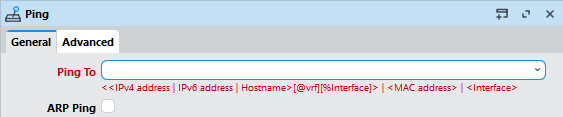
On 7.21 I can't pin vrf or interface in ping

It might be related to this change item:

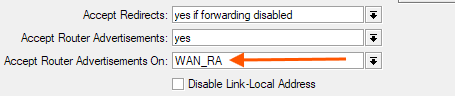
I've run 7.21 since the beta versions on test devices never had problem with the router getting gateway information from RA. But I wanted to test the feature above, so from the beginning the devices always had this configuration:

image

with

/interface list
add name=WAN_RA

/interface list member
add interface=ether1 list=WAN_RA

/ipv6 settings
set accept-router-advertisements=yes accept-router-advertisements-on=WAN_RA

Maybe you can try to restrict accept-router-advertisements-on to a specific interface list too?

From 7.21 with this change item:

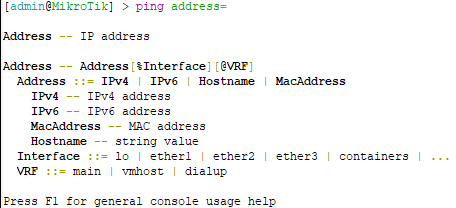
You'll need to specify any VRF or interface customization together with the address with %interface and @vrf (can also have both at the same time). In the console if you press F1 you'll see the full available syntax:

WinBox 4 also shows the syntax:

fixed it with the help of ChatGPT :slight_smile:
thx @pe1chl for the insight.

Holy crap! How did I miss that before. Thanks for pointing out that subtle change. That makes sense to me and I'll have to give it a go. Seems like the better implementation would be to accept RA on all interfaces by default as it was before, then allow the user to limit to a specific interface. I'll report back after I update the router again to 7.21

EDIT: Just updated the RB5009 and then set the RA to use my WAN interface list which only consists of ether8. Cannot get a default route. And by default, the RA feature is set to all so that is the way it was before. I’m perplexed and bothered.

Oh, maybe it's something similar to what @nogaff was experiencing in the beta thread:

You can click the arrow to open @nogaff's chain of replies in that thread. When the ISP periodically sends RA without prefix information then RouterOS removes the default route, probably as a side effect of these changes:

Although the previously advertised prefix has not expired, when the router receives a RA message without prefix, it probably expires the previously received prefix.

In the RC thread MikroTik had some response but I don't see anything mentioned afterwards in the RC changelog, and @nogaff hasn't posted that his problem has been resolved.

Can you check if your problem is the same as @nogaff? The workaround was apparently to block the smaller RA packets.

Hello, I use container and installed openwrt .It’s good on 7.19.6. but on 7.20.6 it failes. and shows something like ‘no such file or directory‘ . I try 7.21 ,the same as 7.20.6 .Could you please take a look?

Where is the LTE package in MIPSBE ?

You can use a workaround like the following. In this example I have a /56 pool with prefix-length=60:

/ipv6 pool
add name=main-ula prefix=fdda:4a64:48c2:4500::/56 prefix-length=60

We assign a prefix from this pool to our interface (in this example ether2), the prefix is /60, which means we can no longer turn on "Advertise":

/ipv6 address
add address=::10:1:2:3:4/60 advertise=no from-pool=main-ula interface=ether2

Here the chosen prefix-id is 10, and the prefix is properly reserved from the pool and will not be used for other purposes:

image

Now we only have to manually advertise the prefix, but as /64 on ether2 for SLAAC for everything to work:

/ipv6 nd prefix
add interface=ether2 preferred-lifetime=30m prefix=fdda:4a64:48c2:4510::/64 valid-lifetime=1h

Of course, if your pool is dynamic (prefix coming from DHCPv6 client for example), then you'll need to do a bit of scripting (DHCPv6 client script) and do the following in the script:

  • Extract address from interface, with something like [/ipv6 address get ([find interface=ether2 global !dynamic !deprecated]->0) address].
  • This is a string, so you can strip the "/xx" part, then convert to IPv6 address with :toip6.
  • Apply the & operator with ffff:ffff:ffff:ffff:: as mask to strip the interface id part, then append "/64" to the result.
  • Use the calculated value to update the /ipv6 nd prefix entry for ether2.

With manually added entries in /ipv6 nd prefix you can also "share" that /60 prefix you get from the pool among multiple interfaces, in the example above, I can advertise and use fdda:4a64:48c2:4511::/64 for ether3 for example.

/ipv6 nd prefix
add interface=ether3 preferred-lifetime=10m prefix=fdda:4a64:48c2:4511::/64 valid-lifetime=10m
/ipv6 route
add dst-address=fdda:4a64:48c2:4511::/64 gateway=ether3 scope=10 target-scope=5

There is no need to assign the address entry to ether3! We only need to manually add the /64 route. Of course, if your pool has a dynamic prefix, then those two entries will need to be updated by the script.

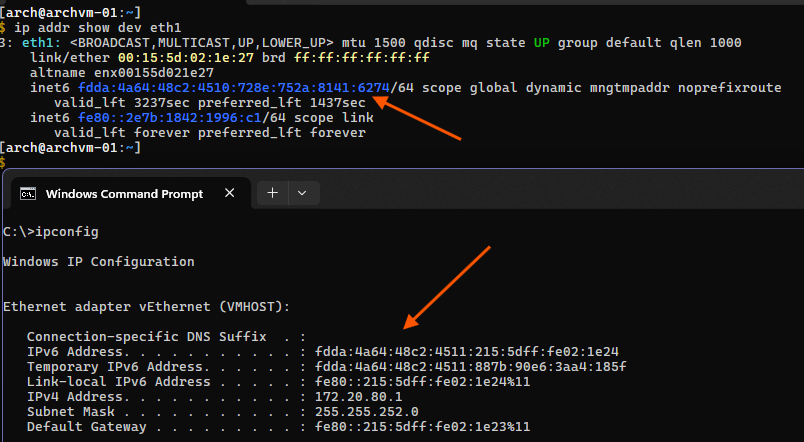
As seen in this screenshot, Linux & Windows clients attached to ether2 and ether3 properly get the IPv6 and routes via SLAAC and RA:
So, I was seeing it as an improvement, but seems that is not the case. Why we should use this option instead of the CAP? (Serious question, not sure what is better)

If you want to apply firewall rules for example, you can do it on the CAPsMAN when capsman-forwarding is used.

I have a RB4011 as Router and two HAPax3 as AP which is setup via CAPsMAN. What i noticed is that iPhone gets frequently disconnected when the wifi range changes or when in lock screen and reconnects when we wake-up/unlock device. Never had this issue on 7.20.

Change dtim to 3.

My iphones now won't disconnect when the screen is off.