This is a Raspberry Pi 4 connected to RB4011iGS+RM with RouterOS V7.22.1:
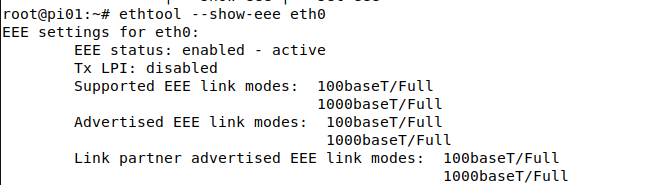
EEE is clearly advertised by RB4011.
This is a Raspberry Pi 4 connected to RB4011iGS+RM with RouterOS V7.22.1:
EEE is clearly advertised by RB4011.
I agree. I have a system with Intel Ethernet controllers, connected to an RB4011.
One is Intel I219-LM and it shows this:
EEE settings for eno1:
EEE status: enabled - active
Tx LPI: 17 (us)
Supported EEE link modes: 100baseT/Full
1000baseT/Full
Advertised EEE link modes: 100baseT/Full
1000baseT/Full
Link partner advertised EEE link modes: 100baseT/Full
1000baseT/Full
The other is I225-V and it shows this:
EEE settings for eno2:
EEE status: disabled
Tx LPI: disabled
Supported EEE link modes: Not reported
Advertised EEE link modes: Not reported
Link partner advertised EEE link modes: Not reported
I am sure. Settings were exactly the same before upgrade from 7.20.8. I checked and rechecked against it’s counterparts (have multiple AX S to configure, all on 7.20.8 and thought I would try 7.22.1 + mediatek on one of them to see if the \System\LEDs poe LED table entry bug displaying “none” was fixed - which it is although not with * and in blue text like normal). Then discovered test iOS devices would not connect to 2Ghz only 5Ghz, yet old Motorolla Android was fine on both. Downgraded back to 7.20.8 + mediatek and still no iOS registration, only Android. netinstall 7.20.8 + mediatek and imported config script back, iOS devices register. I did test 7.22rc4 + mediatek earlier in week under advisement of Support when I reported poe table bug, then downgraded back to 7.20.8 + mediatek as wanted to deploy long term RouterOS to customer sites. Maybe bouncing versions left hidden mess on file system; maybe 7.22.1 mediatek is not good. Maybe “wireless stability fixes” in 7.22.1 are not good - don’t know, don’t have time to investigate and try again. I will stick with 7.20.8 on AX S as it works for what I need to deploy with no weird quirks thus far - I can live with “unknown” in \System\LEDs poe LED table entry as PoE out still functions correctly and I will not be using it anyway - I presume merely an “aesthetic” issue rather than functional.
Thankyou for reply but not going to re-upgrade device to 7.22.1 to test again. I will stick with 7.20.8 for it and the others I am deploying.
Downgrade is useless if pre-update-backup is not reloaded...
Completely useless.
Mikrotik had a Halow product on display at MWC
For those thinking, wow I will be able to configure my mikrotik in a virtual reality cloud with an AI helper, HALOW is not that. 
Contextual Developments in Wi-Fi HaLow (Sub-GHz) Technology:
Morse Micro Collaboration: Many new Wi-Fi HaLow solutions presented at MWC 2026 and CES 2026 are powered by Morse Micro’s 2nd-gen MM8108 chip, which supports 850-950MHz and brings high-speed IoT connectivity over long ranges.
Industry Trends: Other manufacturers (like Quectel) unveiled Wi-Fi HaLow modules at MWC that offer 1km+ ranges, making them ideal for smart agriculture, smart cities, and industrial applications.
MikroTik's Current Focus: At MWC 2026, MikroTik showed new 5G Chateau routers and potential hEX pro devices, indicating a focus on higher-speed Wi-Fi 7 and 5G upgrades rather than immediate entry into the Sub-1GHz IoT market.
While unofficial user-modded solutions have existed for years, a native, integrated MikroTik Wi-Fi HaLow product is not yet available.
BGP Route Leaking between VRFs solve that need of services in multiple VRFs.
What is this AI Slop?
All units arrived as 7.19.6. Habit is to upgrade to latest stable which was 7.21.3 when first unit deployed. However that unit acted weird on wireless and switch group seemed to freeze. Thought had a lemon. Not complex config, normal gateway to UFB WAN in front of network switches, protection firewall rules, practically stock. Simple office stuff. Looked on forums about AX S and one person commented they will only stay on 7.20.8 for this model so in place downgraded that unit to his\her recommendation\commentary. Unit has been stable for the past two weeks it has been in service, so thought would make all the others exactly the same. Except decided to play with one unit, noticed \System\LEDs table for poe said “unknown”, raised bug report, installed 7.22rc4 as recommended by Support as they said it included fixes for LED which it did, not going to deploy RC though so bounced back to 7.20.8, worked fine, but tempted to try 7.22.1 today and then spent next two hours playing with phones and iPad trying to figure why iOS no longer connects yet Android does. Finally conceded to netinstall 7.20.8 and normality restored. Should have left it alone and not be tempted.
But still: are you sure the regular downgrade to 7.20.8 actually executed properly? E.g. by verifying the ROS version afterwards? There are no known "config auto migrations" in the wifi section, between 7.20.8 and 7.22. So what and why should a regular downgrade not have the same effect as netinstall? and what kind of netinstall? Netinstall keep-configuration or Netinstall with empty configuration and manual step by step config restore afterwards or Netinstall with backup restore afterwards?
Do not upgrade if you are using CAPsMAN.
CAPsMAN version 7.22 only causes iOS devices to freeze after entering the password and fail to connect. Android devices work normally.
Downgrading to version 7.21.3 or 7.21.2 may not work. I have two devices; downgrading one fixed the problem, but downgrading the other still resulted in the iOS device failing to connect.
works fine with my CAPsMAN, 7.22.1 and IOS devices  cap sitting on RB5009, HAP AX2 as AP
Its what happens when people start throwing around new terms or fancy terms without explaining them.
Do you want more slop it can be arranged.
Yes, confirmed all RouterOS versions through entire process as I also bounce “firmware” upgrade to match installed version. Well I can’t comment on wireless settings not remaining intact as you say, because they were on this device and also on the previous one I downgraded at site which was the first when I thought 7.21.3 might be weird - leading me to believe I can bounce round at will as long as I include mediatek package at the same time. At no point did my config change and I sight checked them many times. With today’s troublesome unit netinstall erased totally to 7.20.8 after in place downgrade back to 7.20.8 did not fix 2G for iOS. AFTER netinstall, hand reconfigured in part and restored minor custom additions via rsc. Like I said, Android phone connected to “weird state” unit fine AFTER upgrade because it already had custom SSID remembered, iOS refused and registering screen froze on devices when trying to reconnect or trying to set up new device. 5G worked fine on iOS devices from already joined custom SSID. Just relating todays experience and events. Particularly fun? I would say not. You say wireless config not migratable, not what happened to me (obviously netinstall factory restore all, factory settings). This is what happened. I don’t really care about the why’s and how’s, as long as it goes again which it does and have been test loading it for the past 5 hours.
Was it a bespoke product, a KNOT/wAP with a new miniPCIe card, indoor/outdoor?
I’m pretty excited for this, I’ve been testing the official Morse Micro HalowLink1, HalowLink2 and some Heltec devices. I have a few applications for Halow devices, and Mikrotik is one of the few vendors I’d trust to implement an outdoor product well enough.
Yes, same here on a RB4011 running V7.22.1.
Most modern PHYs / Switch ASICs have EEE enabled by default. Looks like Mikrotik never really cared and it just depends on the built in Ethernet chips having it enabled by default or not. It was now disabled for devices using Broadcom 88E639x chips (RB5011, CCR2004), but it is still active on Realtek RTL8367 (RB4011, and most likely on RB1100AHx4 using the same chip).
There are only two reasons to disable EEE:
Some (mostly older) devices have broken EEE implementations and may flap or not link up at all
Special applications with high sensitivity to latency (Industrial RT like EtherCAT, DANTE audio, and similar)
So wouldn't it be easier to add a setting to ROS Ethernet settings showing if EEE is supported by HW, it it is enabled or not and if it is currently active or not? On the Ethernet chips I know all that is needed for handling EEE is reading/flipping bits in some chip control register.
And we also started to get tenders with EEE mandated for all active network devices, because it's something companies like to write into their annual ISO14000 environmental reports.
On RB5009UG+S+ it is not possible to switch off the LEDs any more.
All my hAP Lite 7.22.1 logging on reboot this error “error while running customized default configuration script: syntax error (line 1335 column 50)“