Remember to make backup/export files before an upgrade and save them on another storage device;
Make sure the device will not lose power during upgrade process;
Device has enough free storage space for all RouterOS packages to be downloaded.
What's new in 7.22.1 (2026-Mar-23 16:35):
bgp-vpn - fixed non-working import filter after reboot;
certificate - added option to configure built-in trust store for all services (CLI only);
certificate - use "default" for built-in trust store default value;
chr - improved virtio_net stability;
console - removed the "reset" command from shared settings menus (IP/IPv6/Bridge/L3HW/Neighbor-Discovery/Connection-Tracking);
defconf - fixed architecture detection for apps;
hardware - name serial devices after port names;
hardware - name storage hardware devices after slot name in "/disk" menu;
l3hw - fixed a system stability issue (introduced in v7.21);
leds - allow multiple interface selection for interface-activity trigger;
log - do not provide non-existent logging topics for configuration;
log - fixed "/system/logging/action/get" command (introduced in v7.22);
lte - fixed LTE modem automatic modeswitch (introduced in v7.22);
lte - fixed Tx stat reporting in LTE passthrough mode (introduced in v7.22);
qos-hw - display queue0 limits for CPU port;
qos-hw - fixed "offline" tx-manager ability to queue at least one packet (introduced in v7.21);
qos-hw - prohibit setting CPU port with "offline" tx-manager;
quickset - fixed configuration of multi-link APs;
ssh - make login process asynchronous;
switch - disable EEE on RB5009 and CCR2004-16G-2S+ devices;
system - fixed total memory reporting on hAP be3 Media;
tr069 - fixed modem extended revision reporting;
wifi - fixed bridge VLAN configuration for multi-link interfaces;
wifi - fixed EAP authentication for multi-link clients;
wifi - improved link-specific parameter application after reboot for multi-link interfaces;
wifi - improved stability during association;
winbox - added "Supported HW Caps" and "Multi Link Mode" configuration options under the "WiFi/Provisioning" menu;
winbox - do not set empty chain when adding/editing routing rule;
winbox - fixed "Remote AS" setting under the "Routing/BGP/Connections" menu;
winbox - fixed "Src/Dst Address Type" under the "IP/Firewall/NAT" menu;
winbox - make the band field on the WiFi registration table multi-argument;
To upgrade, click Check For Updates under System/Packages menu and select the stable Channel in RouterOS configuration interface, or head to our download page: http://www.mikrotik.com/download
Everything went smoothly
I encountered an issue after the update (please post about the device, configuration, and unexpected symptoms)
I encountered an issue, but solved it (please post the solution)
0voters
If you experience version related issues, then please send supout file from your router to support@mikrotik.com. The file must be generated while a router is not working as suspected or after some problem has appeared on the device
Please keep this forum topic strictly related to this particular RouterOS release.
Yep - still nothing for hAP ax S…
7.22.1 dropped and the first thing I did was rush to the changelog hoping they finally remembered hAP ax S users exist. Of course – not a single mention. The issues are sitting right where they’ve been for months, and MikroTik just keeps quiet. Great device on paper, complete disappointment in practice. At this point I don’t even know if it’s worth updating anymore…
Note: IEEE 802.3az Energy Efficient Ethernet (EEE) capabilities are disabled on all our products. There is no option to manually enable or disable EEE settings.
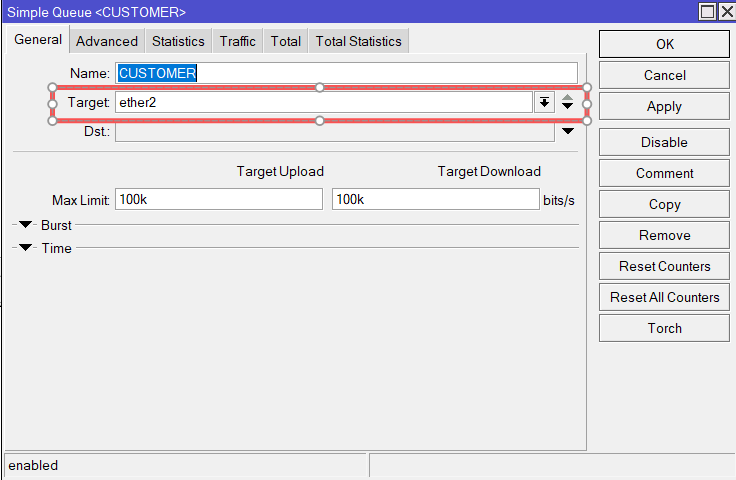
Simple Queue does not properly limit upload traffic when using target interface inside a VRF in RouterOS 7.22.1. Download is limited correctly, but upload bypasses the queue.
# 2026-03-24 18:40:32 by RouterOS 7.22.1
# system id = +3uf3bBqzBA
#
/interface ethernet
set [ find default-name=ether1 ] comment="*** WAN ***" disable-running-check=\
    no
set [ find default-name=ether2 ] comment="*** To R2 ***" \
    disable-running-check=no
set [ find default-name=ether3 ] disable-running-check=no
set [ find default-name=ether4 ] disable-running-check=no
/ip vrf
add interfaces=ether1,ether2 name=VRF-INTERNET
/queue simple
add max-limit=100k/100k name=CUSTOMER target=ether2
/ip address
add address=192.168.0.1/30 comment="*** To R2 ***" interface=ether2 network=\
    192.168.0.0
add address=10.1.0.5/24 interface=ether1 network=10.1.0.0
/ip firewall nat
add action=src-nat chain=srcnat src-address=192.168.0.0/30 to-addresses=\
    10.1.0.5
/ip route
add disabled=no dst-address=0.0.0.0/0 gateway=10.1.0.1 routing-table=main \
    vrf-interface=VRF-INTERNET
/system identity
set name=R1
It would be nice when there was some way to handle locally originated traffic in /routing/rule.
When there is no way to specify the source address (e.g. in DNS and NTP client or system upgrade) there is no way to match this traffic because it is not incoming on any interface and has no source address yet.
2Ghz Wi-Fi is broken for iOS devices now. 5Ghz seems ok. Android phone connects fine to 2Ghz. 3x iPhones and 1x iPad no longer connect and hang at joining screen. In place downgrade back to 7.20.8 does not fix [/system/package/downgrade]. Going through hassle of netinstall back to 7.20.8. Edit: hAP AX S.
My L009UiGS (on ARM64 software and firmware version: 7.22) did not come back after the reboot. Powered the device down after about 5 minutes and power it up again and it seems to be working as expected.
Unfortunately no changes regarding routing table priorities inside containers.
just tested and facing the same issues on 7.22.1 as on 7.22.0 and on 7.22rc.
The big big problem with VRF is that local services can exist only in a single VRF. I would need to have stuff like DNS resolver, NTP server etc to be available in each VRF, if possible with different configuration.
Also I do not think there is a way to specify the VRF when updating packages, for example.
In some of my use cases I could now fix it by swapping the use of the main and auxiliary routing table, because it is now possible to have the DHCP client put its default route in another table. But it would be a little confusing.