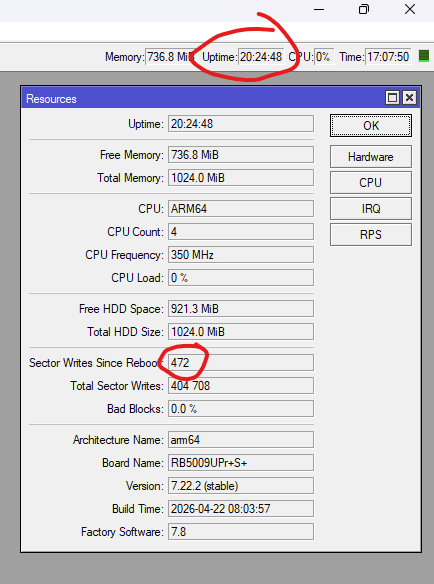
Ok, thanks for info on 4h refresh time. Back to 7.22.2, without adlists, and will keep an eye on sector writes. If within normal range,I will upload a local file to disk, use it without changes, and see what happens.
It might be worth storing a static adlist on a usb stick so you know that no extra writes are being done to NVRAM for the file itself and the file is persistent across reboots.
It seems like Testing Department stuck in some loop.. Mikrotik Test Stuff can you test every new released build for 7 days before release to public? Seriously, we dont need new build every week, just to discover that it have serious bugs. Pls pls stop releasing fresh builds every week, and increase testing period !
I am also using traffic flow and ipv6 FastTrack counters are still growing. As FastPath is a prerequisite for FastTrack I would say it is working for me.
Answering to myself ...
I did find a (partial ? full ?) culprit this morning.
USB3 disk was once again not properly mounted, so my log files were going to internal memory, not to disk.
Found this when trying to replicate that export / Files problem with all sort of app folders (a problem which I did not see but I did notice all my log files were on internal disk instead of USB).
Integral 256GB USB3.0 DRIVE COURIER BLUE UP TO R-120 W-30 MBS USB flash drive USB Type-A 3.2 Gen 1 (3.1 Gen 1) Blue, Silver
Personally, this is the only flash drive I've had working properly on my 5009. Others just fall into USB 2.0 mode or disappear from the system entirely. But when I bought it, I didn't buy it for containers at all..
Maybe the same documentation contains a hint? idk.
"It's not mandatory to use reload to update the lists, Adlist checks for new updates once every four hours."
My bad, you were already informed of this, here and here.
What do you still consider a mystery at this point?
Woah, I did not expect that.
How do you expect the router to know if the file contains any changes without fully downloading it?
If you remember that this wasn't an issue in the past please downgrade to some version that didn't present this problem.
Just to validate his memory, I wasn't implying to stay on that version. D'uh.
Although earlier implementation might've downloaded the list in RAM? The improvements made to it over time aren't very detailed.
Or wasn't even reloaded every 1 or 4 hours? Earlier versions of the documentation mentions that it was checked every hour for updates.
I did not see any sector writes impact by adlist on 7.22.1. I have configured one external url. It may be platform/device specific, specific to 7.22.2 or completely unrelated to adlist at all?