Please upgrade your winbox and test again.
After upgrade from 7.20.8 Long Term to this one 7.22.3 Stable on my RB5009 my container stopped working due to this message:
start failed: no command specified , set cmd or entrypoint mikrotik
EDIT: I read that this is due to bug in Winbox 3 and i left from containers for now. No other issues noticed !
I have an L009 UiGS, upgraded to arm64 at 7.22.2. Have now gone to 7.22.3 and it seems to work fine. Now looking for a long term arm64 version for this unit.
After the update i got the following error in the console of my CHR:
system,error,critical Automatic supout.rif file generated due to service malfunction, please contact MikroTik support and supply the generated file
Opened a ticket… SUP-216025
Use WinBox 4. It won’t be possible to set the Shm size with WinBox 3.
MikroTik should announce EOL of WinBox 3.x officially. The current "void state" is really unfair.
But before doing so, please at least fix the silliest things,
like the one written above or the extra field created on the wifi interface that causes problems (only) with the iSewers...
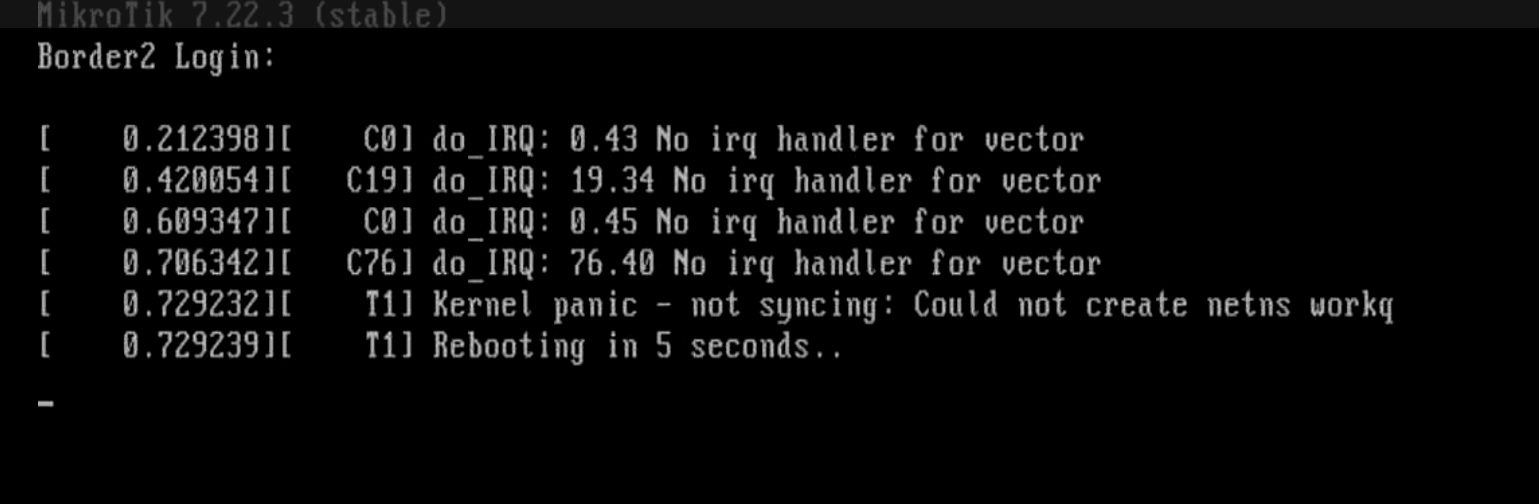
we get kernel Panic also using mqpfifo and static irq-cpu assigment on Boxes with les the 92 cpu (64).
so you could you easly reproduce it on you lab.
Hi MikroTik Team,
Currently, I am experiencing an issue where Simple Queue cannot limit upload traffic for an interface inside a VRF, but download traffic is working normally.
If I apply the limit by IP address, both download and upload traffic work correctly. However, my requirement is to apply the Simple Queue limit directly to the interface.
Here is my configuration.
/interface ethernet
set [ find default-name=ether1 ] comment="*** WAN ***" disable-running-check=\
no
set [ find default-name=ether2 ] comment="*** To Router-2 ***" \
disable-running-check=no
/ip vrf
add interfaces=ether1,ether2 name=INTERNET
/queue simple
add max-limit=100k/100k name=queue1 target=ether2
/ip address
add address=10.1.0.8/24 comment="*** WAN ***" interface=ether1 network=\
10.1.0.0
add address=192.168.0.1/30 comment="*** To Router-2 ***" interface=ether2 \
network=192.168.0.0
/ip firewall nat
add action=src-nat chain=srcnat src-address=192.168.0.0/30 to-addresses=\
10.1.0.8
/ip route
add disabled=no dst-address=0.0.0.0/0 gateway=10.1.0.1 routing-table=main \
vrf-interface=INTERNET
/system identity
set name=R1
I was working on 2 brand new crs354-48Gs the download went fine. When I went to clear the temp configs I had on them it will no longer log into the GUI. Gets to the login page then can’t get past 192.168.88.1/webfig just says stie can’t be reached. Plugged in directly, rebooted several times. Kinda stuck now.
Looks like you are bringing up a cached version of the login page? Are you physically connecting to any ethernet port other than ether1?
Connection to rest-api via HTTPS still hangs - comnand is executed, but in /user/active the connection stays visible until RB reboot. Removing the user via /user/active/remove is not working.
SUP-216230 opened.
Update:
Bug confirmed, fix to be implemented in next ROS versions.
I had an issue with one of my four RBs. Something gone bad and my hAP Lite TC went in a reboot loop and became irresponsible to WebFig and Winbox. I solved it reinstalling the firmware via Netinstall.
HAP ac2, updated without issues, but had to delete ZeroTier completely 
I’ve netinstalled 7.22 with it together (to alleviate HAP ac2 old logs issue) and it worked okayish for some weeks, but lately router ran out of memory again (log was full or errors that system config cannot be saved). It’s a shame honestly, because it used to work on the very same hardware, but not anymore… 
Either I have to buy ax3 now, or push zerotier (or even tailscale) to end users, which is not always possible - one of my use cases was reliable Plex streaming. I’ve used and set up manual hub-and-spoke wireguard configs before and that’s what I went back to, but after zerotier convenience (and honestly much better traffic routing) it feels like a step back.
Yes, the hAP ac2 is the MikroTik device most affected by the shortage of flash storage. You can still use it to do what it was originally designed for, but when you add extra packages sooner or later things will go wrong. It will probably be best to buy a new ax3 and use that as your router, and then use the ac2 only as a WiFi accesspoint in another room, which you can connect and power via an ethernet cable.
For devices like the hAP ac² or the cAP ac, not only should wifi-qcom-ac be split into a version without the QCA9884 firmware (reduces the size by 570KB), but a routeros ARM package for those devices should also be introduced that doesn't contain the prestera_dx_mac.ko kernel driver module. This module is solely needed for the CRS ARM devices with the Marvell switch chips but increases the routeros ARM package by nearly 220KB (almost 700KB uncompressed).
Together, that's 780KB that can be used to provide things like HTTP/2 support to the ARM devices with wifi-qcom-ac and 16MiB flash storage.
Similar to the upgrade to 7.13, the upgrade to 7.24 on ARM can for example split routeros into routeros and switch-marvell and wifi-qcom-ac into wifi-qcom-ac and wifi-qcom-ac-qca and hAP ac² owners can delete the two useless packages.
On the ARM64 side, new devices like the https://mikrotik.com/product/crs804_ddq already require the additional switch-marvell package for the switch chip driver.
...or to fix "wifi-qcom-ac" to work properly with VLANs
...or to fix "kernel failure in previuos boot" which appears only with "wifi-qcom-ac"

All my devices' upgrade went smooth. The only thing that I found annoying is that all my scripts that uses fetch command to send Telegram alerts just broke as Mikrotik changed the Syntaxis of the command.
This made to find and adjust each one of them to fix the new syntax.
This is the second time I see this in the past few years and every time it happens it's really annoying and adds me unnecessary additional work.
Hello
what changed to the fetch command ?