No, I did not make a support ticket yet, because I hope MikroTik is still monitoring this thread, as it's new and only has a few posts.
If there is no response and the next RC still has the issue, then I'll create a ticket  .
.
No, I did not make a support ticket yet, because I hope MikroTik is still monitoring this thread, as it's new and only has a few posts.
If there is no response and the next RC still has the issue, then I'll create a ticket .
I installed 7.22rc1 again.
The one I fixed shows it’s a acme certifcate. But on reboots it still creates a new acme cert.
So, yeah it needs more work.
It seems that the “reading index file…” operation when opening WinBox4 has become considerably slower in the recent 7.22beta/rc releases.
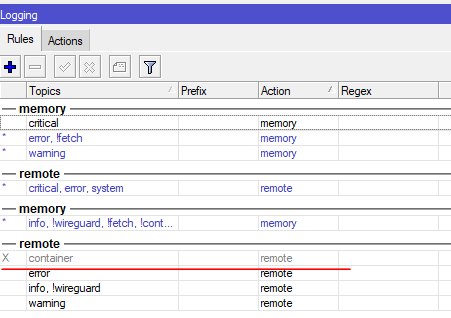
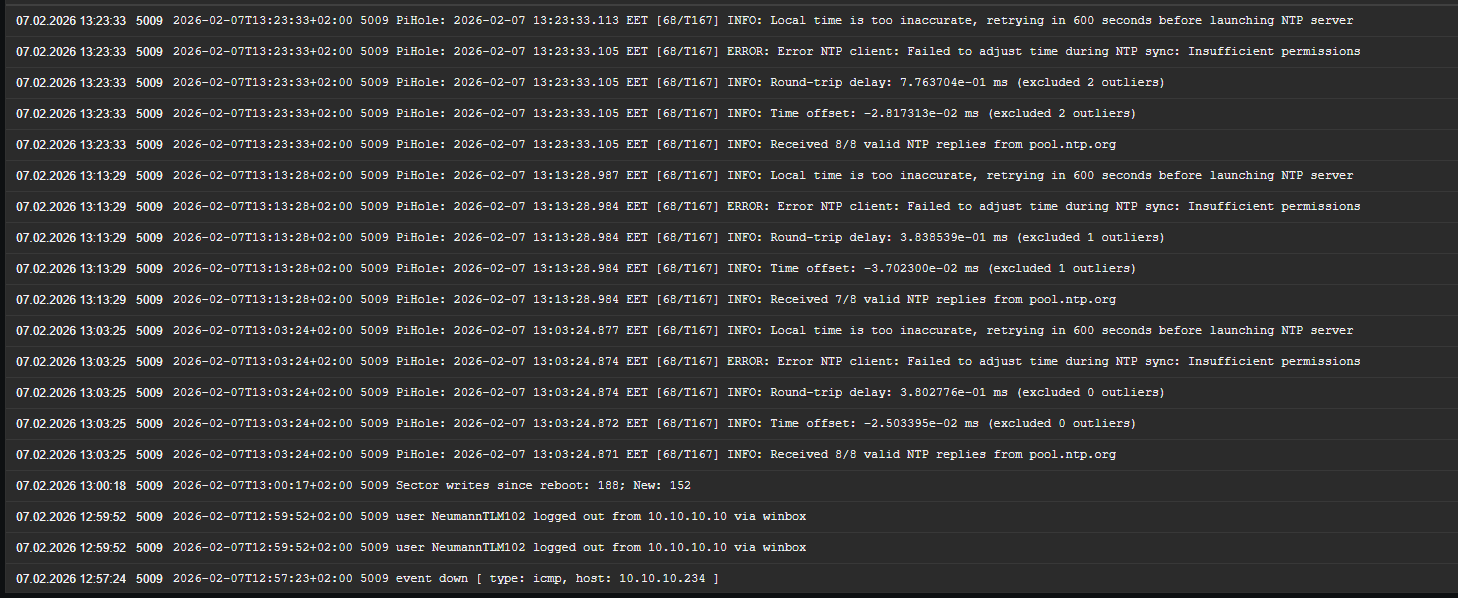
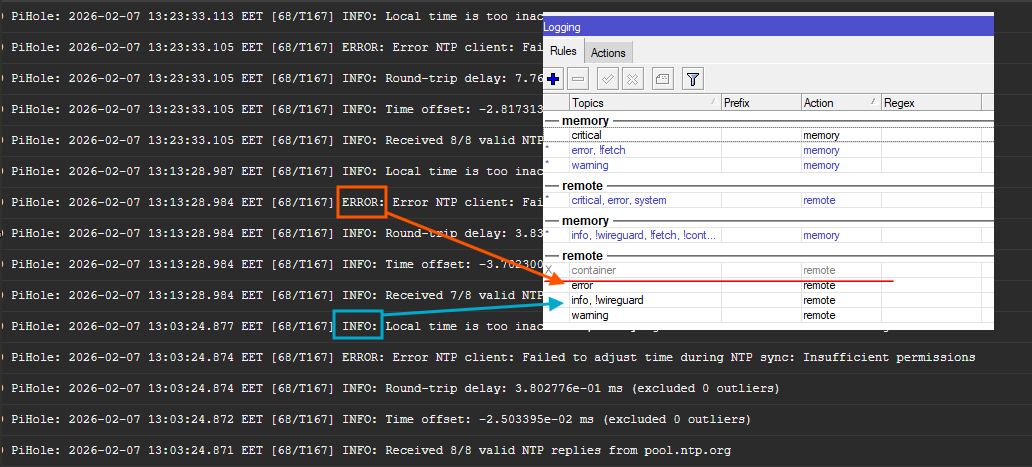
In don't see the problem here. If the log message has the info topic (which is the case from the 2nd screenshot), it will be matched by the 2nd rule from the bottom (info, !wireguard) and that rule also has the remote action.
You'll need to add !container to the 3 other remote rules to achieve what you want (exclude container from remote).
Even if you delete the remote rule, the log will still be remotely copied from the container to the rsyslog. I noticed this in the current long-term branch, then upgraded to the beta version and now on the RC. Although before the long-term branch, deleting the rule no longer resulted in the log being remotely copied.
Are you talking just about the “container” remote rule or about all?
Because as @CGGXANNX already mentioned your INFO rule still matches
yes, talking just about the “container” remote rule
what is the meah of: dhcp,error 240e:b8f:700:xxx::/60 can't add dual-stack queue: DUID format 0004 not supported
restarted my router and it appears the ipv6 default route issue is NOT fixed after all. I don’t have anything in ipv6/routes and a ipv6 test shows that my computer does not have an visible GUA since no ipv6 traffic is routing out. So…….bummer
Is this somewhere documented ?
The last update of the log page was in October
Personally not sure, but a simple search gives @CGGXANNX detailed explaination
RB5009, observed a funky free memory value jumping around if any ethernet interface has a raised L2MTU over the default (currently 9018), have not noticed ‘till now because I had no need to set 9k L2MTU on an interface, yet here we are. Wrote a tiny script to get the free mem value every 0.5 sec and print the new value if it has changed and how long it took since the last change, I’ve traced this down to version 7.14beta4:
Free: 915584 | Diff: +88 | Since Last: 00:00:01
Free: 915712 | Diff: +128 | Since Last: 00:00:01
Free: 915816 | Diff: +104 | Since Last: 00:00:00
Free: 915840 | Diff: +24 | Since Last: 00:00:01
Free: 915920 | Diff: +80 | Since Last: 00:00:00
Free: 916080 | Diff: +160 | Since Last: 00:00:01
Free: 916184 | Diff: +104 | Since Last: 00:00:00
Free: 916208 | Diff: +24 | Since Last: 00:00:01
Free: 916392 | Diff: +184 | Since Last: 00:00:00
Free: 916512 | Diff: +120 | Since Last: 00:00:01
Free: 916616 | Diff: +104 | Since Last: 00:00:00
Free: 916768 | Diff: +152 | Since Last: 00:00:01
Free: 915760 | Diff: -1008 | Since Last: 00:00:00
Free: 916000 | Diff: +240 | Since Last: 00:00:01
Free: 916208 | Diff: +208 | Since Last: 00:00:01
Free: 916352 | Diff: +144 | Since Last: 00:00:01
Free: 916464 | Diff: +112 | Since Last: 00:00:00
Free: 916624 | Diff: +160 | Since Last: 00:00:01
Free: 916752 | Diff: +128 | Since Last: 00:00:01
Free: 916856 | Diff: +104 | Since Last: 00:00:00
Free: 916992 | Diff: +136 | Since Last: 00:00:01
Free: 916104 | Diff: -888 | Since Last: 00:00:00
7.14beta3:
Free: 829696 | Diff: -512 | Since Last: 00:00:02
Free: 830080 | Diff: +384 | Since Last: 00:00:15
Free: 829824 | Diff: -256 | Since Last: 00:00:01
Free: 830080 | Diff: +256 | Since Last: 00:00:07
Free: 830336 | Diff: +256 | Since Last: 00:00:08
Free: 830080 | Diff: -256 | Since Last: 00:00:03
Free: 829824 | Diff: -256 | Since Last: 00:00:05
Free: 829248 | Diff: -576 | Since Last: 00:00:09
Free: 829824 | Diff: +576 | Since Last: 00:00:07
Free: 829248 | Diff: -576 | Since Last: 00:00:03
Free: 829632 | Diff: +384 | Since Last: 00:00:07
Free: 829888 | Diff: +256 | Since Last: 00:00:36
LE: Also tested on RB4011, it behaves the same (as the 7.14beta4 above) since at least 7.12.2, did not install older versions. So guess that ‘arm’ was already “optimized”.
LE2: Changing L2MTU back to the default does NOT stop this behaviour, it needs a reboot to ‘settle’.
Hi All,
I have my first use case to try this container support in MT CHR, my question is does it support forward proxy/socks when going out in the internet to downloads apps, this CHR is not exposed directly to the internet neither I can’t do NAT it’s beyond my control, I haven’t seen in the docs that it support proxy
In that case the “app” support is useless for you. But you still can configure containers by yourself.
Yeah I’m fine that i have to built the container myself and upload it by hand since this is a one off case, however imho it should support proxy in the future I’m sure there were similar environment that need this more than mine 
It has always been like that, also with upgrade by the router itself (downloading the packages)… also does not work for some of my routers, would work via a proxy.
Just an idea, perhaps the Sockify feature might work.
Now that kinda defeats someones goal not have internet on router, but, I believe, some targetted action=sockisfy rule might work to apply a proxy server for /app (and /container with remote-image=). But have not tried.
Hi @Amm0 thanks for the idea, will toy the idea though I hate to admit i don’t think this is worth exploring given the niche of my use case (freeradius + mysql + genieacs) but of course this is another opportunity to learn