we probably better off waiting for next release, currently there’s an overhead of managing O(N) connections and TLS exchange for dns-over-https. There is no http/2 multiplexing implemented yet.
I think there was this exploit in the past RouterOS Post Exploitation. Shared Objects, RC Scripts, and a… | by Jacob Baines | Tenable TechBlog | Medium.
Signature verification matters until it doesn’t
One of the more interesting things stored in /flash/ is the files in /flash/var/pdb/.
“Hey, aren’t those the names of all the packages I have installed?”
It turns out that this is where RouterOS stores all of the installed NPK files. Oddly, as root, they are all writeable. I can tell you from experience, you don’t want to overwrite the system package.
Where if you could modify the file system content, you could put modified .npk files on it in a special folder, and they will be loaded without signature check.
The package signing procedure upgrade mentioned by the page above (MikroTik · Upgraded package signatures) fixed that issue, that's why it says "It will also add a possibility to verify the integrity of existing installations.".
The Netinstall suggestion on that page is probably to tell you the way to make sure no such previous hacks can survive because the flash is wiped.
The reason to use Netinstall on a compromised device is that it can make a completely fresh start formatting the flash and wiping all possible remains of malicious code or config. Not that it checks the packages better than a normal on-line upgrade does.
I am in favour of this division.
Everyone who isn't a MikroTik member agrees with this, only MikroTik staff disagrees.
They do not disagree; they are silent.
Thank you. I had the same thing. ISP giving out /60. But I was forcing /64 by using prefix-hint=::/64, which now no longer works, as I get a /72 instead. I now need to use pool-prefix-length=64 to get /64.
I have opened an support for it. They are currently investigating the matter, as it does not appear to be a configuration issue.
prefix-hint is ... as name hints, a hint. ISP may accept it or not. IMO the best use of prefix hint (if ISP accepts it) is to set it to "current" prefix received by your router ... which makes probability of keeping same prefix after reboot (or something) a bit higher.
Device: RB750UPr2
LTE modem connected to USB ( HUAWEI E3372 working as HiLink -> so with own NAT )
After the device update, the default gateway 0.0.0.0/0 for the LTE interface does not appear in the routing table, resulting in no internet access. I have to disable and re-enable the LTE interface after every device restart. After a restart, the routing table only contains the route to the LTE device ( in ma case 192.168.32.1 ).
I (warning: Xfinity user) just upgraded my RB5009 to 7.23 and I now seem to lose upstream connectivity after 6-1/2 minutes (400 seconds). Only resetting the cable modem does connectivity to the world continues.
There were no issues under the 7.22.1 (edit: corrected version), where my RB5009 successfully renegotiated a new IP address two weeks ago. Just seems after this upgrade to 7.23 it appears the router fails to move data upstream. The default gateway updates properly after the restart.
The device and connectivity has been great up until this upgrade.
Are you also using check-gateway ping/arp?
If yes, did you try with check=none?
No, not using that option. I've not used that in the past. Previous upgrades went smoothly without requiring a modem restart. Never have I lost upstream connectivity after an upgrade before. Rebooting the modem was either a physical power reset or via my phone to my provider to command a modem reboot; the modem showed online all the time.
I've since downgraded to 7.22.1 to see if the problem still exists. Seems odd that an upgrade would lose connectivity after a few minutes. Almost like it didn't want to move data past the WAN interface (ether1).
At first I thought it was the Dynu update scripts and I disabled those, but that wasn't the case.
After downgrading to 7.22.1 (previously used version) I've not yet lost upstream connectivity leading me to believe 7.23 has something I'll be waiting for in 7.23.1.
After upgrading to RouterOS 7.23, which introduced HTTP/2 support, I started seeing a strange issue with DoH.
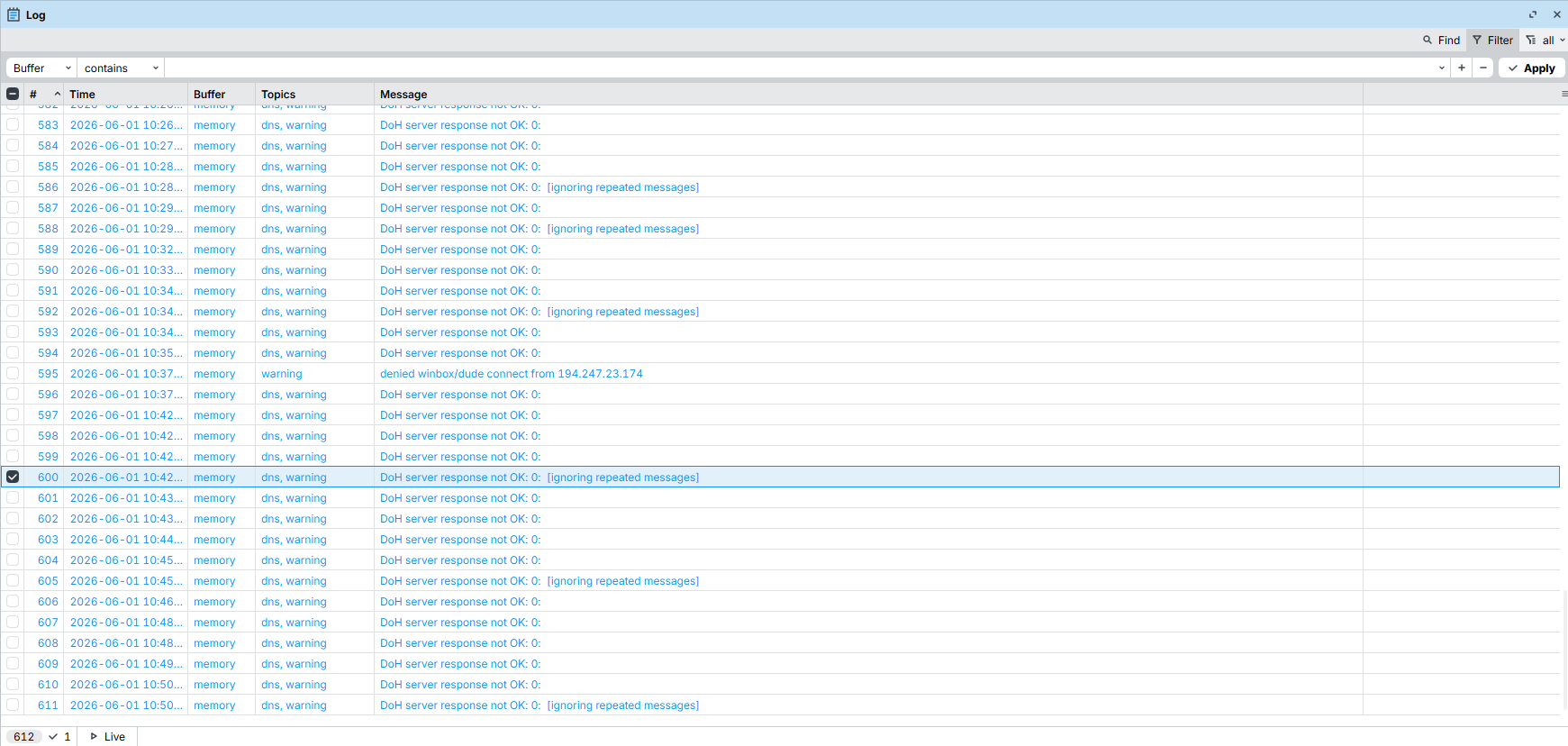
I'm using Quad9 (https://dns11.quad9.net/dns-query) and have imported the complete certificate chain to ensure proper certificate validation. DNS resolution appears to work normally, but the logs are constantly filled with the following warning:
DoH server response not OK: 0: [ignoring repeated messages]
As far as I can tell, DoH is functioning correctly and all queries are being resolved as expected. However, the repeated warning messages make me think something isn't quite right.
Has anyone else experienced this after upgrading to 7.23, or is there a known issue related to HTTP/2 and DoH?
After upgrade to 7.23 on my RB4011 I found massive connectivity issues with some IPs at least from my wifi clients. I really was unable to investigate what actually happened.
But during normal usage like 10% of websites or mobile apps did not load content or it took ages to show data. Other sites and apps had no issue at all. Since I was unable to debug further I downgraded to 7.22.3 because I had no other idea. With 7.22.3 running all issues seem to be gone again.
Any ideas what could be the issue and what I could try to debug?
The first thing you should always do when you think there are WiFi issues after an upgrade: be patient and see if it rectifies itself. Many clients are confused when a WiFi AP disappears and will try to connect 2GHz instead of 5GHz or try to connect an AP elsewhere in the house when you have that.
This is nothing particular to MikroTik or to this version. You see the same "my WiFi is slower/unreliable after upgrade" in each and every forum for WiFi devices.
I updated two days ago and was only deciding today there must be something wrong which is not going away itself.
This could be a MTU/MSS issue, or may be related to IPv4/IPv6.
So how do you explain that it only happens on the CHR ?
Take your pick on the version it's all the same!
==================================================================================================
 DOH MONITOR | 17:14:20 | RUNTIME: 1 min | CYCLE: 15/∞
==================================================================================================
Target         Type  MS  Max Med Jit Fail Att  %    Status  Last Err  SF  TO
--------------------------------------------------------------------------------------------------
Adguard DoH3   Cold  30  41  27  3   0    15   100% OK      NONE      0   0
Adguard DoH3   Warm  3   3   2   1   0    15   100% OK      NONE      0   0
--------------------------------------------------------------------------------------------------
ProxyQ9  DoQ   Cold  24  99  28  4   0    15   100% OK      NONE      0   0
ProxyQ9  DoQ   Warm  2   5   3   1   0    15   100% OK      NONE      0   0
--------------------------------------------------------------------------------------------------
CHR Q9  DoH2   Cold  26  373 26  0   2    15   86%  FAIL    SERVFAIL  2   0
CHR Q9  DoH2   Warm  3   28  2   1   0    15   100% OK      NONE      0   0
--------------------------------------------------------------------------------------------------
To note, other https dns work ok ie adguard nextdns cloudflare.