I have to correct myself. The issue re-appeared after the downgrade a bit later again.
Meanwhile I updated again last evening and until now it works again. It's really weird but maybe unrelated to the RouterOS version while I really have no clue.
I have to correct myself. The issue re-appeared after the downgrade a bit later again.
Meanwhile I updated again last evening and until now it works again. It's really weird but maybe unrelated to the RouterOS version while I really have no clue.
Yes, that is what I expected. It is usual for those problems to appear after reboots, and a reboot is part of an upgrade or downgrade.
Is there any way to check the integrity of the bootloader that netinstall uses to format the flash and launch the firmware? (I mean, if we can find the device by its MAC address, it means there's some kind of unchangeable bootloader in the device that accepts connections via TFTP and allows formatting the flash drive and uploading an NPK, but the bootloader itself stays the same, right?)
For example, if this bootloader is infected (or am I just being paranoid?), it could accept the NPK, unpack it, inject malicious files, and tell netinstall "all good, restored."
Maybe netinstall has a way to verify that the bootloader, which is being used to format the flash and upload the NPK and so on, isn’t compromised?
There is also a "backup bootloader". I guess it could be compromised as well, but seeing how difficult it is to update that one when you need to, the likelyhood is probably small.
I encountered issues with this on my rb5009... coming from 7.22.2. dhcp client configured on ether1, my isp is spectrum (charter), cable modem (motorola mb8611). after the upgrade to 7.23, the system still had an IP on the interface from the provider, but no traffic would flow over it. A release/renew had no effect. A reboot of the modem did not work. Downgrading back to 7.22.x and a modem power cycle resulted in everything coming back.
Seems like a similar situation reported by atleast one other user (with rogers in canada). supout and packet captures submitted to support..
OSPF Memory Leak. Im looking at a site that has upgraded from 7.18 to 7.23 and we are seeing OOM errors and Kernal Panics. Supout shows OSPF Memory usage getting above 2Gb on a CCR2004.
While there may be some config issues/optimisation in the OSPF we are going to address, these did not cause the Router to crash prior to its upgrade.
Has anyone else seen similar issues please ?
Version 7.23.1 has been released:
Meanwhile I think I figured it out.
It was most likely IPv6 based and the issue was that suddenly my clients had multiple IPv6 default routes. It turned out that my CAPsMAN APs in the network sincd 7.23 send out RA even if they are not supposed to and advertisement in IPv6 address set up is set to no.
I now disabled IPv6 forward on such devices hoping I didn't break anything else and so far I believe the issue is resolved. But still RA should not be sent if advertise is "no"?
Is that a new issue in 7.23? Meanwhile running 7.23.1 but still the same issue.
Was advertise already "no" or did you change that? Because it may be necessary to reboot after such changes.
I did not touch anything before so it was already "no".
Downgrade to 7.21 LTS solved this leak issue.
Does out-bridge-port still require use-ip-firewall=yes? IPv4 only or IPv6 as well?
Could you elaborate on this, please? Does that mean containers stored on tmpfs will be automatically repulled on reboot?
I totally missed this one and just heard about it in the 7.23 changelog yt video. Nice additions!
i hope they will add some more features to that copy command, would be cool to have recursive copy and archive mode skipping files that are not newer.
Reply to smn's post a bit back...
I had a similar problem on Xfinity with 7.23.2 on an RB5009.
After restarting the router DHCP wouldn't get an IPv4 address or IPv6 subnets until I restarted my Netgear CM2050V modem. Then I'd get an IPV4 address after a bit, and, a while later, an IPv6 /61. The Internet world work on IPv4 until IPv6 got its subnets. Then... splat. Nothing works, and the packet sniffer looks like it's not even trying to send. That gap between IPv4 coming up and IPv6 coming up might be why it quit working for you.
I downgraded to the 7.21.5 long term support version and all is well. I'll be keeping a copy of the 7.21.5 binaries and a config backup for it until I get a newer version that works. Maybe longer. Of course it's entirely possible I just needed to change some config setting in 7.23.2, but I didn't see anything obvious in bold brightly colored text about a mandatory config change in the release notes, so if there was one I say it's a bug.
It's completely possible something changed that doesn't play nice with Comcast/Xfinity. They do some weird things, and some behavior is modem dependent. Back when I got this RB5009 in 2022 I ended up pulling my hair out twice trying to get it to work on Comcast. My DHCPv6 server isn't on the same IPv6 subnet as my router's WAN address, so I had to change a firewall rule to deal with that. Also kinda got looked at funny by some people on here for a "don't do that" config that worked when I was using an all-in-one WiFi router in bridge mode and broke when I got the Netgear modem. Pretty sure that all-in-one would respond to IPv6 neighbor solicitations for any IP address with its own MAC address.
At any rate, 7.23.2 -> 7.21.5 Long Term Support downgrade fixed my problems. I think I'll stick with long term support from now on.
It's the RA spamming issue introduced with 7.23. See the other threads that I linked in this post.
You can upgrade to the latest stable 7.23.3 and it should work again, because it has this change:
But it still only a hack. To really resolve the issue, you should disable the default all /ipv6 nd entry, and make separate ones for each of your interfaces that have clients connected (bridge & VLANs).
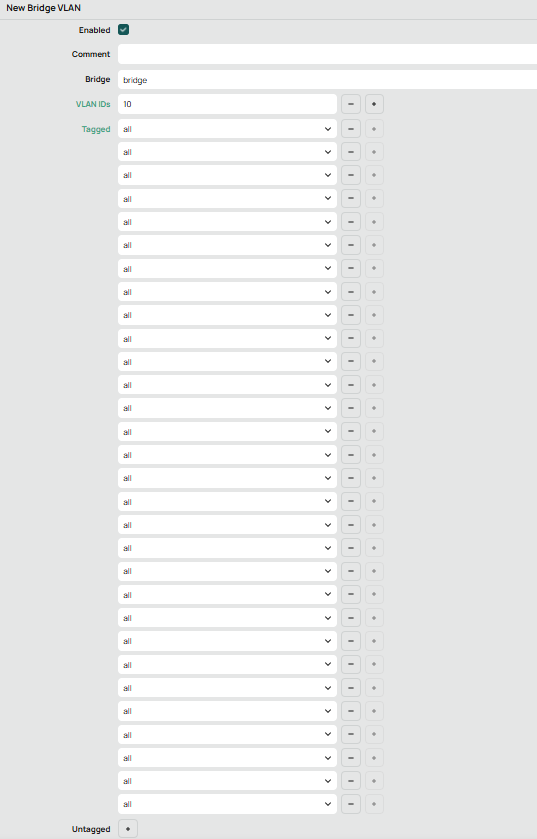
In some way, in a far far away land, I agree that needs to exist a limitation to how many entries should be allowed in ports on bridge vlans.
Not because "this uglier" or "this is prettier". Specially not worried with the pretty of configuration.
But think in how are created those rules in SwitchChips.
From practice I learned that there are a limited number of entries to program SDK of Broadcom.
The number of entries depends on chip Model.... Tomahawk 4 supports much more entries then Metroline Chips.
Also, the max number of entries do no count just the number of ports and number of vlans.
It concours with vlan-translation, vlan mirroring, vlan qinq selection rules, and many other things.
And, considering my very shallow and very dummy experience in the case...
I remember a "kind of hack" to reduce the impacts of those limitations.
I'm not sure of the name, but it was something close of "group of ports".
On rendering from the config of the NOS to SDK, there was some kind of processing and separating based on affinities, and the it were created a group of ports, and the rules were programed using those groups.
For easiness with MikroTik RouterOS, already exists "interface-lists".
So I believe that the most intelligent way of bypassing that kind of limitation, is to use interface-lists, and put the interface-list you need on "tagged" or "untagged".
The part that I do not agree is that limitation being blindly fixed on 16.
Without considering number of physical ports, or number of max entries of rules in SwithchChip of the equipment.
So the suggestion for that could be a variable limitation depending on those factors.
Another suggestion, even more important, would be:
Create a few read-only fields in some place (probably inside /interface/ethernet/switch or in /system/routerboard)... Saying:
P.S.: On Juniper, Huawei, Cisco, Arista... There is "show commands" to check how are those values related to FIB (or CEF in Cisco World).