Hi MikroTik Support Team and Forum Community,
I am writing to share some detailed feedback regarding a UI text rendering issue observed after recent updates. Please note that English is not my native language, so I am using an AI assistant to help translate my test results as clearly as possible.
The underlying router configurations are functioning perfectly normally via CLI, so this seems to be purely related to frontend character rendering, browser cache handling, or font mapping on certain system locales.
[My Environment]
- Device: RB5009
- OS Environment: Windows 10 (Simplified Chinese Locale / zh-CN)
- RouterOS Tested: * ROS 7.20: Renders perfectly normal.
- ROS 7.21.4 (Long-term) & ROS 7.23 (Stable): Text rendering anomalies occur.
- Management Clients:
- WinBox 4.0 beta 42: Displays ROS 7.21.4 / 7.23 perfectly fine.
- WinBox 4.1: Displays ROS 7.21.4 / 7.23 with text anomalies.
- WebFig: Tested on PC browsers (Chrome/Firefox) and mobile (Android) browsers.
[Symptom Description]
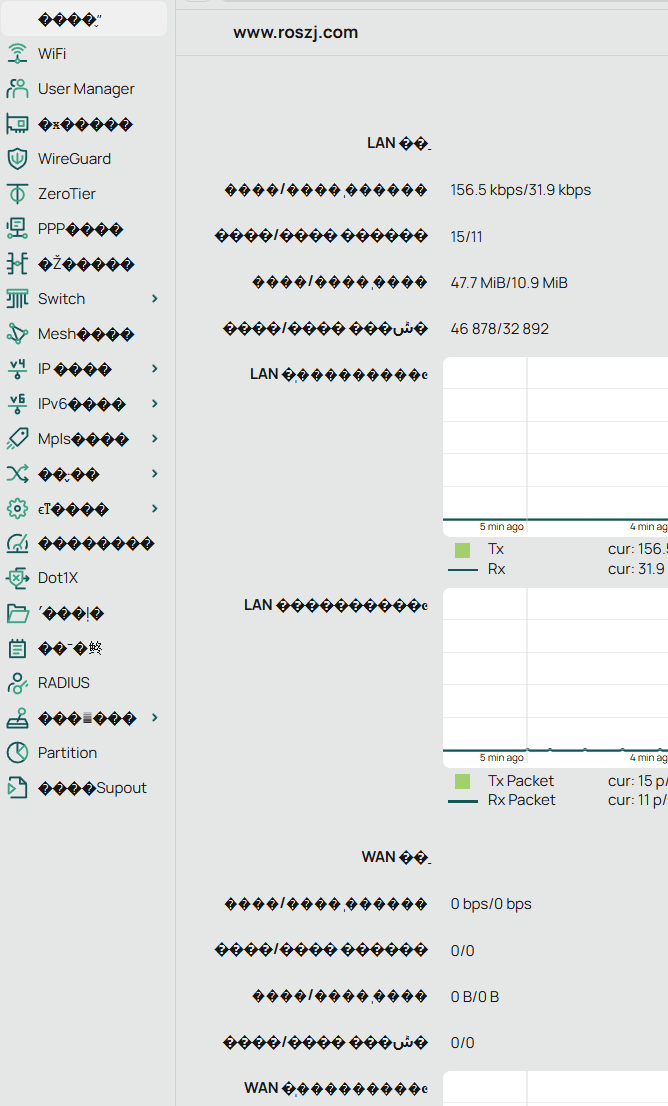
As shown in the attached screenshot, the text rendering anomaly selectively affects some of the hardcoded system-native strings:
- On the left main menu, some standard English sub-menus display correctly (e.g., WiFi, User Manager, WireGuard, Switch, RADIUS, Partition). However, adjacent items like IP, IPv6, MPLS, PPP are partially or fully replaced by diamond question marks () or other broken symbols.
- On the WebFig Home Screen (Status page), several native system indicators and traffic statistics labels also display as strings of , making it difficult to read the real-time status.
[Detailed Observations & Cross-Testing Results]
To help narrow down the issue, I performed several cross-tests on my devices:
- Progression from 7.21.4 to 7.23: I tested this with two separate Windows 10 PCs. Back on ROS 7.21.4, PC #1 showed text corruption immediately, while PC #2 occasionally showed normal text. If it corrupted on PC #2, pressing Shift+F5 to force refresh twice (one refresh was not enough) would temporarily restore the correct text. However, since upgrading to ROS 7.23, both PCs and mobile browsers are completely corrupted, and the Shift+F5 force-refresh workaround no longer works at all.
- Browser Incognito Mode: I have tested using Incognito/Private windows in browsers to rule out standard local cookie/cache interference, but the issue persists identically.
- Windows UTF-8 Region Settings: I also tested toggling the Windows 10 system locale setting "Beta: Use Unicode UTF-8 for worldwide language support" (both enabled and disabled, with full system reboots), but it made no difference to the WinBox 4.1 or WebFig rendering.
- Configuration Check: I have fully audited my configuration file via CLI. The entire configuration consists of standard English characters, with no non-ASCII or legacy local encoded text strings in any scripts, comments, or interface names.
We love RouterOS and hope this detailed timeline and observations will be helpful for the UI/frontend development team to investigate. Thank you very much for your time and continuous effort on improving the platform.
WinBox and WebFig are not localized, the UI labels are normally all in English. Are you sure you don't have some programs / hooks on your computer that automatically translate UI texts to your language (Chinese)? What you installed probably intercepts Windows text rendering routines and performs the translation. But then the font used by WinBox and WebFix (Inter by default) doesn't have the necessary glyphs.
That would also explain why WinBox 4.0beta42 does not have the problem you experienced. Until and including beta42, WinBox 4 used internal methods to render the texts itself (that why the rendering was low quality and blurry on Windows), which means whatever tool you installed could not intercept the text rendering routines.
But from 4.0beta44 WinBox renders text using the operating system's (Windows) native methods:
and whatever add-on you've installed now has the ability to modify the text content displayed. Same with WebFig because the browser rendering is probably intercepted too by an extension.
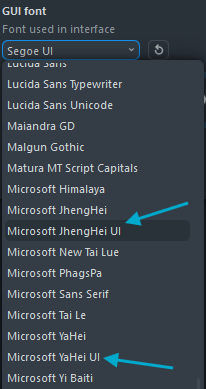
So, check the softwares & tools you've installed on your computer. In case you are unable to remove that software, you can tell WinBox 4 to use another font (instead of Inter) that has the CJK glyphs. Microsoft YaHei UI should support Simplified Chinese, and Microsoft JhengHei UI should be usable for Traditional Chinese:
Hi,
Thank you for your very detailed and professional technical breakdown! I tracking along with your logic, so I did some deep troubleshooting on my end. However, the results suggest the root cause might be slightly different. Here is what I found:
- Environment & Process Inspection
I used Process Explorer (procexp64) to thoroughly inspect all loaded DLLs, handles, and fonts for WinBox.
Besides standard System32 files and the WinBox executable itself, the only injected network-related DLL was mdnsNSP.dll.
Regarding fonts: I have around 200+ Chinese fonts installed in my system's default Fonts directory. Process Explorer showed that all fonts loaded by WinBox came directly from the standard Windows Fonts folder, with the sole exceptions of Sarasa Gothic (更纱黑体) and the Tencent QQ font (which were located outside the Fonts directory but are completely safe, native app fonts).
There are absolutely no translation software, screen-scraping tools, overlay hooks, or injected dictionary utilities running on my system.
-
Font Testing Inside WinBox 4
Following your advice, I manually switched the WinBox 4 font to several CJK-supported fonts, including Microsoft YaHei UI (微软雅黑), Sarasa Gothic (更纱黑体), PingFang SC (苹方字体), Alibaba PuHuiTi (阿里普惠体), and Source Han Sans (思源黑体). While the font styles changed accordingly, the corrupted characters and their exact positions remained completely unchanged.
-
Cross-Platform & Browser Isolation (WebFig)
To completely rule out browser extensions or localized hooks:
Desktop: The issue persists on a completely clean installation of Firefox with zero add-ons.
Mobile: Accessing WebFig via Chrome on Android/iOS (with no extensions) yields the same corrupted text.
Linux: Testing on Ubuntu 22.04 LTS via Firefox also results in the exact same rendering artifacts.
(Hardware/Software version used: WinBox 4.1 + RouterOS 7.23)
-
Current Workaround
As of now, rolling back to 4.0beta43 remains the only reliable way to mitigate this issue for me.
-
Clean Slate Test Offer
If it helps with your investigation, I can set up a completely fresh, vanilla Windows 10 installation (from scratch) on a clean machine, download WinBox 4.1, reboot the ROS router, and log in immediately to see if the issue persists on a 100% pristine OS environment.
Given these findings, could it be related to how the new native rendering engine handles specific character encodings (like localized strings or UTF-8 parsing), or perhaps an issue with font fallback mechanisms on systems with East Asian language packs installed?
Looking forward to your thoughts!