WinBox and WebFig are not localized, the UI labels are normally all in English. Are you sure you don't have some programs / hooks on your computer that automatically translate UI texts to your language (Chinese)? What you installed probably intercepts Windows text rendering routines and performs the translation. But then the font used by WinBox and WebFix (Inter by default) doesn't have the necessary glyphs.
That would also explain why WinBox 4.0beta42 does not have the problem you experienced. Until and including beta42, WinBox 4 used internal methods to render the texts itself (that why the rendering was low quality and blurry on Windows), which means whatever tool you installed could not intercept the text rendering routines.
But from 4.0beta44 WinBox renders text using the operating system's (Windows) native methods:
and whatever add-on you've installed now has the ability to modify the text content displayed. Same with WebFig because the browser rendering is probably intercepted too by an extension.
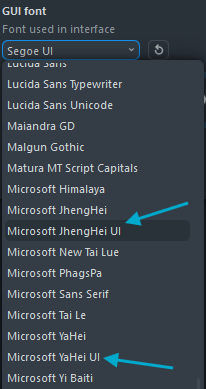
So, check the softwares & tools you've installed on your computer. In case you are unable to remove that software, you can tell WinBox 4 to use another font (instead of Inter) that has the CJK glyphs. Microsoft YaHei UI should support Simplified Chinese, and Microsoft JhengHei UI should be usable for Traditional Chinese: