i did, i downgraded my test unit at work which had a 7.2.1 stable at the time to lts 6.48.6, it’s a rb2011. I just put the downgrade file in files list and wrote in terminal:
/system package downgrade;
/system reboot;
and the thing did the downgrade no issues. After that i did the routerboard update and again no issues…
I followed this guide: https://help.mikrotik.com/docs/display/RKB/Downgrading+RouterOS
I have a hap ac3 at home, and waited a week to see the reactions on this release before pushing it to my router, since last time i did the update on the same day it got out and bricked my device…update to 7.3.1 went thru with no issues. And they finnaly fixed the wlan led
When I get the office connected to the network again, hopefully tomorrow, I’ll post some of that stuff.
My use of ospf has been dead simple, following the examples in the Mikrotik guide on ospf. And they worked beautifully, through many major revisions. The only thing that might have been a problem, and it turns out it wasn’t, was setting up a loopback address and using that as the ID of the router instead of one of the ethernet IP addresses. It seems like the problem manifests itself in storms across the network. This isn’t a huge network, perhaps 50 routers in all, and many of those point-to-point Mikrotik backhauls. There are three separate logical networks that connect into the core router, and I suppose I could set up three areas to reduce ospf chatter across the entire network, but I avoided such complexity simply because it was working fantastically well under v6.x and everything before it.
And an update on the bricking issue. I noticed last night when I was sitting next to our core router that’s co-located at our fiber providers NOC, that there is one specific labelled port that is used for netbooting. Sounds obvious, Mikrotik has been so carefree that I haven’t done a net boot in probably two years. Turns out that’s also the case for the hex S, (without the labeling) that I was using as my test system. Eth 1. So it’s running happily on v6.48.6. Now 7.31 after a bit of breath holding. And back to 6.48.6 I’m happy to report. It does take quite a bit of time on this minimal hardware… patience is advised.
I have mikrotik router 951G-2HnD and I upgrade it to v 7.3.1 stable to get zerotier package
After upgrade every thing is working as normal but I can not find zerotier package.
Well it seems the User Manager is not the problem.
Got locked out several times more, just after reboot.
Re-installed ROS 7.3.1 through Netinstall. No User manager added The lockout still happens after some reboots.
There is no way to get in. Ethernet ports are active for some seconds, then the LED’s are out, and stay out.
Never worked with MT devices in ROS6 where I could not get in at all.
Downgraded (Netinstall) to 6.49.6 since those hard lockouts in ROS7.3.1 make that version very annoying.
I am not currently running that version anywhere so I cannot confirm it. I have a 16MB flash device (hAP ac2) currently running 7.4beta4 and I have not seen that problem there. Sure it uses a large portion of the 16MB, currently 1.7MB is available. I think it was a BAD decision to manufacture so many devices with 16MB flash. But that is another topic…
Regarding the Nest cam issue when upgrading to 7.3.x, this is what I found:
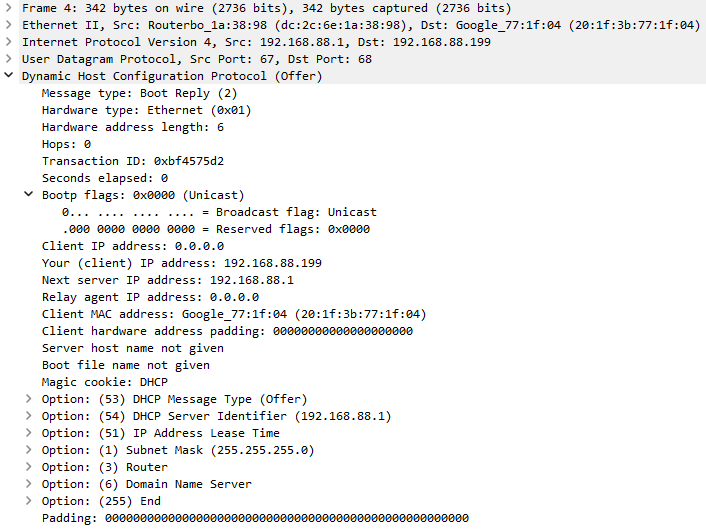
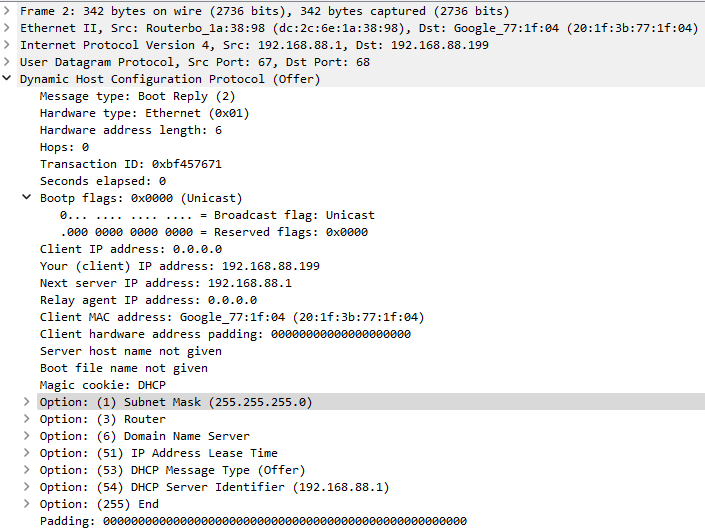
The DHCP Offer has re-ordered options compared to 7.2.x.
7.2.1 DHCP Offer:
7.3.1 DHCP Offer:
You will notice that the options are now in numerically sorted order in 7.3.x, which dhcpcd-5.5.6 (which is in use on Nest hardware, and clearly a ludicrously old version) does not seem to support.
@stroebs: if you find a standard (RFC) which requires particular ordering of options inside DHCP offer, then you can file bug report with MT. If you don’t find it (quite likely), then … I’m sorry, mate.
Yes. You are right. I mark some packets for routing.
But were you seen that change was intentional? Maybe bug?
I couldn’t find dst-adress-type option? I can see dst-address and dst-sddress-list.
As for what’s intentional, routing marks having highest priority definitely is. So most common surprise for users will be that when you mark routing and given routing table has default route, then basically routing rules no longer apply to such packets. If you want some exclusions, you have to handle it using mangle rules and not mark it at all. Special case is when destination is local address, that was previously hardcoded to always go to router, regardless of routing marks and routing rules. That’s now gone too and whether that’s intentional, there’s some doubt, but if you treat it as if it is, you can’t go wrong.
Container feature is not available on every architecture. Will be available on architecture such as MMIPS or mipsbe ? Or actual available architectures list is definitive ?
It makes little sense to release MMIPS or others, since it will not be easy to find any programs that run on MMIPs. Certainly not Pihole or other common docker containers will work there.
Of course anyone with a bit of determination can cross-compile programs for e.g. MIPSBE. For MIPSBE, MetaRouter exists and people have compiled OpenWRT to run on that!
MMIPS of course is a different matter as there are only two devices with that architecture, and they are too small to run any extra things.
Docker does not support MIPS or Tilera (TILE support anyway was removed from official Linux kernels in 2018).
While technically Docker most likely could be ported to Linux/MIPS or Linux/Tile, there still would not be any prebuilt images available in the docker repos for those architectures.
The whole Embedded Linux world has a strong tendency to move towards ARM/ARM64, based on the huge investments into this platform driven by the Smartphone world.