in PPP-active connection when you ping it says timeout but it is active and has a connection.
Chateau 5g upgraded without issue to beta37.
Chateau LTE12 also upgraded without issue and being used as Home Dual AP with LTE as backup.
I´ve updated my 5 CRS Switches to 7.3Beta37 from 7.2.1, but my issue with the non working IPv6 after activating L3HW offloading and accidently changed STP is still present.
Even a factory reset didn´t help…strange.
I will try a netinstall on one of them…
Is this enough user attention for a priority boost?
http://forum.mikrotik.com/t/feature-request-ipv6-fasttrack/149315/1
Sure, but no.
I sincerely hope the focus for the coming month will be on fixing things that are broken or still missing (relative to v6) and not on working on new features.
Ah, thanks for the LINK 
But IPv6 is even not working anymore (on all 5 CRS3xxx switches) even after a rebbot or a factory reset. Today I´ll try to reactivate it with a netinstall.
All other devices without L3HW offloading are working fine with IPv6…
Tested on CCR2116: unstable after 3 hours, looses health info and fans spin up/down non stop.
Setting an interface to 2.5Gbps completely crashes the switch part (with 7.2 as well)
I’m not asking for it to be prioritized over stability fixes, but it’s not even on the roadmap yet according to the last official statement on the matter. I think that ought to change given that 40% of worldwide traffic is on IPv6 already and in parts of the world, 2/3rds of users are on IPv6.
It is not like this feature is critical. It only means you need to buy a slightly more powerful device in order to handle the speed of your internet connection.
For example, I have a 180Mbps internet connection and a RB4011 router, and I do not need any fasttrack whatsoever (v4 nor v6).
The 4011 is a fast router and it replaced one of my hEX-S, which needs fasttracking to archive speeds over 230Mbit/s.
Even encrypting traffic with the 4011 is a breeze and it archives almost line-speed. I needed two hEX-S in series (spliting up multiple connections), to archive 2/3 line-speed.
*) sfp - added 2.5Gbps rate for SFP+ and QSFP+ interfaces on 98DXxxxx and 98PX1012 switches (requires disabled auto-negotiation);
CRS305 is using 98DX3236, CRS309 is using 98DX8208.
It looks like someone reported 2.5Gbps option is available in CRS305 when auto negotiation is disabled.
However, I don’t see the 2.5Gbps option in CRS309 …
*) sfp - added 2.5Gbps rate for SFP+ and QSFP+ interfaces on 98DXxxxx and 98PX1012 switches (requires disabled auto-negotiation);
I don’t see it in CRS317 too… On beta37
I have a CCR2004 on 3 gbps service. With this, I get around 90-95% of peak throughput on ipv6 with synthetic benchmarks, as it’s bottlenecking on a single core. On real world usage, on things that I can configure to use ipv4 vs ipv6, the ipv6 performance is around 60% of ipv4 performance. So you’re saying this $600 router isn’t enough for 3 gbps and I need to step up to something “slightly more powerful”? What’s the next step up? The $2800 CCR2216?
By your logic, getting missing 6.x features into 7.x isn’t critical either, as one can just run 6.x.
Just got a reply from another thread indicating the option is only available via CLI and not WinBox at the moment.
http://forum.mikrotik.com/t/feature-request-hsgmii-for-sfp-1gbps-synchronization/142864/1
Not this version specific I think:

On WebFig if you open that it looks fine though.
Maybe 3Gbps is not as easy to route as you would hope.
Fasttrack was introduced to be able to route 500Mbps on 600 MHz MIPSBE devices. I.e. to extend the useful life of these a bit more, as they were designed in the times when 100Mbps was really the upper limit of what a user at home had.
It is more or less a stopgap measure. It has issues when you use the advanced features of the router. Which I do, so I always switch it off.
When I upgraded my line from 100 to 180 Mbps, I bought a new router. 3Gbps is not possible here, so I have no problem.
But I do use BGP and I do have problems with the v7 BGP implementation. So I rather think they should fix that first, as it worked in v6 and IPv6 fasttrack never did.
Expecting a new release today.
The RB4011/RB5009/CCR2004 are quad-core CPU’s that all seem to max out around 3-5Gbps, depending on the configuration and software version. Aside from the limited switch chip on 4011/5009, there is little offloaded to hardware (IPSEC is about it).
On my 4011’s and 5009’s I’m seeing a peak of about 5Gbps in/out through the SFP+ port (router-on-a-stick config). On the 2004, I’m lucky to route anything over 3Gbps on 6 or 7. Bridging on 7.2.x does perform as expected (6+Gbps no problem).
The next step up is the CCR2116 for roughly $800. It’s a 16-port Layer 3 switch with a 40Gbps connection to the 16-core CPU. With IPv4 L3-Hw-offload enabled, CPU literally drops to 0% (but so does NAT/firewall functionality).
I’ve now deployed a half-dozen 2116’s across my network, one of which replaced my busiest 2004. They can be found for just under US$800. They’re essentially a CCR3XX switch with a 40Gbps connection to the CPUs, and so far I’m impressed with their performance.
Edit: I replaced the home/office 2004 with a 2116 and am able to go over 3Gbps without breaking a sweat. The bottleneck at this point is the 27km 80GHz shot running at 4Gbps.
To your original point, based on my experience, the 2004 should be able to route 3Gbps just fine with a handful of NAT rules, VPNs, etc. It performs better on 7 than it does on 6 (for the hardware revision capable of running 6).
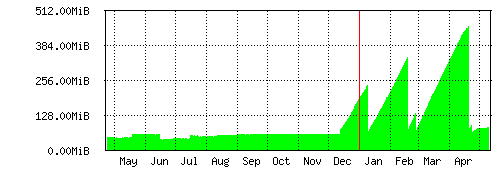
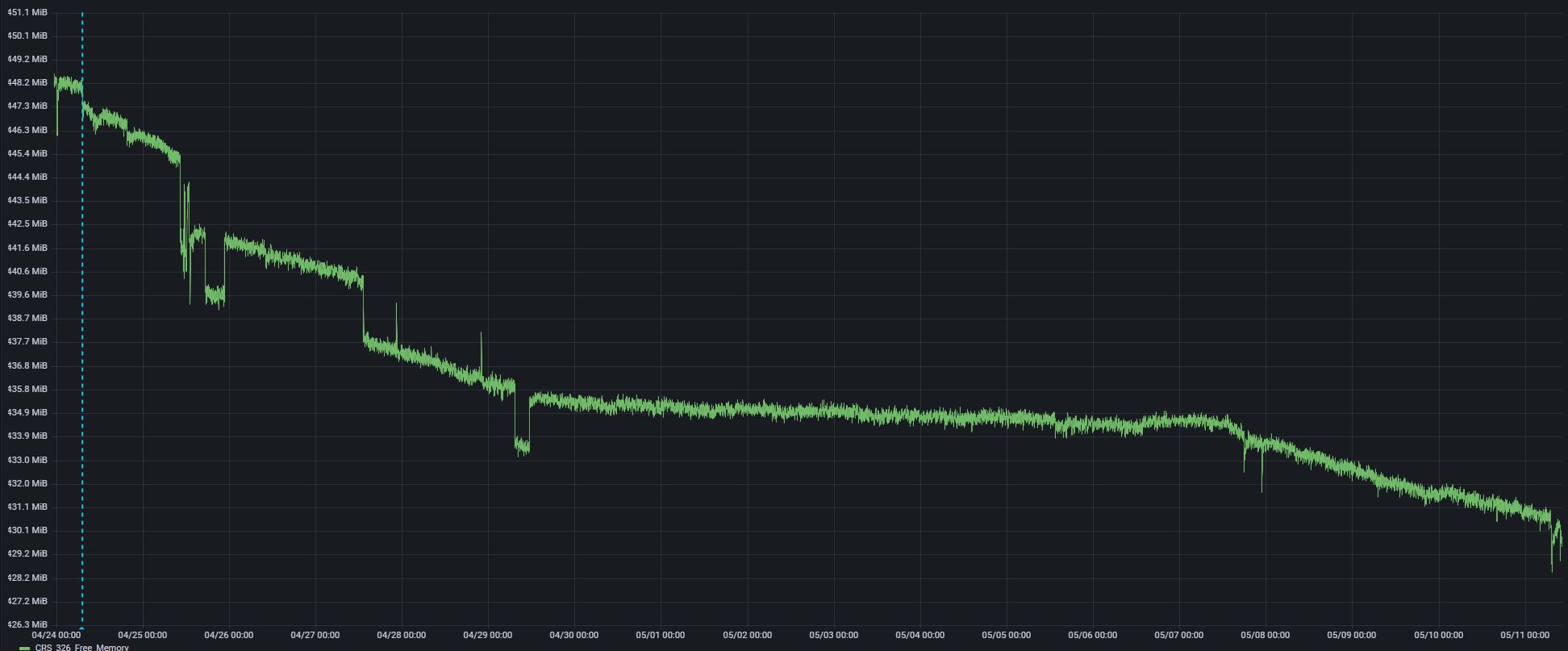
In RouterOS 7.1 I had some problems with a memory leak in my CRS326. Now, since april 24th, with 7.3Beta34 installed the worst is gone, but still a small leak is left behind. The memory-consumption does follow the amount of data-throughput. During a week of holiday the leaked memory was less than the last few days. I’ve already tried clearing the log, and de/re-activating DNS-caching, and lowering max-ttl in DNS-cache and firewall connection tracking, but this does not free up any memory. Any thoughts on how I can find out what process is leaking this memory?
CRS Free memory:
RouterOS 7.1 Memory leak on yearly-graph: