WPA2/3 authentication bug with older iOS devices on wifiwave2 with 802.11r enabled still present…
GRE tunnel is broken. v7.4 rc1 on both ends between RB5009 and HAP AC^2
Hi there,
Since moving to 7.x I observe unstable operation of SOCKS 5 service. At some point in time it just stops working. And a connection to SOCKS port cannot be established:
C:\Users\user>telnet 192.168.11.1 1080
Connecting To 192.168.11.1...Could not open connection to the host, on port 1080: Connect failed
To bring it back to normal I disabled and enabled the service on the router. Another option is to just leave it alone for some minutes and then try again.
I switched from last stable 6.49.6 to 7.3 on my hAP ac2. With 6.49.6 I did not not experience any SOCKS related issues. The problem still exists in 7.4rc1.
Hello, since with 7.4 beta4 it was added support for the DW5821e,
I upgraded mine (I had 1.0.0.5.2 Revision 035 instead of 044 or greater, now I’m at Revision 048)
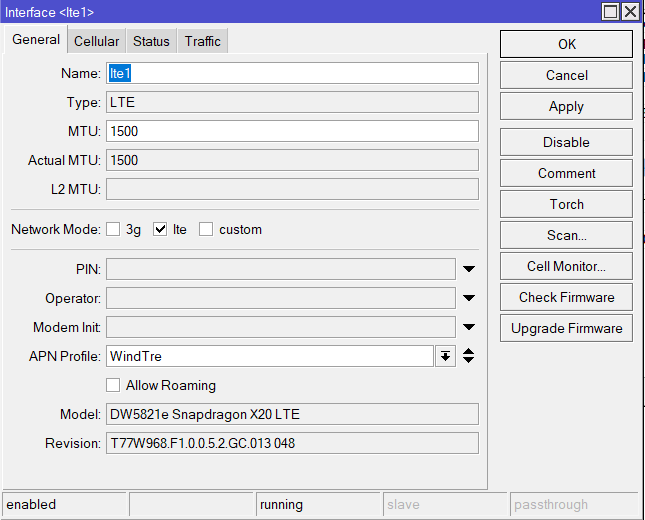
and plugged it into a USB 3.0 LTE Adapter, and put the modem in MBIM mode inside the RBM33G I have.
However, something strange happens, the AT channel gets disabled for some reason (I’ve been able to send it for a very short time a few commands like at^temp?")
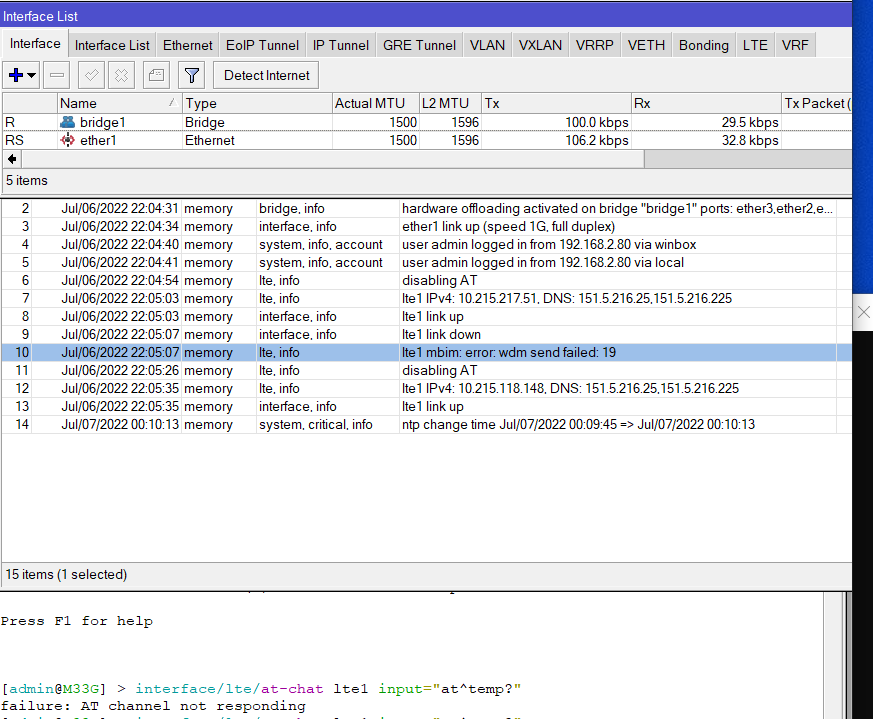
Also I noticed “disabling AT” as a “lte,info” message, why is this happening? how do I enable it back?
DHCP Regression issue from 7.3 and above. support acknowledges(SUP-85542) but fails to provide information as to which release it would be fixed.
/container/mounts/ seems to be broken: you create a new mount but it does not show in /file/print or via FTP; not sure what happens to the data the container tries to write to those mounted paths.
Is this known? Will it be fixed in the next RC? Should I generate a supout.rif file and send a report?
a lot of instability on bgp sessions about hold timer expired (where sessions were stable with v6.49):
08:24:51 route,bgp,error Session *=0xd800010
08:24:53 route,bgp,error HoldTimer expired
08:24:53 route,bgp,error Session *=0xd810240
08:24:56 route,bgp,error HoldTimer expired
08:24:56 route,bgp,error Session *=0xc7d0240
08:25:45 route,bgp,error HoldTimer expired
08:25:45 route,bgp,error Session *=0xc300010
08:26:25 route,bgp,error HoldTimer expired
08:26:25 route,bgp,error Session *=0xc440010
08:26:42 route,bgp,error HoldTimer expired
08:26:42 route,bgp,error Session *=0xc7a0470
08:26:43 route,bgp,error HoldTimer expired
08:26:43 route,bgp,error Session *=0xd800010
08:26:44 route,bgp,error HoldTimer expired
08:26:44 route,bgp,error Session *=0xc510240
08:27:20 route,bgp,error HoldTimer expired
08:27:20 route,bgp,error Session *=0xd810240
08:27:28 route,bgp,warning RECV RouteRefresh with invalid subtype: 0
08:28:06 route,bgp,error HoldTimer expired
08:28:06 route,bgp,error Session *=0xd860470
08:28:29 route,bgp,error HoldTimer expired
08:28:29 route,bgp,error Session *=0xd880010
08:28:47 route,bgp,error HoldTimer expired
08:28:47 route,bgp,error Session *=0xc500010
08:28:53 route,bgp,error HoldTimer expired
08:28:53 route,bgp,error Session *=0xc7c0010
08:28:54 route,bgp,error HoldTimer expired
08:28:54 route,bgp,error Session *=0xc7d0240
08:28:55 route,bgp,error HoldTimer expired
08:28:55 route,bgp,error Session *=0xd890240
08:28:56 route,bgp,error HoldTimer expired
08:28:56 route,bgp,error Session *=0xc300010
08:29:09 route,bgp,error HoldTimer expired
08:29:09 route,bgp,error Session *=0xd840010
08:29:42 route,bgp,error HoldTimer expired
08:29:42 route,bgp,error Session *=0xc440010
08:29:47 route,bgp,error HoldTimer expired
08:29:47 route,bgp,error Session *=0xd800010
08:30:16 route,bgp,error HoldTimer expired
08:30:16 route,bgp,error Session *=0xd810240
08:30:30 route,bgp,error HoldTimer expired
08:30:30 route,bgp,error Session *=0xc7c0010
08:30:42 route,bgp,error HoldTimer expired
08:30:42 route,bgp,error Session *=0xd8a0470
I cannot confirm that, my GRE tunnels still work fine after upgrade. What was your previously installed version? And what is the config of your tunnels and firewall?
You upgraded straight from v6.49 to v7.4rc1 and this is your first experience with v7? Then you likely need to make BGP config changes, auto conversion is not complete.
Also when you have installed v7 before, downgraded, then worked with v6 a while and now again try the upgrade to v7, you can also expect issues.
Those can be resolved by doing an export (don’t forget show-sensitive parameter), then a fresh netinstall of v7 without default config, and import the config again.
this is my second v7 deployment in a complex bgp enviroment.
Seems a problem in they way the multicore bgp deal with main rotuing process.
My router has 2 BGP templates (what used to be “instances”) and 8 peers, on a 4-core router. It does not have that issue, it only logs this when a peer link is failing.
(of course the log messages suck as they do not specify which connection has failed, but I am complaining about that for a long time and it seems the BGP programmer left the scene)
my behavior is little bit more complex, with 353 bgp sessions and a total of 4M learned routes on CCR2216.
Sometng goes wrong syncing bgp processes and main rotuing process… the strange thing is that only some bgp sessions are affected.
10:22:09 route,bgp,error HoldTimer expired
10:22:09 route,bgp,error Session *=0xd800010
10:23:27 route,bgp,warning RECV RouteRefresh with invalid subtype: 0
10:23:27 route,bgp,error HoldTimer expired
10:23:27 route,bgp,error Session *=0xc610220
10:24:05 route,bgp,error HoldTimer expired
10:24:05 route,bgp,error Session *=0xdd62980
10:24:54 route,bgp,info Write to bgp failed (32) { #buf=1 max=64 sk=Socket{ 32[0] } }
10:24:54 route,bgp,info Write to bgp failed (9) { #buf=2 max=64 sk=Socket{ -1[0] } }
10:24:54 route,bgp,info Write to bgp failed (9) { #buf=3 max=64 sk=Socket{ -1[0] } }
10:24:54 route,bgp,info Write to bgp failed (9) { #buf=4 max=64 sk=Socket{ -1[0] } }
10:24:54 route,bgp,info Write to bgp failed (9) { #buf=5 max=64 sk=Socket{ -1[0] } }
10:24:54 route,bgp,info Write to bgp failed (9) { #buf=6 max=64 sk=Socket{ -1[0] } }
10:24:54 route,bgp,info Write to bgp failed (9) { #buf=7 max=64 sk=Socket{ -1[0] } }
10:24:54 route,bgp,info Write to bgp failed (9) { #buf=8 max=64 sk=Socket{ -1[0] } }
10:24:54 route,bgp,info Write to bgp failed (9) { #buf=9 max=64 sk=Socket{ -1[0] } }
10:24:54 route,bgp,info Write to bgp failed (9) { #buf=10 max=64 sk=Socket{ -1[0] } }
10:24:54 route,bgp,info Write to bgp failed (9) { #buf=11 max=64 sk=Socket{ -1[0] } }
10:24:54 route,bgp,info Write to bgp failed (9) { #buf=12 max=64 sk=Socket{ -1[0] } }
10:24:54 route,bgp,info Write to bgp failed (9) { #buf=13 max=64 sk=Socket{ -1[0] } }
10:24:54 route,bgp,info Write to bgp failed (9) { #buf=14 max=64 sk=Socket{ -1[0] } }
10:24:54 route,bgp,info Write to bgp failed (9) { #buf=15 max=64 sk=Socket{ -1[0] } }
10:24:54 route,bgp,info Write to bgp failed (9) { #buf=16 max=64 sk=Socket{ -1[0] } }
10:24:54 route,bgp,info Write to bgp failed (9) { #buf=17 max=64 sk=Socket{ -1[0] } }
10:24:54 route,bgp,info Write to bgp failed (9) { #buf=18 max=64 sk=Socket{ -1[0] } }
10:24:54 route,bgp,info Write to bgp failed (9) { #buf=19 max=64 sk=Socket{ -1[0] } }
10:24:54 route,bgp,info Write to bgp failed (9) { #buf=20 max=64 sk=Socket{ -1[0] } }
10:25:40 route,bgp,error HoldTimer expired
10:25:40 route,bgp,error Session *=0xdd20470
10:26:09 route,bgp,error HoldTimer expired
10:26:09 route,bgp,error Session *=0xdd00010
10:26:10 route,bgp,error HoldTimer expired
10:26:10 route,bgp,error Session *=0xc71b200
10:27:15 route,bgp,error HoldTimer expired
10:27:15 route,bgp,error Session *=0xdda0470
10:27:18 route,bgp,error HoldTimer expired
10:27:18 route,bgp,error Session *=0xdd80010
10:28:50 route,bgp,error HoldTimer expired
10:28:50 route,bgp,error Session *=0xde00010
10:30:00 route,bgp,error HoldTimer expired
10:30:00 route,bgp,error Session *=0xddd0240
10:30:10 route,bgp,error HoldTimer expired
10:30:10 route,bgp,error Session *=0xdde0470
10:30:25 route,bgp,error HoldTimer expired
10:30:25 route,bgp,error Session *=0xde00010
i made the experience, that when the reason isn’t the other peer it’s mostly the underlying igp. in case you upgraded ospf as igp from ros6 to ros7, you have to rebuild it manually from the scratch.
What’s new in 7.4rc2 (2022-Jul-07 15:29):
*) chr - fixed booting with added additional SCSI disk;
*) container - added support for running Docker ™ containers on ARM, ARM64 and x86 (containers created before v7.4 must be recreated);
*) defconf - fixed default configuration loading on devices with WifiWave2 package;
*) lte - show current value for “antenna” parameter when auto antenna selection fails;
*) mpls - improved stability with enabled loop-detect;
*) netwatch - added support for more advanced probing;
*) routerboard - do not try exporting WPS button configuration on devices that does not have it (introduced in v7.4beta5);
*) wifiwave2 - added initial support for roaming (802.11r) between local AP interfaces;
Possibility to set the src-address?
VRF support?
Thank you very much!
Regards,
Can you please provide more info on what this exactly fixes ? What was the problem ?
VRF support was already present since beta versions:
https://help.mikrotik.com/docs/display/ROS/Netwatch
ipv4@vrf
ipv6@vrf
Request for src-address is logged in our system.
Thanks!
Just guessing: in all ROS versions, when wifiwave2 driver is installed, device emits error message like this:
jul/08/2022 11:05:41 system,error,critical error while running customized default configuration script: bad command name wireless (line 979 column 25)
jul/08/2022 11:05:41 system,error,critical
It seems benign, but it’s ugly as hell.
So perhaps quoted change log entry refers to this problem.