Yes. I saw another topic that is pretty much the same like yours, but that was on a RB750Gr3 on RouterOS v7.1.3. → http://forum.mikrotik.com/t/missing-cpu-graph/156260/3
So it must be related. After an upgrade it breaks graphs.
The graphs work fine here. For such cases of strange behavior that other people do not see, I advise jumping through the export-netinstall-import hoop.
Don’t pollute this topic. Open a separate topic for installation package assistance, or better use search, and you’ll find dozens of similar cases.
But what @Znevna suggest is right: do not upgrade remotely from v6 to v7…
I have a similar issue with a pair of wireless wire that started to get flaky after upgrading from 7.4.1 to 7.5. gonna test a downgrade with netinstall today and see
Edit: downgraded to 7.4.1 with netinstall and the link is stable again.
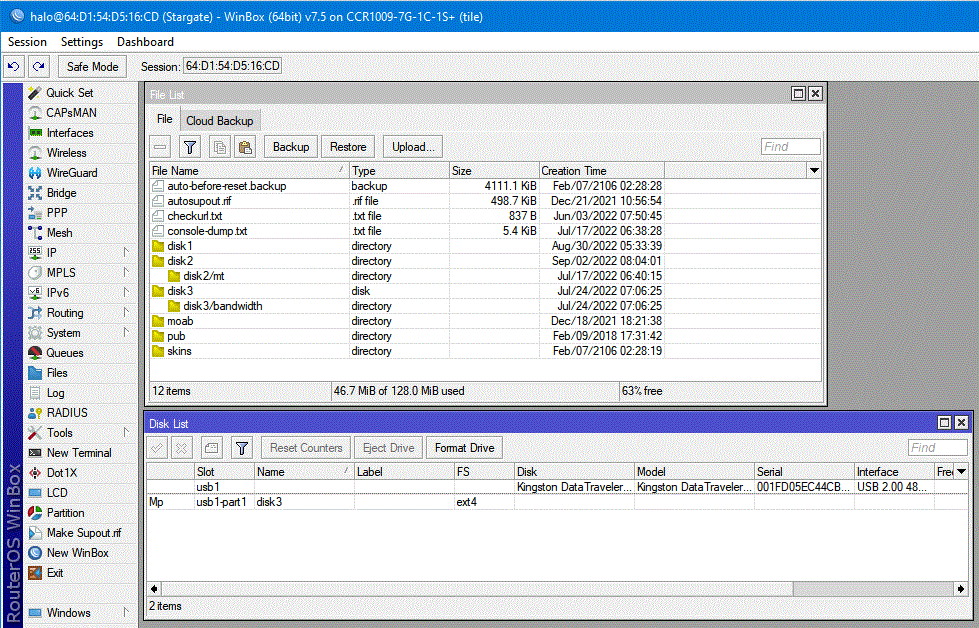
Under Winbox v3.37
Disks do not show the installed number of Disks … attached image shows that under Files does show the proper number of disks but under Disks only 2 disks are visible
Disk2 is USB and named Disk2 but as shown in screen shot as directory
There is an option to retrieve the script being used at startup, I believe ?
You should be able to see specifically what the error is about since the exact location has been mentioned ?
No need to dig into it, error message says it loud and clear:
bad command name > wireless
If wifiwave2 package is installed, then /interface/wireless disapears and /interface/wifiwave2 appears. So it’s only necessary to wrap the legacy wireless setup with check whether legacy wireless exists or not.