Capacitor or fuse as 1A requirement for capacitors makes no sense.
Is for another power adapter, not for anotehr capacitor for replace the damaged on power adapter…
“Simple” TCP might not be so simple … I guess the tricky part of netinstall binary is that it includes BOOTP/DHCP server and TFTP server, additionally device opens sort of control connection (could be it’s actually a service which gets started after device boots from image received from netinstall server via TFTP) which allows netinstall binary to push actual npk files and default configuration … none of which is possible using simple TFTP. Surely netinstall could relly on other (standard) servers to provide these services, but that would mean multiple servers (by multiple vendors) with appropriate config. I guess that would proove a nightmare for every Mikrotik user but hard-core network admins. I guess the tricky part is to bind BOOTP/DHCP and TFTP services to correct interface, at least BOOTP/DHCP service has to listen to “raw” IP/UDP network interface to catch those broadcasts from client. Even standard ISC DHCP server on linux used to bind to raw network device to deal with requests reliably (I’m not sure about recent versions though).
That is what I mean: do not use BOOTP, TFTP etc but just run a TCP service on some port where a client can make a TCP connection and do all the things it needs to do (upload the image, the parameters, etc). it could be port 80 or 443, even. The netinstall could likely be done from a browser extension or javascript app.
That way there will be no firewall issues on the client. The IP of the router can be fixed. Of course then there still is the inconvenient issue that you need to set a fixed IP on the computer, but with the current netinstall you need to do that anyway.
I guess the reason for not doing it this way in the pat was to keep the ROM code as small as possible, and a “simple” UDP BOOTP and TFTP client would be smaller than a TCP implementation, but I guess with todays devices that issue is not that important anymore.
RB1100AH, CRS125-24G, hAP ac, hAP ac^2, CCR2004-16G: Upgraded, no problems noticed.
To do that, device (client) has to do full IP self-setup anyway … which means DHCP server somewhere. And for simple bootstrap client currently re-uses standard protocols (BOOTP and TFTP). According to your idea this part would be part of routerboot (making it more complex and prone to bugs preventing device from being unbricked). The rest of process (uploading packages and config) is probably (I didn’t wireshark that part) already over IP and only fails occasionally (the part where upload “finishes” in microseconds, but device doesn’t do anything).
I still think it’s a good idea to have bare minimum routerboot and have everything else neatly packed in single executable so the netinstall can be performed with direct connection between device and management computer, without any additional 3rd party services. The whole thing only has to become less fragile and it seems the fragility is in the windows executable (since linux executable seems to perform much better with same routerboot in devices).
I don’t understand what you wanted to explain. If L2 would be enough for Netinstall to work defining IP addresses would be unnecessary.
You can see after you have posted if a new message in the mean time has entered between your latest post and replied post(not a problem on this small forum). Then you can edit your post and quote whats needed. Another stuff happens when you quote a post, an email are sent to the user.
Continue discuss quoting here: http://forum.mikrotik.com/t/does-quouting-quotes-of-quotes-in-consecutive-post-make-any-sense/144357/1
This thread is a about 7.6. Make a new thread about Netinstall. I never have needed to do it. One reason is that I never upgrade the first day after new releases, so avoid mayor flaws.
Same here but with a /48 on both sides. It looks like IPv6 NETMAP is still broken, no matter which direction you go in (prerouting/dstnat or postrouting/srcnat).
Sooo, back to 7.6.
I have three CCR2116’s, two of which do full BGP tables to three providers (filtered to a single AS away) and feed the combination into a third 2116 that then feeds our CGNAT core. The 2116’s were all running 7.4.1 with L3HW offload and BGP overlaid on OSPF between them, and working fine. The two border routers have a 10Gbps fiber connection to each other and the one in the middle is connected to the other two via low-latency (<1ms) E-band radios. We see roughly 500-700Mbps per provider, for a combination of 1-2Gbps throughout most of the day and evening.
After testing 7.6 on a few smaller routers, I loaded it onto these three. For the bulk of the day, things seemed to be just fine with the exact same config. But later in the day customers started complaining of random disconnects and slow bandwidth. Further investigation showed OSPF resets in the logs, particularly between the middle one and one of the borders. Monitoring the live graphs of both routers and radios showed traffic stopping for a second or two. One at a time, I backed off the routers to 7.4.1 (hoorah for partitions and exceedingly fast boot time of the 2116’s!). From what I could tell, as long as L3HW offload was off on the router(s) that had 7.6, OSPF stopped bouncing.
Now they’re all backed off to 7.4.1, L3HW offload is re-enabled, and I’ve had no OSPF resets or traffic drops. Unfortunately I wasn’t in a position to grab support files, but perhaps this scenario can be rebuilt in a lab, or other providers who see this will benefit and perhaps share anything else they’ve learned.
On the upside,
I am running 7.6 on the home/office CCR2116. I put in a 500GB NVME disk and loaded up piHole to start. Pretty slick. Containers have come a long way since 7.1.
With 1TB-4TB SSD’s at a reasonable price, I’m thinking some owncloud, FreePBX/Asterisk, etc. and you’ve got a sweet box for managed services. Also excited to see what I can do with my cluster of RB5009’s and CCR2004-16G-2S+ and their USB3 ports.
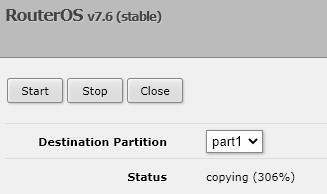
So this isn’t right? Rb5009UPr
Part1 now broken after i canceled this process.. Anything known?
Search in this thread for partition for the solution, you are not the only one. I had this after the upgrade. Delete your veth interface and everything works well after that.
That's what i did beforehand.. Funny enough "partitioN" does not return results.. searching for "veth" however did!
Thanks, that did it!
The src.Address in the radius setting cannot send Radius Packet from the specified IP address.
If the outgoing IP address is dynamically changing, it will not work properly on the radius server.
Tested on rb750gr3 7.6 7.5
src-address (ipv4/ipv6 address; Default: 0.0.0.0) Source IP/IPv6 address of the packets sent to the RADIUS server
Sounds positive,
How many routes are you receiving from BGP peers?
Only the default routes from all 3 peers, they are the same provider, the second IPv4 is for failover.
As long as you have no special routing needs or have multiple providers, etc., it is useless to have any full route table.
Thx @rextended.
I would be interested to know if anyone is running 7.6 in production with full internet routing table or at least receiving more than 500k routes from peers.
It’s the same for me.
hEX, upgraded from a netinstalled 7.4.1 to 7.6
> /routing/bgp/advertisements/print count-only
4366
no such item (4)
Everything else looks like it’s working for me. Wireguard, IPSEC, GRE tunnels, SSH, BGP…
I'm using it with 2 BGP full tables, around 1.900.000 prefixes in table...