Very poor 5G performance despite proximity to BTS

I would really appreciate your help. A few days ago, I purchased a MikroTik Chateau 5G AX R17 router.
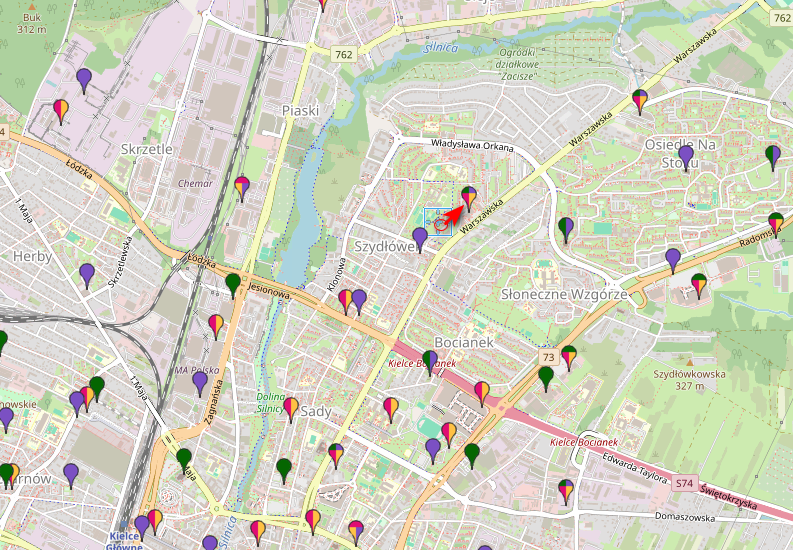
I live about 250 meters from the BTS transmitter in a straight line. The router is on the refrigerator, 1 meter from the window. There is a 4-story building on the way to the BTS, and I live on the third floor.
The modem software is RG650EEU00AAR01A04G8G_01.300.01.300.
The router software is 7.21.2, although I also installed 7.20.8 (with long-term, then I upgraded in the RouterBOARD tab, but the results were similar).

Despite the proximity of the BTS, LTE parameters are poor, RI sometimes jumps to 2, but generally remains at 1. QPSK modulation.


            status: running                                  
      manufacturer: Quectel                                  
             model: RG650E-EU                                
          revision: RG650EEU00AAR01A04G8G                    
  current-operator: nju                                      
    current-cellid: 58140448                                 
            enb-id: 227111                                   
         sector-id: 32                                       
        phy-cellid: 457                                      
        data-class: 5G NSA                                   
    session-uptime: 9m59s                                                   
      primary-band: B7@15Mhz earfcn: 3025 phy-cellid: 457    
           ca-band: n78@100Mhz earfcn: 640704 phy-cellid: 164
                    B1@15Mhz earfcn: 75 phy-cellid: 458      
                    B3@10Mhz earfcn: 1749 phy-cellid: 457    
                    B20@10Mhz earfcn: 6200 phy-cellid: 383   
     dl-modulation: qpsk                                     
               cqi: 9                                        
                ri: 1                                        
               mcs: 0                                        
              rssi: -44dBm                                   
              rsrp: -82dBm                                   
              rsrq: -20dB                                    
              sinr: -2dB                                     
  nr-dl-modulation: qpsk                                     
           nr-rsrp: -79dBm                                   
           nr-rsrq: -10dB                                    
           nr-sinr: 20dB     

As you can see, it's not much despite the proximity of the BTS. Speedtest speeds range between 400-500 MBits (download) and 80-100Mbits upload. Pings are not very good.

Is it possible to improve the radio signal or performance in any way? Could the fact that the modem does not force modulation higher than QPSK, RI remains at 1, be a problem with the modem firmware or antenna damage? I will paste the cell monitor result:

[admin@Norka] > /interface lte cell-monitor lte1
Columns: PHY-CELLID, BAND, EARFCN, RSRP, RSRQ, RSSI, AGE
PHY-CELLID BAND EARFCN RSRP RSRQ RSSI AGE
382 B8 3764 -66dBm -8dB -45dBm 0s
383 B8 3764 -71dBm -13dB -48dBm 0s
457 B3 1749 -76dBm -13dB -43dBm 0s
457 B1 75 -79dBm -19dB -40dBm 0s
456 B1 75 -81dBm -18dB -55dBm 3s
458 B1 75 -81dBm -18dB -53dBm 0s
458 B3 1749 -81dBm -18dB -48dBm 0s
457 B7 3025 -82dBm -17dB -49dBm 0s
458 B7 3025 -86dBm -17dB -58dBm 0s

I would like to add that the previous router, which I returned due to firmware errors (ZTE 888 Pro), achieved 950 MBits download speed without any problems.
Thank you in advance for any help.
Of the bands listed in either primary-band and ca-band or on the list of detected cells, the analysis says the following:

  • primary band B7 is operating at 2600MHz ... which more or less required direct line of sight (which there isn't due to 4 story building between you and BTS)
  • ca band N78 is operating at 3500MHz ... which even more required direct line of sight
  • ca band B1 is operating at 2100MHz ... again more or less requires direct line of sight
  • ca band B3 is operating at 1800MHz ... slightly better in non-line of sight conditions but still
  • ca band B20 is operating at 800MHz ... which can work in NLOS conditions but not very good
  • monitored cell at B8 is operating at 900MHz ... similarly to B20 it can work in NLOS but not very good

Even for bands where I indicated that they can work in NLOS conditions, it still holds that they work decently with LOS or near LOS (i.e. through sparse tree tops or similar).

Further more, you have to look at RSRP levels (don't look at RSSI) ... and RSRP below -80dBm is not good for decent performance.

Another complication is bad RSRQ ... which together with half-decent RSRP indicates high level of interference ... which could be due to overlapping cells which operate at same frequency band. Or it could be due to excessive multi-path which is expected with NLOS conditions (all of received signal is bouncing off surrounding buildings which causes signal to pass many different paths .. .and these interfer with each other).

And to add to injury: it seems that your MNO is quite aggressively forcing terminals to higher frequency bands (B7 in your case) which doesn't seem to be the vest in your case. OTOH, lower frequency bands (B8, B20) most often offer low channel capacity (i.e. 10MHz bandwitch in B20 v.s. 100MHz in N78). shared with many stations (because of better coverage and NLOS performance).

Regarding poor modulation (QPSK): did you look at it while active data transfers or while link was idle? Modulation changes according to needs, when tehre's no data to be transferred (in DL in this case) used modulation will be the most robust ... because this allows to use least Tx power which in turn means lower interference to adjacent cells.

To recap: your particular 5G modem placement is poor from radio perspective and you can't expect perfect performance. Yes, there are devices with better receiver so they achieve better RSRQ (and SINR) ... and there's potential to improve RSRP by using decent broadband antennas (if your 5G device allow connecting external antennas).

JFYI, people are adding external antennas when/where coverage is sub-optimal:
https://confusedbird.com/thread-119-page-7.html

Unfortunately I couldn’t add more than one images as a new user.

So I wrote a speedtest results down:

ZTE 888 Pro:

MikroTik Chateau R17 5G AX:
Download: 238,39	upload: 95,5
Download: 301,71	upload: 102,15
Download: 438,58	upload: 135,42

ZTE:
Download: 955,46	upload: 71,17
Download: 988,78	upload: 66,11

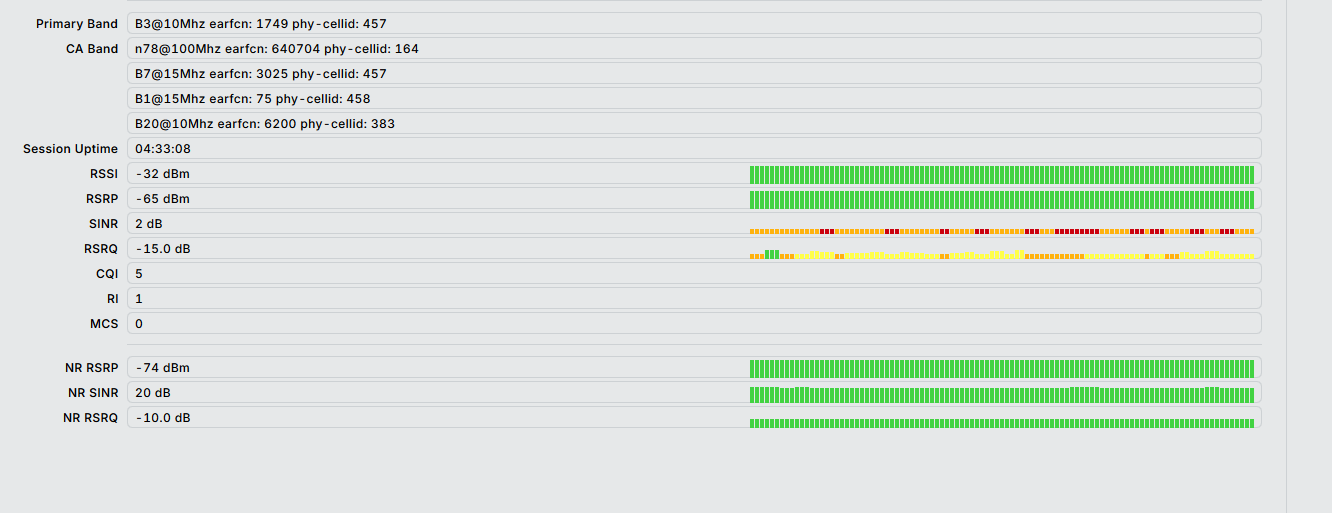
Now I reached these levels of signal:

Thank you very much for your help and for explaining how radio networks work.
What surprises me is that the ZTE 888 Pro, under the same conditions, achieved a download speed of around 950 Mbit/s in the speed test, while now the MikroTik Chateau R17 5G has much weaker results, even though it is a better router and I am in the same location.

MikroTik: Speedtest 1

Speedtest 2

Speedtest 3

And, for comparison ZTE 888 Pro:

Zte1

Zte 2

I wonder if the MikroTik modem should negotiate better speeds in these conditions? External antennas 250m away from the building? Hmm.

By turning the router around on the window, I found its position where the signal looked like this:

Under these conditions, shouldn't the modem negotiate better network speeds?
Alternatively, maybe I should block some frequencies in LTE?

I live here near this bts with arrow:

Is there any chance that I could get a better signal using the modem's AT commands? Or maybe my model has damaged antennas? Is there any way to check this?

Out of interest are you performing your speed test over ethernet or WiFi? If you are using WiFi, the chateau 5g ax r17 is limited to 80mhz channel width on the 5ghz bands. The ZTE MC888 pro however can do 160mhz channel width on the 5ghz band so will outperform the chateau by a substantial amount over WiFi.

@Pudpoh, I’m doing speedtest over WiFi, but WiFi on 80MHz has 1200 Mbit/s of speed.

You'll get about half of that in real world usage as a WiFi is not full duplex, so you likely won't hit anything faster than around 600mbit with 80mhz channel width. Whereas on the Zte with 160mhz channel width you should be able to achieve gigabit speeds. I think this could be where your bottle neck is.

Are you able to try with ethernet, ideally with the 2.5g port and a card that supports these speeds?

Thank you all for your replies and help. I think, that if I’m too close to this BTS tower, maybe there’s a way to connect to another tower, maybe at longer distance? Are there any commands in term, to lock the modem on another tower? Maybe this will help to get better signal? AFAIK Chateau R17 cannot have external antennas.