Virtual CHR as CAPsMAN for cAP ax with multiple SSIDs/VLANs and third party router/switch

Virtual CHR as CAPsMAN for cAP ax with multiple SSIDs/VLANs and third party router/switch

Hello everyone,

I am pretty new to Mikrotik so I’ll try to be as clear as possible with my issue. My main purpose is to install a Wireless AP (precisely the cAP ax) and let it expose N SSIDs, each of them taking the traffic from a specific VLAN coming into the wired interface. The traffic will be delivered by a L2 switch and everything managed by a NGFW firewall, both of them not being Mikrotik.

I first tried with manually configuring everything, then I decided to go with CAPsMAN since after the first AP some others will follow suit and I didn’t want to do the same work all over again. The CAPsMAN is a VM on a server connected on the same switch.

This is the basic idea. VLAN 1000 is the management, VLAN 2000 is the first traffic (let’s call it PRIVATE), VLAN 3000 is the second traffic (let’s call it GUEST).

VLAN 1000 subnet is 10.1.1.0/24
VLAN 2000 subnet is 10.2.2.0/24
VLAN 3000 subnet is 10.3.3.0/24

The virtual appliance that will be the CAPsMAN will have the address 10.1.1.10 while the first cAP will have 10.1.1.20.

I started configuring the CHR VM and this is what I did. Everything from the “physical” console of the VM at first, then SSH.

  1. Configure the management IP
/ip address add address=10.1.1.10/24 interface=ether1 network=10.1.1.0

From a laptop on a port on the switch (set as access for VLAN 1000) I can ping the interface.
2. Enable the CAPsMAN

/interface wifi capsman set ca-certificate=auto enabled=yes interfaces=vlan1000-mgmt package-path="" require-peer-certificate=no upgrade-policy=none

I can see it generated a CA and a certificate for the manager
3. Create two security profiles

/interface/wifi/security add authentication-types=wpa2-psk,wpa3-psk disabled=no name=security_private passphrase=Private123
/interface/wifi/security add authentication-types=wpa2-psk,wpa3-psk disabled=no name=security_guest passphrase=Guest123
  1. Configure the SSIDs
/interface wifi configuration add country=Latvia disabled=no mode=ap name=configuration_private security=security_private ssid=ssid_private
/interface wifi configuration add country=Latvia disabled=no mode=ap name=configuration_guest security=security_guest ssid=ssid_guest

Then I configured the cAP. I connected to ether2 and logged through WinBox using the MAC address.

  1. Add a bridge with the three VLAN
/interface/bridge add name=bridge vlan-filtering=no

/interface/vlan add disabled=no name=vlan_1000 vlan-id=1000 interface=bridge
/interface/vlan add disabled=no name=vlan_2000 vlan-id=2000 interface=bridge
/interface/vlan add disabled=no name=vlan_3000 vlan-id=3000 interface=bridge

/interface/bridge/port add bridge=bridge interface=ether1 pvid=1000
/interface/bridge/port add bridge=bridge interface=vlan_1000 pvid=1000
/interface/bridge/port add bridge=bridge interface=vlan_2000 pvid=2000
/interface/bridge/port add bridge=bridge interface=vlan_3000 pvid=3000
/interface/bridge/port add bridge=bridge interface=ether2 pvid=1000

Here it kicks me out because I’m connected to ether2 but I can get back in via the connection on the MAC address.
2. Now I add the VLANs to the bridge

/interface/bridge/vlan add bridge=bridge vlan-ids=1000 tagged=bridge,ether1 untagged=vlan_1000,ether2
/interface/bridge/vlan add bridge=bridge vlan-ids=2000 tagged=bridge,ether1,vlan_2000
/interface/bridge/vlan add bridge=bridge vlan-ids=3000 tagged=bridge,ether1,vlan_3000
  1. Configure the management IP
/ip address add address=10.1.1.20/24 interface=vlan_1000 network=10.1.1.0
  1. Enable the filtering
/interface/bridge set [ find name=bridge ] vlan-filtering=yes pvid=1000

From the same laptop on the port on the switch (set as access for VLAN 1000) I should be able to ping the interface. I should be kicked out from WinBox but then I could get back in connecting to the IP address. And obviously it should be able to ping the CAPsMAN VM.

Up until now everything should be correct, right? I can then enable the CHR machine to be a CAPsMAN and the AP to be controlled. I know it’s not complete yet but if everything until now is wrong I need to fix it before involving the other part.

I would suggest you to follow the official guide: https://help.mikrotik.com/docs/display/ROS/WiFi#WiFi-CAPsMAN-CAPVLANconfigurationexample:

I have to be honest. Those commands come from the documentation. While I thank you for the attempt, being pointed back to it, after having it read thoroughly is not nice. I would not get anything more than I did.

You did not specify if things are working or not nor did you show your full config so referring back to the documentation was not really that wrong as an answer.

Does it work or not ?
If not, full config please for both CHR and cAP AX.

I apologize. I did not realize you already read the documentation since the very first line in the example of the configuration of the CAP refers to the definition of the datapath, while I was not able to trace anything about that in your code. Conversely, your code defines vlan while the code of the example does not do that. Are you referring to the section “CAPsMAN - CAP VLAN configuration example” (especially CAP using “wifi-qcom” package) of the WiFi page?

Yes, I’m referring to the VLAN part. After some troubles I discovered that this link is actually for old versions and not applicable to me. The theory at least is the same but since my AP doesn’t have the /caps-man menu I have to refer to the new documentation.

Which appears to be this page here. Still it has the old /caps-man commands, though.

Unfortunately I could only find this forum post with the proper commands. I obviously had to adapt the commands to my usercase since I have a separate router from the CAPsMAN and what I don’t understand is if I did this step correctly.

Just to be clear about my intentions, I need to send clients from ssid_private to VLAN 2000 and clients from ssid_guest to VLAN 3000. Both the VLANs have to get out of ether1 on the cAP and go to the switch. That has to send the two client VLANs to the appropriate destination (basically the firewall-router that’s responsible for connecting everything to the internet) while the management VLAN 1000 has to go to the same L2 section where there also is the CHR VM. That’s the only thing I’m sure it’s working consistently. The cAP can ping with no problems the CAPsMAN every single time so I’m sure VLAN 1000 gets out of ether1 of the cAP with the proper TAG.

The initial post was when I was about to config the two devices. Now I actually implemented all the commands. And they don’t work. What works is that the SSIDs are enabled and devices can connect to them.

I used two different client WiFi machines. One Windows, the other an iOS device. If I set static IPs the two WiFi machines can connect to each other so the L2 part of WiFi works correctly and I have to assume all the CAPsMAN works as well. What doesn’t work is the outgoing traffic from the WiFi radio to the firewall-router. Neither the DHCP made from WiFi devices that didn’t have a manual IP set nor a ping from the firewall-router to device with manual IP set (which responds to pings from the other WiFi client device with manual IP).

These are the /export from the two devices. Obviously 10.1.1.10 is the CAPsMAN and 10.1.1.21 is the AP, on the management VLAN 1000.

This is the CAPsMAN, I decided to remove ther 5 GHz radio from the equation. It is disabled temporary but everything should work without it anyway, with every device just going at 2.4 GHz.

/interface bridge
add name=bridge vlan-filtering=yes
/interface ethernet
set [ find default-name=ether1 ] disable-running-check=no
/interface wifi
add name=cap-wifi1 radio-mac=D4:01:C3:E1:D5:18
/interface wifi datapath
add disabled=no name=datapath_vlan2000 vlan-id=2000
add disabled=no name=datapath_vlan3000 vlan-id=3000
/interface wifi security
add authentication-types=wpa2-psk,wpa3-psk disabled=no name=security_vlan2000
add authentication-types=wpa2-psk,wpa3-psk disabled=no name=security_vlan3000
/interface wifi configuration
add country=Latvia datapath=datapath_vlan2000 disabled=no mode=ap name=configuration_vlan2000 security=security_vlan2000 ssid=ssid_private
add country=Latvia datapath=datapath_vlan3000 disabled=no mode=ap name=configuration_vlan3000 security=security_vlan3000 ssid=ssid_guest
/port
set 0 name=serial0
set 1 name=serial1
/interface wifi capsman
set ca-certificate=auto enabled=yes interfaces=ether1 package-path="" require-peer-certificate=no upgrade-policy=none
/interface wifi provisioning
add action=create-dynamic-enabled disabled=yes master-configuration=configuration_vlan2000 supported-bands=5ghz-a,5ghz-n,5ghz-ac,5ghz-ax
add action=create-dynamic-enabled disabled=no master-configuration=configuration_vlan2000 slave-configurations=configuration_vlan3000 supported-bands=2ghz-g,2ghz-n,2ghz-ax
/ip address
add address=10.1.1.10/24 interface=ether1 network=10.1.1.0
/ip dhcp-client
add interface=ether1
/ip dns
set servers=10.50.50.51,10.50.50.52
/ip route
add gateway=10.1.1.1
/system identity
set name=id-capsman
/system note
set show-at-login=no

This is the AP. I set ether1 as the connection to the switch and ether2 as my fallback on the management VLAN just to be sure to get back into the device if anythign goes wrong now. I’ll disable it completely later.

/interface bridge
add name=bridge pvid=1000 vlan-filtering=yes
/interface ethernet
set [ find default-name=ether1 ] mac-address=D4:01:C3:E1:D5:16
set [ find default-name=ether2 ] loop-protect=off mac-address=D4:01:C3:E1:D5:17
/interface wifi
# managed by CAPsMAN
set [ find default-name=wifi1 ] configuration.manager=capsman .mode=ap disabled=no mac-address=D4:01:C3:E1:D5:18
# managed by CAPsMAN
# mode: AP, SSID: ssid_private, channel: 2432/ax/eC
set [ find default-name=wifi2 ] configuration.manager=capsman .mode=ap disabled=no
/interface vlan
add interface=bridge name=vlan1000 vlan-id=1000
add interface=bridge name=vlan2000 vlan-id=2000
add interface=bridge name=vlan3000 vlan-id=3000
/interface bridge port
add bridge=bridge interface=ether2 pvid=1000
add bridge=bridge frame-types=admit-only-vlan-tagged interface=ether1 pvid=1000
add bridge=bridge interface=vlan2000 pvid=2000
add bridge=bridge interface=vlan3000 pvid=3000
add bridge=bridge interface=vlan1000 pvid=1000
add bridge=bridge interface=wifi1 pvid=2000
add bridge=bridge interface=wifi2 pvid=2000
/interface bridge vlan
add bridge=bridge tagged=bridge,ether1 untagged=ether2,vlan1000 vlan-ids=1000
add bridge=bridge tagged=ether1,vlan2000 vlan-ids=2000
add bridge=bridge tagged=ether1,vlan3000 vlan-ids=3000
/interface wifi cap
set caps-man-addresses=10.1.1.10 certificate=request enabled=yes
/ip address
add address=10.1.1.21/24 interface=vlan1000 network=10.1.1.0
/ip route
add disabled=no distance=1 dst-address=0.0.0.0/0 gateway=10.1.1.1 routing-table=main scope=30 suppress-hw-offload=no target-scope=10
/system clock
set time-zone-name=Etc/UTC
/system identity
set name=id-cap-01
/system note
set show-at-login=no
/system ntp client
set enabled=yes

Don’t set VLAN filtering on the AP device.

So you’re saying that in all the configuration of the cAP I just need to remove the pvid=1000 vlan-filtering=yes from the following part of the configuration? Just that?

/interface bridge
add name=bridge pvid=1000 vlan-filtering=yes

Probably it’s me that missed some part of the documentation and that I followed this forum post that was actually more updated than the documentation itself but it explicitly stated to actually enable vlan-filtering. Can you explain where and why I was wrong? In the meantime I’ll try to re-do the cAP without the vlan filtering.

EDIT: I did everything back again the same exact way and now even with vlan-filtering disabled the CAPsMAN can see the cAP and can tell them to enable to WiFi SSIDs. The client machines can enter the WiFi network and still can ping each other (with static IPs like 10.2.2.51 and 10.2.2.52) but not their default gateway with IP 10.2.2.1 (the firewall) and they still cannot ping a wired machine connected to the switch on a port configured to be access on VLAN 2000. The same wired machine can correctly ping the default gateway (from 10.2.2.50 to 10.2.2.1).

What’s driving me crazy is that if I enable the DHCP client on the two wireless devices I can see a DHCP discover and a DHCP offer if I enable the packet capture on the firewall. This means the L2 frame correctly gets to the switch and then to the firewall-router. I cannot understand why the DHCP offer doesn’t come back to the WiFi client devices.

EDIT2: to be fair now without VLAN filtering I cannot even see the DHCP discover coming to the firewall-router and obviously I cannot see the DHCP offer departing from the firewall-router. It actually seems to have made me going the opposite direction of where I wanted to go. I would love to understand if this is because of another missing configuration is it is actually a wrong direction, especially considering the post I mentioned before which clearly says to enable the VLAN filtering. I definitely need to explore more under the hood.

So the story is: (1) you thoroughly read the wrong documentation, (2) I pointed out to the right documentation, (3) you complained with me without noticing that the documentation I pointed you out gives a very different configuration, (4) I remarked that your configuration does not reflect that one, (5) you are still using commands from the configuration that does not apply to you.
(To be honest, I realize that I am not nice, now, but, given your behaviour, I am sure that you understand why.)

Summing up, in my opinion what you have to do?

The reset button has three functions:
Hold this button during boot time until the LED light starts flashing, and release the button to reset the RouterOS configuration (total 5 seconds).
Keep holding for 5 more seconds, the LED turns solid, release now to turn on CAP mode. The device will now look for a CAPsMAN server (total 10 seconds).

  • your virtual CHR configuration should look like this:
/interface ethernet
set [ find default-name=ether1 ] disable-running-check=no
/interface wifi datapath
add disabled=no name=datapath_vlan2000 vlan-id=2000
add disabled=no name=datapath_vlan3000 vlan-id=3000
/interface wifi security
add authentication-types=wpa2-psk,wpa3-psk disabled=no name=security_vlan2000
add authentication-types=wpa2-psk,wpa3-psk disabled=no name=security_vlan3000
/interface wifi configuration
add country=Latvia datapath=datapath_vlan2000 disabled=no mode=ap name=configuration_vlan2000 security=security_vlan2000 ssid=ssid_private
add country=Latvia datapath=datapath_vlan3000 disabled=no mode=ap name=configuration_vlan3000 security=security_vlan3000 ssid=ssid_guest
/interface wifi capsman
set ca-certificate=auto enabled=yes interfaces=ether1 package-path="" require-peer-certificate=no upgrade-policy=none
/interface wifi provisioning
add action=create-dynamic-enabled disabled=yes master-configuration=configuration_vlan2000 supported-bands=5ghz-a,5ghz-n,5ghz-ac,5ghz-ax
add action=create-dynamic-enabled disabled=no master-configuration=configuration_vlan2000 slave-configurations=configuration_vlan3000 supported-bands=2ghz-g,2ghz-n,2ghz-ax
/ip address
add address=10.1.1.10/24 interface=ether1 network=10.1.1.0
/ip dns
set servers=10.50.50.51,10.50.50.52
/ip route
add gateway=10.1.1.1
/system identity
set name=id-capsman
/system note
set show-at-login=no
  • assuming that the virtual CHR is connected directly to the switch, then the switch should tag the port of the virtual CHR with vlan id 1000

  • assuming that the cAP AX is connected directly to the switch, then the switch should tag untagged frame with VLAN id 1000 and leave tags 2000 and 3000

The last two points depend on your network topology and kind of equipment.

So the story is: (1) you thoroughly read the wrong documentation, (2) I pointed out to the right documentation, (3) you complained with me without noticing that the documentation I pointed you out gives a very different configuration, (4) I remarked that your configuration does not reflect that one, (5) you are still using commands from the configuration that does not apply to you.
(To be honest, I realize that I am not nice, now, but, given your behaviour, I am sure that you understand why.)

I think the story is a little bit different.

  1. I read the documentation and I discovered there is NO DOCUMENTATION regarding the RouterOS version I have in my AP. To be clear. This is the official documentation and it is not applicable to my AP. Which has the last version of RouterOS available. It’s the documentation that’s old.
  2. You pointed me to the very same documentation I already found not applicable to me because it is not updated.
  3. I just tried to tell you what happened. The first issue is obviously that the documentation has to be updated.
  4. And how could it reflect? It’s not applicable! How can I use that docs if there is no /caps-man in my system?
  5. I am still using commands from a forum post that is more updated than the official documentation

Don’t worry that I’m not mad at you for “not being nice”, you are not paid for the time you’re here writing to me and I accept whatever help you can. I am just trying to make clear that I’m doing my best to be the one who “reads the fucking manual” and to be as not problematic as I can. :slight_smile:

To answer to your proposed TODO list.


I thought about going full CAP mode but I was somehow worried. I don’t understand how could the cAP find that the CAPsMAN can be reached via VLAN 1000. After all the physical configuration is fixed (one trunk coming to ether1 with VLAN 1000, 2000, 3000) and cannot be modified by the CAP mode auto detection. Does the cAP set in CAP mode search in all the VLANs it receives in its wired NICs in order to understand where the CAPsMAN is?


  • your virtual CHR configuration should look like this:

Apart from the missing bridge definition it seems to be pretty consistent with what I have. I am pretty happy I got that right. Just to learn: the missing bridge definition is because it’s not necessary at all since there will be no switching and there will be no VLAN managed by the CHR, right?


  • assuming that the virtual CHR is connected directly to the switch, then the switch should tag the port of the virtual CHR with vlan id 1000

The virtual CHR is actually a virtualized machine on a hypervisor that’s trunked to the switch. For all intents and purposes the CHR presents itself as an access port on VLAN 1000 the exact same way a laptop I connected to a ethernet NIC of the switch is. The CHR is 10.1.1.10, the firewall-router which is 10.1.1.1 and the laptop which is 10.1.1.50: every one of those three can ping every other one.
So the answer to this part I can confidently say is: already done exactly as you described.


  • assuming that the cAP AX is connected directly to the switch, then the switch should tag untagged frame with VLAN id 1000 and leave tags 2000 and 3000

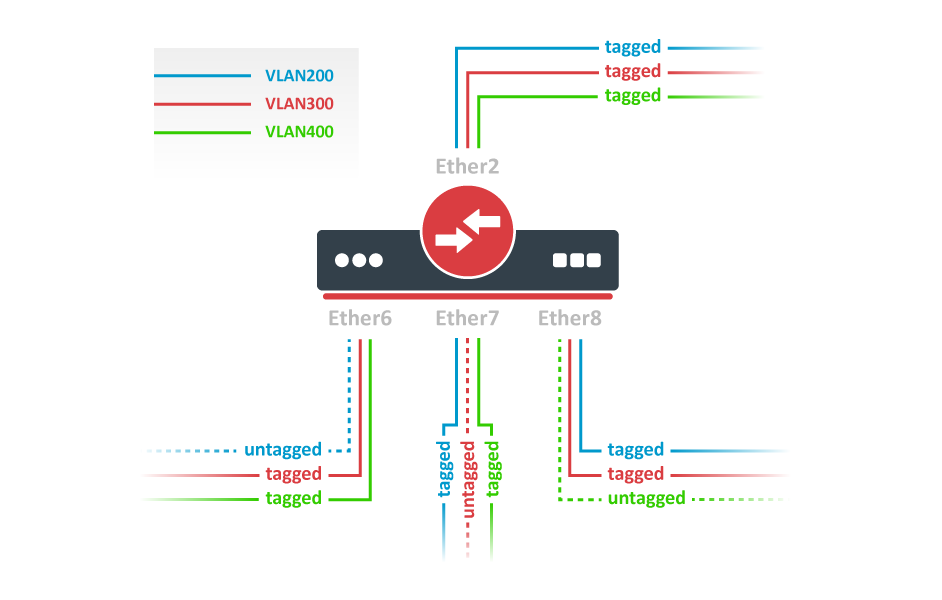
So in the case the switch is a Mikrotik with SwitchOS could I confidently say that this part of the docs is the correct one? In the link there is this image. If we look at ether8 the blue and red VLANs are tagged and the green is untagged. The green would be my VLAN 1000 and the red and blue would be my 2000 and 3000. The ether2 NIC would pretty much describe my switch===firewall-router trunk connection since the three VLANs arrive tagged and I extract them inside the firewall software config.

If this is the case, the choice of not doing the VLAN configuration manually (and thus using the CAP mode) is merely a convenience thing as I suppose or is there anything that I missed?

No. That documentation (https://help.mikrotik.com/docs/display/ROS/CAPsMAN+with+VLANs) is the documentation of the CAPsMAN in the wireless package.
This documentation (https://help.mikrotik.com/docs/display/ROS/WiFi#WiFi-WiFiCAPsMAN) is the documentation of the WiFi CAPsMAN (the one you get with recent versions of RouterOS withou the wireless package).
The two “versions” of CAPsMAN manage different kind of devices. In your case (since you are trying to configure a cAP AX) you must follow the documentation I pointed you at (specifically the part “wifi-qcom” package). Don’t look to the other one (some features are different).

(I am assuming that you are using version 7.15.*.)

I thought about going full CAP mode but I was somehow worried. I don’t understand how could the cAP find that the CAPsMAN can be reached via VLAN 1000. After all the physical configuration is fixed (one trunk coming to ether1 with VLAN 1000, 2000, 3000) and cannot be modified by the CAP mode auto detection. Does the cAP set in CAP mode search in all the VLANs it receives in its wired NICs in order to understand where the CAPsMAN is?

The point is that packets from the switch to the cAP are untagged, so the cAP will be able to see them. WiFi traffic will be tagged in the respective VLANs by the cAP AX.
After that setup works you can try to enable vlan filtering and the explicit VLAN 1000 on the cAP AX.

Apart from the missing bridge definition it seems to be pretty consistent with what I have. I am pretty happy I got that right. Just to learn: the missing bridge definition is because it’s not necessary at all since there will be no switching and there will be no VLAN managed by the CHR, right?

Yes. Less is more.

The virtual CHR is actually a virtualized machine on a hypervisor that’s trunked to the switch. For all intents and purposes the CHR presents itself as an access port on VLAN 1000 the exact same way a laptop I connected to a ethernet NIC of the switch is. The CHR is 10.1.1.10, the firewall-router which is 10.1.1.1 and the laptop which is 10.1.1.50: every one of those three can ping every other one.
So the answer to this part I can confidently say is: already done exactly as you described.

Perfect.

So in the case the switch is a Mikrotik with SwitchOS could I confidently say that this part of the docs is the correct one? In the link there is this image. If we look at ether8 the blue and red VLANs are tagged and the green is untagged. The green would be my VLAN 1000 and the red and blue would be my 2000 and 3000. The ether2 NIC would pretty much describe my switch===firewall-router trunk connection since the three VLANs arrive tagged and I extract them inside the firewall software config.

Yes.


If this is the case, the choice of not doing the VLAN configuration manually (and thus using the CAP mode) is merely a convenience thing as I suppose or is there anything that I missed?

Mostly no. Automatic/centralized VLAN configuration via CAPsMAN on devices using “wifi-qcom” package is done using datapaths in the configuration used by the provisioning rules (on the CAPsMAN device). So you should not configure VLANs on the CAPs. CAP mode is simply a very bare configuration (no firewall, single bridge for eth interfaces, DHCP client listening on the bridge, wifi interfaces configured for being configured from capsman). You can inspect and customize that configuration later on (if needed).

OK I managed to actually reboot the cAP into CAP mode. I preferred to do it from WinBox, there was a nice button. Obviously I had to adapt the switch to the new configuration. Fortunately there is a nice guide for that since the switch actually runs SwitchOS right now. The port has been configured as VLAN Mode=strict/VLAN Receive=any/Default VLAN ID=1000 exactly as the guide in the “Trunk and Hybrid Ports” says.

The steps were:

  • disabled the cAP as controlled by the CAPsMAN
  • disabled the CAPsMAN as manager
  • set the switch according to the guide
  • removed the certificates from the CAPsMAN store
  • enabled back the CAPsMAN without requiring the peer certificate (since there won’t be any at first)
  • rebooted the cAP into CAP mode

The cAP rebooted correctly, started being controlled by the manager and started to expose the two SSIDs as expected.

Everything seemed fine.

Then I tried to have one client device join the AP. They got a DHCP address but couldn’t ping the firewall-router. Investigating the issue with a packet capture on the firewall-router I can see the DHCP discover incoming and the DHCP offer outgoing from the firewall-router. Everything from the firewall-router perspective is correct. The offer comes to the client device because I can see the configuration set and correctly matches the lease on the firewall-router.

Unfortunately, when I try to ping the IP of the default gateway the only packet I see using WireShark on the client device is an ARP request demanding the MAC of the firewall-router. There is no trace of the same frame in the firewall-router packet capture signalling that some frames (the DHCP discover) can pass from the client device and arrive to the default gateway while some others cannot leave the cAP and reach the gateway.

I seriously don’t understand what’s wrong and probably there is a stupid setting I missed somewhere. Either as a Mikrotik configuration or a theoretical step I forgot.

P.S. basically there is no difference from where I was before rebooting in CAP mode. I experienced the exact same behavior. :cry:

Please, export the updated configuration.

Both CHR and caps please.

Disappeared. :frowning:

Honestly, you guys probably scared him away… :
I’m trying to do the same setup, and the documentation is pretty unhelpful in this specific scenario…

Well, the next actions to be taken remain the same, though …
export of both manager and caps device please.

While I mostly agree with you about the documentation, you also must admit that I was pointing to the right documentation while he continued using the wrong one (complaining, too).

My impression is that he was here for complaining rather than fixing his setup. But we may discover my impression is wrong if he come back.