My advice regarding any wifi pertains to a non capsman setup.
For the life of me I dont understand why you keep trying to add capsman as it adds needless complexity.
Just get the vlan to work first, as per the linked reference. If you need capsman after that, then add it…at your own risk LOL.
(1) For now remove the ingress and other changes you have made to the top level Bridge identification.
/interface bridge
add frame-types=admit-only-vlan-tagged ingress-filtering=yes name=bridge1
protocol-mode=none vlan-filtering=yes
The only change to the default bridge line should be setting vlan-filtering to yes, at the end.
identified, configured the vlans to ether1 and not the bridge for the interface setting.
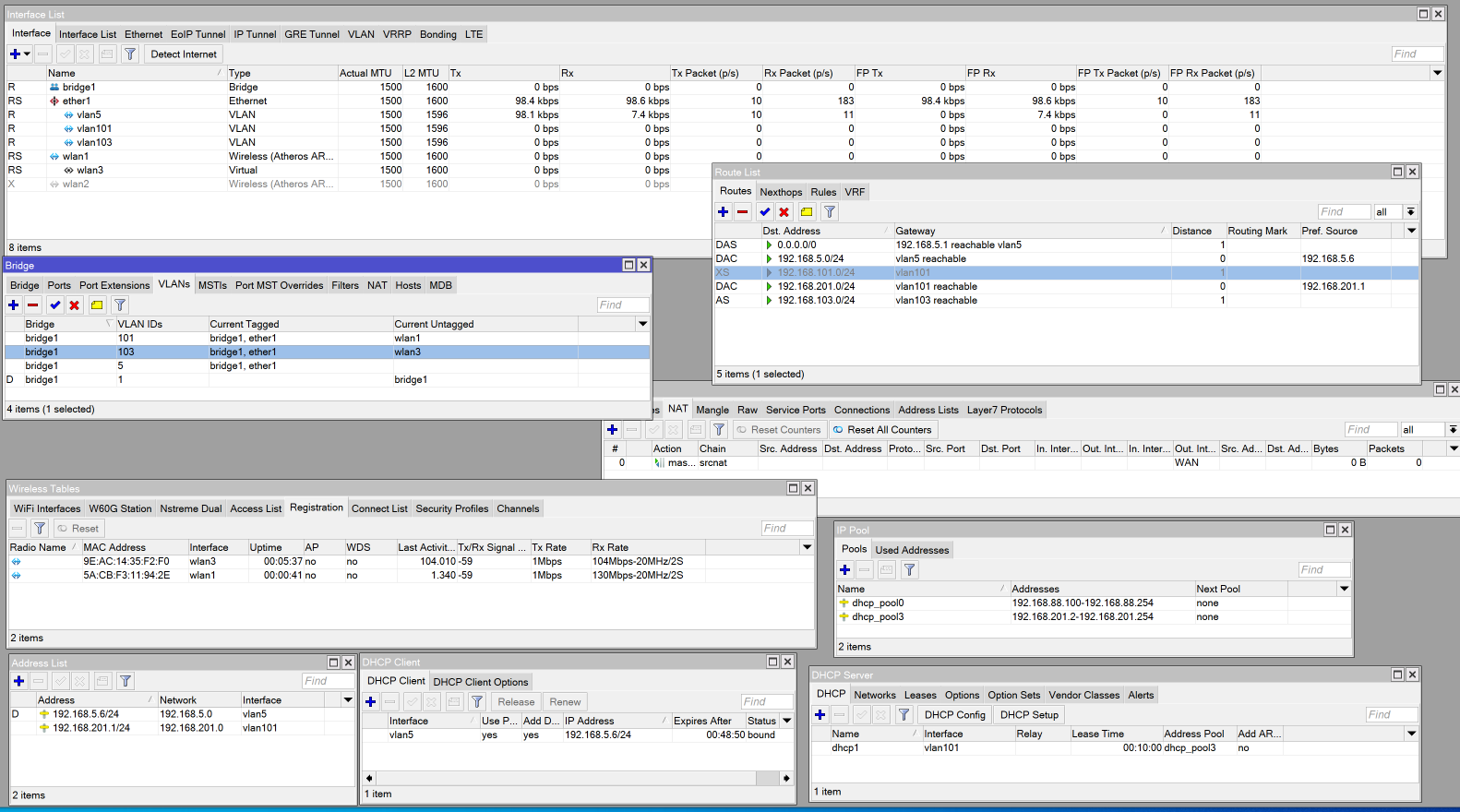
(3) You have two IP pools but 3 vlans…??? (okay I see late vlan5 is Internet??)
(4) You have 3 vlans and only one DHCP server (still missing one)
(5) You have 3 vlans and only one DHCP server network. (still missing one)
(6) In your Bridge vlan settings you are missing tagging the bridge as well.
/interface bridge vlan
add bridge=bridge1 tagged=ether1.??? vlan-ids=101
add bridge=bridge1 tagged=ether1,??? vlan-ids=103
add bridge=bridge1 tagged**=bridge1,**ether1 vlan-ids=5
(7) Interface list members… (note changed since realized vlan5 is actually a WANVLAN…
disregard next
VLAN5 should be also be listed as a VLAN member
/interface list member
add interface=ether1 list=WAN
add interface=vlan101 list=VLAN
add interface=vlan103 list=VLAN
add interface=vlan5 list=VLAN
add interface=vlan5 list=BASE
NEW Improved version…
/interface list member
add interface=ether1 list=WAN
ad interface=vlan5 list=WAN
add interface=vlan101 list=VLAN
add interface=vlan103 list=VLAN
add interface=vlan103 list=BASE (assuming 103 is the management vlan)
(8) You have three vlans but only one IP address (in this case you may be missing two)
(9) Finally at DHCP client , it is noted that vlan5 is actually a vlan for your WAN connection ???
(10) You have routes for your LAN subnets that I have no clue why they are there.
(11) The final straw that seems wrong. should be out-interface-list=WAN
/ip firewall nat
add action=masquerade chain=srcnat out-interface=all-vlan
(12) Is this device attached to an ISP modem? If so where are the firewall rules??
IN SUMMARY
Please provide a detailed network diagram to show connectivity between devices…
and the Subnets/vlans expected.
I dont understand your ISP connection at all…
 Below is the current config. Comments if this is the right and/or best config are always welcome.