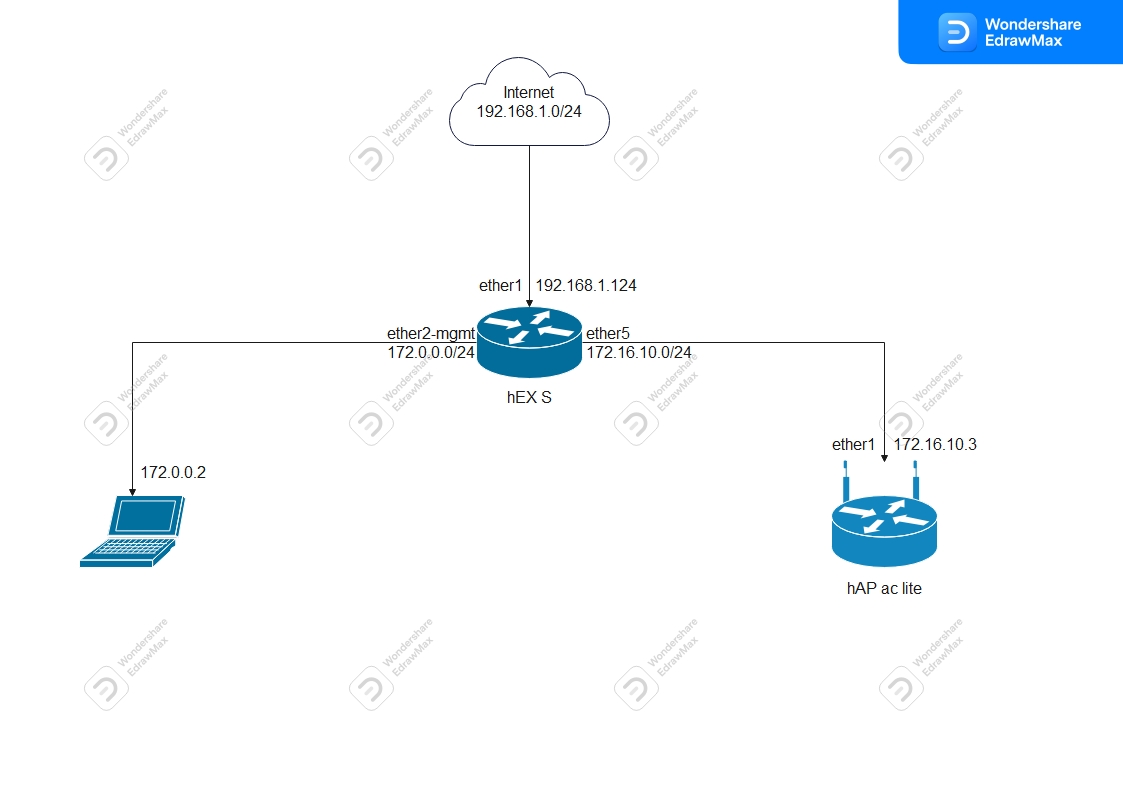
hapac3 right now is in the bedroom on the second floor because antena for the wifi link is mounted on the roof.
I’m waiting for warmer weather so i can run the cable from the antenna to the network cabinet. In network cabinet at the moment there is ISP1 router ( i know, not good for wifi but hey, for guests it’s good for now hehe), and 24V DC UPS power supply for all equipement, routers, APs and cooling fan for the cabinet.
When I learn enough then i will redo whole network.
For now, any changes i made will be on the hex s and hapac lite.
Yes, plan is to keep both ISP until fiber internet become available (in about 2-3 years hopefully). “Slow” ISP is here just as a redundancy for my wife. If “Fast” ISP goes down she can connect to “Slow” ISP. As for the speeds, “Fast” ISP is about 165/130 Mbps DL/UL, and “Slow” ISP is 23/1.25 Mbps DL/UL. I could order the RB5009 if needed. It would be nice to have automatic failover. I already searched a little for informations about that topic.
As for the switches, i ordered CSS106-1G-4P-1S (RB260GSP) but as I said, i have to wait until may for it to arrive. Aruba I have is 1930 instant on JL680A, 8×1Gig rj45 and 2×SFP
As for configuring hexS with vlan-filtering, i would like that for sure. I will update FW on routers with this testing FW.
In the future, probably hexS or RB5009 would be main router, and capac would be downstairs AP and hapac3 would be upstairs AP.
Little update, I changed subnets from default to something else so there is no “default” subnets. I hope that i will later this day manage to find some time to start with @anav tutorial.
I just looked and it seems that RB5009 are in short supply, so you will probably be using your hEX S for your main router for at least the next 6 months, unless you want to pay dearly. When you get fiber internet in the future, you will probably want to upgrade to a more powerful router than the hEX S, but the hEX S will probably be able to deal with your current internet. But if you are expecting to do a lot of inter-vlan routing, then the hEX may be a bottleneck, and will probably be a problem. So it will probably be best to try to keep hosts that will be transferring a lot of data between them on the same vlan and subnet (it is best practice to have only as single subnet per (v)lan, then dhcp will work). Within a subnet the CPU won’t be involved, it will all be handled at layer 2 by the switch ASIC. So if you have a NAS, and your main comsumer is your PC, it would put the least load on your hEX if the PC and the NAS are on the same subnet, because then, no routing is needed, and things will be switched at L2 by the switch ASICs in the hEX S, hapac2 and JL680A. No CPU involvement from the hEX will be needed (as long as your bridge is configured correctcly, and it is allowing the switch ASIC to do the heavy lifting).
If you haven’t seen it, @anav has a good startling point with links to other useful info in this NEW USER PATHWAY TO CONFIG SUCCESS but maybe you are not a new user, since you have quite a bit of MikroTik kit already.
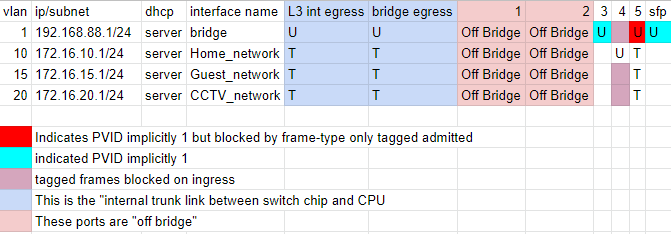
But the first thing you need to do is decide what vlans you want to use, and make a plan so you will have a blueprint to work off of. And update your diagram with the switch, vlans and ip addresses you plan to use. I prefer to have my third octet of the ip address match the vlan id, but that is just a naming convention that makes it a bit easier to keep things straight. Maybe even create a google spreadsheet with a row for each vlan (including 1, even if you don’t plan to use it, it will be the default vlan) Then create a column for every port on every device you have and put a T(agged) or U(ntagged) or E(xcluded), or just leave blank if a port isn’t a member of that vlan. Having a document makes finding configuration mistakes easier (at least it does for me).
I would suggest creating an “off bridge” port to work from as @anav suggests, then from a PC connected to that “off bridge” port, configure the vlans on the bridge. And backup frequently… I lost some work because I didn’t, and I should have know better. Then create vlan trunk port on the hEX and the JL680A and connect them with a patch cable. Create some access ports on the JL680A, and at least one access port on the hEX. Then you should be able to put a PC on the access port on the hEX and a PC on the access port in the same vlan on the JL680A, and the two PCs should be able to ping each other. This should be true even if there is no “connection to the hEX CPU/routing engine” and even if the pc’s can’t get an ip address via dhcp, they should configure themselves APIPA link local ip addresses “randomly” chosen from the 169.254.0.0/16 address block. You could open a cmd prompt on each PC, and use ipconfig to get the ip address each PC has assigned itself, and your should be able to ping the other PC if you know its address. Then you can configure a dhcp server on the hEX and if you ipconfig /release ipconfig /renew the PC’s should get an IP address from the hEX dhcp server. Then the PCs should be able to ping the hEX (al least if it is configured correctly) and the firewall allows it. And each PC should be able to ping the other PC with the ip address the hEX leased it.
This post has some links to other things I found helpful when learning about the ROS way of dealing with vlans. But I would recommend loading v7.2rc4 if you are going to use vlans with the vlan-filtering single bridge method (at least on the hEX S).
You may want to search for the pdf manual for the JL680A. There are also some youtube videos on setting it up. I know I would use the local management myself (instead of cloud), since it appears that has a lot more features.
But then you could start playing with vlans between your MikroTik and the HP switch. (Note Well: HP means something different than most vendors when they use the term trunk. They mean “Link Aggregation” or what MikroTik calls Bonding. So don’t get confused by the term trunk when you are working with your HP switch.)
This may seem like nitpicking, but 172.0.0.0/24 is in the public address space. the rfc1918 172 ip block is 172.16.0.0/12 (or 172.16.0.0 - 172.31.255.255)
Yes, I tried to buy RB5009 online and it’s unavailable… And it’s unknown when it will arrive… So hEX s it is
For now i just want to learn how to do vlans and everything that is required to make it work propertly.
So this is VLAN table I made as you suggested. (This is for test setup but same will be configured later on real network)
VLAN1 is present but not used, none of the ports are member oh that VLAN.
VLAN 10 is “general” home network where PC, Home WiFI and other equipement connects and maybe it should be managment network also ? I mean, it’s trusted network.
VLAN 15 will be guest WiFi network (ports not needed, this will be WiFi only)
VLAN 20 will be CCTV network (maybe one port on the router, not sure for now)
I tagged ether5 for all VLANs as that port will be trunk port for AP (access ports are wifi interfaces on hapac lite so i will untag vlans as needed on that interfaces if i understood correctly)
I untagged ether 3 and 4 as they will be access ports on the router so i can connect devices to that vlan.
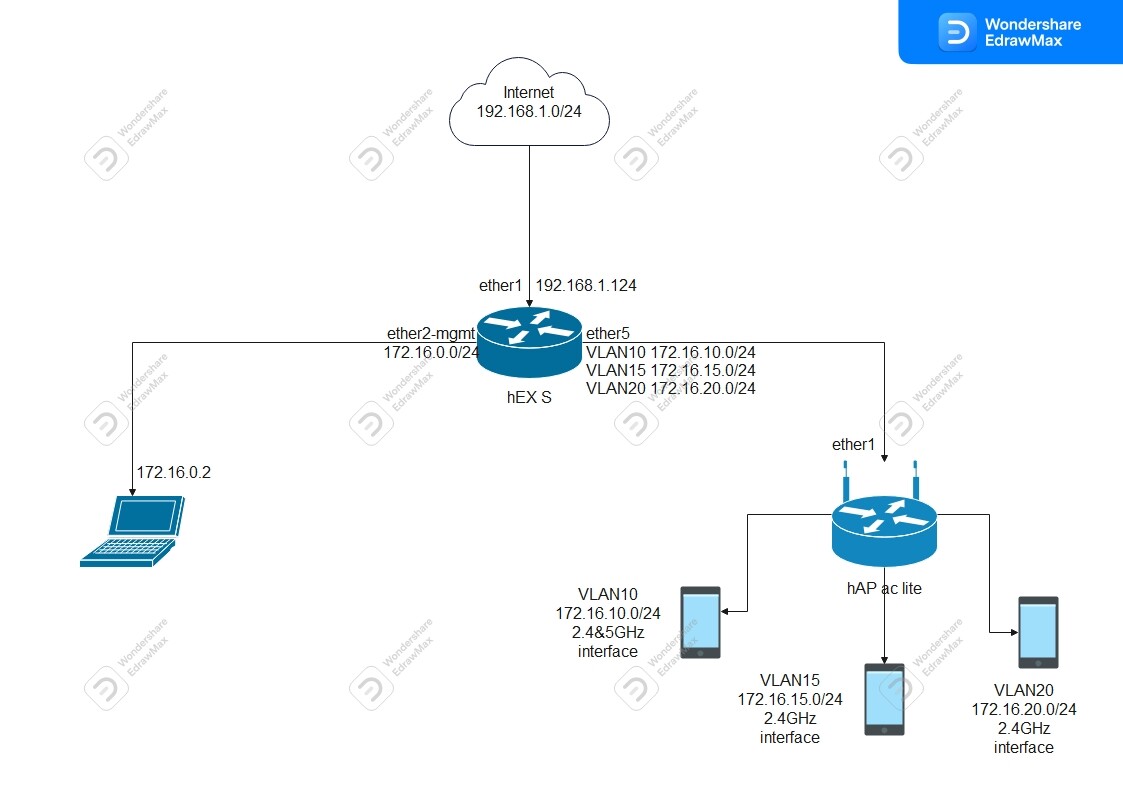
I also changed managment network subnet to 172.16.0.0/24 so it’s not i public address space and i assigned ether2 earlier to be managment port and it’s off the bridge, i followed anav’s tutorial for that.
Here is test setup network diagram, i will update it as i progress or made any changes.
Also hex s and hapac lite are updated to 7.2rc4
Also link for anav tutorial that you provided is not working, error 404
So I tried to config router using config from @anav tutorial.
I added VLANs that i need, added my addresses and now this is configuration from HEXs
# mar/20/2022 15:24:28 by RouterOS 7.2rc4
# software id =
#
# model = RB760iGS
# serial number =
/interface bridge
add ingress-filtering=no name=Test_network vlan-filtering=yes
add admin-mac=DC:2C:6E:0D:34:53 auto-mac=no comment=defconf name=bridge
/interface ethernet
set [ find default-name=ether2 ] comment="Managment port" name=ether2-mgmt
/interface vlan
add interface=Test_network name=CCTV_network vlan-id=20
add interface=Test_network name=Guest_network vlan-id=15
add interface=Test_network name=Home_network vlan-id=10
/interface list
add comment=defconf name=WAN
add comment=defconf name=LAN
add name=Home
/interface lte apn
set [ find default=yes ] ip-type=ipv4 use-network-apn=no
/interface wireless security-profiles
set [ find default=yes ] supplicant-identity=MikroTik
/ip pool
add name=dhcp_pool2 ranges=172.16.0.2-172.16.0.5
add name=dhcp_pool3 ranges=172.16.5.2-172.16.5.254
/ip dhcp-server
add address-pool=dhcp_pool2 interface=ether2-mgmt name=dhcp1
add address-pool=dhcp_pool3 interface=bridge name=dhcp2
/port
set 0 name=serial0
/interface bridge port
add bridge=bridge comment=defconf ingress-filtering=no interface=ether3
add bridge=bridge comment=defconf ingress-filtering=no interface=ether4
add bridge=bridge comment=defconf ingress-filtering=no interface=ether5
add bridge=bridge comment=defconf ingress-filtering=no interface=sfp1
add bridge=Test_network frame-types=admit-only-untagged-and-priority-tagged \
    interface=Home_network pvid=10
add bridge=Test_network frame-types=admit-only-untagged-and-priority-tagged \
    interface=Guest_network pvid=15
add bridge=Test_network frame-types=admit-only-untagged-and-priority-tagged \
    interface=CCTV_network pvid=20
add bridge=Test_network interface=ether1
/ip neighbor discovery-settings
set discover-interface-list=Home
/ipv6 settings
set disable-ipv6=yes max-neighbor-entries=8192
/interface bridge vlan
add bridge=Test_network tagged=ether1,Test_network untagged=\
    Home_network,ether4 vlan-ids=10
add bridge=Test_network tagged=ether1,Test_network untagged=Guest_network \
    vlan-ids=15
add bridge=Test_network tagged=ether1,Test_network untagged=CCTV_network \
    vlan-ids=20
/interface list member
add comment=defconf interface=bridge list=LAN
add comment=defconf interface=ether1 list=WAN
add interface=ether2-mgmt list=LAN
add interface=Home_network list=Home
add interface=Guest_network list=Home
add interface=CCTV_network list=Home
/interface ovpn-server server
set auth=sha1,md5
/ip address
add address=172.16.5.1/24 comment=defconf interface=bridge network=172.16.5.0
add address=172.16.0.1/24 comment=Managment interface=ether2-mgmt network=\
    172.16.0.0
add address=172.16.10.1/24 interface=Home_network network=172.16.10.0
add address=172.16.15.1/24 interface=Guest_network network=172.16.15.0
add address=172.16.20.1/24 interface=CCTV_network network=172.16.20.0
/ip dhcp-client
# DHCP client can not run on slave interface!
add comment=defconf interface=ether1
/ip dhcp-server network
add address=172.16.0.0/24 dns-server=172.16.0.1 gateway=172.16.0.1
add address=172.16.5.0/24 dns-server=172.16.5.1 gateway=172.16.5.1
add address=192.168.88.0/24 comment=defconf gateway=192.168.88.1
/ip dns
set allow-remote-requests=yes servers=172.16.10.1
/ip dns static
add address=192.168.88.1 comment=defconf name=router.lan
/ip firewall filter
add action=accept chain=input comment=\
    "defconf: accept established,related,untracked" connection-state=\
    established,related,untracked
add action=drop chain=input comment="defconf: drop invalid" connection-state=\
    invalid
add action=accept chain=input comment="defconf: accept ICMP" protocol=icmp
add action=accept chain=input comment=\
    "defconf: accept to local loopback (for CAPsMAN)" dst-address=127.0.0.1
add action=drop chain=input comment="defconf: drop all not coming from LAN" \
    in-interface-list=!LAN
add action=accept chain=forward comment="defconf: accept in ipsec policy" \
    ipsec-policy=in,ipsec
add action=accept chain=forward comment="defconf: accept out ipsec policy" \
    ipsec-policy=out,ipsec
add action=fasttrack-connection chain=forward comment="defconf: fasttrack" \
    connection-state=established,related hw-offload=yes
add action=accept chain=forward comment=\
    "defconf: accept established,related, untracked" connection-state=\
    established,related,untracked
add action=drop chain=forward comment="defconf: drop invalid" \
    connection-state=invalid
add action=drop chain=forward comment=\
    "defconf: drop all from WAN not DSTNATed" connection-nat-state=!dstnat \
    connection-state=new in-interface-list=WAN
/ip firewall nat
add action=masquerade chain=srcnat comment="defconf: masquerade" \
    ipsec-policy=out,none out-interface-list=WAN
/ip route
add disabled=no dst-address=0.0.0.0/0 gateway=172.16.10.1
/system clock
set time-zone-name=Europe/Zagreb
/system identity
set name=MikroTik_eth_router
/system package update
set channel=testing
/tool mac-server
set allowed-interface-list=none
/tool mac-server mac-winbox
set allowed-interface-list=Home
Windows reports internet access but can’t access internet. Right now there is no ports added to new bridge, that is correct ? ports stay in old bridge ? or do i need to reasign them to new bridge ?
Bucky eye is well meaning but he isnt give you correct information in terms of requirements.
Specifically the Hex S is not really a good choice for future fiber.
The hapac2 at the same price is far better and will meet expectations of 1Gig.
The Hapac3 will as well just slightly less throughput.
My recommendation is the RB4011 or the RB5009 for wired only, but a HAPAC2 will do nicely for the same price as the hex S. (just dont turn the wifi on )
Not sure what you are doing but it appears you are mixing apples and oranges.
Management Port is NOT an off bridge port…
hence hex S should look like
ether1 - WAN
ether2 - off bridge completely different IP structure all you need is to set IP address → 192.168.77.1/24 interface=ether2-offbridge network=192.168.77.0 { only used when required }
ether3 - Trunk port carrying three vlans
ether4 - wired to your laptop on vlan 10 home network.
Trusted network = vlan10 = home
Interface list + members
wan = ether1 (or name of interface if done through pppoe or vlan etc…)
lan = vlan 10 name, vlan 15 name, vlan 20 name home = vlan 10 name, ether2
Ip neighbours discovery interface list = home
Tool mac-server mac-winbox interface list= home
+++++++++++++++++++++++++++++++++++++++++++
not sure why you have a fetish for bridges and your vlans are ALL wrong…
ONE BRIDGE, no other work.
Identify the 3 vlans, all with interface= name of bridge
vlan 10 , vlan 20, vlan 30 all get IP pool, IP address, Dhcp server, dhcp server network.
Why is ether 1 on any bridge ???
Keep ether2 off the bridge,
Use ether 4 to the laptop pvid=10 ingress-filtering=yes frame-types=admit-only-priority-and-untagged
Ether3 is the trunk port ingress-filtering=yes frame-types=admin-only-vlan-tagged
So i presume there is no default configuration present ? while I have default configuration so that’s why I have two bridges. I will redo the configuration.
Internet present on ether4, also i get 172.16.10.X address and can connect to winbox
managment port on ether2, have internet but can’t connect if i choose IP address in winbox (router visible in winbox), but if i choose MAC address i can connect.
Yea, i realized that later… my mistake… I’ve made new configuration. Now I have to configure hapac lite using instructions from that topic I presume ? Just modify it to suite my needs.
Thanks for letting me know. I forgot to add the link, now fixed in the original post (edited).
Changed
[url]NEW USER PATHWAY TO CONFIG SUCCESS[/url]
to
[url=https://forum.mikrotik.com/viewtopic.php?p=906567]NEW USER PATHWAY TO CONFIG SUCCESS[/url]
Everything remaining in black is good!
Seems fine you have an off bridge access on ether2, the only thing I dont understand is the parts of the original default config hanging around like a bad smell.
/interface bridge
add admin- auto-mac=no comment=defconf
ingress-filtering=no name=bridge vlan-filtering=yes
/interface vlan
add interface=bridge name=CCTV_network vlan-id=20
add interface=bridge name=Guest_network vlan-id=15
add interface=bridge name=Home_network vlan-id=10
/interface list
add comment=defconf name=WAN
add comment=defconf name=LAN
add name=Home
/interface wireless security-profiles
set [ find default=yes ] supplicant-identity=MikroTik
/ip hotspot profile
set [ find default=yes ] html-directory=hotspot
/ip pool
add name=default-dhcp ranges=192.168.88.10-192.168.88.254 What is this for ???
add name=dhcp_pool1 ranges=172.16.10.2-172.16.10.254
add name=dhcp_pool2 ranges=172.16.15.2-172.16.15.254
add name=dhcp_pool3 ranges=172.16.20.2-172.16.20.254
/ip dhcp-server
add address-pool=default-dhcp interface=bridge name=defconf What is this for ???
add address-pool=dhcp_pool1 interface=Home_network name=dhcp1
add address-pool=dhcp_pool2 interface=Guest_network name=dhcp2
add address-pool=dhcp_pool3 interface=CCTV_network name=dhcp3
/port
set 0 name=serial0
/interface bridge port
add bridge=bridge comment=defconf interface=ether3 ( what is ether 3 connected to??? )
add bridge=bridge comment=defconf frame-types=
admit-only-untagged-and-priority-tagged interface=ether4 pvid=10 (assuming attached to your PC )
add bridge=bridge comment=defconf frame-types=admit-only-vlan-tagged \ ( assuming attached to switch or other smart device )
interface=ether5
add bridge=bridge comment=defconf interface=sfp1 (what is sfp1 connected to ???)
/ip neighbor discovery-settings
set discover-interface-list=Home
/interface bridge vlan
add bridge=bridge tagged=bridge,ether5 untagged=ether4 vlan-ids=10
add bridge=bridge tagged=bridge,ether5 vlan-ids=15
add bridge=bridge tagged=bridge,ether5 vlan-ids=20
/interface list member
add comment=defconf interface=bridge list=LAN what is this for…
add comment=defconf interface=ether1 list=WAN
add interface=Home_network list=Home
add interface=ether2 list=Home
add interface=Home_network list=LAN
add interface=Guest_network list=LAN
add interface=CCTV_network list=LAN
/ip address
add address=192.168.88.1/24 comment=defconf interface=bridge network=\ ( what is this for? )
192.168.88.0
add address=172.16.0.1/24 interface=ether2 network=172.16.0.0
add address=172.16.10.1/24 interface=Home_network network=172.16.10.0
add address=172.16.15.1/24 interface=Guest_network network=172.16.15.0
add address=172.16.20.1/24 interface=CCTV_network network=172.16.20.0
/ip dhcp-client
add comment=defconf interface=ether1
/ip dhcp-server network
add address=172.16.10.0/24 gateway=172.16.10.1
add address=172.16.15.0/24 gateway=172.16.15.1
add address=172.16.20.0/24 gateway=172.16.20.1
add address=192.168.88.0/24 comment=defconf dns-server=192.168.88.1 gateway=
192.168.88.1 ( what is this for )
/ip dns
set allow-remote-requests=yes
/ip dns static
add address=192.168.88.1 comment=defconf name=router.lan ( what is this for?)
Think about it.
What is the input firewall rule that says something like " everything not from the LAN interface list is blocked. "
Is ether2 part of the LAN interface… NO.
So you could just prior to the LAN rule put this
add chain=input action=accept in-interface=ether2
Not sure if you do this but if you want to access winbox by IP you need to put the IP and PORT together XX.YY.ZZ.BB:port#
I normally just use mac address.
However, the fix above is cheap and not the better path! lets improve the overall security of your router and access to the config.
This default rule - which says in a back handed way. Drop everything not coming from the LAN. add action=drop chain=input comment=“defconf: drop all not coming from LAN”
in-interface-list=!LAN
Means that all LAN users can access the router for required services such as DNS and possibly NTP but ALSO can access the winbox port.
This is fine as default setting but once you know a bit more you want to ensure that only the admin has access to winbox.
So replace the rule above with, now at least only users on the trusted subnet and now your eth2 have access. add chain=input action=accept in-interface-list=Home
But we can do better still, we should only allow the admin not the entire trusted subnet have potential access to the config.
So we create an address list of IPs that are allowed (set admin devices as static fixed leases in DHCP server etc…)
Thus our rule would look like
where src-address list is a firewall address list like so.
add address=IP of admin desktop list=authorized
add address=IP of admin laptop list=authorized
add address=IP of admin ipad list=authorized
add address=IP of admin smart phone list=authorized
add address=IP of OFF bridge (use something you will remember like 172.16.0.69)
++++++++++++++++++++++++++++++++++++++
Okay so now only the admin has access to the input chain and ONLy to the winbox port.
But we need to give back the services for all LAN users.
THus
add chain=input action=accept in-interface-list=LAN dst-port=53 protocol=udp
add chain=input action=accept in-interface-list=LAN dst-port=53 protocol=tcp
Good so far, but there is something we are missing…
Going back to the original rule which was weirdly stated using the ! question mark symbol…which is to be avoided in general by the new user for any other parts of the config.
It said block all not coming from LAN…which means block all from WAN as well, which we DO VERY MUCH WANT>
The best way to accomplish this is to use a DROP rule at the end of the input chain. This blocks all WAN to router traffic and any other LAN to Router traffic …
add chain=input action=drop comment=“drop all else”
CAUTION< you will lock yourself out of the router it you put this in first.
Ensure this is the LAST firewall rule you put in and AND ensure before doing so that you as admin can login to to winbox from the home lan and from eth2 with the new rules in place.
In other words, the way the config was in the post, if you plugged a PC into ether3, my guess is that your PC (if configured to obtain its ip address via dhcp) would have gotten an address from the 192.168.88.0/24 default-dhcp pool associated with the implicit PVID 1. The one that @anav hates and avoids.
That isn’t consistent with what your “table” in http://forum.mikrotik.com/t/virtual-wlan-and-vlans/156583/1 specifies for ether3, which I understood you wanted in vlan10, like ether4. If you plugged into ether4, I would have expected the PC to get an address from the 172.16.10.0/24 dhcp_pool1 pool. (but probably not get a dns server from the router, because /ip dhcp-server network entries you added don’t have dns-server= compare to the one from the defconf
user has two bridges, default bridge without VLAN filtering and Test_network with vlan-filtering enabled.
ports ether3, ether4, ether5 and sfp1 are members of bridge, so no VLANs there
a few VLAN interfaces anchored to Test_network interface
bridge Test_network connects untagged ends of the very same VLAN interfaces, also connects ether1
/interface bridge vlan is attempt to make port membership correct … but thus section is mainly (only!) for egress … without proper L2 (bridge port membership) this (L2.5) config can’t make things work
Which means your analysis posted in image of a table is not valid.


 )
)