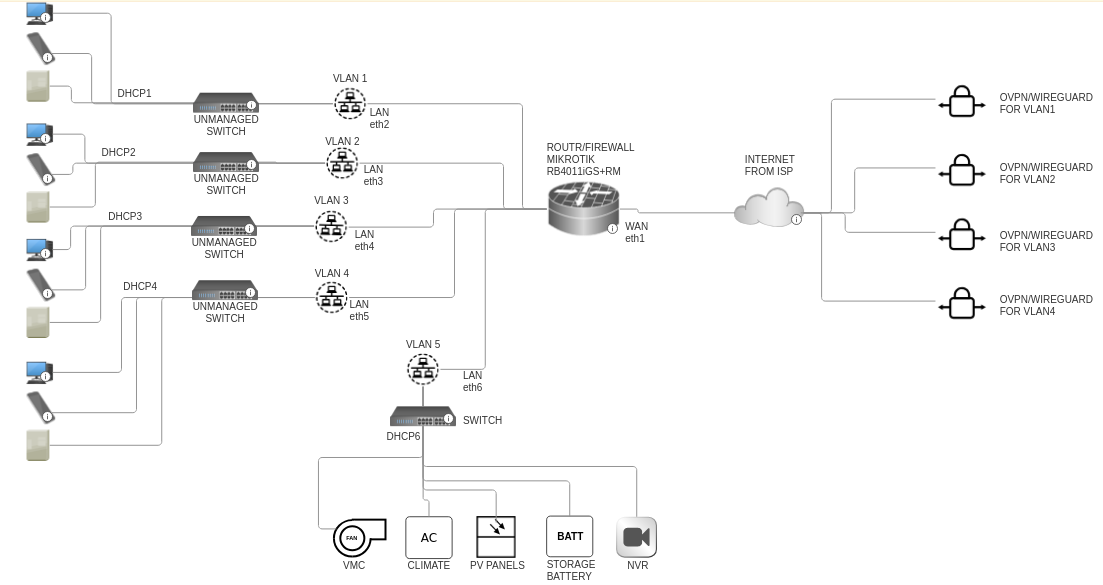
Hi all,
It’s my first time here and I would apologize in advance for my bad English.
I’ve write something like this:
/interface bridge
add name=bridge vlan-filtering=yes

/interface vlan
add interface=bridge name=impianti vlan-id=50
add interface=bridge name=rovera vlan-id=100
add interface=bridge name=frongia vlan-id=150
add interface=bridge name=geometra vlan-id=200
add interface=bridge name=eberhofer vlan-id=250

/interface list
add comment=defconf name=WAN
add comment=defconf name=LAN

/interface wireless security-profiles
set [ find default=yes ] supplicant-identity=MikroTik

/ip pool
add name=50pool ranges=192.168.50.10-192.168.50.254
add name=100pool ranges=192.168.100.10-192.168.100.254
add name=150pool ranges=192.168.150.10-192.168.150.254
add name=200pool ranges=192.168.200.10-192.168.200.254
add name=250pool ranges=192.168.250.10-192.168.250.254

/ip dhcp-server
add address-pool=50pool disabled=no interface=impianti name=50dhcp
add address-pool=100pool disabled=no interface=rovera name=100dhcp
add address-pool=150pool disabled=no interface=frongia name=150dhcp
add address-pool=200pool disabled=no interface=geometra name=200dhcp
add address-pool=250pool disabled=no interface=eberhofer name=250dhcp

/interface bridge port
add bridge=bridge comment=defconf interface=ether6 pvid=50
add bridge=bridge comment=defconf interface=ether2 pvid=100
add bridge=bridge comment=defconf interface=ether3 pvid=150
add bridge=bridge comment=defconf interface=ether4 pvid=200
add bridge=bridge comment=defconf interface=ether5 pvid=250

/ip neighbor discovery-settings
set discover-interface-list=LAN

/interface bridge vlan
add bridge=bridge tagged=bridge vlan-ids=50
add bridge=bridge tagged=bridge vlan-ids=100
add bridge=bridge tagged=bridge vlan-ids=150
add bridge=bridge tagged=bridge vlan-ids=200
add bridge=bridge tagged=bridge vlan-ids=250

/interface list member
add comment=defconf interface=ether1 list=WAN
add interface=rovera list=LAN
add interface=frongia list=LAN
add interface=geometra list=LAN
add interface=eberhofer list=LAN
add interface=impianti list=LAN

/ip address
add address=192.168.50.1/24 interface=impianti network=192.168.50.0
add address=192.168.100.1/24 interface=rovera network=192.168.100.0
add address=192.168.150.1/24 interface=frongia network=192.168.150.0
add address=192.168.200.1/24 interface=geometra network=192.168.200.0
add address=192.168.250.1/24 interface=eberhofer network=192.168.250.0

/ip dhcp-client
add comment=defconf disabled=no interface=ether1

/ip dhcp-server network
add address=192.168.50.0/24 dns-server=8.8.8.8 gateway=192.168.50.1
add address=192.168.100.0/24 dns-server=8.8.8.8 gateway=192.168.100.1
add address=192.168.150.0/24 dns-server=8.8.8.8 gateway=192.168.150.1
add address=192.168.200.0/24 dns-server=8.8.8.8 gateway=192.168.200.1
add address=192.168.250.0/24 dns-server=8.8.8.8 gateway=192.168.250.1

/ip dns
set servers=8.8.8.8

/ip firewall filter
add action=accept chain=input comment="defconf: accept established,related,untracked" connection-state=\
established,related,untracked
add action=drop chain=input comment="defconf: drop invalid" connection-state=invalid
add action=accept chain=input comment="defconf: accept ICMP" protocol=icmp
add action=accept chain=input comment="defconf: accept to local loopback (for CAPsMAN)" dst-address=127.0.0.1
add action=drop chain=input comment="defconf: drop all not coming from LAN" in-interface-list=!LAN
add action=accept chain=forward comment="defconf: accept in ipsec policy" ipsec-policy=in,ipsec
add action=accept chain=forward comment="defconf: accept out ipsec policy" ipsec-policy=out,ipsec
add action=fasttrack-connection chain=forward comment="defconf: fasttrack" connection-state=established,related
add action=accept chain=forward comment="defconf: accept established,related, untracked" connection-state=\
established,related,untracked
add action=drop chain=forward comment="defconf: drop invalid" connection-state=invalid
add action=drop chain=forward comment="defconf: drop all from WAN not DSTNATed" connection-nat-state=!dstnat \
connection-state=new in-interface-list=WAN

/ip firewall nat
add action=masquerade chain=srcnat comment="defconf: masquerade" ipsec-policy=out,none out-interface-list=WAN

/system clock
set time-zone-name=Europe/Rome
I’ve done this searching on the forum regarding the VLANs management and I hope that’s works.
Attached there’s a simple graphic of my configuration:
Thanks in advance for everyone that will help me!
Regards,
Davide
anav
January 15, 2025, 2:54pm
2
Hi Davide, excellent start.http://forum.mikrotik.com/t/using-routeros-to-vlan-your-network/126489/1
I recommend taking one port not used off the bridge, giving it its own IP address and the doing the config from that safe spot./ethernet
Hi Davide, excellent start.http://forum.mikrotik.com/t/using-routeros-to-vlan-your-network/126489/1
I recommend taking one port not used off the bridge, giving it its own IP address and the doing the config from that safe spot./ethernet
Hi Anav!
# Allow all VLANs to access the Internet only, NOT each other
add chain=forward action=accept connection-state=new in-interface-list=VLAN out-interface-list=WAN comment="VLAN Internet Access only"
In this way I can isolate every single VLANs I think, correct?
But talking about WIREGUARD o OVPN how I need to operate?
Thank you!
Hi!
I’ve tried to update the rsc file with a partial WIREGUARD setup for the 4 VLANs.
# mar/09/2023 00:24:18 by RouterOS 6.49.7
# software id = Uxxxxx
#x
# model = xxxxx
# serial number = xxxxx

/ethernet
name=OffBridge8

/interface bridge
add name=bridge vlan-filtering=yes

/interface wireguard
add listen-port=13231 name=wireguard_rovera
add listen-port=13232 name=wireguard_frongia
add listen-port=13233 name=wireguard_studio
add listen-port=13234 name=wireguard_eberhofer

/interface vlan
add interface=bridge name=impianti vlan-id=50
add interface=bridge name=rovera vlan-id=100
add interface=bridge name=frongia vlan-id=150
add interface=bridge name=geometra vlan-id=200
add interface=bridge name=eberhofer vlan-id=250

/interface list
add comment=defconf name=WAN
add comment=defconf name=LAN
add interface=OffBridge8 list=LAN

/interface wireless security-profiles
set [ find default=yes ] supplicant-identity=MikroTik

/ip pool
add name=50pool ranges=192.168.50.10-192.168.50.254
add name=100pool ranges=192.168.100.10-192.168.100.254
add name=150pool ranges=192.168.150.10-192.168.150.254
add name=200pool ranges=192.168.200.10-192.168.200.254
add name=250pool ranges=192.168.250.10-192.168.250.254

/ip dhcp-server
add address-pool=50pool disabled=no interface=impianti name=50dhcp
add address-pool=100pool disabled=no interface=rovera name=100dhcp
add address-pool=150pool disabled=no interface=frongia name=150dhcp
add address-pool=200pool disabled=no interface=geometra name=200dhcp
add address-pool=250pool disabled=no interface=eberhofer name=250dhcp

/interface bridge port
add bridge=bridge comment=defconf interface=ether6 pvid=50
add bridge=bridge comment=defconf interface=ether2 pvid=100
add bridge=bridge comment=defconf interface=ether3 pvid=150
add bridge=bridge comment=defconf interface=ether4 pvid=200
add bridge=bridge comment=defconf interface=ether5 pvid=250

/ip neighbor discovery-settings
set discover-interface-list=LAN

/interface bridge vlan
add bridge=bridge tagged=bridge vlan-ids=50
add bridge=bridge tagged=bridge vlan-ids=100
add bridge=bridge tagged=bridge vlan-ids=150
add bridge=bridge tagged=bridge vlan-ids=200
add bridge=bridge tagged=bridge vlan-ids=250

/interface list member
add comment=defconf interface=ether1 list=WAN
add interface=pppoe-out1 list=WAN
add interface=rovera list=LAN
add interface=frongia list=LAN
add interface=geometra list=LAN
add interface=eberhofer list=LAN
add interface=impianti list=LAN

/ip address
add address=192.168.50.1/24 interface=impianti network=192.168.50.0
add address=192.168.100.1/24 interface=rovera network=192.168.100.0
add address=192.168.150.1/24 interface=frongia network=192.168.150.0
add address=192.168.200.1/24 interface=geometra network=192.168.200.0
add address=192.168.250.1/24 interface=eberhofer network=192.168.250.0
add address=192.168.99.1/30 interface=OffBridge8 network=192.168.99.0
add address=192.168.101.1/24 interface=wireguard_rovera
add address=192.168.151.1/24 interface=wireguard_frongia
add address=192.168.201.1/24 interface=wireguard_studio
add address=192.168.251.1/24 interface=wireguard_eberhofer

/interface wireguard peers
add allowed-address=192.168.101.1/24, endpoint-address=192.168.100.252 endpoint-port=13231 interface=wireguard_rovera public-key="paste key here"
add allowed-address=192.168.101.2/24, endpoint-address=192.168.100.253 endpoint-port=13231 interface=wireguard_rovera public-key="paste key here"
add allowed-address=192.168.101.3/24, endpoint-address=192.168.100.254 endpoint-port=13231 interface=wireguard_rovera public-key="paste key here"

add allowed-address=192.168.151.1/24, endpoint-address=192.168.150.252 endpoint-port=13232 interface=wireguard_frongia public-key="paste key here"
add allowed-address=192.168.151.2/24, endpoint-address=192.168.150.253 endpoint-port=13232 interface=wireguard_frongia public-key="paste key here"
add allowed-address=192.168.151.3/24, endpoint-address=192.168.150.254 endpoint-port=13232 interface=wireguard_frongia public-key="paste key here"

add allowed-address=192.168.201.1/24, endpoint-address=192.168.200.252 endpoint-port=13233 interface=wireguard_studio public-key="paste key here"
add allowed-address=192.168.201.2/24, endpoint-address=192.168.200.253 endpoint-port=13233 interface=wireguard_studio public-key="paste key here"
add allowed-address=192.168.201.3/24, endpoint-address=192.168.200.254 endpoint-port=13233 interface=wireguard_studio public-key="paste key here"

add allowed-address=192.168.251.1/24, endpoint-address=192.168.250.252 endpoint-port=13234 interface=wireguard_eberhofer public-key="paste key here"
add allowed-address=192.168.251.2/24, endpoint-address=192.168.250.253 endpoint-port=13234 interface=wireguard_eberhofer public-key="paste key here"
add allowed-address=192.168.251.3/24, endpoint-address=192.168.250.254 endpoint-port=13234 interface=wireguard_eberhofer public-key="paste key here"


/ip dhcp-client
add comment=defconf disabled=no interface=ether1

/ip dhcp-server network
add address=192.168.50.0/24 dns-server=8.8.8.8 gateway=192.168.50.1
add address=192.168.100.0/24 dns-server=8.8.8.8 gateway=192.168.100.1
add address=192.168.150.0/24 dns-server=8.8.8.8 gateway=192.168.150.1
add address=192.168.200.0/24 dns-server=8.8.8.8 gateway=192.168.200.1
add address=192.168.250.0/24 dns-server=8.8.8.8 gateway=192.168.250.1

/ip dns
set servers=8.8.8.8

/ip firewall filter
add action=accept chain=input comment="defconf: accept established,related,untracked" connection-state=\
established,related,untracked
add action=drop chain=input comment="defconf: drop invalid" connection-state=invalid
add action=accept chain=input comment="defconf: accept ICMP" protocol=icmp
add action=accept chain=input comment="defconf: accept to local loopback (for CAPsMAN)" dst-address=127.0.0.1
add action=drop chain=input comment="defconf: drop all not coming from LAN" in-interface-list=!LAN
add action=accept chain=forward comment="defconf: accept in ipsec policy" ipsec-policy=in,ipsec
add action=accept chain=forward comment="defconf: accept out ipsec policy" ipsec-policy=out,ipsec
add action=fasttrack-connection chain=forward comment="defconf: fasttrack" connection-state=established,related
add action=accept chain=forward comment="defconf: accept established,related, untracked" connection-state=\
established,related,untracked
add action=drop chain=forward comment="defconf: drop invalid" connection-state=invalid
add action=drop chain=forward comment="defconf: drop all from WAN not DSTNATed" connection-nat-state=!dstnat \
connection-state=new in-interface-list=WAN
add chain=forward action=accept connection-state=new in-interface-list=VLAN out-interface-list=WAN comment="VLAN Internet Access only"
add action=accept chain=forward comment="allow port forwarding" connection-nat-state=dstnat
add action=accept chain=input comment="WG handshake" dst-port=13231 protocol=udp
add action=accept chain=input comment="WG handshake" dst-port=13232 protocol=udp
add action=accept chain=input comment="WG handshake" dst-port=13233 protocol=udp
add action=accept chain=input comment="WG handshake" dst-port=13234 protocol=udp
add action=accept chain=forward dst-address=192.168.100.252/24 src-address=192.168.101.1/24
add action=accept chain=forward dst-address=192.168.100.253/24 src-address=192.168.101.2/24
add action=accept chain=forward dst-address=192.168.100.254/24 src-address=192.168.101.3/24
add action=accept chain=forward dst-address=192.168.150.252/24 src-address=192.168.151.1/24
add action=accept chain=forward dst-address=192.168.150.253/24 src-address=192.168.151.2/24
add action=accept chain=forward dst-address=192.168.150.254/24 src-address=192.168.151.3/24
add action=accept chain=forward dst-address=192.168.200.252/24 src-address=192.168.201.1/24
add action=accept chain=forward dst-address=192.168.200.253/24 src-address=192.168.201.2/24
add action=accept chain=forward dst-address=192.168.200.254/24 src-address=192.168.201.3/24
add action=accept chain=forward dst-address=192.168.250.252/24 src-address=192.168.251.1/24
add action=accept chain=forward dst-address=192.168.250.253/24 src-address=192.168.251.2/24
add action=accept chain=forward dst-address=192.168.250.254/24 src-address=192.168.251.3/24
add action=drop chain=input comment="drop all else"

/ip firewall nat
add action=masquerade chain=srcnat comment="defconf: masquerade" ipsec-policy=out,none out-interface-list=WAN

/system clock
set time-zone-name=Europe/Rome
Hope that someone can help me please
Thanks!
anav
January 20, 2025, 3:22pm
5
If we can be clear on requirements, assistance can be rendered.
a. identify all users/devices, external and internal, and admin
If we can be clear on requirements, assistance can be rendered.
a. identify all users/devices, external and internal, and admin
I’m sorry, I belived that the first post was clear enough.
User 1 (named “Rovera”) for VLAN1 that need to navigate on internet with xx device connected in his LAN and 2-3 external devices connected trough WIREGUARD in his VLAN1. The VLAN is not visible and reachable from others VLANs
User 2 (named “Frongia”) for VLAN2 that need to navigate on internet with xx device connected in his LAN and 2-3 external devices connected trough WIREGUARD in his VLAN2. The VLAN is not visible and reachable from others VLANs
User 3 (named “Studio”) for VLAN3 that need to navigate on internet with xx device connected in his LAN and 2-3 external devices connected trough WIREGUARD in his VLAN3. The VLAN is not visible and reachable from others VLANs
User 4 (named “Eberhofer”) for VLAN4 that need to navigate on internet with xx device connected in his LAN and 2-3 external devices connected trough WIREGUARD in his VLAN4. The VLAN is not visible and reachable from others VLANs
User 5 (named “Impianti”) for VLAN5 that need to navigate on internet with xx device connected in his LAN. The VLAN is not visible and reachable from others VLANs
User 6 the “Management user” single user with fixed IP on eth8 that have full access on Mikrotik
I’m really a beginner, I know.
I’ve think to create 4 WIREGUARD connection that listen connection on 4 different port and assign the connection to a specific IP; then trough routing and firewall assign the WIREGUARD connection to the specific VLAN.
Thank you for your patience.
anav
January 23, 2025, 7:10pm
7
1.Upgrade firmware to 7.12 and then to 7.17 ( also routerboard )
/ethernet
name=OffBridge2
/interface bridge
add name=bridge vlan-filtering=yes
/interface wireguard
add listen-port=15511 name=wireguard1
/interface vlan
add interface=bridge name=gestione20  vlan-id=20
add interface=bridge name=impianti vlan-id=50
add interface=bridge name=rovera vlan-id=100
add interface=bridge name=frongia vlan-id=150
add interface=bridge name=geometra vlan-id=200
add interface=bridge name=eberhofer vlan-id=250
/interface list
add comment=defconf name=WAN
add comment=defconf name=LAN
add name=TRUSTED
/interface list member
add interface=impianti list=LAN
add interface=rovera list=LAN
add interface=frongia list=LAN
add interface=geometra list=LAN
add interface=eberhofer list=LAN
add interface=gestione20 list=LAN
add interface=OffBridge2 list=LAN
add interface=wireguard1 list=LAN
add interface=gestione20 list=TRUSTED
add interface=OffBridge8 list=TRUSTED
add interface=wireguard1 list=TRUSTED
/ip pool
add name=20pool ranges=192.168.20.100-192.168.20.120
add name=50pool ranges=192.168.50.10-192.168.50.254
add name=100pool ranges=192.168.100.10-192.168.100.254
add name=150pool ranges=192.168.150.10-192.168.150.254
add name=200pool ranges=192.168.200.10-192.168.200.254
add name=250pool ranges=192.168.250.10-192.168.250.254
/ip dhcp-server
add address-pool=20pool disabled=no interface=gestione name=20dhcp
add address-pool=50pool disabled=no interface=impianti name=50dhcp
add address-pool=100pool disabled=no interface=rovera name=100dhcp
add address-pool=150pool disabled=no interface=frongia name=150dhcp
add address-pool=200pool disabled=no interface=geometra name=200dhcp
add address-pool=250pool disabled=no interface=eberhofer name=250dhcp
/interface bridge port
add bridge=bridge ingress-filtering=yes frame-type=admit-only-priority-and-untagged  interface=ether2 pvid=20 comment="admin pc for management"
add bridge=bridge ingress-filtering=yes frame-type=admit-only-priority-and-untagged  interface=ether6 pvid=100
add bridge=bridge ingress-filtering=yes frame-type=admit-only-priority-and-untagged  interface=ether7 pvid=150
add bridge=bridge ingress-filtering=yes frame-type=admit-only-priority-and-untagged  interface=ether8 pvid=200
add bridge=bridge ingress-filtering=yes frame-type=admit-only-priority-and-untagged  interface=ether9 pvid=250
add bridge=bridge ingress-filtering=yes frame-type=admit-only-vlan-tagged  interface=ether10  comment="trunk to  switch impianti"
/ip neighbor discovery-settings
set discover-interface-list=TRUSTED
/interface bridge vlan
add bridge=bridge tagged=bridge,ether10  vlan-ids=20,50  comment="vlan20 to give managed switch an IP address"
add bridge=bridge tagged=bridge untagged=ether6 vlan-ids=100
add bridge=bridge tagged=bridge untagged=ether7 vlan-ids=150
add bridge=bridge tagged=bridge untagged=ether8 vlan-ids=200
add bridge=bridge tagged=bridge untagged=ether9 vlan-ids=250
/interface list member
add comment=defconf interface=ether1 list=WAN
add interface=pppoe-out1 list=WAN
add interface=rovera list=LAN
add interface=frongia list=LAN
add interface=geometra list=LAN
add interface=eberhofer list=LAN
add interface=impianti list=LAN
add interface=gestione20 list=LAN
add interface=OffBridge2 list=LAN
add interface=wireguard1 list=LAN
add interface=gestione20 list=TRUSTED
add interface=OffBridge2 list=TRUSTED
add interface=wireguard1 list=TRUSTED
/ip address
add address=192.168.20.1/24 interface=gestione20  network=192.168.20.0
add address=192.168.50.1/24 interface=impianti network=192.168.50.0
add address=192.168.100.1/24 interface=rovera network=192.168.100.0
add address=192.168.150.1/24 interface=frongia network=192.168.150.0
add address=192.168.200.1/24 interface=geometra network=192.168.200.0
add address=192.168.250.1/24 interface=eberhofer network=192.168.250.0
add address=192.168.99.1/30 interface=OffBridge2 network=192.168.99.0
++++++++++++++++++++++++++++++++++++++++++++++++++++++++++++++
add address=192.168.25.1/24  interface=wireguard1  network=192.168.25.0 comment="genione wg subnet"
add address=192.168.51.1/24  interface=wireguard1  network=192.168.51.0 comment="impianti wg subnet"
add address=192.168.101.1/24 interface=wireguard1  network=192.168.101.0  comment="rovera wg subnet"
add address=192.168.151.1/24 interface=wireguard1  network=192.168.151.0 comment="frongia wg subnet"
add address=192.168.201.1/24 interface=wireguard1  network=192.168.201.0 comment="geometra wg subnet"
add address=192.168.251.1/24 interface=wireguard1  network=192.168.251.0 comment="eberhofer wg subnet"
/interface wireguard peers
add allowed-address=192.168.25.2/24  interface=wireguard1 public-key="paste key here" comment="genione admin device1 - laptop"
add allowed-address=192.168.25.3/24  interface=wireguard1 public-key="paste key here" comment="genione admin device2 - smartphone"
add allowed-address=192.168.51.2/24  interface=wireguard1 public-key="paste key here" comment=impianti peer1"
add allowed-address=192.168.51.3/24  interface=wireguard1 public-key="paste key here" comment=impianti peer2"
add allowed-address=192.168.101.2/24  interface=wireguard1 public-key="paste key here" comment="rovera peer1"
add allowed-address=192.168.101.3/24  interface=wireguard1 public-key="paste key here" comment="rovera peer2"
add allowed-address=192.168.151.2/24  interface=wireguard1 public-key="paste key here" comment="frongia peer1"
add allowed-address=192.168.151.3/24  interface=wireguard1 public-key="paste key here" comment="frongia peer2"
add allowed-address=192.168.201.2/24  interface=wireguard1 public-key="paste key here" comment="geometra peer1"
add allowed-address=192.168.201.3/24  interface=wireguard1 public-key="paste key here" comment="geometra peer2"
add allowed-address=192.168.251.2/24  interface=wireguard1 public-key="paste key here" comment="eberhofer peer1"
add allowed-address=192.168.251.3/24  interface=wireguard1 public-key="paste key here" comment="eberhofer peer2"
/ip dhcp-client
add comment=defconf disabled=yes interface=ether1
/ip dhcp-server network
add address=192.168.20.0/24 dns-server=8.8.8.8 gateway=192.168.20.1
add address=192.168.50.0/24 dns-server=8.8.8.8 gateway=192.168.50.1
add address=192.168.100.0/24 dns-server=8.8.8.8 gateway=192.168.100.1
add address=192.168.150.0/24 dns-server=8.8.8.8 gateway=192.168.150.1
add address=192.168.200.0/24 dns-server=8.8.8.8 gateway=192.168.200.1
add address=192.168.250.0/24 dns-server=8.8.8.8 gateway=192.168.250.1
/ip dns
set servers=8.8.8.8
/ip firewall address-list
add address=192.168.20.0/24  list=Authorized  comment="management network"
add address=192.168.25.0/24  list=Authorized comment="admin wg subnet"
add address=192.168.99.2 list=Authorized comment="admin OffBridge"
/ip firewall filter
add action=accept chain=input  connection-state=established,related,untracked
add action=drop chain=input comment="defconf: drop invalid" connection-state=invalid
add action=accept chain=input comment="defconf: accept ICMP" protocol=icmp
add action=accept chain=input comment="defconf: accept to local loopback (for CAPsMAN)" dst-address=127.0.0.1
add action=accept chain=input comment="WG handshake" dst-port=15511 protocol=udp
add action=accept chain=input comment="admin access" in-interface-list=TRUSTED src-address-list=Authorized
add action=accept chain=input comment="user to services" in-interface-list=LAN dst-port=53 protocol=udp
add action=accept chain=input comment="user to services" in-interface-list=LAN dst-port=53 protocol=tcp
add action=drop chain=input comment="drop all else"    {   insert this rule  last  }
add action=fasttrack-connection chain=forward comment="defconf: fasttrack" connection-state=established,related
add action=accept chain=forward  connection-state=established,related,untracked
add action=drop chain=forward comment="defconf: drop invalid" connection-state=invalid
add action=drop chain=forward comment="internet traffic"  in-interface-list=LAN out-interface-list=WAN
add action=accept chain=forward comment="allow port forwarding" connection-nat-state=dstnat
add action=accept chain=forward comment="impianti wg to subnet"  in-interface=wireguard1 src-address=192.168.55.0/24  dst-address=192.168.50.0/24
add action=accept chain=forward comment="roverai wg to subnet"  in-interface=wireguard1 src-address=192.168.101.0/24  dst-address=192.168.100.0/24
add action=accept chain=forward comment="frongia wg to subnet"  in-interface=wireguard1 src-address=192.168.151.0/24  dst-address=192.168.150.0/24
add action=accept chain=forward comment="geometra wg to subnet"  in-interface=wireguard1 src-address=192.168.201.0/24  dst-address=192.168.200.0/24
add action=accept chain=forward comment="eberhofer  wg to subnet"  in-interface=wireguard1 src-address=192.168.251.0/24  dst-address=192.168.250.0/24
add action=drop chain=input comment="drop all else"
/ip firewall nat
add action=masquerade chain=srcnat comment="defconf: masquerade" ipsec-policy=out,none out-interface-list=WAN
/system clock
set time-zone-name=Europe/Rome
If any of the assumptions are incorrect, clearly things change.
Another point did you want the users coming in on wireguard, going to the subnets, to have access to the internet or just their singular LAN subnets?