I tried to bypass the router by connecting cameras and server on a managed switch with an uplink to the Mikrotik Router. This way I could rule out that the Mikrotik is the root of evil 
The video streaming artefacts also appear when data is only passing the managed switch.
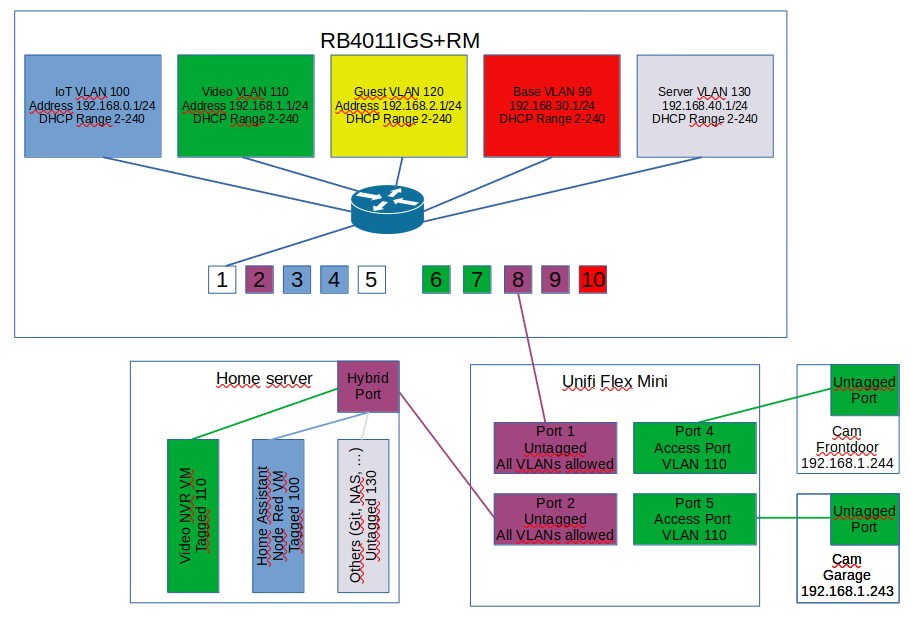
The switch ports have been set to “Access Port VLAN 110 (video)”. All other ports are transparent. Video NVR server has interface in VLAN 110.
To be absolutely sure data is not going through the router I removed the uplink.
I guess the problem won’t be the cameras because the stream directly from camera to VLC on PC is working fine. Maybe it has something to do with the docker ipvlan interface used to have a tagged network interface in the video VLAN.
Maybe I’ll just try to treat my server with a second network card and configure an access port in VLAN 110 for the video server