VLAN Filtering - Unreachable Bridge IP

Hi all,

The diagram below depicts my current setup:
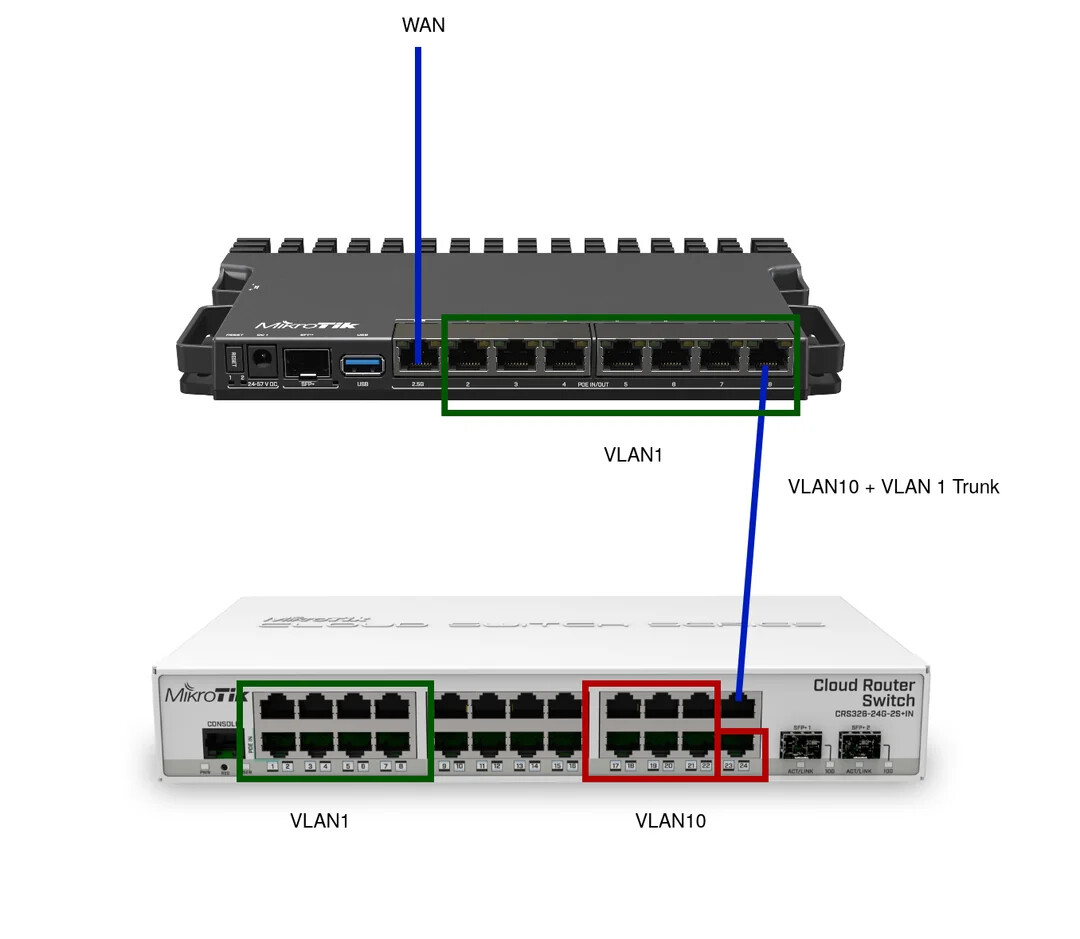
The RB5009 has a IP on VLAN1 (192.168.88.1) and on VLAN 10 (172.16.10.1), providing DHCP services, which works fine.

The CRS has a management IP on VLAN1 (192.168.88.2)

On my CRS I have some ports dedicated to VLAN1, some VLAN10.

When I enable VLAN filtering on my CRS, everything seems to work fine for a while. Eventually, however, I'll lose access to the CRS's management IP, nor can I connect to it via MAC in Winbox

RB5009 Config:

# 2025-09-17 11:01:16 by RouterOS 7.19.6
# model = RB5009UG+S+

/interface bridge
add admin-mac=<omitted> auto-mac=no comment=defconf name=bridge \
    vlan-filtering=yes
/interface vlan
add interface=ether8 name=vlan10-dg vlan-id=10
/interface list
add comment=defconf name=WAN
add comment=defconf name=LAN
/interface wireless security-profiles
set [ find default=yes ] supplicant-identity=MikroTik
/ip pool
add name=default-dhcp ranges=192.168.88.10-192.168.88.254
add name=vlan-10-pool ranges=172.16.10.10-172.16.10.254
/ip dhcp-server
add address-pool=default-dhcp interface=bridge name=defconf
add address-pool=vlan-10-pool interface=vlan10-dg name=dhcp-vlan-10
/disk settings
set auto-media-interface=bridge auto-media-sharing=yes auto-smb-sharing=yes
/interface bridge port
add bridge=bridge comment=defconf interface=ether2
add bridge=bridge comment=defconf interface=ether3
add bridge=bridge comment=defconf interface=ether4
add bridge=bridge comment=defconf interface=ether5
add bridge=bridge comment=defconf interface=ether6
add bridge=bridge comment=defconf interface=ether7
add bridge=bridge comment=defconf interface=ether8
add bridge=bridge comment=defconf interface=sfp-sfpplus1
/ip neighbor discovery-settings
set discover-interface-list=LAN
/interface bridge vlan
add bridge=bridge tagged=bridge,ether8 vlan-ids=10
/interface list member
add comment=defconf interface=bridge list=LAN
add comment=defconf interface=ether1 list=WAN
add interface=vlan10-dg list=LAN
/ip address
add address=192.168.88.1/24 comment=defconf interface=bridge network=\
    192.168.88.0
add address=172.16.10.1/24 interface=vlan10-dg network=172.16.10.0
/ip dhcp-client
add comment=defconf interface=ether1 use-peer-dns=no
/ip dhcp-server lease
add address=192.168.88.228 client-id=1:0:11:32:e5:79:5b mac-address=\
    00:11:32:E5:79:5B server=defconf
/ip dhcp-server network
add address=172.16.10.0/24 dns-server=192.168.1.1 gateway=172.16.10.1 \
    netmask=24
add address=192.168.88.0/24 comment=defconf dns-server=192.168.88.1 gateway=\
    192.168.88.1
/ip dns
set allow-remote-requests=yes cache-size=8192KiB doh-max-concurrent-queries=\
    200 max-concurrent-queries=1000 max-concurrent-tcp-sessions=2000 servers=\
    1.1.1.1 use-doh-server=https://cloudflare-dns.com/dns-query \
    verify-doh-cert=yes
/ip dns static
add address=192.168.88.1 comment=defconf name=router.lan type=A
/ip firewall filter
add action=accept chain=input comment=\
    "defconf: accept established,related,untracked" connection-state=\
    established,related,untracked
add action=drop chain=input comment="defconf: drop invalid" connection-state=\
    invalid
add action=accept chain=input comment="defconf: accept ICMP" protocol=icmp
add action=accept chain=input comment=\
    "defconf: accept to local loopback (for CAPsMAN)" dst-address=127.0.0.1
add action=drop chain=input comment="defconf: drop all not coming from LAN" \
    in-interface-list=!LAN
add action=accept chain=forward comment="defconf: accept in ipsec policy" \
    ipsec-policy=in,ipsec
add action=accept chain=forward comment="defconf: accept out ipsec policy" \
    ipsec-policy=out,ipsec
add action=fasttrack-connection chain=forward comment="defconf: fasttrack" \
    connection-state=established,related hw-offload=yes
add action=accept chain=forward comment=\
    "defconf: accept established,related, untracked" connection-state=\
    established,related,untracked
add action=drop chain=forward comment="defconf: drop invalid" \
    connection-state=invalid
add action=drop chain=forward comment=\
    "defconf: drop all from WAN not DSTNATed" connection-nat-state=!dstnat \
    connection-state=new in-interface-list=WAN
/ip firewall nat
add action=masquerade chain=srcnat comment="defconf: masquerade" \
    ipsec-policy=out,none out-interface-list=WAN
/ipv6 firewall address-list
add address=::/128 comment="defconf: unspecified address" list=bad_ipv6
add address=::1/128 comment="defconf: lo" list=bad_ipv6
add address=fec0::/10 comment="defconf: site-local" list=bad_ipv6
add address=::ffff:0.0.0.0/96 comment="defconf: ipv4-mapped" list=bad_ipv6
add address=::/96 comment="defconf: ipv4 compat" list=bad_ipv6
add address=100::/64 comment="defconf: discard only " list=bad_ipv6
add address=2001:db8::/32 comment="defconf: documentation" list=bad_ipv6
add address=2001:10::/28 comment="defconf: ORCHID" list=bad_ipv6
add address=3ffe::/16 comment="defconf: 6bone" list=bad_ipv6
/ipv6 firewall filter
add action=accept chain=input comment=\
    "defconf: accept established,related,untracked" connection-state=\
    established,related,untracked
add action=drop chain=input comment="defconf: drop invalid" connection-state=\
    invalid
add action=accept chain=input comment="defconf: accept ICMPv6" protocol=\
    icmpv6
add action=accept chain=input comment="defconf: accept UDP traceroute" \
    dst-port=33434-33534 protocol=udp
add action=accept chain=input comment=\
    "defconf: accept DHCPv6-Client prefix delegation." dst-port=546 protocol=\
    udp src-address=fe80::/10
add action=accept chain=input comment="defconf: accept IKE" dst-port=500,4500 \
    protocol=udp
add action=accept chain=input comment="defconf: accept ipsec AH" protocol=\
    ipsec-ah
add action=accept chain=input comment="defconf: accept ipsec ESP" protocol=\
    ipsec-esp
add action=accept chain=input comment=\
    "defconf: accept all that matches ipsec policy" ipsec-policy=in,ipsec
add action=drop chain=input comment=\
    "defconf: drop everything else not coming from LAN" in-interface-list=\
    !LAN
add action=fasttrack-connection chain=forward comment="defconf: fasttrack6" \
    connection-state=established,related
add action=accept chain=forward comment=\
    "defconf: accept established,related,untracked" connection-state=\
    established,related,untracked
add action=drop chain=forward comment="defconf: drop invalid" \
    connection-state=invalid
add action=drop chain=forward comment=\
    "defconf: drop packets with bad src ipv6" src-address-list=bad_ipv6
add action=drop chain=forward comment=\
    "defconf: drop packets with bad dst ipv6" dst-address-list=bad_ipv6
add action=drop chain=forward comment="defconf: rfc4890 drop hop-limit=1" \
    hop-limit=equal:1 protocol=icmpv6
add action=accept chain=forward comment="defconf: accept ICMPv6" protocol=\
    icmpv6
add action=accept chain=forward comment="defconf: accept HIP" protocol=139
add action=accept chain=forward comment="defconf: accept IKE" dst-port=\
    500,4500 protocol=udp
add action=accept chain=forward comment="defconf: accept ipsec AH" protocol=\
    ipsec-ah
add action=accept chain=forward comment="defconf: accept ipsec ESP" protocol=\
    ipsec-esp
add action=accept chain=forward comment=\
    "defconf: accept all that matches ipsec policy" ipsec-policy=in,ipsec
add action=drop chain=forward comment=\
    "defconf: drop everything else not coming from LAN" in-interface-list=\
    !LAN
/system clock
set time-zone-name=Europe/London
/tool mac-server
set allowed-interface-list=LAN
/tool mac-server mac-winbox
set allowed-interface-list=LAN

CRS Config:

# 2025-09-11 09:11:49 by RouterOS 7.19.6
# software id = U4RC-4HII
#
# model = CRS326-24G-2S+
/interface bridge
add admin-mac=<omitted> auto-mac=no comment=defconf name=bridge \
    vlan-filtering=yes
/interface wireless security-profiles
set [ find default=yes ] supplicant-identity=MikroTik
/port
set 0 name=serial0
/interface bridge port
add bridge=bridge comment=defconf interface=ether1
add bridge=bridge comment=defconf interface=ether2
add bridge=bridge comment=defconf interface=ether3
add bridge=bridge comment=defconf interface=ether4
add bridge=bridge comment=defconf interface=ether5
add bridge=bridge comment=defconf interface=ether6
add bridge=bridge comment=defconf interface=ether7
add bridge=bridge comment=defconf interface=ether8
add bridge=bridge comment=defconf interface=ether9
add bridge=bridge comment=defconf interface=ether10
add bridge=bridge comment=defconf interface=ether11
add bridge=bridge comment=defconf interface=ether12
add bridge=bridge comment=defconf interface=ether13
add bridge=bridge comment=defconf interface=ether14
add bridge=bridge comment=defconf interface=ether15
add bridge=bridge comment=defconf interface=ether16
add bridge=bridge comment=defconf interface=ether17
add bridge=bridge comment=defconf interface=ether18
add bridge=bridge comment=defconf interface=ether19
add bridge=bridge comment=defconf interface=ether20
add bridge=bridge comment=defconf interface=ether21 pvid=10
add bridge=bridge comment=defconf interface=ether22 pvid=10
add bridge=bridge comment=defconf interface=ether23 pvid=10
add bridge=bridge comment=defconf interface=ether24
add bridge=bridge comment=defconf interface=sfp-sfpplus1
add bridge=bridge comment=defconf interface=sfp-sfpplus2
/interface bridge vlan
add bridge=bridge tagged=ether24 vlan-ids=1,10
/ip address
add address=192.168.88.2/24 comment=defconf interface=bridge network=\
    192.168.88.0

Hoping someone can have a look at my diagram and config to see if there's anything I've done wrong?

Thanks,

Hi there -

First, if you haven't yet, read the VLAN Bible. It is an important reading.

Second, can you post your configuration here using the triple-backticks around the configurations? This is a lot better than referring to an external site.

Hi,

Thanks, I have read the docs, very useful but I think there's some kind of nuance with my config given the intermittent nature.

Have edited the OP to embed the configs.

There is a discrepancy for the trunk:

In the RB you have tagged VID 10, VID 1 is native (and not tagged)

In the CRS, both are tagged.

Remove the tagging for VID1 on the CRS and check again.

Ah, well spotted. I assume I also need to add the bridge to the tagged interfaces on the CRS?

Hi,
if you want to use the VLAN1 as tagged, yes, you need to add bridge interface to the tagged interfaces as well and add vlan interface on the bridge.

/interface bridge vlan add bridge=bridge tagged=ether24 vlan-ids=1,10
/interface vlan add interface=bridge name=bridge-vlan1 vlan-id=1

if you want to use the VLAN1 as untagged (native), you need to remove vlan-ids=1 from the bridge on CRS

/interface bridge vlan add bridge=bridge tagged=ether24 vlan-ids=10

Actually no, the bridge interface has PVID 1 (that's the default, native VLAN 1). On the CRS, interface ether24 has PVID1, and should have VLAN 10 tagged, but not VLAN 1.

And I personally would not use VLAN 1 as tagged as it is considered a native VLAN. Use something else for your management VLAN, instead of 1 use let's say 99 or something between 2 - 4094 :slight_smile:

I personally would never use vlanid=1 for any traffic when using a managed switch and multiple vlans. It sits in the background doing its thing. Furthermore, I would probably even on a home system use a separate management vlan where all smart devices get their IP address from.
Lastly I would use an offbridge port to make all changes. Plug your laptop into ether7, give it an Ip address of 192.168.77.2 and username/password etc.

Note the error in your dns gateway for dhcp server setting, there is no such subnet 192.168.1.1 nor do you need to enter in netmask.

/ip dhcp-server network
add address=172.16.10.0/24 dns-server=**192.168.1.1** gateway=172.16.10.1 \
    netmask=24
/interface bridge
add admin-mac=<omitted> auto-mac=no comment=defconf name=bridge \
    vlan-filtering=no  {  would change to yes after all other  changes made and also at same chg to frame-types=admit-only-vlan-tagged }
/interface ethernet
(set interface=ether7 ) name=OffBridge7 
/interface vlan
add interface=bridge name=vlan10-dg vlan-id=10
add interface=bridge name=vlan99-mg  vlan-id=99
add interface=bridge name=vlan20-hm  vlan-id=20 comment="previous home bridge subnet"
/interface list
add comment=defconf name=WAN
add comment=defconf name=LAN
add name=MGMT
/interface wireless security-profiles
set [ find default=yes ] supplicant-identity=MikroTik
/ip pool
add name=default-dhcp ranges=192.168.88.10-192.168.88.254
add name=vlan-10-pool ranges=172.16.10.10-172.16.10.254
add name=vlan-99-pool ranges=192.168.99.10-192.168.99.20
/ip dhcp-server
add address-pool=default-dhcp interface=vlan20-hm name=defconf
add address-pool=vlan-10-pool interface=vlan10-dg name=dhcp-vlan-10
add address-pool=vlan-99-pool interface=vlan99-mg name=dhcp-vlan-99
/disk settings
set auto-media-interface=bridge auto-media-sharing=yes auto-smb-sharing=yes
/interface bridge port
add bridge=bridge ingress-filtering=yes frame-types=admit-priority-and-untagged \
interface=ether2 pvid=20
add bridge=bridge ingress-filtering=yes frame-types=admit-priority-and-untagged \
interface=ether3 pvid=20
add bridge=bridge ingress-filtering=yes frame-types=admit-priority-and-untagged \
interface=ether4 pvid=20
add bridge=bridge ingress-filtering=yes frame-types=admit-priority-and-untagged \
interface=ether5 pvid=20
add bridge=bridge ingress-filtering=yes frame-types=admit-priority-and-untagged \
interface=ether6 pvid=20
add  bridge=bridge ingress-filtering=yes frame-types=admit-only-tagged interface=ether8
add bridge=bridge ingress-filtering=yes frame-types=admit-priority-and-untagged \
interface=sfp-sfpplus1 pvid=20
/ip neighbor discovery-settings
set discover-interface-list=MGMT
/interface bridge vlan
add bridge=bridge tagged=bridge,ether8 vlan-ids=10,99
add bridge=bridge tagged=bridge,ether8  untagged=ether2,ether3,ether4,ether5 \
ether6,sfp-sfpplus1 vlan-ids=20
/interface list member
add comment=defconf interface=ether1 list=WAN
add interface=vlan10-dg list=LAN
add interface=vlan20-hm list=LAN
add interface=vlan99-mg list=LAN
add interface=OffBridge7 list=LAN
add interface=vlan20-hm list=MGMT
add interface=vlan99-mg list=MGMT
add interface=OffBridge7 list=MGMT
/ip address
add address=192.168.88.1/24 comment=defconf interface=vlan20-hm network=\
    192.168.88.0
add address=172.16.10.1/24 interface=vlan10-dg network=172.16.10.0
add address=192.168.99.1/24 interface=vlan99-hm network=192.168.99.0
add address=192.168.77.1/30  interface=OffBridge7 network=192.168.77.0
/ip dhcp-client
add comment=defconf interface=ether1 use-peer-dns=no
/ip dhcp-server lease
add address=192.168.88.228 client-id=1:0:11:32:e5:79:5b mac-address=\
    00:11:32:E5:79:5B server=defconf
/ip dhcp-server network
add address=172.16.10.0/24 dns-server=192.168.88.1 gateway=172.16.10.1 
add address=192.168.88.0/24 comment=defconf dns-server=192.168.88.1 gateway=\
    192.168.88.1
add address=192.168.99.0/24 dns-server=192.168.88.1 gateway=192.168.99.1
/ip dns
set allow-remote-requests=yes cache-size=8192KiB doh-max-concurrent-queries=\
    200 max-concurrent-queries=1000 max-concurrent-tcp-sessions=2000 servers=\
    1.1.1.1 use-doh-server=https://cloudflare-dns.com/dns-query \
    verify-doh-cert=yes
/ip dns static
add address=192.168.88.1 comment=defconf name=router.lan type=A
/ip firewall address-list
add address=192.168.88.X  list=Authorized comment="admin PC wired"
add address=192.168.88.Y list=Authorized comment="admin wifi"
add adddress=192.168.99.Z list=Authorized comment="admin device on mgmt network"
add address=192.168.77.2  list=Authorized comment-="offbridge access"
/ip firewall filter
add action=accept chain=input connection-state=established,related,untracked
add action=drop chain=input connection-state=invalid
add action=accept chain=input  protocol=icmp
add action=accept chain=input comment=\
    "defconf: accept to local loopback (for CAPsMAN)" dst-address=127.0.0.1
add action=accept chain=input comment="admin access"  in-interface-list=MGMT \
src-address-list=Authorized
add action=accept chin=input comment="users to services"  in-interface-list=LAN \
 dst-port=53 protocol=udp
add action=accept chin=input comment="users to services"  in-interface-list=LAN \
 dst-port=53 protocol=tcp
add action=drop chain=input comment="drop all else"   { place this rule here but last of  all rules } 
+++++++++++++++++++++++++++++
add action=fasttrack-connection chain=forward connection-state=established,related hw-offload=yes
add action=accept chain=forward connection-state=established,related untracked
add action=drop chain=forward connection-state=invalid
add action=accept chain=forward comment="internet" in-interface-list=LAN out-interface-list=WAN
add action=accept chain=forward comment="port forwarding"  connection-nat-state=dstnat \
disabled=yes { enable if required or remove }
add action=accept  chain=forward comment="admin to all"  src-address-list=Authorized \
out-interface-list=LAN
add action=drop chain=forward comment="drop all else"
/ip firewall nat
add action=masquerade chain=srcnat comment="defconf: masquerade" \
    ipsec-policy=out,none out-interface-list=WAN
/ipv6 firewall address-list
add address=::/128 comment="defconf: unspecified address" list=bad_ipv6
add address=::1/128 comment="defconf: lo" list=bad_ipv6
add address=fec0::/10 comment="defconf: site-local" list=bad_ipv6
add address=::ffff:0.0.0.0/96 comment="defconf: ipv4-mapped" list=bad_ipv6
add address=::/96 comment="defconf: ipv4 compat" list=bad_ipv6
add address=100::/64 comment="defconf: discard only " list=bad_ipv6
add address=2001:db8::/32 comment="defconf: documentation" list=bad_ipv6
add address=2001:10::/28 comment="defconf: ORCHID" list=bad_ipv6
add address=3ffe::/16 comment="defconf: 6bone" list=bad_ipv6
/ipv6 firewall filter
add action=accept chain=input comment=\
    "defconf: accept established,related,untracked" connection-state=\
    established,related,untracked
add action=drop chain=input comment="defconf: drop invalid" connection-state=\
    invalid
add action=accept chain=input comment="defconf: accept ICMPv6" protocol=\
    icmpv6
add action=accept chain=input comment="defconf: accept UDP traceroute" \
    dst-port=33434-33534 protocol=udp
add action=accept chain=input comment=\
    "defconf: accept DHCPv6-Client prefix delegation." dst-port=546 protocol=\
    udp src-address=fe80::/10
add action=accept chain=input comment="defconf: accept IKE" dst-port=500,4500 \
    protocol=udp
add action=accept chain=input comment="defconf: accept ipsec AH" protocol=\
    ipsec-ah
add action=accept chain=input comment="defconf: accept ipsec ESP" protocol=\
    ipsec-esp
add action=accept chain=input comment=\
    "defconf: accept all that matches ipsec policy" ipsec-policy=in,ipsec
add action=drop chain=input comment=\
    "defconf: drop everything else not coming from LAN" in-interface-list=\
    !LAN
add action=fasttrack-connection chain=forward comment="defconf: fasttrack6" \
    connection-state=established,related
add action=accept chain=forward comment=\
    "defconf: accept established,related,untracked" connection-state=\
    established,related,untracked
add action=drop chain=forward comment="defconf: drop invalid" \
    connection-state=invalid
add action=drop chain=forward comment=\
    "defconf: drop packets with bad src ipv6" src-address-list=bad_ipv6
add action=drop chain=forward comment=\
    "defconf: drop packets with bad dst ipv6" dst-address-list=bad_ipv6
add action=drop chain=forward comment="defconf: rfc4890 drop hop-limit=1" \
    hop-limit=equal:1 protocol=icmpv6
add action=accept chain=forward comment="defconf: accept ICMPv6" protocol=\
    icmpv6
add action=accept chain=forward comment="defconf: accept HIP" protocol=139
add action=accept chain=forward comment="defconf: accept IKE" dst-port=\
    500,4500 protocol=udp
add action=accept chain=forward comment="defconf: accept ipsec AH" protocol=\
    ipsec-ah
add action=accept chain=forward comment="defconf: accept ipsec ESP" protocol=\
    ipsec-esp
add action=accept chain=forward comment=\
    "defconf: accept all that matches ipsec policy" ipsec-policy=in,ipsec
add action=drop chain=forward comment=\
    "defconf: drop everything else not coming from LAN" in-interface-list=\
    !LAN
/system clock
set time-zone-name=Europe/London
/tool mac-server
set allowed-interface-list=none
/tool mac-server mac-winbox
set allowed-interface-list=MGMT

Same advice for CRS, off port bridge, etc. only vlan needs identifying is vlan99.

# 2025-09-11 09:11:49 by RouterOS 7.19.6
# software id = U4RC-4HII
#
# model = CRS326-24G-2S+
/interface bridge
add admin-mac=<omitted> auto-mac=no comment=defconf name=bridge \
    vlan-filtering=yes
/interface ethernet
(set interface=ether19) name=OffBridge19
/interface vlan
add interface=bridge name=vlan99 vlan-id=99
/interface wireless security-profiles
set [ find default=yes ] supplicant-identity=MikroTik
/port
set 0 name=serial0
/interface bridge port
add bridge=bridge ingress-filtering=yes frame-types=admit-priority-and-untagged \
interface=ether1 pvid=20
{ repeat for ether2-ether18)
add bridge=bridge ingress-filtering=yes frame-types=admit-priority-and-untagged \
interface=ether20 pvid=99  comment="in case you have mgmt PC on the switch"
add bridge=bridge ingress-filtering=yes frame-types=admit-priority-and-untagged \
interface=ether21 pvid=10
add bridge=bridge ingress-filtering=yes frame-types=admit-priority-and-untagged \
interface=ether22 pvid=10
add bridge=bridge ingress-filtering=yes frame-types=admit-priority-and-untagged \
interface=ether23 pvid=10
add bridge=bridge ingress-filtering=yes frame-types=admit-only-vlan-tagged interface=ether24
add bridge=bridge ingress-filtering=yes frame-types=admit-priority-and-untagged \
interface=sfp=sfpplus1 pvid=20
add bridge=bridge ingress-filtering=yes frame-types=admit-priority-and-untagged \
interface=sfp-sfpplus2 pvid=20
/interface bridge vlan
add bridge=bridge tagged=bridge,ether24 untagged=ether20 vlan-ids=99
add bridge=bridge tagged=ether24 untagged=ether1,ether2,ether3,ether4,ether5,ether6,ether7,ether8, \
ether9,ether10,ether11,ether12,ether13,ether14,ether15,ether16,ether17,ether18,sfp-sfplus1, \
sfp-sfpplus2  vlan-ids=20
add bridge=bridge tagged=ether24  untagged=ether21,ether22,ether23  vlan-id=10
/ip address
add address=192.168.99.2/24 comment=defconf interface=vlan99 network=\
    192.168.99.0
add address=192.168.19.1/30 interface=OffBridge19 network=192.168.19.0
/interface list 
add list=MGMT
/interface list member
add interface=vlan99 list=MGMT
add interface=OffBridge19 list=MGMT
/ip neighbor discovery-settings
set discover-interface-list=MGMT
/ip dns
set server=192.168.99.1
/ip route
add dst-address=0.0.0.0/0 gateway=192.168.99.1 routing-table=main
/tool mac-server
set allowed-interface-list=none
/tool mac-server mac-winbox
set allowed-interface-list=MGMT

Using vlan 1 for traffic is no worse than using 192.168.88.0/24 (or worse 192.168.1.0/24) for a subnet. The problem is that they are both defaults, and because of this can have unintended behavior when used with other devices.

Unless specifically overridden, all ports in the bridge will have pvid=1. So on the CRS, all ports other than ether21, ether22 and ether23 will be members of vlan 1. That's quite a bit different than what your graphic shows.

So in the config posted, if you remove vlan 1 from the list of tagged vlan ids specified in /interface bridge vlan as noted by @vingjfg here VLAN Filtering - Unreachable Bridge IP - #4 by vingjfg things would work. i.e. if you plug a pc into CRS port 1, you should be connected to the 192.168.88.0/24 network. Likewise, if you plug into port 23 you will be connected to the 172.16.10.0/24.

I didn't review the firewall, but @anav probably did.

While I agree that it is cleaner to not use vlan 1 for data, other than it being a default used by many vendors, and suggested as default by the 802.1Q spec, and that some vendors "assume" that vlan1 will always be untagged, vlan 1 is just like any other vlan.

One advantage of leaving it as vlan 1 while you are setting up, is that in the defconf state, you can safely turn on vlan-filtering and other than blocking tagged traffic between bridge-ports, it will not "lock you out". What will lock you out is changing the pvid on the bridge without making sure there is another port that is a member of the vlan you are changing it to. See @CGGXANNX post here Once and for all COMPLETE Offbridge Port setup - #14 by CGGXANNX and @Amm0's post here Once and for all COMPLETE Offbridge Port setup - #30 by Amm0 and skim this thread My recent VLAN fiasco

Thanks everyone for the replies - everything looks good now and after reading the comments I'll look into changing some of the defaults.

Much appreciated.