I checked the generated .rsc and it closely matched what I have currently. I guess I'm on the right track 
So I tried to setup guest WiFi, but the client device cannot acquire an IP address. I'm guessing the wifi2-guest interface cannot interact with the bridge VLAN?
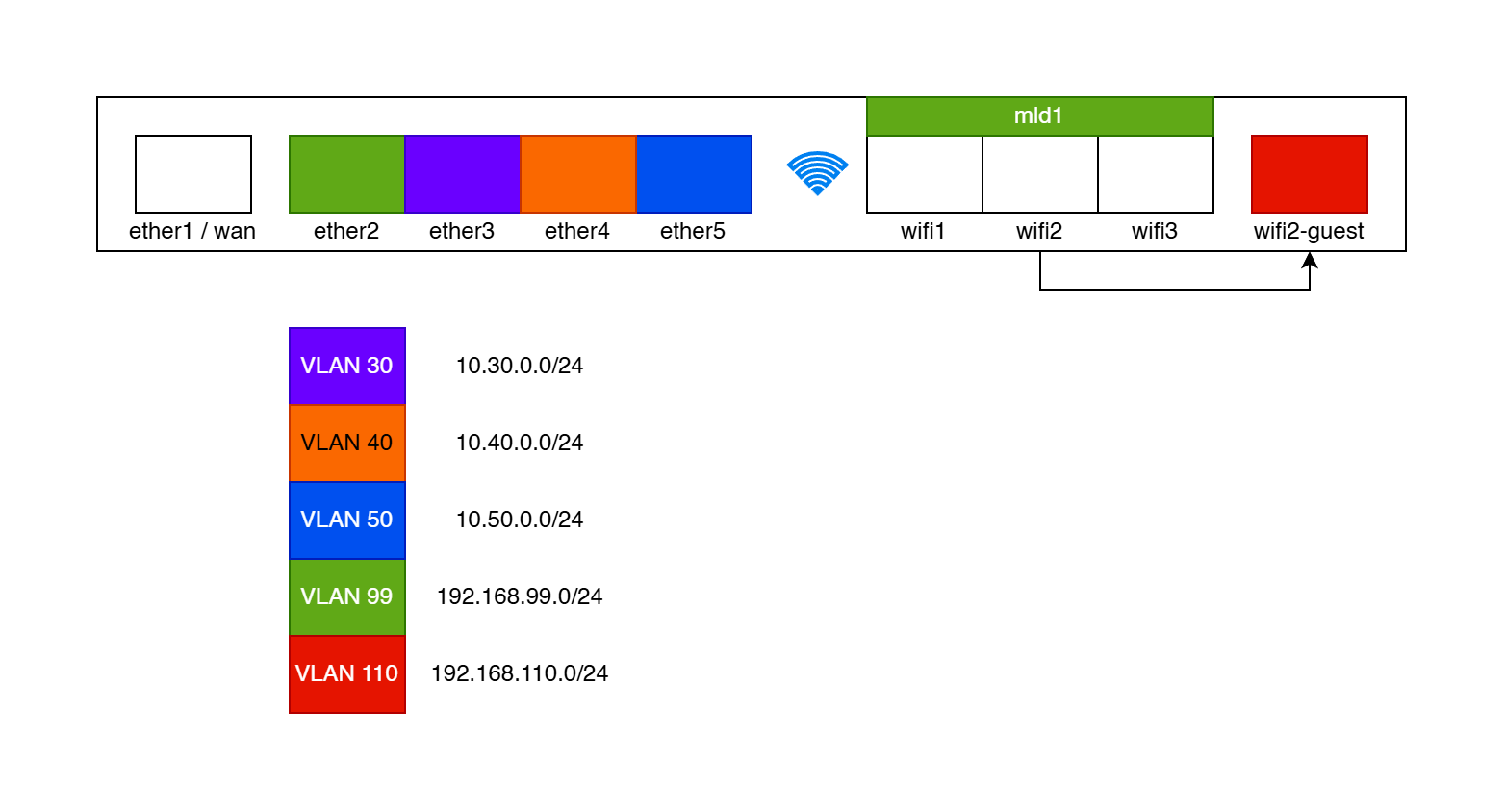
/interface vlan
add comment=GUEST-WIFI interface=bridge name=vlan110 vlan-id=110

/interface list member
add comment=vlan110@VLAN-WAN-ONLY interface=vlan110 list=VLAN-WAN-ONLY
add comment=bridge-vlan110 interface=vlan110 list=LAN

/ip dhcp-server network
add address=192.168.110.0/24 comment=bridge-vlan110 dns-server=192.168.110.1 gateway=192.168.110.1

/ip pool
add name=vlan110-pool ranges=192.168.110.10-192.168.110.200

/ip address
add address=192.168.110.0/24 comment=bridge/vlan110 interface=vlan110 \
    network=192.168.110.0

/ip dhcp-server
add address-pool=vlan110-pool comment=bridge-vlan110 interface=vlan110 name=\
    vlan110-server

/interface wifi
add comment=GUEST configuration.mode=ap .ssid=\
    MikroTik-XXXXXX disabled=no mac-address=XX:XX:XX:XX:XX:XX \
    master-interface=wifi2 name=wifi2-guest security.authentication-types=\
    wpa2-psk,wpa3-psk

/interface bridge port
add bridge=bridge frame-types=admit-only-untagged-and-priority-tagged \
    interface=wifi2-guest pvid=110

/interface bridge vlan
add bridge=bridge tagged=bridge untagged=wifi2-guest vlan-ids=110
I tried allowing DHCP on the firewall, but I think it still cannot resolve the gateway (192.168.110.1) through ARP?
Here is my current firewall rules:
/ip firewall filter
add action=accept chain=input comment=\
    "defconf: accept established,related,untracked" connection-state=\
    established,related,untracked
add action=drop chain=input comment="defconf: drop invalid" connection-state=\
    invalid log=yes
add action=drop chain=input comment="DROP DNS from WAN (tcp)" dst-port=53 \
    in-interface-list=WAN protocol=tcp
add action=drop chain=input comment="DROP DNS from WAN (udp)" dst-port=53 \
    in-interface-list=WAN protocol=udp
add action=accept chain=input comment="defconf: accept ICMP" protocol=icmp
add action=accept chain=input comment=\
    "defconf: accept to local loopback (for CAPsMAN)" dst-address=127.0.0.1 \
    in-interface=lo src-address=127.0.0.1
# -- BEGIN are these necessary?
add action=accept chain=input comment="accept DNS from LAN (tcp)" dst-port=53 \
    in-interface-list=LAN protocol=tcp
add action=accept chain=input comment="accept DNS from LAN (udp)" dst-port=53 \
    in-interface-list=LAN protocol=udp
add action=accept chain=input comment="accept DHCP from LAN" dst-port=67,68 \
    in-interface-list=LAN protocol=udp
# -- END are these necessary?
# otherwise, only allow access from MGMT
add action=drop chain=input comment="DROP all not coming from MGMT" \
    in-interface-list=!MGMT log=yes
add action=drop chain=input comment="defconf: drop all not coming from LAN" \
    disabled=yes in-interface-list=!LAN
add action=accept chain=forward comment="defconf: accept in ipsec policy" \
    ipsec-policy=in,ipsec
add action=accept chain=forward comment="defconf: accept out ipsec policy" \
    ipsec-policy=out,ipsec
add action=fasttrack-connection chain=forward comment="defconf: fasttrack" \
    connection-state=established,related
add action=accept chain=forward comment=\
    "defconf: accept established,related, untracked" connection-state=\
    established,related,untracked
add action=drop chain=forward comment="defconf: drop invalid" \
    connection-state=invalid
add action=drop chain=forward comment=\
    "DROP isolated VLANs access to non-WAN interfaces" connection-state=\
    !established in-interface-list=VLAN-WAN-ONLY log=yes out-interface-list=\
    !WAN
add action=drop chain=forward comment=\
    "defconf: drop all from WAN not DSTNATed" connection-nat-state=!dstnat \
    in-interface-list=WAN
Any help is very appreciated!
UPDATE: So I think I found why my guest wifi was not working. It was a typo in the /ip address section, should have specified address=192.168.110.1/24 but set address=192.168.110.0/24 instead. I also need to allow DNS in the firewall and remove the DHCP filters.
/ip address
add address=192.168.110.1/24 comment=bridge/vlan110 interface=vlan110 \
    network=192.168.110.0