VLAN setup for wireless router

Hello everyone!

I am setting up a hAP be3 Media for home use. I'm not well experienced with networking and have read/skimmed some documentations. I wish to setup my network as follows:
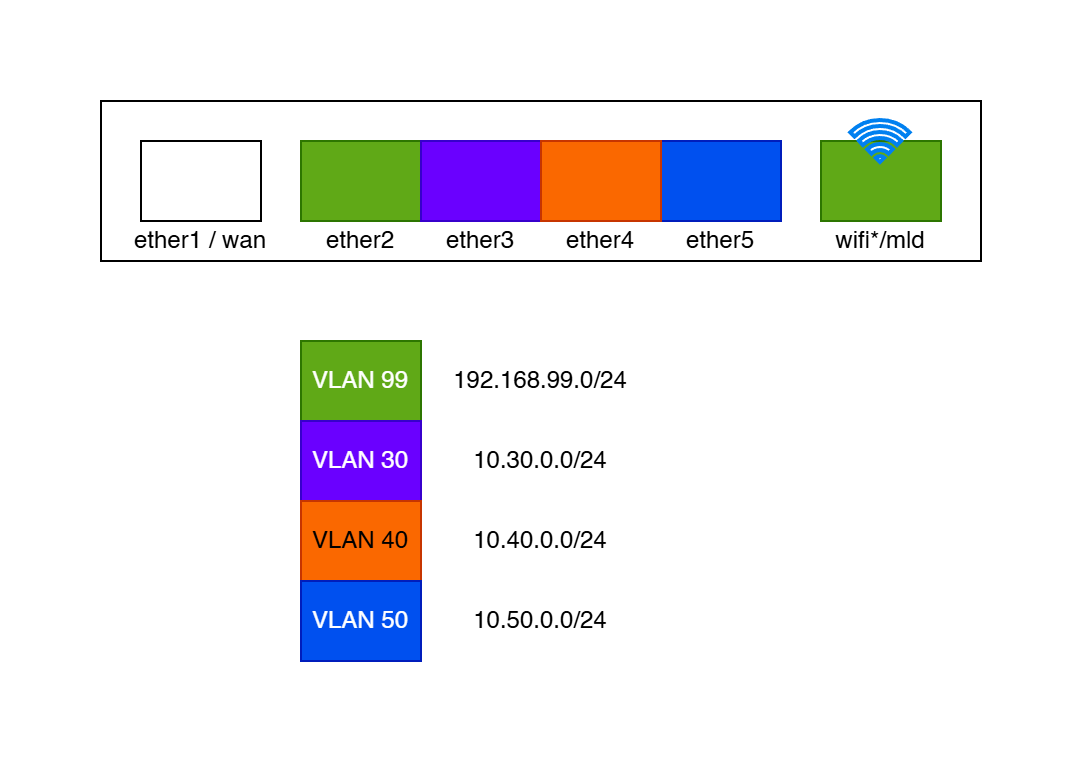
I set up VLAN 99 as the default trusted/management VLAN with shared addresses between ether2 and wifi/mld. VLAN 30/40/50 are untrusted/isolated and have their own address pools. (I will probably add another wifi+VLAN for guest access in the future.)

However, the wifi VLAN setup was problematic because the DHCP keep failing with the message "vlan99-server offering lease 192.168.99.XXX for XX:XX:XX:XX:XX:XX without success". I think it was because I had set the bridge VLAN 99 with mld* as tagged. Removing this solved the problem, but I don't know whether this is intended behaviour or proper setup :sweat_smile:

This is my current work-in-progress script:

/interface list
add comment=defconf name=WAN
add comment=defconf name=LAN
add name=MGMT
/ip neighbor discovery-settings
set add-dns-entries=yes discover-interface-list=LAN
/ipv6 settings
set disable-ipv6=yes
/ip dhcp-server network
add address=10.30.0.0/24 comment=bridge1-vlan30 dns-server=10.30.0.1 gateway=10.30.0.1
add address=10.40.0.0/24 comment=bridge1-vlan40 dns-server=10.40.0.1 gateway=10.40.0.1
add address=10.50.0.0/24 comment=bridge1-vlan50 dns-server=10.50.0.1 gateway=10.50.0.1
add address=192.168.88.0/24 comment=defconf dns-server=192.168.88.1 gateway=192.168.88.1
add address=192.168.99.0/24 comment=bridge1-vlan99 dns-server=192.168.99.1 gateway=192.168.99.1
/ip dns static
add address=192.168.88.1 comment=defconf name=router.lan type=A
/ip pool
add name=default-dhcp ranges=192.168.88.10-192.168.88.254
add name=vlan30-pool ranges=10.30.0.10-10.30.0.200
add name=vlan40-pool ranges=10.40.0.10-10.40.0.200
add name=vlan50-pool ranges=10.50.0.10-10.50.0.200
add name=vlan99-pool ranges=192.168.99.10-192.168.99.200
/ipv6 firewall address-list
add address=::/128 comment="defconf: unspecified address" list=bad_ipv6
add address=::1/128 comment="defconf: lo" list=bad_ipv6
add address=fec0::/10 comment="defconf: site-local" list=bad_ipv6
add address=::ffff:0.0.0.0/96 comment="defconf: ipv4-mapped" list=bad_ipv6
add address=::/96 comment="defconf: ipv4 compat" list=bad_ipv6
add address=100::/64 comment="defconf: discard only " list=bad_ipv6
add address=2001:db8::/32 comment="defconf: documentation" list=bad_ipv6
add address=2001:10::/28 comment="defconf: ORCHID" list=bad_ipv6
add address=3ffe::/16 comment="defconf: 6bone" list=bad_ipv6
/interface bridge
add admin-mac=XX:XX:XX:XX:XX:XX auto-mac=no comment=defconf frame-types=admit-only-vlan-tagged name=bridge vlan-filtering=yes
/interface ppp-client
add apn=internet name=ppp-out1 port=usb2
/interface wifi
add configuration.ssid=MikroTik-XXXXXX disabled=no mac-address=XX:XX:XX:XX:XX:XX mld-name=mld-XXXXXX name=mld1 security.authentication-types=wpa3-psk
set [ find default-name=wifi1 ] channel.band=2ghz-be .skip-dfs-channels=10min-cac .width=20/40mhz configuration.dtim-period=3 .mode=ap .ssid=MikroTik-XXXXXX .tx-power=5 disabled=no mld-interface=mld1 \
    security.authentication-types=wpa2-psk,wpa3-psk .ft=no .ft-over-ds=no
set [ find default-name=wifi2 ] channel.band=5ghz-be .skip-dfs-channels=10min-cac .width=20/40/80mhz configuration.dtim-period=3 .mode=ap .ssid=MikroTik-XXXXXX .tx-power=5 disabled=no mld-interface=mld1 \
    security.authentication-types=wpa2-psk,wpa3-psk .ft=no .ft-over-ds=no
set [ find default-name=wifi3 ] channel.band=6ghz-be .skip-dfs-channels=10min-cac .width=20/40/80/160/320mhz configuration.dtim-period=3 .mode=ap .ssid=MikroTik-XXXXXX .tx-power=5 disabled=no \
    mld-interface=mld1 security.authentication-types=wpa3-psk .ft=no .ft-over-ds=no
/interface vlan
add comment=bridge-vlan30 interface=bridge name=vlan30 vlan-id=30
add comment=bridge-vlan40 interface=bridge name=vlan40 vlan-id=40
add comment=bridge-vlan50 interface=bridge name=vlan50 vlan-id=50
add comment=bridge-vlan99 interface=bridge name=vlan99 vlan-id=99
/disk settings
set auto-media-interface=bridge auto-media-sharing=yes auto-smb-sharing=yes
/interface list member
add comment=defconf interface=bridge list=LAN
add comment=defconf interface=ether1 list=WAN
add comment=bridge-vlan99 interface=vlan99 list=LAN
add comment=bridge-vlan30 interface=vlan30 list=LAN
add comment=bridge-vlan30 interface=vlan40 list=LAN
add comment=bridge-vlan50 interface=vlan50 list=LAN
add comment=bridge-vlan99@MGMT interface=vlan99 list=MGMT
/ip address
add address=192.168.88.1/24 comment=defconf interface=bridge network=192.168.88.0
add address=10.30.0.1/24 comment=bridge/vlan30 interface=vlan30 network=10.30.0.0
add address=10.40.0.1/24 comment=bridge/vlan40 interface=vlan40 network=10.40.0.0
add address=10.50.0.1/24 comment=bridge/vlan50 interface=vlan50 network=10.50.0.0
add address=192.168.99.1/24 comment=bridge/vlan99 interface=vlan99 network=192.168.99.0
/ip dhcp-client
# Interface not active
add comment=defconf interface=ether1 name=client1
/ip dhcp-server
add add-dns-entries=yes address-pool=default-dhcp disabled=yes interface=bridge name=defconf
add add-dns-entries=yes address-pool=vlan30-pool comment=bridge-vlan30 interface=vlan30 name=vlan30-server
add add-dns-entries=yes address-pool=vlan40-pool comment=bridge-vlan40 interface=vlan40 name=vlan40-server
add add-dns-entries=yes address-pool=vlan50-pool comment=bridge-vlan50 interface=vlan50 name=vlan50-server
add add-dns-entries=yes address-pool=vlan99-pool comment=bridge-vlan99 interface=vlan99 name=vlan99-server
/ip dns
set allow-remote-requests=yes verify-doh-cert=yes
/ip firewall filter
add action=accept chain=input comment="defconf: accept established,related,untracked" connection-state=established,related,untracked
add action=drop chain=input comment="defconf: drop invalid" connection-state=invalid
add action=accept chain=input comment="defconf: accept ICMP" protocol=icmp
add action=accept chain=input comment="defconf: accept to local loopback (for CAPsMAN)" dst-address=127.0.0.1 in-interface=lo src-address=127.0.0.1
add action=drop chain=input comment="defconf: drop all not coming from LAN" in-interface-list=!LAN
add action=accept chain=forward comment="defconf: accept in ipsec policy" ipsec-policy=in,ipsec
add action=accept chain=forward comment="defconf: accept out ipsec policy" ipsec-policy=out,ipsec
add action=fasttrack-connection chain=forward comment="defconf: fasttrack" connection-state=established,related
add action=accept chain=forward comment="defconf: accept established,related, untracked" connection-state=established,related,untracked
add action=drop chain=forward comment="defconf: drop invalid" connection-state=invalid
add action=drop chain=forward comment="defconf: drop all from WAN not DSTNATed" connection-nat-state=!dstnat in-interface-list=WAN
/ip firewall nat
add action=masquerade chain=srcnat comment="defconf: masquerade" ipsec-policy=out,none out-interface-list=WAN
/ipv6 firewall filter
add action=accept chain=input comment="defconf: accept established,related,untracked" connection-state=established,related,untracked
add action=drop chain=input comment="defconf: drop invalid" connection-state=invalid
add action=accept chain=input comment="defconf: accept ICMPv6" protocol=icmpv6
add action=accept chain=input comment="defconf: accept UDP traceroute" dst-port=33434-33534 protocol=udp
add action=accept chain=input comment="defconf: accept DHCPv6-Client prefix delegation." dst-port=546 protocol=udp src-address=fe80::/10
add action=accept chain=input comment="defconf: accept IKE" dst-port=500,4500 protocol=udp
add action=accept chain=input comment="defconf: accept ipsec AH" protocol=ipsec-ah
add action=accept chain=input comment="defconf: accept ipsec ESP" protocol=ipsec-esp
add action=accept chain=input comment="defconf: accept all that matches ipsec policy" ipsec-policy=in,ipsec
add action=drop chain=input comment="defconf: drop everything else not coming from LAN" in-interface-list=!LAN
add action=fasttrack-connection chain=forward comment="defconf: fasttrack6" connection-state=established,related
add action=accept chain=forward comment="defconf: accept established,related,untracked" connection-state=established,related,untracked
add action=drop chain=forward comment="defconf: drop invalid" connection-state=invalid
add action=drop chain=forward comment="defconf: drop packets with bad src ipv6" src-address-list=bad_ipv6
add action=drop chain=forward comment="defconf: drop packets with bad dst ipv6" dst-address-list=bad_ipv6
add action=drop chain=forward comment="defconf: rfc4890 drop hop-limit=1" hop-limit=equal:1 protocol=icmpv6
add action=accept chain=forward comment="defconf: accept ICMPv6" protocol=icmpv6
add action=accept chain=forward comment="defconf: accept HIP" protocol=139
add action=accept chain=forward comment="defconf: accept IKE" dst-port=500,4500 protocol=udp
add action=accept chain=forward comment="defconf: accept ipsec AH" protocol=ipsec-ah
add action=accept chain=forward comment="defconf: accept ipsec ESP" protocol=ipsec-esp
add action=accept chain=forward comment="defconf: accept all that matches ipsec policy" ipsec-policy=in,ipsec
add action=drop chain=forward comment="defconf: drop everything else not coming from LAN" in-interface-list=!LAN
/tool mac-server
set allowed-interface-list=LAN
/tool mac-server mac-winbox
set allowed-interface-list=LAN
/interface wifi
add comment=defconf configuration.mode=ap .ssid=MikroTik-XXXXXX-IoT mac-address=XX:XX:XX:XX:XX:XX master-interface=wifi1 name=iot-wifi security.authentication-types=wpa2-psk
/interface bridge port
add bridge=bridge comment=defconf frame-types=admit-only-untagged-and-priority-tagged interface=ether2 pvid=99
add bridge=bridge comment=defconf frame-types=admit-only-untagged-and-priority-tagged interface=ether3 pvid=30
add bridge=bridge comment=defconf frame-types=admit-only-untagged-and-priority-tagged interface=ether4 pvid=40
add bridge=bridge comment=defconf frame-types=admit-only-untagged-and-priority-tagged interface=ether5 pvid=50
add bridge=bridge comment=defconf frame-types=admit-only-untagged-and-priority-tagged interface=mld1 pvid=99
add bridge=bridge comment=defconf disabled=yes frame-types=admit-only-untagged-and-priority-tagged interface=iot-wifi pvid=100
add bridge=bridge frame-types=admit-only-untagged-and-priority-tagged interface=wifi1 pvid=99
add bridge=bridge frame-types=admit-only-untagged-and-priority-tagged interface=wifi2 pvid=99
add bridge=bridge frame-types=admit-only-untagged-and-priority-tagged interface=wifi3 pvid=99
/interface bridge vlan
add bridge=bridge comment=vlan30 tagged=ether3 vlan-ids=30
add bridge=bridge comment=vlan40 tagged=ether4 vlan-ids=40
add bridge=bridge comment=vlan50 tagged=ether5 vlan-ids=50
add bridge=bridge comment=vlan99 tagged=ether2 vlan-ids=99
# iot-wifi not a bridge port
add bridge=bridge comment=vlan100 disabled=yes tagged=iot-wifi vlan-ids=100

I have not got around to setting up the firewall to isolate the VLANs yet, so any tips are much appreciated.

Thank you very much in advance! :blush:

When you add a port to a VLAN, you can make it tagged of untugged

For tagged port each frame gets a 802.1Q tag with VLAN ID, that mean all devices on the other side should also be configured to accept this tag. Your WiFi devices weren't aware of it, so they weren't able to see the DHCP response.

It is also a good practice to mark a port with DHCP server as trusted, enable DHCP snooping and then enable bridge filtering. That way, you gonna be sure regular users wouldn't be able to run their own DHCP servers on VLAN to spoof it.

Once you configure VLANs, you will have separate broadcast domains and you will need to create virtual VLAN interface in each VLAN to connect it to the routing and then use firewall filters to configure firewall between vlans.

Tips? Yes. If you are posting in Beginner Basics, implement 1 vLAN at a time. It is quicker to find the learning points that way and therefore quicker overall to implement a Grand Plan.

Also, leave 1 port of your router or switch not vLAN'd, so you can get back in if you make a mistake.

Try this: Free RouterOS configuration generator (browser-based, no account)

Also: always use safe-mode, and have a console cable:)

Does it's router have console port at all? Mabe the internal soldering pads exist but I doubt easy connecting.

Sorry, you are right. This model (sadly) doesn't have one. Which makes safe-mode even more important.

I don't use MikroTik for wifi and don't have an hAP be3 Media router (only RB760iGS and RB5009).

My question is are any of the wired LAN ports (ether2-ether4) working? It doesn't seem possible that they are because you are transmitting frames with tags but only allowing untagged frames to be received.

This is the part I am addressing:

I don't think you need the /interface bridge vlan section at all, ROS will dynamically add the stuff to the vlan table based on your addition of vlan interfaces (/interface vlan) and specifying pvids on the /interface bridge port settings.

Ahhh, that's what I suspected.

This was the after like 5-6 times of trial and error :grinning_face_with_smiling_eyes:

Wiil do this one! I think it's safe to just leave the ether2 without VLAN.

I learned about safe mode after being locked out the first time :laughing:

It seems to be working. I tried to plug on each of the ports and checked that I got an IP address. Should I not set them, not set the interfaces as tagged in the bridge VLAN settings? It's probably why my wifi was not working before.

Ahhh, I was under the impression that you need to add those bridge VLANs. Is it only applicable when it's for any downstream switches and devices? Will probably remove those though!

Thank you all for the feedback! :heart:

Hello everyone!

So a bit of update. I haven't touched my VLAN setup yet other than removing the unnecessary bridge VLAN. I'm not sure if I can just omit ether2 from the VLAN since the bridge is setup to admit only tagged. Probably need to remove that or create separate bridge for ether2?

On the firewall side, I have setup a filter to drop any packets from the isolated VLANs other than to WAN. Not sure if this is the correct way to do it, but I tested ether3 and it seems to work as expected?

# ADD INTERFACE LIST FOR ISOLATED VLANS

/interface list
add comment=defconf name=WAN
add comment=defconf name=LAN
add name=MGMT
add comment=VLAN-WAN-ONLY name=VLAN-WAN-ONLY
/interface list member
add comment=defconf interface=bridge list=LAN
add comment=defconf interface=ether1 list=WAN
add comment=bridge-vlan99 interface=vlan99 list=LAN
add comment=bridge-vlan30 interface=vlan30 list=LAN
add comment=bridge-vlan30 interface=vlan40 list=LAN
add comment=bridge-vlan50 interface=vlan50 list=LAN
add comment=bridge-vlan99@MGMT interface=vlan99 list=MGMT
add comment=ether2@MGMT interface=bridge list=MGMT
add comment=vlan30@VLAN-WAN-ONLY interface=vlan30 list=VLAN-WAN-ONLY
add comment=vlan40@VLAN-WAN-ONLY interface=vlan40 list=VLAN-WAN-ONLY
add comment=vlan50@VLAN-WAN-ONLY interface=vlan50 list=VLAN-WAN-ONLY

# ADD FIREWALL FILTER TO DROP PACKETS CROSSING VLANS

/ip firewall filter
add action=accept chain=input comment="defconf: accept established,related,untracked" connection-state=established,related,untracked
add action=drop chain=input comment="defconf: drop invalid" connection-state=invalid
add action=accept chain=input comment="defconf: accept ICMP" protocol=icmp
add action=accept chain=input comment="defconf: accept to local loopback (for CAPsMAN)" dst-address=127.0.0.1 in-interface=lo src-address=127.0.0.1
# -- begin custom drop filter
add action=drop chain=forward comment="DROP isolated VLANs access to non-WAN interfaces" connection-state=!established in-interface-list=VLAN-WAN-ONLY log=yes out-interface-list=!WAN
# -- end custom drop filter
add action=drop chain=input comment="defconf: drop all not coming from LAN" in-interface-list=!LAN
add action=accept chain=forward comment="defconf: accept in ipsec policy" ipsec-policy=in,ipsec
add action=accept chain=forward comment="defconf: accept out ipsec policy" ipsec-policy=out,ipsec
add action=fasttrack-connection chain=forward comment="defconf: fasttrack" connection-state=established,related
add action=accept chain=forward comment="defconf: accept established,related, untracked" connection-state=established,related,untracked
add action=drop chain=forward comment="defconf: drop invalid" connection-state=invalid
add action=drop chain=forward comment="defconf: drop all from WAN not DSTNATed" connection-nat-state=!dstnat in-interface-list=WAN
/ip firewall nat
add action=masquerade chain=srcnat comment="defconf: masquerade" ipsec-policy=out,none out-interface-list=WAN

I also found that winbox/webfix/etc were accessible from the isolated VLANs, so I set stricter subnet for all the services. Again, not sure if this is the proper way to do this. I can still curl the webfig URL, but it returns empty reply. I think it should have not been able to connect at all. Maybe I need a firewall rule?

/ip service
set ftp available-from=192.168.88.0/24,192.168.99.0/24
set ssh available-from=192.168.88.0/24,192.168.99.0/24
set telnet available-from=192.168.88.0/24,192.168.99.0/24
set www available-from=192.168.88.0/24,192.168.99.0/24
set www-ssl available-from=192.168.88.0/24,192.168.99.0/24
set reverse-proxy available-from=192.168.88.0/24,192.168.99.0/24
set winbox available-from=192.168.88.0/24,192.168.99.0/24
set api available-from=192.168.88.0/24,192.168.99.0/24
set api-ssl available-from=192.168.88.0/24,192.168.99.0/24

Tips are appreciated! :heart:

Yes, it's better to use firewall rules, both IPv4 and IPv6, that filter by interface lists (only allows the MGMT interface list for example).

Also don't forget that MAC WinBox is not affected by the settings under /ip service or the firewall at all (neither IPv4 nor IPv6) firewall. You need to filter MAC WinBox access by interface list, as example, to enable MAC WinBox for the MGMT list while turning off MAC Telnet and MAC Ping:

/tool mac-server
set allowed-interface-list=none
/tool mac-server mac-winbox
set allowed-interface-list=MGMT
/tool mac-server ping
set enabled=no

What should I set as the destination to block access to winfig/winbox/etc? Deny from vlan30 to 10.30.0.1 port 80? *Do I need to specify it one by one for each VLAN?

I have set the following:

/tool mac-server
set allowed-interface-list=MGMT
/tool mac-server mac-winbox
set allowed-interface-list=MGMT

I think the others are enabled by default.

If you read in on this forum, usually in setups with strict access to the router involving a separate management interface, there is a drop all rule (really drop all, not only drop if not from LAN) at the bottom of the input chain. Then above it, still for the input chain you have the usual "accept established,related,untracked" rule, the "drop invalid" rule and the "accept ICMP" rule.

Then you should have an explicit accept rules on the input chain above the "drop all" rule for the MGMT in-inteface-list, that will cover the access to those services above. If the router also acts as DNS server for the LAN devices, then you can add the two rules accepting UDP & TCP 53 for in-interface-list=LAN.

The action=drop chain=input rule at the bottom will ensure that everything else trying to connect to the router is dropped.

This is MAC Telnet and probably shouldn't be enabled because it's not encrypted. And the only use I've seen is in some MikroTik videos when connecting from one router to another without IP addresses.

there are two "builtin" interface lists. "none" is the "null" list, and "all" is "every interface"

So to "disable" MAC Telnet (you can do everything using winbox, i.e. you can create a "terminal" in winbox), but WinBox uses AES128-CBC-SHA as an encryption algorithm.

/tool mac-server
set allowed-interface-list=none

If you issue a reset-configuration no-defaults=yes ... then if the value isn't overridden the "default" will be all.

And then do an export it won't show anything unless you use export verbose.

With export verbose will display all the "raw default" values (as opposed to the "defconf" values set by the script that sets up the router similar to a home router, i.e. with firewall, ip addresses, WAN and LAN (bridged) interfaces.

[demo@MikroTik] > /tool/mac-server/export verbose
# 2026-10-07 09:56:14 by RouterOS 7.23.8
# software id = ****-****
#
# model = RB760iGS
# serial number = ************
/tool mac-server
set allowed-interface-list=all
/tool mac-server mac-winbox
set allowed-interface-list=all
/tool mac-server ping
set enabled=yes

In the full reset state, it has to enable it so you are not locked out.

Just in case:
Once and for all COMPLETE Offbridge Port setup

The Free RouterOS configuration generator (browser-based, no account) tool will always generate an explicit /interface bridge vlan section in the configs it generates, but it will create "consistent" entries.

There are times that you must have the /interface bridge vlan section in the config. Specifically, when you are configuring a device as a switch, where the switch is aware of vlans and bridge-port vlan membership, but there are no vlan interfaces for the vlan on the device. The vlan interfaces are for layer 3 (ip operations), the vlan table is for layer 2 (mac switching operations).

Here's what I expected the section to look like (if the /interface bridge vlan section was there). In fact, this is what the generation tool will create for "access ports".

/interface bridge port
add bridge=bridge comment="genconf" frame-types=admit-only-untagged-and-priority-tagged ingress-filtering=yes interface=ether2 pvid=99
add bridge=bridge comment="genconf" frame-types=admit-only-untagged-and-priority-tagged ingress-filtering=yes interface=ether3 pvid=30
add bridge=bridge comment="genconf" frame-types=admit-only-untagged-and-priority-tagged ingress-filtering=yes interface=ether4 pvid=40
add bridge=bridge comment="genconf" frame-types=admit-only-untagged-and-priority-tagged ingress-filtering=yes interface=ether5 pvid=50

/interface bridge vlan
add bridge=bridge comment="vlan99" tagged=bridge untagged=ether2 vlan-ids=99
add bridge=bridge comment="vlan30" tagged=bridge untagged=ether3 vlan-ids=30
add bridge=bridge comment="vlan40" tagged=bridge untagged=ether4 vlan-ids=40
add bridge=bridge comment="vlan50" tagged=bridge untagged=ether5 vlan-ids=50

If I understand correctly, chain=input is for any request to the router (e.g. for webfig/winbox/etc), chain=forward is for between devices connected to the router (including bridge?), chain=output is for the router to any devices on LAN/WAN?

So I just need to drop everything from input except for the MGMT interfaces?

Got it, will disable that.

*Updated my firewall filters as follows:

/ip firewall filter
add action=accept chain=input comment="defconf: accept established,related,untracked" connection-state=established,related,untracked
add action=drop chain=input comment="defconf: drop invalid" connection-state=invalid
add action=accept chain=input comment="defconf: accept ICMP" protocol=icmp
add action=accept chain=input comment="defconf: accept to local loopback (for CAPsMAN)" dst-address=127.0.0.1 in-interface=lo src-address=127.0.0.1
# -- DROP input not from MGMT
add action=drop chain=input comment="DROP all not coming from MGMT" in-interface-list=!MGMT
# -- disabled default config
add action=drop chain=input comment="defconf: drop all not coming from LAN" disabled=yes in-interface-list=!LAN
add action=drop chain=forward comment="DROP isolated VLANs access to non-WAN interfaces" connection-state=!established in-interface-list=VLAN-WAN-ONLY log=yes out-interface-list=!WAN
add action=accept chain=forward comment="defconf: accept in ipsec policy" ipsec-policy=in,ipsec
add action=accept chain=forward comment="defconf: accept out ipsec policy" ipsec-policy=out,ipsec
add action=fasttrack-connection chain=forward comment="defconf: fasttrack" connection-state=established,related
add action=accept chain=forward comment="defconf: accept established,related, untracked" connection-state=established,related,untracked
add action=drop chain=forward comment="defconf: drop invalid" connection-state=invalid
add action=drop chain=forward comment="defconf: drop all from WAN not DSTNATed" connection-nat-state=!dstnat in-interface-list=WAN
/ip firewall nat
add action=masquerade chain=srcnat comment="defconf: masquerade" ipsec-policy=out,none out-interface-list=WAN

Thank you for the information!

Ahh, okay. I need to use the verbose option.

Got it! I will try to re-add the VLAN table, if just for documentation.

Thank you for the information!

Great to know, thanks!

Here is an input file from when I was playing with your configuration.

Things that are not "standard" defaults for the tool

  1. I disabled the bogon filter (because I don't know if you are using your router behind another router.
  2. blocked ping from internet. This does not block the necessary icmp traffic, it just makes the router not respond to pings from the internet. This is easy to control with the config generator, it is just an on/off switch.
  3. You vlans and ip addressing schemes are different than the tool generates by default.
  4. This was generated with so it will use your existing users. If you reset, you need to make sure you select keep-users=yes

mtmt-MA53UG+HbeH-office.json (11.6 KB)

mtmt-MA53UG+HbeH-office.rsc (11.6 KB) This is the generated .rsc that corresponds to the inputs in the .json file

mtmt-MA53UG+HbeH-office.pdf (193.3 KB) this is the "handover sheet the tool generates, it't useful for documentation.

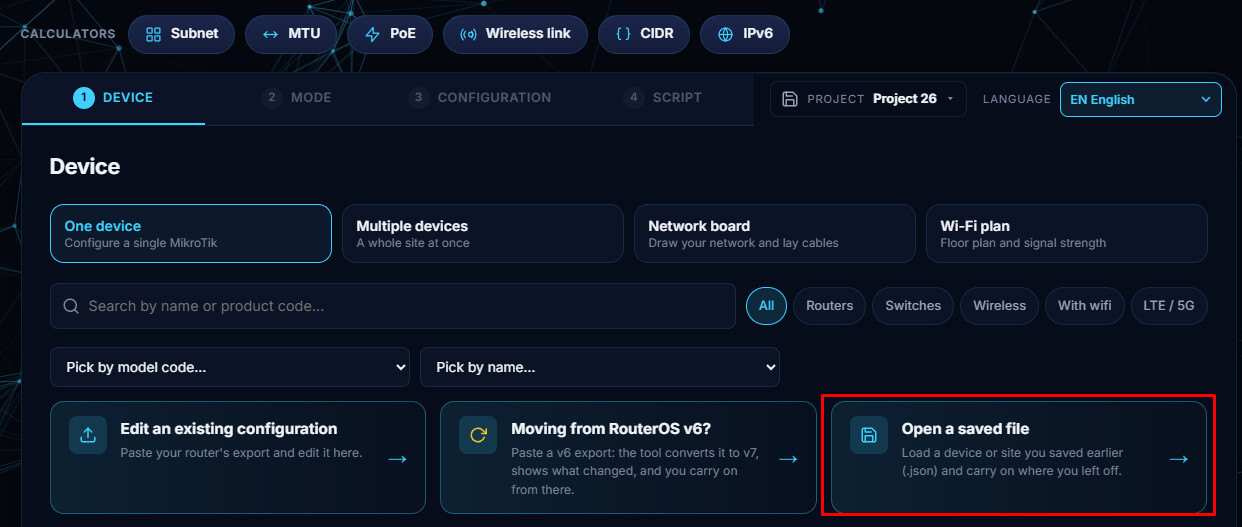
To load the .json file, start the config tool, then select "Open a saved file".