VLAN : struggling with hybrid port

Hi !

First , I’d like to thank @anav for pointing me toward http://forum.mikrotik.com/t/using-routeros-to-vlan-your-network/126489/1

I have an access point from Ubiquiti, with Network1 (untagged) and Network100 ( tagged with vlan id 100), they are both connected to ether3( which has a PVID of 50 ).
I have router setup to server DHCP adress on VLAN 50 and VLAN 100.


With the below config my untagged trafic is tagged at the port level ( ether3 ) with vlan id 50 and can reach the dhcp server to get an IP.
I tried to setup an hybrid port so the tagged trafic ( with vlan 100) would reach the dhcp server for vlan 100 but it fails..

/system identity set name="Mikrotik"

/interface bridge add name=BR1

/interface bonding add mode=802.3ad name=bond1 slaves=ether7,ether8

/interface bridge port
add bridge=BR1 interface=ether1
add bridge=BR1 interface=ether2 pvid=50
add bridge=BR1 interface=ether3 pvid=50
add bridge=BR1 interface=ether4 pvid=50
add bridge=BR1 interface=ether5 pvid=50
add bridge=BR1 interface=ether6 pvid=50
add bridge=BR1 interface=bond1 pvid=50
add bridge=BR1 interface=sfp-sfpplus1 pvid=50

/interface bridge vlan add bridge=BR1 tagged=ether1 untagged=ether2,ether4,ether5,ether6,bond1,sfp-sfpplus1,BR1 vlan-ids=50
/interface bridge vlan add bridge=BR1 tagged=ether1 vlan-ids=100
/interface bridge vlan set bridge=BR1 tagged=ether3 [find vlan-ids=100]

/interface bridge set BR1 vlan-filtering=yes

I’m not sure where to go from here ( change network1 to use vlan id 50 and remove the pvid from ether3 maybe? )

I’d be glad for suggestions at this point!

Thanks !!
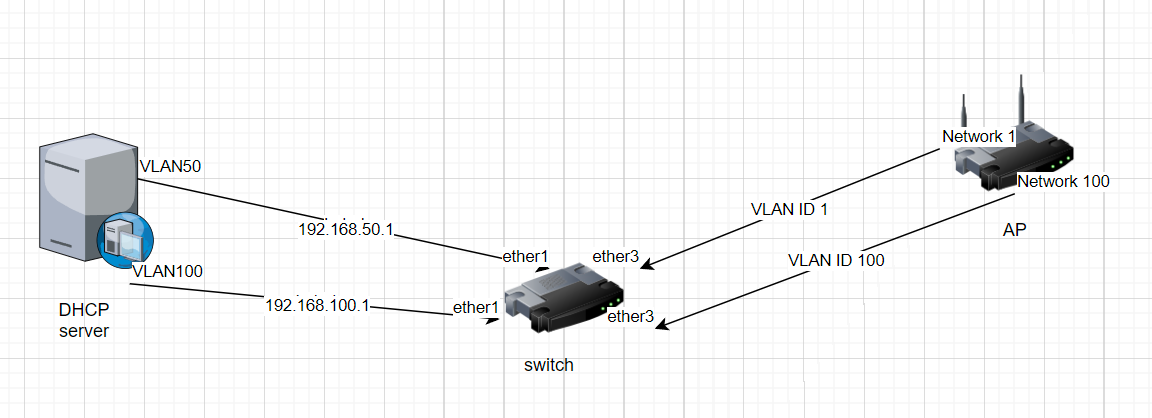
vlan.png

Not a clue …
Your diagram does not identify which device is the MT??
The switch make is not identified either, ( able to read vlans?)
Your MT config is not complete
/export file=anynameyouwish ( minus router serial number and any public WANIP information)

The first command sets tagged members of VLAN 100 to “ether1”. The second command replaces list of tagged members of VLAN 100 with “ether3” (so it removes “ether1” from the list). Command set replaces property setting with new value, it doesn’t append it. So you actually want to execute

/interface bridge vlan set bridge=BR1 tagged=ether1,ether3 [find vlan-ids=100]

Yes, it’s awkward and it sucks, but that’s the way it is. There is no friendly way of maintaining VLAN port membership (add or remove a single port).

Hi!

@anav, the model of the MT device is RB5009UPr+S+ ( I know that it’s a very capable router that I sadly under utilize, but I want it like that :slight_smile: )

here’s the the export file:

# 1970-01-02 00:11:44 by RouterOS 7.13
# software id = PDRU-DC9W
#
# model = RB5009UPr+S+
# serial number = XXXXXXXXXX
/interface bridge
add name=BR1 vlan-filtering=yes
/interface bonding
add mode=802.3ad name=bond1 slaves=ether7,ether8
/interface wireless security-profiles
set [ find default=yes ] supplicant-identity=MikroTik
/interface bridge port
add bridge=BR1 interface=ether1
add bridge=BR1 interface=ether2 pvid=50
add bridge=BR1 interface=ether3 pvid=50
add bridge=BR1 interface=ether4 pvid=50
add bridge=BR1 interface=ether5 pvid=50
add bridge=BR1 interface=ether6 pvid=50
add bridge=BR1 interface=bond1 pvid=50
add bridge=BR1 interface=sfp-sfpplus1 pvid=50
/interface bridge vlan
add bridge=BR1 tagged=ether1 untagged=\
    ether2,ether4,ether5,ether6,bond1,sfp-sfpplus1,BR1 vlan-ids=50
/system identity
set name=Mikrotik
/system note
set show-at-login=no

weirldy, the above export doesn’t show

/interface bridge vlan set bridge=BR1 tagged=ether1,ether3 [find vlan-ids=100]

(I ran the command again another time before doing the export to confirm).

@mkx maybe I misunderstood you, but replacing:

/interface bridge vlan add bridge=BR1 tagged=ether1 vlan-ids=100
/interface bridge vlan set bridge=BR1 tagged=ether3 [find vlan-ids=100]

with

/interface bridge vlan set bridge=BR1 tagged=ether1,ether3 [find vlan-ids=100]

doesn’t work but it put me on the right track !!!

I managed to finally make it work with:

/interface bridge vlan add bridge=BR1 tagged=ether1,ether3 vlan-ids=100

I hope this is not a lucky misconfig ( in which case I’d be happy to read the correct one )

Here’s all the command I ran starting from

/system reset-configuration no-defaults=yes

(so it may help others in the same case ) :

/system identity set name="Mikrotik"

/interface bridge add name=BR1

/interface bonding add mode=802.3ad name=bond1 slaves=ether7,ether8

/interface bridge port
add bridge=BR1 interface=ether1
add bridge=BR1 interface=ether2 pvid=50
add bridge=BR1 interface=ether3 pvid=50
add bridge=BR1 interface=ether4 pvid=50
add bridge=BR1 interface=ether5 pvid=50
add bridge=BR1 interface=ether6 pvid=50
add bridge=BR1 interface=bond1 pvid=50
add bridge=BR1 interface=sfp-sfpplus1 pvid=50

/interface bridge vlan add bridge=BR1 tagged=ether1 untagged=ether2,ether4,ether5,ether6,bond1,sfp-sfpplus1,BR1 vlan-ids=50
/interface bridge vlan add bridge=BR1 tagged=ether1,ether3 vlan-ids=100

/interface bridge set BR1 vlan-filtering=yes

Thanks a ton for your help !!!

So which device is the MT, what you call the switch?
Where is the rest of the config, like the firewall rules etc… or are you saying the RB5009 is only acting as a switch?

You did great. My suggested command was replacing only the second command line … in case you wanted to execute the first command as you showed it for some reason.

The RB5009 … as mentioned, it’s awful waste of resources, but it makes a good switch anyway.

In that case…

https://forum.mikrotik.com/viewtopic.php?t=182276

Where the RB5009 gets an IP on the trusted subnet/vlan.
As far as hybrid ports go
/interface bridge port
add bridge=bridge interface=etherAP pivd=XX ( where the pvid is the one vlan that is going to the AP device untagged )

/interface bridge vlan
add bridge=bridge tagged=bridge,ether1 untagged=etherAP vlan-id=XX ( where ether1 is the incoming tagged port from DHCP device )
add bridge=bridge tagged=ether1,etherAP vlan-id=ZZ ( which handles the tagged vlan coming from DHCP device to AP )

Note the bridge is included in the first rule assuming that the untagged vlan to the ap device is also the managment or trusted vlan, otherwise the bridge would not be tagged.