Hello all, this is my first post so go easy.
Im struggling with VLAN setup on my Mikrotic Chateau 5g with a unifi switch and unifi access points. I’d like my network to look similar to the below diagram. I have no specific firewall rules between VLANs at the moment. I wanted to keep everything open until i got IP address assignments fully resolved. The diagram doesnt show a full list of devices but gives an idea of the structure.
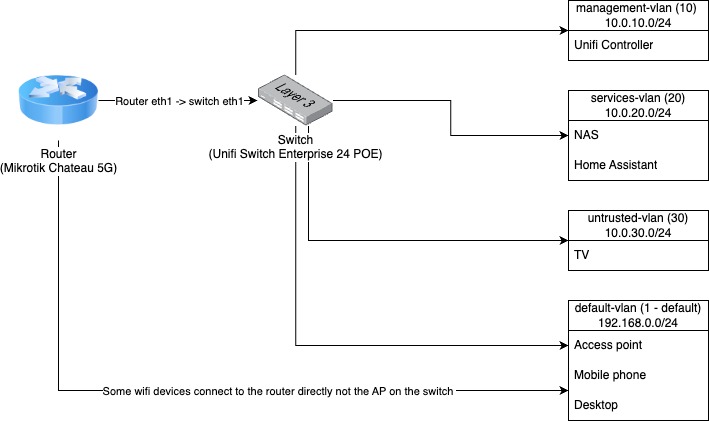
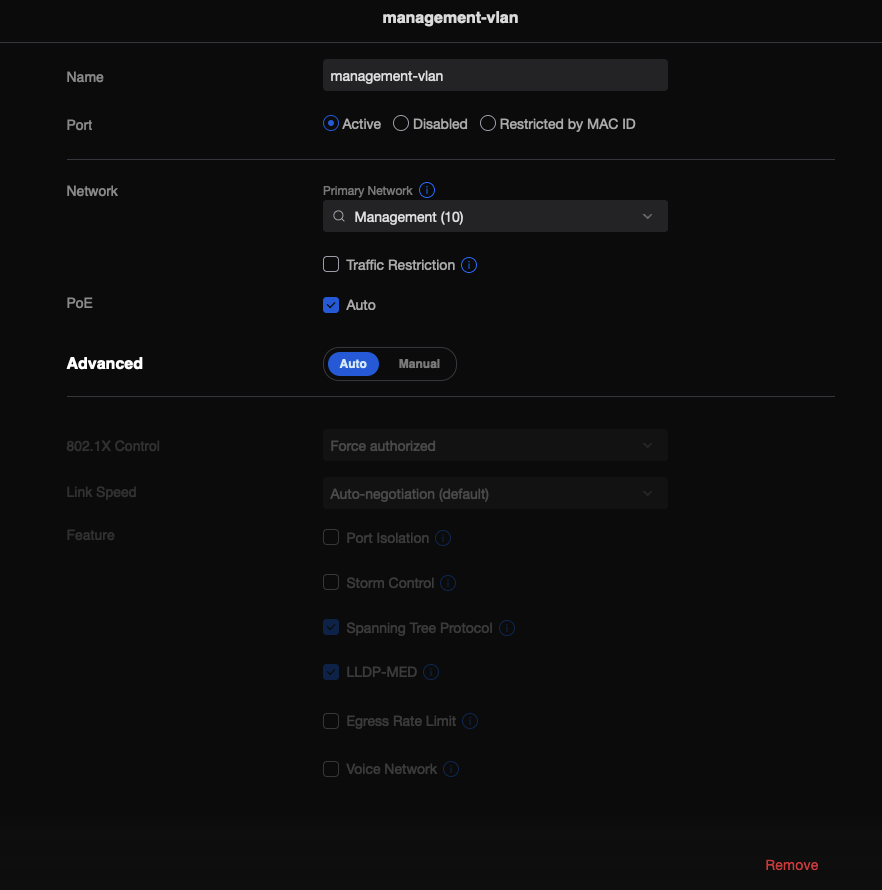
I have setup 3 VLANs in the router, and on the unifi controller managing the unifi switch enterprise 24 poe and wireless access points i have setup 3 networks for my 3 tagged VLANs. I understand that on the unifi side it should be as simple as creating the VLAN networks with a 3rd party gateway. I created a port profile setting the default VLAN to the VLAN i want that port to be tagged with and then assigned the port profile to my port. These are shown in the screenshots below.

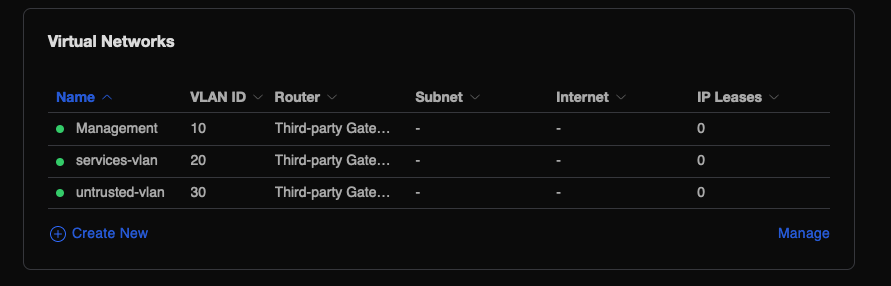
I expected any untagged traffic to be provided an IP address directly to the bridge default pool (I assume this may be where my problem lies but im unsure). This seems to work, all devices connected to the switch without a port profile are simply provided an IP from my default range in the bridge directly. The default pool is currently directly on the bridge but i plan to move this to its own VLAN in the future. This is basically so i can try not to disturb the entire network at once and i can slowly move devices into each vlan bit by bit.
On trying to assign a VLAN tag port profile to a device attached to my unifi switch, the device attached to the tagged access port only gets a self assigned IP and doent seem to use an IP address from the dhcp pool for that VLAN (I have tried all of the VLANs to no avail). Im stumped as to what im doing wrong. Am i missing something in the Mikrotik config?
# 2023-10-10 11:30:05 by RouterOS 7.10.2
# software id = PUHY-IU22
#
# model = D53G-5HacD2HnD
# serial number = xxxx
/interface bridge
add admin-mac=xxxxx auto-mac=no comment=defconf name=bridge vlan-filtering=yes

/interface vlan
add interface=bridge name=management-vlan vlan-id=10
add interface=bridge name=services-vlan vlan-id=20
add interface=bridge name=untrusted-vlan vlan-id=30

/interface list
add comment=defconf name=WAN
add comment=defconf name=LAN

/ip pool
add name=default-vlan ranges=192.168.0.100-192.168.0.199
add name=services-vlan ranges=10.0.20.100-10.0.20.254
add name=management-vlan ranges=10.0.10.100-10.0.10.254
add name=untrusted-vlan ranges=10.0.30.100-10.0.30.254

/ip dhcp-server
add address-pool=default-vlan interface=bridge name=dhcp-server
add address-pool=services-vlan interface=services-vlan name=services-vlan
add address-pool=management-vlan interface=management-vlan name=management-vlan
add address-pool=untrusted-vlan interface=untrusted-vlan name=untrusted-vlan

/interface bridge port
add bridge=bridge comment=defconf frame-types=admit-only-untagged-and-priority-tagged interface=ether1
add bridge=bridge comment=defconf interface=ether2
add bridge=bridge comment=defconf interface=ether3
add bridge=bridge comment=defconf interface=ether4
add bridge=bridge comment=defconf interface=ether5
add bridge=bridge comment=defconf interface=wlan1
add bridge=bridge comment=defconf interface=wlan2

/interface bridge vlan
add bridge=bridge tagged=bridge,ether1 vlan-ids=10
add bridge=bridge tagged=bridge,ether1 vlan-ids=20
add bridge=bridge tagged=bridge,ether1 vlan-ids=30

/interface list member
add comment=defconf interface=bridge list=LAN
add comment=defconf interface=lte1 list=WAN
add interface=wireguard1 list=LAN

/ip address
add address=192.168.0.1/24 comment=default-vlan interface=bridge network=192.168.0.0
add address=10.0.20.1/24 comment=services-vlan interface=services-vlan network=10.0.20.0
add address=10.0.10.1/24 comment=management-vlan interface=management-vlan network=10.0.10.0
add address=10.0.30.1/24 comment=untrusted-vlan interface=untrusted-vlan network=10.0.30.0

/ip dhcp-server network
add address=10.0.10.0/24 dns-server=10.0.10.1 gateway=10.0.10.1
add address=10.0.20.0/24 dns-server=10.0.20.1 gateway=10.0.20.1
add address=10.0.30.0/24 dns-server=10.0.30.1 gateway=10.0.30.1
add address=192.168.0.0/24 dns-server=192.168.0.1 gateway=192.168.0.1

/ip dns
set allow-remote-requests=yes servers=9.9.9.9

/ip dns static
add address=192.168.0.1 name=router.lan

/ip firewall filter
add action=accept chain=input comment="defconf: accept established,related,untracked" connection-state=established,related,untracked
add action=accept chain=input comment="defconf: accept ICMP" protocol=icmp
add action=accept chain=input comment="defconf: accept to local loopback (for CAPsMAN)" dst-address=127.0.0.1
add action=drop chain=input comment="defconf: drop all not coming from LAN" in-interface-list=!LAN
add action=fasttrack-connection chain=forward comment="defconf: fasttrack" connection-state=established,related hw-offload=yes
add action=accept chain=forward comment="defconf: accept established,related, untracked" connection-state=established,related,untracked
add action=drop chain=input comment="defconf: drop invalid" connection-state=invalid
add action=drop chain=forward comment="defconf: drop all from WAN not DSTNATed" connection-nat-state=!dstnat connection-state=new in-interface-list=WAN

/ip firewall nat
add action=masquerade chain=srcnat comment="defconf: masquerade" ipsec-policy=out,none out-interface-list=WAN
add action=accept chain=srcnat

/ipv6 firewall address-list
add address=::/128 comment="defconf: unspecified address" list=bad_ipv6
add address=::1/128 comment="defconf: lo" list=bad_ipv6
add address=fec0::/10 comment="defconf: site-local" list=bad_ipv6
add address=::ffff:0.0.0.0/96 comment="defconf: ipv4-mapped" list=bad_ipv6
add address=::/96 comment="defconf: ipv4 compat" list=bad_ipv6
add address=100::/64 comment="defconf: discard only " list=bad_ipv6
add address=2001:db8::/32 comment="defconf: documentation" list=bad_ipv6
add address=2001:10::/28 comment="defconf: ORCHID" list=bad_ipv6
add address=3ffe::/16 comment="defconf: 6bone" list=bad_ipv6

/ipv6 firewall filter
add action=accept chain=input comment="defconf: accept established,related,untracked" connection-state=established,related,untracked
add action=drop chain=input comment="defconf: drop invalid" connection-state=invalid
add action=accept chain=input comment="defconf: accept ICMPv6" protocol=icmpv6
add action=accept chain=input comment="defconf: accept UDP traceroute" port=33434-33534 protocol=udp
add action=accept chain=input comment="defconf: accept DHCPv6-Client prefix delegation." dst-port=546 protocol=udp src-address=fe80::/10
add action=accept chain=input comment="defconf: accept IKE" dst-port=500,4500 protocol=udp
add action=accept chain=input comment="defconf: accept ipsec AH" protocol=ipsec-ah
add action=accept chain=input comment="defconf: accept ipsec ESP" protocol=ipsec-esp
add action=accept chain=input comment="defconf: accept all that matches ipsec policy" ipsec-policy=in,ipsec
add action=drop chain=input comment="defconf: drop everything else not coming from LAN" in-interface-list=!LAN
add action=accept chain=forward comment="defconf: accept established,related,untracked" connection-state=established,related,untracked
add action=drop chain=forward comment="defconf: drop invalid" connection-state=invalid
add action=drop chain=forward comment="defconf: drop packets with bad src ipv6" src-address-list=bad_ipv6
add action=drop chain=forward comment="defconf: drop packets with bad dst ipv6" dst-address-list=bad_ipv6
add action=drop chain=forward comment="defconf: rfc4890 drop hop-limit=1" hop-limit=equal:1 protocol=icmpv6
add action=accept chain=forward comment="defconf: accept ICMPv6" protocol=icmpv6
add action=accept chain=forward comment="defconf: accept HIP" protocol=139
add action=accept chain=forward comment="defconf: accept IKE" dst-port=500,4500 protocol=udp
add action=accept chain=forward comment="defconf: accept ipsec AH" protocol=ipsec-ah
add action=accept chain=forward comment="defconf: accept ipsec ESP" protocol=ipsec-esp
add action=accept chain=forward comment="defconf: accept all that matches ipsec policy" ipsec-policy=in,ipsec
add action=drop chain=forward comment="defconf: drop everything else not coming from LAN" in-interface-list=!LAN