hi,
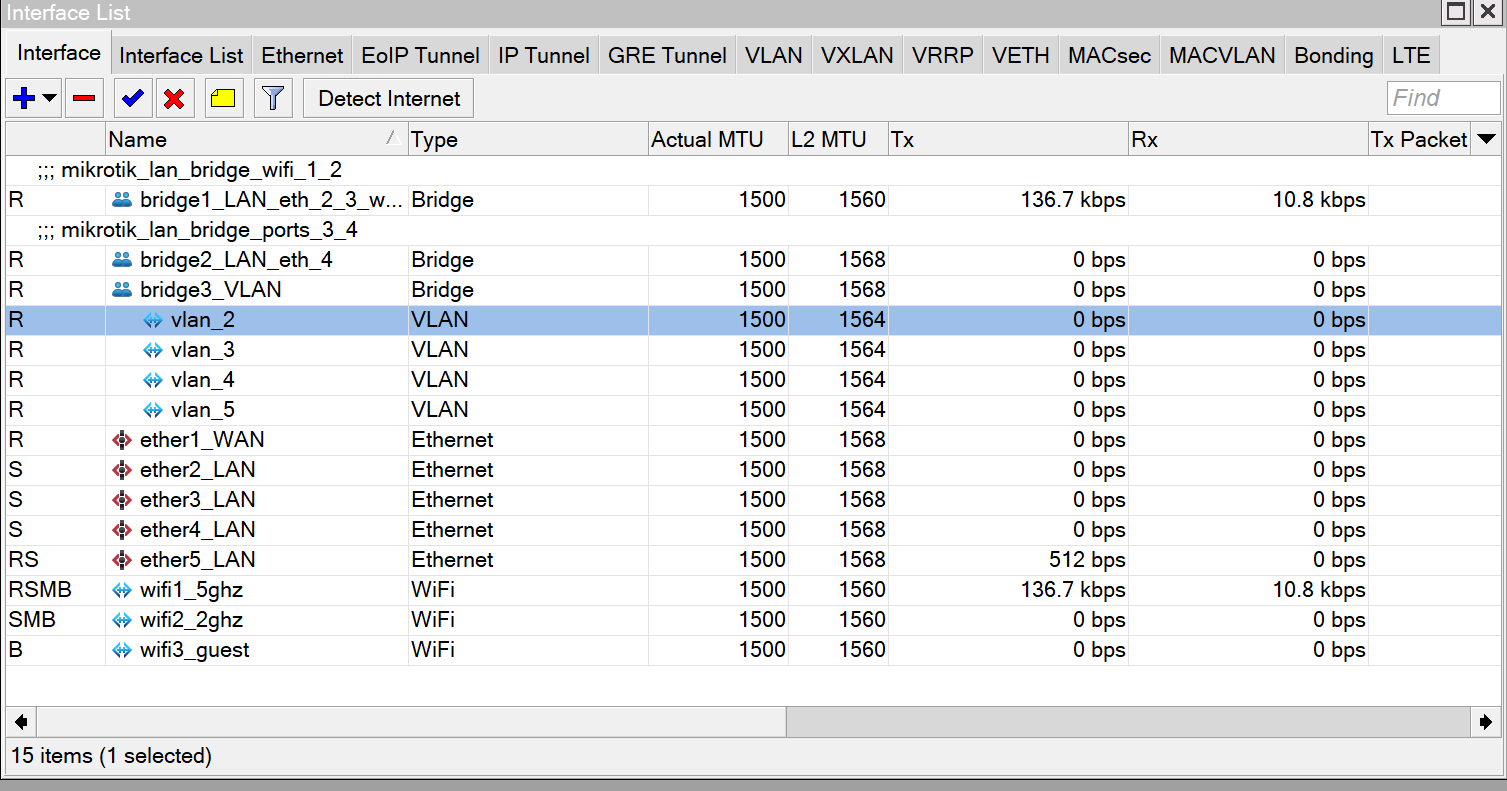
I created 4 VLAN interface under a bridge directly , this bridge contains the trunk eth port.
Therefore i didnt bring the VLAN interfaces under the bridge but are created under the bridge interface, is this correct?
second question one of the VLANS is a VLAN = 1 , i created this VLAN so i could see if the DHCP would assign an IP to my Laptop which of course is sitting opn the default VLAN =1.. this is not happening as there must be some root issue.
any ideas?
ciao,
Hello, can you export your configuration here so we can see what did you do. It’s hard to say anything without config.
I wouldn’t use VLAN1 at all, define some other VLAN for management. VLAN1 should work only in the background.
Also this ax2 is your router or is it used as AP/switch ?
Hi,
the router is my router, so i took out some details like MAC addresses etc..
If I define another VLAN for managment hoiw can I fool the computer that he is under that Management VLAN?
ciao,
# 2024-02-09 19:49:48 by RouterOS 7.13.3
# software id = METC-NDW4
#
# model = C52iG-5HaxD2HaxD
# serial number =
/interface bridge
add comment=mikrotik_lan_bridge_wifi_1_2 name=bridge1_LAN_eth_2_3_wifi_1_2 \
    port-cost-mode=short
add comment=mikrotik_lan_bridge_ports_3_4 name=bridge2_LAN_eth_4 \
    port-cost-mode=short
add name=bridge3_VLAN
/interface ethernet
set [ find default-name=ether1 ] name=ether1_WAN
set [ find default-name=ether2 ] name=ether2_LAN
set [ find default-name=ether3 ] name=ether3_LAN
set [ find default-name=ether4 ] name=ether4_LAN
set [ find default-name=ether5 ] name=ether5_LAN
/interface vlan
add interface=bridge3_VLAN name=vlan1_default_test vlan-id=1
add interface=bridge3_VLAN name=vlan_3 vlan-id=3
add interface=bridge3_VLAN name=vlan_4 vlan-id=4
add interface=bridge3_VLAN name=vlan_5 vlan-id=5
/interface wifi channel
add band=2ghz-ax disabled=no name=channel1 width=20/40mhz-eC
add band=5ghz-ax disabled=no frequency=5500,5660,5580,5180 name=channel2
/interface wifi
set [ find default-name=wifi1 ] channel=channel2 channel.band=5ghz-ax \
    .skip-dfs-channels=disabled configuration.country=Italy .mode=ap .ssid=\
    Mikrotik_5 disabled=no name=wifi1_5ghz security.authentication-types=\
    wpa-psk,wpa2-psk
set [ find default-name=wifi2 ] channel=channel1 channel.band=2ghz-ax .width=\
    20/40mhz configuration.country=Italy .mode=ap .ssid=Mikrotik_2 disabled=\
    no name=wifi2_2ghz security.authentication-types=wpa-psk,wpa2-psk
add configuration.mode=ap .ssid=Mikrotik_guest_appa disabled=no mac-address=\
     master-interface=wifi2_2ghz name=wifi3_guest \
    security.authentication-types=wpa-psk,wpa2-psk
/ip pool
add name=dhcp_pool0 ranges=172.22.22.10-172.22.22.200
add name=dhcp_pool1 ranges=172.22.0.10-172.22.0.200
add name=dhcp_pool2 ranges=172.22.1.10-172.22.1.200
add name=dhcp_pool_VLAN_3 ranges=172.22.3.10-172.22.3.200
add name=dhcp_pool_VLAN_4 ranges=172.22.4.10-172.22.4.200
add name=dhcp_pool_VLAN_5 ranges=172.22.5.10-172.22.5.200
add name=dhcp_pool_VLAN_1_default ranges=172.22.11.10-172.22.11.200
/ip dhcp-server
add address-pool=dhcp_pool0 interface=bridge1_LAN_eth_2_3_wifi_1_2 \
    lease-time=1d name=dhcp1
add address-pool=dhcp_pool1 interface=wifi3_guest lease-time=1d name=dhcp2
add address-pool=dhcp_pool2 interface=bridge2_LAN_eth_4 lease-time=1d name=\
    dhcp3
add address-pool=dhcp_pool_VLAN_3 interface=vlan_3 lease-time=1d name=\
    dhcp_VLAN_3
add address-pool=dhcp_pool_VLAN_4 interface=vlan_4 lease-time=1d name=\
    dhcp_VLAN_4
add address-pool=dhcp_pool_VLAN_5 interface=vlan_5 lease-time=1d name=\
    dhcp_VLAN_5
add address-pool=dhcp_pool_VLAN_1_default interface=vlan1_default_test \
    lease-time=1d name=dhcp_VLAN_1
/interface bridge port
add bridge=bridge1_LAN_eth_2_3_wifi_1_2 interface=ether2_LAN \
    internal-path-cost=10 path-cost=10
add bridge=bridge1_LAN_eth_2_3_wifi_1_2 interface=ether3_LAN \
    internal-path-cost=10 path-cost=10
add bridge=bridge1_LAN_eth_2_3_wifi_1_2 interface=wifi1_5ghz \
    internal-path-cost=10 path-cost=10
add bridge=bridge1_LAN_eth_2_3_wifi_1_2 interface=wifi2_2ghz \
    internal-path-cost=10 path-cost=10
add bridge=bridge2_LAN_eth_4 interface=ether4_LAN internal-path-cost=10 \
    path-cost=10
add bridge=bridge3_VLAN disabled=yes interface=vlan_3
add bridge=bridge3_VLAN interface=ether5_LAN
add bridge=bridge3_VLAN disabled=yes interface=vlan_4
add bridge=bridge3_VLAN disabled=yes interface=vlan_5
add bridge=bridge3_VLAN disabled=yes interface=vlan1_default_test
/interface bridge vlan
add bridge=bridge3_VLAN vlan-ids=3
add bridge=bridge3_VLAN vlan-ids=4
add bridge=bridge3_VLAN vlan-ids=5
/ip address
add address=172.22.22.1/24 interface=bridge1_LAN_eth_2_3_wifi_1_2 network=\
    172.22.22.0
add address=172.22.0.1/24 interface=wifi3_guest network=172.22.0.0
add address=172.22.1.1/24 interface=bridge2_LAN_eth_4 network=172.22.1.0
add address=172.22.3.1/24 interface=vlan_3 network=172.22.3.0
add address=172.22.4.0/24 interface=vlan_4 network=172.22.4.0
add address=172.22.5.0/24 interface=vlan_5 network=172.22.5.0
add address=172.22.11.0/24 interface=vlan1_default_test network=172.22.11.0
/ip dhcp-client
add interface=ether1_WAN
/ip dhcp-server alert
add disabled=no interface=bridge1_LAN_eth_2_3_wifi_1_2 on-alert=\
    ": log error= \"not valid DHCP server Bridge_1\"" valid-server=\

add disabled=no interface=bridge2_LAN_eth_4 on-alert=\
    ":log error= \" not valid DHCP server bridge_2\"" valid-server=\

add disabled=no interface=wifi3_guest on-alert=\
    ":log error=\"not valid DHCP server wifi_guest\"" valid-server=\

/ip dhcp-server network
add address=172.22.0.0/24 gateway=172.22.0.1
add address=172.22.1.0/24 gateway=172.22.1.1
add address=172.22.3.0/24 gateway=172.22.3.1
add address=172.22.4.0/24 gateway=172.22.4.1
add address=172.22.5.0/24 gateway=172.22.5.1
add address=172.22.11.0/24 gateway=172.22.11.1
add address=172.22.22.0/24 comment=LAN_HOME gateway=172.22.22.1
/ip firewall address-list
add address=172.22.0.0/24 list=block_porn
add address=172.22.1.0/24 list=block_porn
add address=172.22.3.0/24 list=block_porn
add address=172.22.22.0/24 list=block_porn
/ip firewall filter
add action=drop chain=input comment="if not 172.22.22.0/24 drop ping" \
    protocol=icmp src-address=172.22.0.0/24
add action=drop chain=input comment="block port scanners" src-address-list=\
    port_scanners
add action=fasttrack-connection chain=forward connection-state=\
    established,related hw-offload=no
add action=accept chain=forward connection-state=established,related
add action=add-src-to-address-list address-list=port_scanners \
    address-list-timeout=1d chain=input comment="port scanner detector" \
    protocol=tcp psd=21,3s,3,1
add action=drop chain=forward connection-nat-state="" connection-state=\
    invalid
add action=drop chain=forward connection-nat-state=!dstnat connection-state=\
    new in-interface=ether1_WAN
/ip firewall nat
add action=masquerade chain=srcnat out-interface=ether1_WAN
add action=dst-nat chain=dstnat comment="block porn on guest wifi" dst-port=\
    53 protocol=udp src-address-list=block_porn to-addresses=208.67.222.123 \
    to-ports=53
/ip service
set telnet disabled=yes
set ftp disabled=yes
set www disabled=yes
set ssh address=172.22.22.0/24 port=2222
set api disabled=yes
set winbox address=172.22.1.0/24,172.22.22.0/24,172.22.3.0/24
set api-ssl disabled=yes
/system clock
set time-zone-name=Europe/Rome
/system note
set show-at-login=no
You should use only one bridge, you have 3 bridges here !!
You need 4 VLANs right ? so use VLANs 2,3,4,5. Don’t use VLAN1
/interface vlan
add interface=bridge name=vlan_2 vlan-id=2
add interface=bridge name=vlan_3 vlan-id=3
add interface=bridge name=vlan_4 vlan-id=4
add interface=bridge name=vlan_5 vlan-id=5
You created DHCP servers and assign them to VLAN interfaces, that’s good, only change I would made here is from this:
add address-pool=dhcp_pool_VLAN_1_default interface=vlan1_default_test \
lease-time=1d name=dhcp_VLAN_1
To this:
add address-pool=dhcp_pool_VLAN_2 interface=vlan_2 \
lease-time=1d name=dhcp_VLAN_2
And rename address pool for that DHCP server to:
add name=dhcp_pool_VLAN_2 ranges=172.22.11.10-172.22.11.200
You messed up here:
/interface bridge port
add bridge=bridge1_LAN_eth_2_3_wifi_1_2 interface=ether2_LAN \
internal-path-cost=10 path-cost=10
add bridge=bridge1_LAN_eth_2_3_wifi_1_2 interface=ether3_LAN \
internal-path-cost=10 path-cost=10
add bridge=bridge1_LAN_eth_2_3_wifi_1_2 interface=wifi1_5ghz \
internal-path-cost=10 path-cost=10
add bridge=bridge1_LAN_eth_2_3_wifi_1_2 interface=wifi2_2ghz \
internal-path-cost=10 path-cost=10
add bridge=bridge2_LAN_eth_4 interface=ether4_LAN internal-path-cost=10 \
path-cost=10
add bridge=bridge3_VLAN disabled=yes interface=vlan_3
add bridge=bridge3_VLAN interface=ether5_LAN
add bridge=bridge3_VLAN disabled=yes interface=vlan_4
add bridge=bridge3_VLAN disabled=yes interface=vlan_5
add bridge=bridge3_VLAN disabled=yes interface=vlan1_default_test
You should add only ports here, not VLAN interfaces and it should look like this without VLANs:
/interface bridge port
add bridge=bridge interface=ether2 internal-path-cost=10 path-cost=10
add bridge=bridge interface=ether3 internal-path-cost=10 path-cost=10
add bridge=bridge interface=ether4 internal-path-cost=10 path-cost=10
add bridge=bridge interface=ether5 internal-path-cost=10 path-cost=10
add bridge=bridge interface=wifi1 internal-path-cost=10 path-cost=10
add bridge=bridge interface=wifi2 internal-path-cost=10 path-cost=10
Then you need specify which port will be used as trunk, which ports will be untagged for which VLAN and which VLAN will be management VLAN. On that VLAN should be your PC or device you will use to access to your router. Then we will continue as I can’t configure your VLANs without additonal information.
hi,
I complewted the tyasks as you suggested..
mainly created VLAN 2 and then took out the VLANS from the VLAN bridge
"Then you need specify which port will be used as trunk, which ports will be untagged for which VLAN and which VLAN will be management VLAN. On that VLAN should be your PC or device you will use to access to your router. Then we will continue as I can’t configure your VLANs without additonal information.
I can’t put all those ports under a commeon bridge as they are already under other bridges..
can’t we just use the VLAN bridge i created with port 5 as the trunk port transporting all the VLANS?
I attached a picture with how i crewated the VLANS and the rest..
2024-02-09 20:39:46 by RouterOS 7.13.3
# software id = METC-NDW4
#
# model = C52iG-5HaxD2HaxD
# s
/interface bridge
add comment=mikrotik_lan_bridge_wifi_1_2 name=bridge1_LAN_eth_2_3_wifi_1_2 \
    port-cost-mode=short
add comment=mikrotik_lan_bridge_ports_3_4 name=bridge2_LAN_eth_4 \
    port-cost-mode=short
add name=bridge3_VLAN
/interface ethernet
set [ find default-name=ether1 ] name=ether1_WAN
set [ find default-name=ether2 ] name=ether2_LAN
set [ find default-name=ether3 ] name=ether3_LAN
set [ find default-name=ether4 ] name=ether4_LAN
set [ find default-name=ether5 ] name=ether5_LAN
/interface vlan
add interface=bridge3_VLAN name=vlan_2 vlan-id=2
add interface=bridge3_VLAN name=vlan_3 vlan-id=3
add interface=bridge3_VLAN name=vlan_4 vlan-id=4
add interface=bridge3_VLAN name=vlan_5 vlan-id=5
/interface wifi channel
add band=2ghz-ax disabled=no name=channel1 width=20/40mhz-eC
add band=5ghz-ax disabled=no frequency=5500,5660,5580,5180 name=channel2
/interface wifi
set [ find default-name=wifi1 ] channel=channel2 channel.band=5ghz-ax \
    .skip-dfs-channels=disabled configuration.country=Italy .mode=ap .ssid=\
    Mikrotik_5 disabled=no name=wifi1_5ghz security.authentication-types=\
    wpa-psk,wpa2-psk
set [ find default-name=wifi2 ] channel=channel1 channel.band=2ghz-ax .width=\
    20/40mhz configuration.country=Italy .mode=ap .ssid=Mikrotik_2 disabled=\
    no name=wifi2_2ghz security.authentication-types=wpa-psk,wpa2-psk
add configuration.mode=ap .ssid=Mikrotik_guest_appa disabled=no mac-address=\
    master-interface=wifi2_2ghz name=wifi3_guest \
    security.authentication-types=wpa-psk,wpa2-psk
/ip pool
add name=dhcp_pool0 ranges=172.22.22.10-172.22.22.200
add name=dhcp_pool1 ranges=172.22.0.10-172.22.0.200
add name=dhcp_pool2 ranges=172.22.1.10-172.22.1.200
add name=dhcp_pool_VLAN_3 ranges=172.22.3.10-172.22.3.200
add name=dhcp_pool_VLAN_4 ranges=172.22.4.10-172.22.4.200
add name=dhcp_pool_VLAN_5 ranges=172.22.5.10-172.22.5.200
add name=dhcp_pool_VLAN_2 ranges=172.22.11.10-172.22.11.200
/ip dhcp-server
add address-pool=dhcp_pool0 interface=bridge1_LAN_eth_2_3_wifi_1_2 \
    lease-time=1d name=dhcp1
add address-pool=dhcp_pool1 interface=wifi3_guest lease-time=1d name=dhcp2
add address-pool=dhcp_pool2 interface=bridge2_LAN_eth_4 lease-time=1d name=\
    dhcp3
add address-pool=dhcp_pool_VLAN_3 interface=vlan_3 lease-time=1d name=\
    dhcp_VLAN_3
add address-pool=dhcp_pool_VLAN_4 interface=vlan_4 lease-time=1d name=\
    dhcp_VLAN_4
add address-pool=dhcp_pool_VLAN_5 interface=vlan_5 lease-time=1d name=\
    dhcp_VLAN_5
add address-pool=dhcp_pool_VLAN_2 interface=vlan_2 lease-time=1d name=\
    dhcp_VLAN_2
/interface bridge port
add bridge=bridge1_LAN_eth_2_3_wifi_1_2 interface=ether2_LAN \
    internal-path-cost=10 path-cost=10
add bridge=bridge1_LAN_eth_2_3_wifi_1_2 interface=ether3_LAN \
    internal-path-cost=10 path-cost=10
add bridge=bridge1_LAN_eth_2_3_wifi_1_2 interface=wifi1_5ghz \
    internal-path-cost=10 path-cost=10
add bridge=bridge1_LAN_eth_2_3_wifi_1_2 interface=wifi2_2ghz \
    internal-path-cost=10 path-cost=10
add bridge=bridge2_LAN_eth_4 interface=ether4_LAN internal-path-cost=10 \
    path-cost=10
add bridge=bridge3_VLAN interface=ether5_LAN
/interface bridge vlan
add bridge=bridge3_VLAN vlan-ids=3
add bridge=bridge3_VLAN vlan-ids=4
add bridge=bridge3_VLAN vlan-ids=5
add bridge=bridge3_VLAN vlan-ids=2
/ip address
add address=172.22.22.1/24 interface=bridge1_LAN_eth_2_3_wifi_1_2 network=\
    172.22.22.0
add address=172.22.0.1/24 interface=wifi3_guest network=172.22.0.0
add address=172.22.1.1/24 interface=bridge2_LAN_eth_4 network=172.22.1.0
add address=172.22.3.1/24 interface=vlan_3 network=172.22.3.0
add address=172.22.4.0/24 interface=vlan_4 network=172.22.4.0
add address=172.22.5.0/24 interface=vlan_5 network=172.22.5.0
add address=172.22.11.0/24 interface=vlan_2 network=172.22.11.0
/ip dhcp-client
add interface=ether1_WAN
/ip dhcp-server alert
add disabled=no interface=bridge1_LAN_eth_2_3_wifi_1_2 on-alert=\
    ": log error= \"not valid DHCP server Bridge_1\"" valid-server=\

add disabled=no interface=bridge2_LAN_eth_4 on-alert=\
    ":log error= \" not valid DHCP server bridge_2\"" valid-server=\

add disabled=no interface=wifi3_guest on-alert=\
    ":log error=\"not valid DHCP server wifi_guest\"" valid-server=\

/ip dhcp-server network
add address=172.22.0.0/24 gateway=172.22.0.1
add address=172.22.1.0/24 gateway=172.22.1.1
add address=172.22.3.0/24 gateway=172.22.3.1
add address=172.22.4.0/24 gateway=172.22.4.1
add address=172.22.5.0/24 gateway=172.22.5.1
add address=172.22.11.0/24 gateway=172.22.11.1
add address=172.22.22.0/24 comment=LAN_HOME gateway=172.22.22.1
/ip firewall address-list
add address=172.22.0.0/24 list=block_porn
add address=172.22.1.0/24 list=block_porn
add address=172.22.3.0/24 list=block_porn
add address=172.22.22.0/24 list=block_porn
/ip firewall filter
add action=drop chain=input comment="if not 172.22.22.0/24 drop ping" \
    protocol=icmp src-address=172.22.0.0/24
add action=drop chain=input comment="block port scanners" src-address-list=\
    port_scanners
add action=fasttrack-connection chain=forward connection-state=\
    established,related hw-offload=no
add action=accept chain=forward connection-state=established,related
add action=add-src-to-address-list address-list=port_scanners \
    address-list-timeout=1d chain=input comment="port scanner detector" \
    protocol=tcp psd=21,3s,3,1
add action=drop chain=forward connection-nat-state="" connection-state=\
    invalid
add action=drop chain=forward connection-nat-state=!dstnat connection-state=\
    new in-interface=ether1_WAN
/ip firewall nat
add action=masquerade chain=srcnat out-interface=ether1_WAN
add action=dst-nat chain=dstnat comment="block porn on guest wifi" dst-port=\
    53 protocol=udp src-address-list=block_porn to-addresses=208.67.222.123 \
    to-ports=53
/ip service
set telnet disabled=yes
set ftp disabled=yes
set www disabled=yes
set ssh address=172.22.22.0/24 port=2222
set api disabled=yes
set winbox address=172.22.1.0/24,172.22.22.0/24,172.22.3.0/24
set api-ssl disabled=yes
/system clock
set time-zone-name=Europe/Rome
/system note
set show-at-login=no
One should read this article before proceeding. http://forum.mikrotik.com/t/using-routeros-to-vlan-your-network/126489/1
Dont bother posting with three bridges again.
Why are you insisting on multiple bridges ? They are not needed in your case. @anav … I mean @Mesquite provided you with good tutorial on VLANs.
Which one is Dr. Jekyll and…
jaclaz
February 9, 2024, 8:46pm
10
Once said that the two most common mistakes people make (according to Mikrotik experts) are:
use VLAN 1
use more than one bridge
We are seemingly back to where we were in (utter lack of basic) politeness.
A rose by any other name …
Please, without forum politeness posts again. This topic is about VLANs on ax2.
Mr. Hyde here was direct, no need for three bridges. If OP wants it can be solved with one bridge.
I was referring to the fact that gigabyte recommended one bridge and the OP didnt seem to understand.
jaclaz
February 9, 2024, 9:20pm
13
I guess it is time to invoke Dukhat:http://jdebp.info/FGA/dukhat-on-foolishness.html
Being direct is one thing, “Don’t bother to …” is another.
Asking rethorical questions such as “Why are you insisting on …” doesn’t add anything meaningful to a reply.
If you wish to help the op solve his issues using three bridges then by all means, and I will step aside and assist others.
jaclaz
February 9, 2024, 10:29pm
15
You can well ignore my comments, no time wasted.
I wish I could…
@jaclaz
You can as well ignore other people’s comments and not turn some topic into another discussion. Not defending someone here but I don’t but there was a topic about that, this is about VLANs and I think we should stick to it until we go completely off topic.
@OP
You need to understand that what are you doing is wrong and will have impact on your performance, for eg. Only one bridge per device can be HW offloaded, that means that other bridges needs to be handled by CPU.
You can take them out of the bridge and add to another bridge. When one bridge have no member ports you just delete him.
The simpler the better, you will complicate your life.
hi Gurus’ ,
don’t worry!!
I’m an engineer and like rigor!
i want to do this the right way, have been struggling all night without any success.
i just was fond of my baby
I will create one bridge as the standard proposes and then le’t take it from there..ok guys
for now I need some coffee
ciao,
Guys,
here is the config with only one bridge
the DHCP was saying cant have Dhcp on a slave interface, that wifi guest is created uinder the 2GHZ wifi.
I can clean up everything later or nopw if you thionk better but just want to get the thing running
my PC is running on eth port 5 so was thinking that could be the TRUNK for all the VLANS.
I ordered a mikrotik CRS112-8G-4S-IN but that will come in two weeks so can fine tune this thing to get it working.
ciao,
# 2024-02-10 09:16:58 by RouterOS 7.13.3
# software id = METC-NDW4
#
# model = C52iG-5HaxD2HaxD
# serial number =

/interface bridge
add comment=mikrotik_lan_bridge_wifi_1_2 disabled=yes name=\
    bridge1_LAN_eth_2_3_wifi_1_2 port-cost-mode=short
add comment=mikrotik_lan_bridge_ports_3_4 disabled=yes name=bridge2_LAN_eth_4 \
    port-cost-mode=short
add disabled=yes name=bridge3_VLAN vlan-filtering=yes
add name=main_bridge
/interface ethernet
set [ find default-name=ether1 ] name=ether1_WAN
set [ find default-name=ether2 ] name=ether2_LAN
set [ find default-name=ether3 ] name=ether3_LAN
set [ find default-name=ether4 ] name=ether4_LAN
set [ find default-name=ether5 ] name=ether5_LAN
/interface vlan
add interface=main_bridge name=vlan_2 vlan-id=2
add interface=main_bridge name=vlan_3 vlan-id=3
add interface=main_bridge name=vlan_4 vlan-id=4
add interface=main_bridge name=vlan_5 vlan-id=5
/interface wifi channel
add band=2ghz-ax disabled=no name=channel1 width=20/40mhz-eC
add band=5ghz-ax disabled=no frequency=5500,5660,5580,5180 name=channel2
/interface wifi
set [ find default-name=wifi1 ] channel=channel2 channel.band=5ghz-ax \
    .skip-dfs-channels=disabled configuration.country=Italy .mode=ap .ssid=\
    Mikrotik_5 disabled=no name=wifi1_5ghz security.authentication-types=\
    wpa-psk,wpa2-psk
set [ find default-name=wifi2 ] channel=channel1 channel.band=2ghz-ax .width=\
    20/40mhz configuration.country=Italy .mode=ap .ssid=Mikrotik_2 disabled=\
    no name=wifi2_2ghz security.authentication-types=wpa-psk,wpa2-psk
add configuration.mode=ap .ssid=Mikrotik_guest_appa disabled=no mac-address=\
    master-interface=wifi2_2ghz name=wifi3_guest \
    security.authentication-types=wpa-psk,wpa2-psk
/ip pool
add name=dhcp_pool0 ranges=172.22.22.10-172.22.22.200
add name=dhcp_pool1 ranges=172.22.0.10-172.22.0.200
add name=dhcp_pool2 ranges=172.22.1.10-172.22.1.200
add name=dhcp_pool_VLAN_3 ranges=172.22.3.10-172.22.3.200
add name=dhcp_pool_VLAN_4 ranges=172.22.4.10-172.22.4.200
add name=dhcp_pool_VLAN_5 ranges=172.22.5.10-172.22.5.200
add name=dhcp_pool_VLAN_2 ranges=172.22.11.10-172.22.11.200
add name=dhcp_pool9 ranges=172.22.9.10-172.22.9.200
add name=dhcp_pool10 ranges=10.2.2.10-10.2.2.200
add name=dhcp_pool11 ranges=171.22.2.10-171.22.2.200
add name=dhcp_pool12 ranges=172.22.3.10-172.22.3.200
add name=dhcp_pool13 ranges=172.22.4.10-172.22.4.200
add name=dhcp_pool14 ranges=172.22.5.10-172.22.5.200
/ip dhcp-server
add address-pool=dhcp_pool0 disabled=yes interface=\
    bridge1_LAN_eth_2_3_wifi_1_2 lease-time=1d name=dhcp1
add address-pool=dhcp_pool1 interface=wifi3_guest lease-time=1d name=\
    dhcp_wifi_guest
add address-pool=dhcp_pool2 disabled=yes interface=bridge2_LAN_eth_4 \
    lease-time=1d name=dhcp3
add address-pool=dhcp_pool9 disabled=yes interface=bridge3_VLAN lease-time=1d \
    name=dhcp4
add address-pool=dhcp_pool10 disabled=yes interface=ether5_LAN lease-time=1d \
    name=dhcp5
add address-pool=dhcp_pool11 interface=vlan_2 lease-time=1d name=dhcp_VLAN_2
add address-pool=dhcp_pool12 interface=vlan_3 lease-time=1d name=dhcp_VLAN_3
add address-pool=dhcp_pool13 interface=vlan_4 lease-time=1d name=dhcp_VLAN_4
add address-pool=dhcp_pool14 interface=vlan_5 lease-time=1d name=dhcp_VLAN_5
/interface bridge port
add bridge=main_bridge interface=ether2_LAN internal-path-cost=10 path-cost=\
    10
add bridge=main_bridge interface=ether3_LAN internal-path-cost=10 path-cost=\
    10
add bridge=main_bridge interface=wifi1_5ghz internal-path-cost=10 path-cost=\
    10
add bridge=main_bridge interface=wifi2_2ghz internal-path-cost=10 path-cost=\
    10
add bridge=main_bridge interface=ether4_LAN internal-path-cost=10 path-cost=\
    10
add bridge=main_bridge interface=ether5_LAN
add bridge=main_bridge disabled=yes interface=wifi3_guest
/interface bridge vlan
add bridge=main_bridge tagged=ether5_LAN,main_bridge vlan-ids=3
add bridge=main_bridge tagged=ether5_LAN,main_bridge vlan-ids=4
add bridge=main_bridge tagged=ether5_LAN,main_bridge vlan-ids=5
add bridge=main_bridge tagged=ether5_LAN,main_bridge vlan-ids=2
/ip address
add address=172.22.22.1/24 disabled=yes interface=\
    bridge1_LAN_eth_2_3_wifi_1_2 network=172.22.22.0
add address=172.22.0.1/24 interface=wifi3_guest network=172.22.0.0
add address=172.22.1.1/24 disabled=yes interface=bridge2_LAN_eth_4 network=\
    172.22.1.0
add address=172.22.3.1/24 interface=vlan_3 network=172.22.3.0
add address=172.22.4.1/24 interface=vlan_4 network=172.22.4.0
add address=172.22.5.1/24 interface=vlan_5 network=172.22.5.0
add address=172.22.9.1/24 disabled=yes interface=bridge3_VLAN network=\
    172.22.9.0
add address=10.2.2.1/24 disabled=yes interface=ether5_LAN network=10.2.2.0
add address=171.22.2.1/24 interface=vlan_2 network=171.22.2.0
/ip dhcp-client
add interface=ether1_WAN
/ip dhcp-server alert
add disabled=no interface=bridge1_LAN_eth_2_3_wifi_1_2 on-alert=\
    ": log error= \"not valid DHCP server Bridge_1\"" valid-server=\

add disabled=no interface=bridge2_LAN_eth_4 on-alert=\
    ":log error= \" not valid DHCP server bridge_2\"" valid-server=\

add disabled=no interface=wifi3_guest on-alert=\
    ":log error=\"not valid DHCP server wifi_guest\"" valid-server=\

/ip dhcp-server network
add address=10.2.2.0/24 gateway=10.2.2.1
add address=10.22.22.0/24 gateway=10.22.22.1
add address=171.22.2.0/24 gateway=171.22.2.1
add address=172.22.0.0/24 gateway=172.22.0.1
add address=172.22.1.0/24 gateway=172.22.1.1
add address=172.22.3.0/24 gateway=172.22.3.1
add address=172.22.4.0/24 gateway=172.22.4.1
add address=172.22.5.0/24 gateway=172.22.5.1
add address=172.22.9.0/24 gateway=172.22.9.1
add address=172.22.11.0/24 gateway=172.22.11.1
add address=172.22.22.0/24 comment=LAN_HOME gateway=172.22.22.1
/ip firewall address-list
add address=172.22.0.0/24 list=block_porn
add address=172.22.1.0/24 list=block_porn
add address=172.22.3.0/24 list=block_porn
add address=172.22.22.0/24 list=block_porn
/ip firewall filter
add action=drop chain=input comment="if not 172.22.22.0/24 drop ping" \
    protocol=icmp src-address=172.22.0.0/24
add action=drop chain=input comment="block port scanners" src-address-list=\
    port_scanners
add action=fasttrack-connection chain=forward connection-state=\
    established,related hw-offload=no
add action=accept chain=forward connection-state=established,related
add action=add-src-to-address-list address-list=port_scanners \
    address-list-timeout=1d chain=input comment="port scanner detector" \
    protocol=tcp psd=21,3s,3,1
add action=drop chain=forward connection-nat-state="" connection-state=\
    invalid
add action=drop chain=forward connection-nat-state=!dstnat connection-state=\
    new in-interface=ether1_WAN
/ip firewall nat
add action=masquerade chain=srcnat out-interface=ether1_WAN
add action=dst-nat chain=dstnat comment="block porn on guest wifi" dst-port=\
    53 protocol=udp src-address-list=block_porn to-addresses=208.67.222.123 \
    to-ports=53
/ip service
set telnet disabled=yes
set ftp disabled=yes
set www disabled=yes
set ssh address=172.22.22.0/24 port=2222
set api disabled=yes
set winbox address=\
    172.22.1.0/24,172.22.22.0/24,172.22.3.0/24,172.22.0.0/24,10.22.22.0/24
set api-ssl disabled=yes
/system clock
set time-zone-name=Europe/Rome
/system note
set show-at-login=no
Yes, so assign DHCP server to the VLAN interface, then untag wanted interfaces to desired VLAN.
For eg VLAN2 is for guest wifi, untag desired interface for that VLAN and when guests connects to that interface they will be in correct VLAN.
Your configuration is a mess right now.