Good morning all,
First, I have spent many hours on this forum parsing through the tutorials and advice shared by members in preparation for my own network overhaul. Thank you for making this information available, it has got me very far on my own. But now the time has come to ask for yet more newbie VLAN help. TL;DRs first, router and switch configs + network diagram after.
TL;DR Hardware:
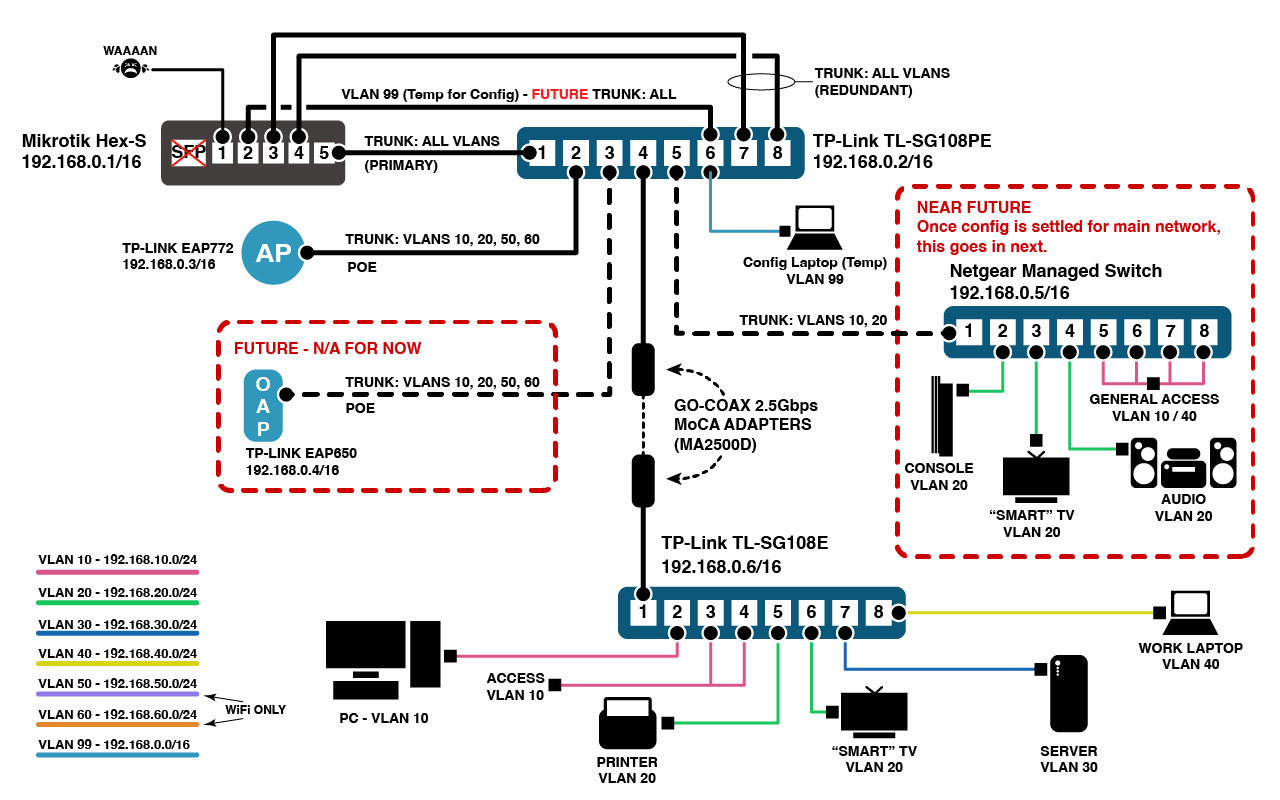
Mikrotik Hex-S router → TP-Link SG108PE PoE Managed Switch → TP-Link WAP + (2x) Managed Switches: (1x) Netgear Managed Switch + (1x) TP-Link SG108E (non-PoE) Managed Switch → Wired Clients (several on each switch).
TL;DR Issue(s):
Despite some success configuring VLANs on the Mikrotik and getting DHCP servers to work through the first switch in the chain, I have zero connectivity to subsequent switches down the line. If I set my laptop to a static IP on the same network as the core hardware, I can ping and log into switches and AP, but I cannot access the router’s bridge at all, despite it being on the same network as the rest of the core devices. My access into the router is achieved via IP on a VLAN interface I created on the same network as the bridge and core hardware, and even then, the bridge IP - essentially the router itself - just sends back ping timeouts or “No Route to Host” messages. This could be caused by a myriad of issues, I understand, so below you will find many more specifics for my setup. There is no firewall yet, as the router is not yet connected to WAN (stay tuned for that post), and I want everything to communicate with everything at first so I can methodically go through and customize rules as needed.
Nitty Gritty
Mikrotik Hex-S Config File:
# jan/06/1970 17:39:24 by RouterOS 6.49.18
# software id = XXX
#
# model = RB760iGS
# serial number = XXX

/interface bridge
add comment="LAN Bridge" frame-types=admit-only-vlan-tagged \
    ingress-filtering=yes name=bridge_LAN vlan-filtering=yes

/interface ethernet
set [ find default-name=ether1 ] comment=WAN

/interface vlan
add comment=cameras interface=bridge_LAN loop-protect=on name=eyes vlan-id=50
add comment="guests welcome" interface=bridge_LAN loop-protect=on name=guest vlan-id=60
add comment="home private" interface=bridge_LAN loop-protect=on name=home vlan-id=10
add comment=management interface=bridge_LAN name=mgmnt vlan-id=99
add comment=server interface=bridge_LAN loop-protect=on name=service vlan-id=30
add comment=IoT interface=bridge_LAN loop-protect=on name=things vlan-id=20
add comment="work isolation" interface=bridge_LAN loop-protect=on name=work vlan-id=40

/interface wireless security-profiles
set [ find default=yes ] supplicant-identity=MikroTik

/ip hotspot profile
set [ find default=yes ] html-directory=hotspot

/ip pool
add comment=home name=DHCP_home ranges=192.168.10.35-192.168.10.254
add comment=IoT name=DHCP_things ranges=192.168.20.15-192.168.20.254
add comment=server name=DHCP_service ranges=192.168.30.25-192.168.30.254
add comment=work name=DHCP_work ranges=192.168.40.15-192.168.40.254
add comment=camers name=DHCP_eyes ranges=192.168.50.35-192.168.50.254
add comment=guest name=DHCP_guest ranges=192.168.60.20-192.168.60.254
add comment=management name=DHCP_mgmnt ranges=192.168.0.25-192.168.0.254

/ip dhcp-server
add add-arp=yes address-pool=DHCP_things disabled=no interface=things \
    lease-time=1d name=DHCP_things src-address=192.168.20.0
add address-pool=DHCP_service disabled=no interface=service lease-time=1d \
    name=DHCP_service src-address=192.168.30.0
add address-pool=DHCP_work disabled=no interface=work lease-time=1d name=\
    DHCP_work src-address=192.168.40.0
add add-arp=yes address-pool=DHCP_eyes disabled=no interface=eyes lease-time=\
    1d name=DHCP_eyes src-address=192.168.50.0
add add-arp=yes address-pool=DHCP_guest disabled=no interface=guest \
    lease-time=1d name=DHCP_guest src-address=192.168.60.0
add address-pool=DHCP_mgmnt disabled=no interface=mgmnt lease-time=1d name=\
    DHCP_mgmnt src-address=192.168.0.0
add address-pool=DHCP_home disabled=no interface=home lease-time=1d name=\
    DHCP_home src-address=192.168.10.0

/interface bridge port
add bridge=bridge_LAN comment=management interface=ether2 pvid=99
add bridge=bridge_LAN frame-types=admit-only-vlan-tagged ingress-filtering=\
    yes interface=ether3 tag-stacking=yes
add bridge=bridge_LAN frame-types=admit-only-vlan-tagged ingress-filtering=\
    yes interface=ether4 tag-stacking=yes
add bridge=bridge_LAN comment="trunk all vlans" frame-types=\
    admit-only-vlan-tagged ingress-filtering=yes interface=ether5 \
    tag-stacking=yes

/ip neighbor discovery-settings
set discover-interface-list=!dynamic

/interface bridge vlan
add bridge=bridge_LAN comment=home_vlan tagged=\
    ether3,ether4,ether5,bridge_LAN vlan-ids=10
add bridge=bridge_LAN comment=mgmnt tagged=ether5,bridge_LAN untagged=ether2 \
    vlan-ids=99
add bridge=bridge_LAN comment=guest_vlan tagged=\
    bridge_LAN,ether3,ether4,ether5 vlan-ids=60
add bridge=bridge_LAN comment=eyes_vlan tagged=\
    bridge_LAN,ether3,ether4,ether5 vlan-ids=50
add bridge=bridge_LAN comment=work_vlan tagged=\
    bridge_LAN,ether3,ether4,ether5 vlan-ids=40
add bridge=bridge_LAN comment=service_vlan tagged=\
    bridge_LAN,ether3,ether4,ether5 vlan-ids=30
add bridge=bridge_LAN comment=things_vlan tagged=\
    bridge_LAN,ether3,ether4,ether5 vlan-ids=20

/ip address
add address=192.168.10.1/24 comment=home interface=home network=192.168.10.0
add address=192.168.20.1/24 comment=IoT interface=things network=192.168.20.0
add address=192.168.30.1/24 comment=servers interface=service network=192.168.30.0
add address=192.168.40.1/24 comment=work interface=work network=192.168.40.0
add address=192.168.50.1/24 comment=cameras interface=eyes network=192.168.50.0
add address=192.168.60.1/24 comment=guest interface=guest network=192.168.60.0
add address=192.168.0.10/16 comment=management interface=mgmnt network=192.168.0.0
add address=192.168.0.1/16 comment="router IP" interface=bridge_LAN network=192.168.0.0

/ip dhcp-client
add comment="DHCP WAN" disabled=no interface=ether1 use-peer-dns=no

/ip dhcp-server network
add address=192.168.0.0/16 comment=mgmnt dns-server=192.168.0.1 gateway=\
    192.168.0.1 netmask=16 ntp-server=192.168.0.1
add address=192.168.10.0/24 comment=home dns-server=192.168.0.1 gateway=\
    192.168.10.1 netmask=24 ntp-server=192.168.0.1
add address=192.168.20.0/24 comment=IoT dns-server=192.168.0.1 gateway=\
    192.168.20.1 netmask=24 ntp-server=192.168.0.1
add address=192.168.30.0/24 comment=service dns-server=192.168.0.1 gateway=\
    192.168.30.1 netmask=24 ntp-server=192.168.0.1
add address=192.168.40.0/24 comment=work dns-server=192.168.0.1 gateway=\
    192.168.40.1 netmask=24 ntp-server=192.168.0.1
add address=192.168.50.0/24 comment=eyes dns-server=192.168.0.1 gateway=\
    192.168.50.1 netmask=24 ntp-server=192.168.0.1
add address=192.168.60.0/24 comment=guest dns-server=192.168.0.1 gateway=\
    192.168.60.1 netmask=24 ntp-server=192.168.0.1

/ip dns
set allow-remote-requests=yes servers=1.1.1.1,1.0.0.1,9.9.9.9,149.112.112.112
TP-Link SG108PE Switch (Config file not available for export - provided manually)
Static IP=192.168.0.2/16
Default Gateway=192.168.0.1
LAG=Default (OFF)
VLAN 802.1Q=
VLAN ID (T=Tagged / UT=Untagged)
1: T=NONE UT=1-8 (Default)
10: T=1-3,6,8 UT=NONE
20: T=1-3,5,7-8 UT=NONE
30: T=1,8 UT=NONE
40: T=1,5,8 UT=NONE
50: T=1-4 UT=NONE
60: T=1-4 UT=NONE
99: T=2,7-8 UT=6
PVID: ALL=1 (Default)
TP-Link SG108E
Static IP=192.168.0.6/16
Default Gateway=192.168.0.1
LAG=Default (OFF)
VLAN 802.1Q=
VLAN ID:
1: T=NONE UT=1-8 (Default)
10: T=1 UT=2-4
20: T=1 UT=6
30: T=1 UT=7
40: T=1 UT=8
99: T=1 UT=5
PVID=
Port 1: 1
Port 2: 10
Port 3: 10
Port 4: 10
Port 5: 99
Port 6: 20
Port 7: 30
Port 8: 40
Netgear Managed Switch - Not yet configured. Once the main issues are sorted, I will apply that knowledge to configuring this switch and clients.
Network Diagram:
I’m sure my issue comes down to two main areas: Not fully understanding VLAN tagging yet, and not quite grasping subnetting as well as I thought. Assigning a .0.0/16 network to my core equipment I thought would, by default, allow all the rest of my /24 subnets to communicate easily as they should be under the overarching /16 but I think I have that wrong.
Further, for VLAN tagging, I understand the role of trunk ports and tagging traffic on them, and I understand access ports and their untagged behavior. But when they mix, I get confused easily. And I am still unclear as to whether a switch will STRIP a VLAN tag on ingress before forwarding to the next hop in the chain, i.e.: Client > Untagged Port > Switch tags traffic, egresses out tagged trunk port > Next switch “opens” frame, thus STRIPPING the original VLAN tag and causing ROUTER ports that expect TAGGED traffic to drop as it’s no longer tagged. Or am I off-base here? There is a lot of conflicting information about this. I thought that if a switch received traffic with a VLAN tag destined for a device not attached to that switch, it would simply send it on down the line, but clearly that isn’t happening in my setup.
For now, I will be happy if I can get my current wired clients onto their correct VLANs, subnets, and communicating with the router and each other across the entire network with DHCP addresses assigned to them from the Mikrotik. From there, I will need help figuring out how exactly my wireless AP assigns VLANS and how to get that up and running. I have tried, and the interface is simple for creating SSIDs and assigning VLANs to them, but with DHCP unable to reach the AP, devices can’t get IPs and therefore won’t connect. But that is beyond the scope of this for now. Firewall rules for network segregation and inter-VLAN routing after that. And of course, WAN connectivity and DNS to round it all out. But not right now.
Thank you to anyone who made it through my post and still decided to help me. Thank you again to the members of this forum who have shared a wealth of knowledge to get me this far to begin with. I am learning networking and self-hosting as a hobby and I am really enjoying it so far. All questions are welcome; I held a lot back since this post is already too long. Good luck and I look forward to everyone’s advice.