VLANs with RouterOS over multiple hAPs

Dear all-knowing forum, I need your help.

Intro

I bought an old house with massive stone walls and partial wood construction. Therefore I currently use 5 hAP ac to cover the area I need.
With the house came an unmanaged 16 port switch that - according to the manufacturer description - supports jumbo frames and 802.1Q VLAN packet transparency. Lets assume this is true. Also, I have some IoT devices that were already in the house. They connect mostly via WLAN.

I have some experience in networking, but I am not an expert, especially not in layer 2 topics.

Current situation

In an effort to separate IoT and guest WLAN traffic, I have created configurations based on the information from "Router-Switch-AP all in one" at Router-Switch-AP all in one on my hAPs. At the moment, the hAPs use a brigde with VLAN filtering. The WLAN interfaces are masqueraded and each of the hAPs has its own DHCP service set up on the WLAN interfaces (one for IoT and one for the guest WLAN). Following some configuration extracts for better understanding of the setup. Firewall rules omitted for brevity.

/interface wireless add name=wlan-iot ssid=**** master-interface=wlan1
/interface wireless add name=guest ssid=**** master-interface=wlan1

/interface bridge add name=br0 protocol-mode=none vlan-filtering=no

/interface bridge port

# Blue VLAN -> local LAN
add bridge=br0 interface=ether1 pvid=10
add bridge=br0 interface=ether2 pvid=10
add bridge=br0 interface=ether3 pvid=10
add bridge=br0 interface=ether4 pvid=10
add bridge=br0 interface=sfp1   pvid=10
add bridge=br0 interface=wlan1  pvid=10
add bridge=br0 interface=wlan2  pvid=10

# Green VLAN -> IoT
add bridge=br0 interface=ether5 pvid=20
add bridge=br0 interface=wlan-iot pvid=20

# Yellow VLAN -> Guest WLAN
add bridge=br0 interface=guest pvid=30

/interface bridge vlan
add bridge=br0 tagged=br0 vlan-ids=10
add bridge=br0 tagged=br0 vlan-ids=20
add bridge=br0 tagged=br0 vlan-ids=30

# add an interface for IP connectivity to the hAP
/interface vlan add interface=br0 name=BLUE_VLAN vlan-id=10
/ip address add address=192.168.0.31/24 interface=BLUE_VLAN
/ip route add dst-address=0.0.0.0/0 gateway=192.168.0.1

# Green VLAN interface creation, IP assignment, and DHCP service (yellow is set up the same way)

/interface vlan add interface=br0 name=GREEN_VLAN vlan-id=20
/ip address add interface=GREEN_VLAN address=10.0.21.1/24
/ip pool add name=GREEN_POOL ranges=10.0.21.20-10.0.21.250
/ip dhcp-server add address-pool=GREEN_POOL interface=GREEN_VLAN name=GREEN_DHCP disabled=no
/ip dhcp-server network add address=10.0.21.0/24 dns-server=8.8.8.8 gateway=10.0.21.1

# Only allow ingress packets without tags on Access Ports

/interface bridge port
set bridge=br0 ingress-filtering=yes frame-types=admit-only-untagged-and-priority-tagged [find interface=ether1]
set bridge=br0 ingress-filtering=yes frame-types=admit-only-untagged-and-priority-tagged [find interface=ether2]
set bridge=br0 ingress-filtering=yes frame-types=admit-only-untagged-and-priority-tagged [find interface=ether3]
set bridge=br0 ingress-filtering=yes frame-types=admit-only-untagged-and-priority-tagged [find interface=ether4]
set bridge=br0 ingress-filtering=yes frame-types=admit-only-untagged-and-priority-tagged [find interface=ether5]
set bridge=br0 ingress-filtering=yes frame-types=admit-only-untagged-and-priority-tagged [find interface=wlan1]
set bridge=br0 ingress-filtering=yes frame-types=admit-only-untagged-and-priority-tagged [find interface=wlan2]
set bridge=br0 ingress-filtering=yes frame-types=admit-only-untagged-and-priority-tagged [find interface=wlan-iot]
set bridge=br0 ingress-filtering=yes frame-types=admit-only-untagged-and-priority-tagged [find interface=guest]
set bridge=br0 ingress-filtering=yes frame-types=admit-only-untagged-and-priority-tagged [find interface=sfp1]

/interface bridge set br0 vlan-filtering=yes

Each of the five hAPs is set up this way, only their LAN IP addresses differ. This works really nicely regarding connectivity and separation but has some drawbacks. First, it is not easily possible to connect from the local LAN directly to an IoT device and I would prefer to avoid static IP addressing. Second, the IoT WLAN networks on the individual hAPs cannot see each other.

Internet connectivity is realized through a hEX as gateway / router. Currently, there is no VLAN setup present on the router, it acts as NAT and firewall device. Traffic coming from the IoT and guest networks to the Internet is masqueraded on the hAP, therefore the internet router sees only the local LAN IP of the hAP.

Desired setup

It would be great to extend the VLANs over all hAPs and to set up the DHCP service centrally on the Internet router. As far as I understood, that would require VLAN trunking between the Internet router and the hAPs. I have experimented with the example "Hybrid Ports Example for Switch with a separate router (RoaS)" from Hybrid Ports Example for Switch with a separate router (RoaS) but wasn't successful. Also I am unsure what the ideal / technically correct setup would be and would greatly appreciate help. Getting a new central switch with management would be possible, but running additional physical cabling is not an option.
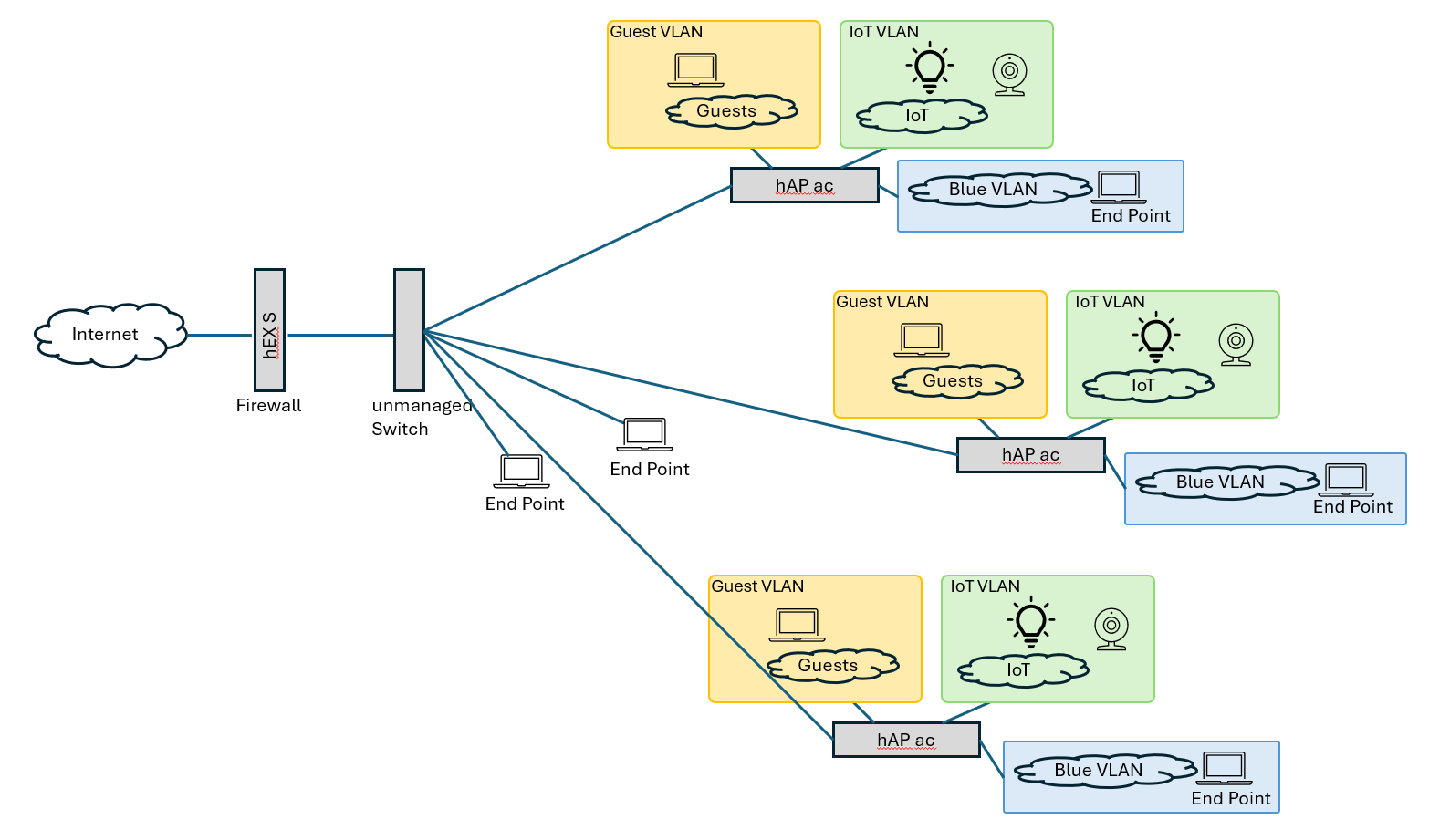
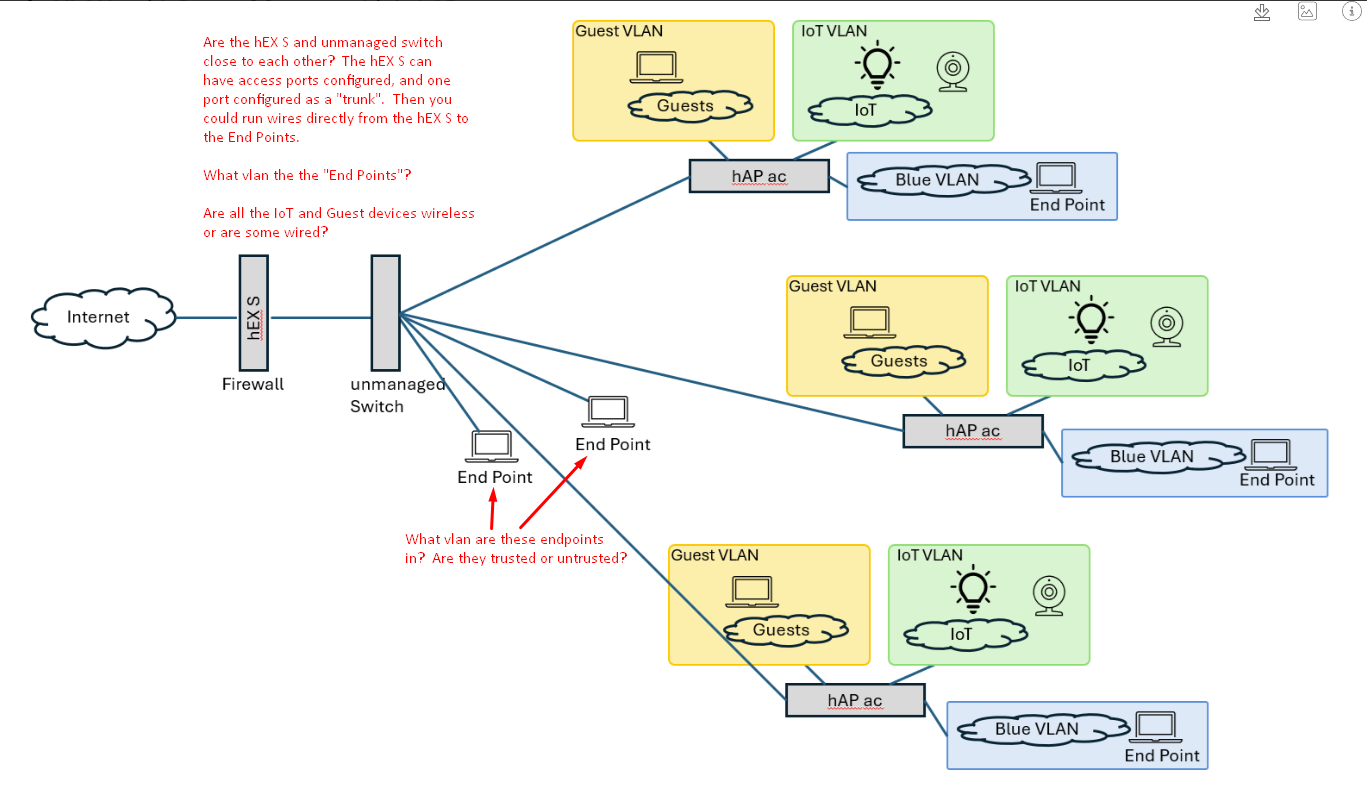
can you show a network diagram with how things are connected. Even a photo of a hand drawn sketch would be better than nothing.

What is the internet router you mentioned? Is is vlan capable?

While using a 16 port vlan transparent switch will "work" as a way to extend trunk links, every link on the switch will be configured identically. And any device connected to one of the switch ports will have the "capability" to see all traffic for all vlans. I.e. from a security point of view, you won't be able to keep traffic truely separated. Anything with the ability to process vlan tags will have complete access.

From a practical point of view, it probably won't be quite that bad, e.g. a windows pc (in my experience) will only see untagged traffic. Others have stated that some windows drives will strip all vlan tags, for example as reported here https://learn.microsoft.com/en-us/answers/questions/4269086/windows-vlan-chaos-how-do-i-stop-windows-combining but I haven't seen that behavior myself.

But it is worth noting that if you want to keep vlans separate, you will need to have some vlan aware switch at the edge to sanitize traffic for untrusted devices. You could do that on the hap devices.

BTW, what model of hap do you have?

Are there existing wires from to each of the rooms with the hap devices? Are thse wires all terminated where the 16 port switch is?

Ideally you would replace the 16 port "dumb" switch with a vlan aware one, and you could use the 16 port dumb one for extending a single vlan to more devices. But I don't know if you have one place that needs 16 ports in a single location.

The normal way to do what you want would be to configure the hap devices as vlan aware switches (with the vlan-filtering bridge). And have only one interface on the hap with its own ip address. (i.e. only a single vlan interface for management of the hap device.

For example, connect from your internet router to the "distribution switch" using a tagged only trunk. Then the only things you would plug into the distirbution switch would be edge switches (or hap devices configured as switches) that are vlan-aware, and you can then can have access ports that will allow non-vlan aware devices to connect to a single vlan.

There is more info in the topics in the Topics tagged rtfum section. But many of the links are to specific posts, instead of the main topic. And they should be pointing to the main topic.

@BartoszP many of the links in Topics tagged rtfum are pointing to apparently random posts within the threads instead of to the main thread topic.

Example: RouterOS bridge mysteries explained - #98 by Josephny

Any chance you can edit these to point to the main topic e.g. RouterOS bridge mysteries explained

Thank you! I have sketched a drawing.

I am using a mikrotik hEX S (model RB760iGS) as Internet router, so it is VLAN capable. The hAPs are hAP ac (model RB962UiGS-5HacT2HnT).

The wiring corresponds to the drawing above, there is the one central unmanaged switch from where cables run to the different building areas / rooms. It will not be easily possible to have more than one physical connection between the central switch and each room / building area. If I understand correctly, your suggestion regarding distribution switch and edge switches would require an edge switch on each place where currently end points are directly connected to the unmanaged switch. If possible, I would like to avoid that.

If I were to install something like this instead of the current unmanaged central switch, I could probably manage the direct end point connections to the switch correctly by configuring those ports to be in a specific VLAN.

Thoughts regarding security / traffic isolation: This is a private building and I am not concerned about unauthorized access to physical connections. The current setup ensures that Guest and IoT traffic cannot see each other and that Guests and IoT devices can only connect to the Internet. But plugging into the central switch and doing some sniffing / arp flooding would show traffic from these devices (although mostly TLS encrypted). The main goal is to ensure Guest and IoT devices can only connect to the Internet and cannot see anything outside of their network segments.

Your hAPs can fulfil that role as @Buckeye said.

Thanks, yes I happily realized that. But I don’t have as many hAPs as I have end points and some end points are located in other places than the hAPs, this is the reason for the pictured direct connections to the central switch.

You could accommodate this by making your trunk between the hEX and the unmanaged switch into a hybrid trunk. You could not run the endpoint on the unmanaged switch on a vlan. If they are intended to be on the same Single Broadcast Domain as the Blue vlan endpoints, you will either need to abandon the Blue vlan or get a managed switch

Are those endpoints "trusted" or not? If they are trusted, then you could use a hybrid trunk link (where one vlan is "implicit" and specified by the pvid and uses untagged ethernet frames; this is still using a vlan withing a vlan-aware switch (or vlan-filtering bridge), but the vlan being used on the switch isn't explicitly specified by an IEEE 802.1Q tag. It is the responsibility of the switch to classify the untagged (standard ethernet) frame into a specific vlan, just like what an access port does. In Cisco terminology this would be the "native vlan". The untrusted vlans would then be tagged on the hybrid link, and untagged by the hAP ac, possibly allowing access ports for wired guest of IoT devices. Then the untrusted devices would only have visibility to the vlan they are on, and the RB760iGS firewall would be responsible to prevent unwanted routing between the trusted and untrusted vlans.

For some background info, I like Ed Harmoush's explanations. See his vlan-index and for review of L2 vs L3, his Networking Fundamentals youtube videos are great.

How many wires are currently connected to the 16 port switch? You only show 3 haps (original post said 5), and two extra endpoints plus the connection to the RB750iGS (total of 6 wires, but those may just be representative).

If you have only "trusted" (i.e. not IoT or Guests) devices connected directly to the unmanaged switch, then as long as all untrusted devices are connected to access ports on either the RB760iGS or the hAP ac, then the untrusted devices would not have access to the other vlans, only the one the access port is configured with access to.

The hAP ac (if RB962UiGS-5HacT2HnT) is a pretty old device, and to get good switching performance would require an advance config using the switch commands, and unless you want to spend a lot of effort, probably isn't worth doing. Just using the software bridging would be easier and would then transfer to newer mikrotik hardware in the future. The wireless is already going to be using the software bridge, so unless you have a wire connection with high utiliization, you probably won't notice the difference. At any rate, I would start with the "new" bridge configuration, and see it if is good enough before trying to get it to work with the switch commands. I have only the RB760iGS and the RB5009, plus several CSS106-5G-1S (aka RB260 although it is a switch and not a router). I know there were some devices that didn't support hybrid links with the switch menu, but I am not sure if that was one based on the QCA8337 switch chip, I think the limited switch was the AR8227. See VLAN Config difference AR 8227 & QCA 8337

Thank you for your help and info pointers, much appreciated. All endpoints that are connected via wire (Ethernet) are trusted. I only showed three HAPs in the picture to illustrate the setup and not overcrowd the picture, but I do have more in use than pictured to ensure sufficient WLAN coverage.

All my current IoT devices connect via WLAN, also for guests I only offer WLAN access. Meaning I have only trusted devices connected directly to the central switch. I will be getting a managed switch to replace the current central unmanaged one (which is anyway more than 10 years old it seems), that should allow solving most current issues. I think / hope that I will be able to accommodate all my use cases based on the provided info and links. Thanks again!

That's the "best" solution and will give you the most flexability. But for a home where you have physical security as stated in your previous post:

I think you can achive your goals using only your current existing equipment. What you can't do with it is to allow wired access to the guest or IoT vlans from non-vlan aware devices. But for wifi only access, and firwall rule that blocks access between different local vlans, (as @anav will be able to point you a way how), you should be able to securely prevent access from the IoT and Guest wifi to your vlan 10 "trusted" devices. I don't think there are any security concerns there if the firewall is correctly set up. But the defconf firewall won't block traffic between interfaces that are both members of "LAN". You would probably also create a different interface list for your untrusted vlans (IoT and Guest), and prevent any management access to your MikroTik devices from the untrusted vlans.

Can you post your sanitized (remove sn, any passwords) of the RB760iGS? Then someone can provide some more specific advice.

The way I would approach the problem would be to have the RB760iGS be the only router, dhcp server, firewall for your home. It would have three vlans, each with their own subnet. I would probably configure with 3 separate vlan interfaces, and use those for the three subnet gateways, as doing this would make it very easy to reconfigure the trunk link to the switch to use only tagged traffic, which you would probably want if you ever do replace the dumb switch with a vlan-aware one. Each subnet would have its own dhcp server as well.

All hap ac devies would be set up as Access points (possibly also adding the ethernet ports to the bridge to allow for wired access ports in all vlans if wanted (for example if you had a wired IoT or Guest device). But these would have only a single L3 interface, and it would be used only for managing the hap device itself. That the firewall would only be applied to the management interface, and input chain should be only firewall chain needed, since the hap won't be doing routing. Also, the hap ac devices should not have dhcp servers. You could have the management interface get an ip via dhcp, but in this role I would use static on the hap devices, but I still like to create static lease entries for the mac addresses with the static ip addresses, just so these addresses will be documented and won't be part of the dhcp address pool.

If you want to access the "End Points" directly connected to the unmanaged switch from the "blue vlan" 10, then that would need to be configured as the "native vlan" on the links from the hap devices as well as the hEX S to the unmanaged switch. The bridge configured on the hap ac would provide layer 2 access (direct ethernet communication) to other devices on the same lan. For example a device connected to vlan 10 via wifi would have unfettered access to other devices on vlan 10, lldp or other discovery processes would work between devices in the same vlan. E.g. the "end points" directly connected to the unmanaged switches would have l2 access to a device connected to the blue vlan via wifi. The hap devices would be operating at layer 2 (switching/bridging) where mac addesses are used. The only layer 3 access would be the hap's management vlan interface, and that just allows the CPU in the hap to act as a host on a specific vlan.

The way I would approach the problem would be to have the RB760iGS be the only router, dhcp server, firewall for your home. It would have three vlans, each with their own subnet.

This is exactly how I intend to proceed. At the moment, the RB760iGS does not have any VLAN configuration. Since in the mean time I have acquired a managed switch, I will update my configurations and will report back once done for future reference. Thank you so much for your very useful advice!

In that case, I would configure hEX S with vlan interfaces for each of your subnets, and if you want, you can leave a hEX S port "out of the bridge" for access in case you get locked out when converting to vlan-filtering mode. Then you can use trunk ports with all data traffic being through the vlan interfaces between the hEX S and the managed switch, and also between the managed switch and the hAP acs.
So the managed switch would have 6 ports configured as trunk ports (one to hEX S, one to each hAP ac). The rest would be configured as access ports for end devices.

For the "end points" directly connected to the managed switch, you can use access ports for which ever vlan you want access. You may as well configure switch-ports on the managed switch as access ports for the guest and IoT vlans as well, as it will give you the ability to easily verify that the hEX S dhcp servers are working correctly. Get some labels to mark the ports that are configured as access ports, it will come in handy when you want to test.

For a Layman's Guide to VLANs using consumer switches, see Network Virtual LANs (VLANs), Explained Simply (part 1) and VLANs Part 2 - Configuring Three Ethernet Switches (a VLAN Rosetta Stone) by Doug Johnson Productions. These are aimed at people that want to know the minimum needed to get things set up, with an example configuration with 4 vlans (one untagged, 3 tagged on the trunk) where each switch is configured to operate in the same way.

Just some guidelines, with my assumptions and reasons.

  1. Document what you have currently.
  2. Have complete backups of all your devices before making any changes.
  3. Plan for what you want, including any new ip addresses.
  4. Get feedback about your plan from forum before implementing, so you don't waste a lot of time trying to do something that won't work.

If I were you, and your hEX S is your current internet router, you will want to be especially careful that you don't introduce any new vulnerabilitiies (be careful changing firewall, for example), and you also don't want to lock yourself out.

So even though this isn't absolutely required, but because the RB760iGS has no serial console, you should read through Once and for all COMPLETE Offbridge Port setup and remove a port from the bridge and assign an ip address to it, optionally a dhcp server (which will make using it easier, as all you will need to do is connect a pc to the port and log in. You will also want to make sure the interface list allowing management access to the router includes this "dedicated off bridge management/emergency port", including the ability to connect with mac-winbox. After setting this up, connect to the dedicated port to verify that you can access the router with ssh and winbox. Then you can make changes to the bridge settings without worring about cutting off the branch you are sitting on, so I would use that port for any configuration changes you make to the bridge or bridge ports. In general don't configure the port you are connected from, and you will be less likely to lock yourself out. And get in the habit of making backups and exports and saving them off the device before you make any changes. It's a pain, but much less of a pain then not having backups when something goes wrong.

I will assome that you won't have the luxury of a complete reconfiguration of everything at one time.

If that's the case, then you could just add vlan interfaces on the RB760iGS and add new ip addresses and dhcp servers for the new vlans, leaving the current ip address on the bridge with its dhcp server for the hap devices. If you have not changed anything from the default config on the RB760iGS, then your LAN (on the bridge) will have an ip address of 192.168.88.1 and the dhcp server will be handing out addresses from 192.168.88.1.

If you ever intend to use vpn to connect back to your home, there are advantages to using less common ip addresses (because if you go to location with the same ip address on the guest lan as one of your lans at home, you won't be able to easily connect to your LAN at home that is using the same LAN address. (e.g. if your friend had an MikroTik and your mobile got an ip 192.168.88.232 from the dhcp server at the friend's house, routing will think that any address in 192.168.88.0/24 is at your friends house, not the instance in your home). So for you vlans you may want to consider using somthing like 10.x.vlan.1/24 for your vlan interfaces, where x is a "random" value (not a mulitple of 10, and not <20 or >240). You can't guarantee you won't get a collision, but you can reduce the chances quite a bit by staying away from the defaults (especially the 192.168.1.0/24 and 192.168.0.0/24 subnets).

If you start with the links from the new managed switch to the hap ac's using hybrid links with the native unchanged, then your existing devices will work just as well as they currently are. But now you can reconfigure them one at a time (as access points). And you can convert to tagged only trunk on the hap ac devices when they are converted to Access points, you will have to change the configuration of the switch-port connecting from the managed switch to the hap ac at the time it is changed from hybrid to tagged only trunk (or you can leave it as a hybrid, hybrid links aren't as evil as some around here will tell you. As with most things there are advantages and disadvantages of either. At least with the managed switch you have a lot more flexibility in your choice.

1 Like

Good points, thank you. I am not uninitiated in security operations and good practices, but I didn’t have much experience with mikrotik and I mostly knew VLANs only theoretically. The infos in this forum were immensely useful.

I keep all my configs in a local git repo, so going back is not a problem. Setting up the new switch and changing the configuration of the hEX S went really well, and I did have the luxury to start fresh, so I did /system/reset-configuration no-defaults=yes as a first step on the hEX S and the hAPs. The switch now has a bunch of trunk ports that connect to all the hAPs and to the hEX and some access ports for direct connections. VLAN filtering is active and firewall rules are in place and I am happy.

Thanks also for the reminders about VPN and address spaces, I learned this the hard way about 20 years ago when setting up IPSec and NAT on Linux which was a real pain at that time. Thankfully mikrotik supports wireguard which is what I am using currently.