VLANs with tagged and untagged ports

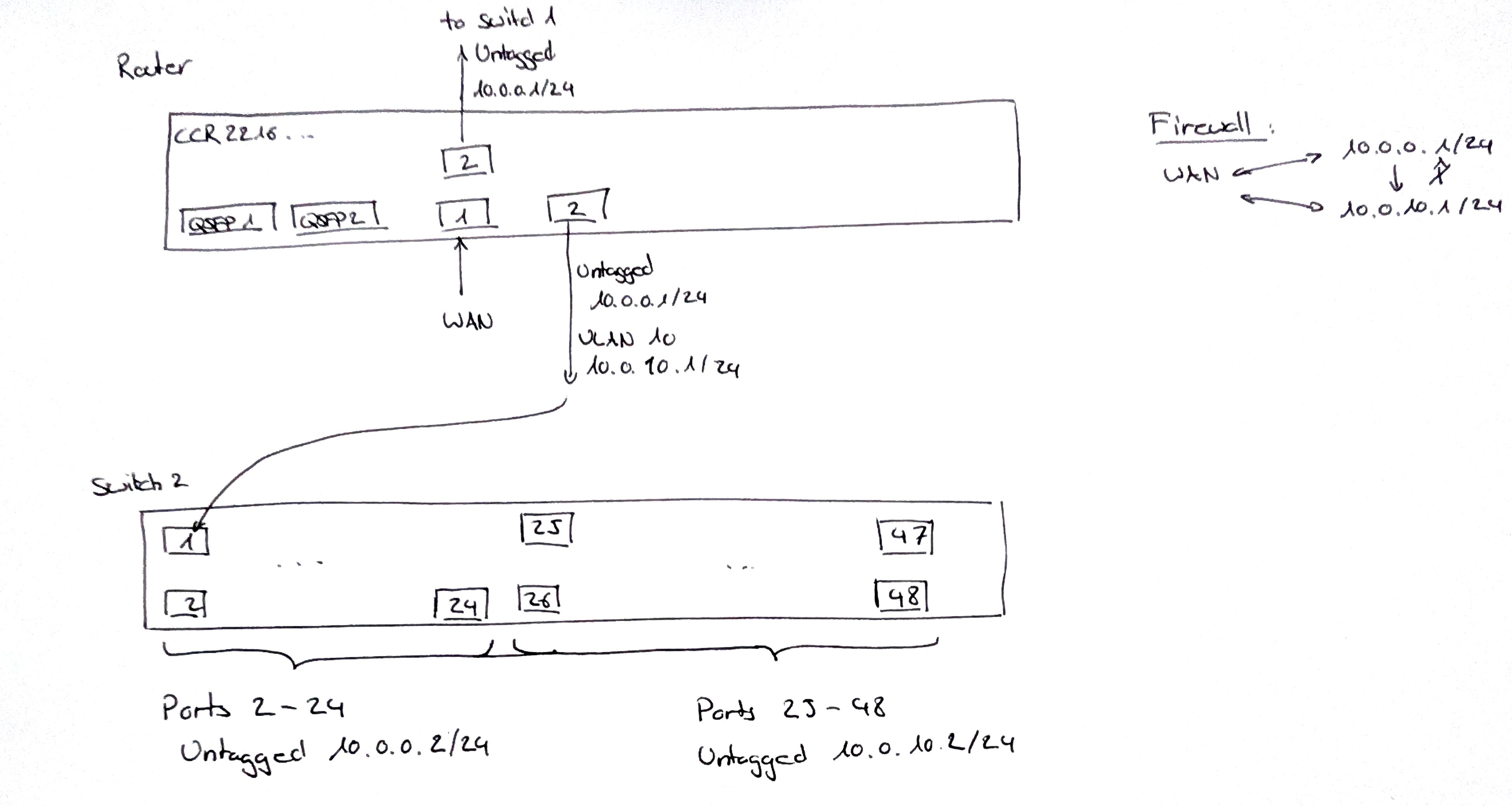
I am trying to set up a CCR2216-1G-12XS-2XG as follows:

All bridge ports by default untagged with dhcp serving IPs in range 10.0.0.1/24.

One port (let’s say sfp-8) should additionally send out tagged traffic on vlan=10 with dhcp serving IPs in range 10.0.10.1/24. My switch will then split the tagged and untagged traffic to regular and IOT devices.

Furthermore I want to create firewall rules such that 10.0.0.1/24 can access 10.0.10.1/24 but not the other way arround but that all devices can access the internet.

I already set up the router except for the vlan and firewall part and this is working fine.

I tried the following configuration (with safe mode) but I cant get it to work:

/interface bridge add name=bridge1 vlan-filtering=no

/interface bridge vlan

add bridge=bridge1 tagged=bridge1,sfp28-8 vlan-ids=10

add bridge=bridge1 tagged=bridge1 vlan-ids=1

/interface vlan

add interface=bridge1 name=vlan1 vlan-id=1

add interface=bridge1 name=vlan10 vlan-id=10

/ip address add address=10.0.10.1/24 interface=vlan10

/interface bridge add name=bridge1 vlan-filtering=yes

I don't know if I also should add

/ip address add address=10.0.0.1/24 interface=vlan1

and then remove this line

/ip address add address=10.0.1.1/24 interface=bridge1

Your hitchhikers guide through VLAN:
Using RouterOS to VLAN your network - RouterOS / Useful user articles - MikroTik community forum

Rules of the Mikrotik Club, just in case:

But before you do anything, take one unused port, or one that you can temporarily use for the initial config AND, create an OffBridge port.

Lets assume its port X
Name it in ethernet interface

/interface ethernet
set [ find default-name=etherX ] name=OffBridgeX 

Give it an IP address and note the mask of only allowing one other IP !!

/ip address
add address-192.168.77.1/30 interface=OffBridgeX  network=192.168.77.0

TAKE THE PORT OFF of any /interface bridge port settings

Ensure you add the port to any trusted interface list that is identified in neighbours discovery and tools mac-server winmac-server!!

/interface list member
add interface=OffBridgeX  list=MGMT

Then connect your laptop to port X, change your laptop IPV4 settings to 192.168.77.2
and with your username and password you should have access to the router and to make many vlan changes from a spot of safety.

1 Like

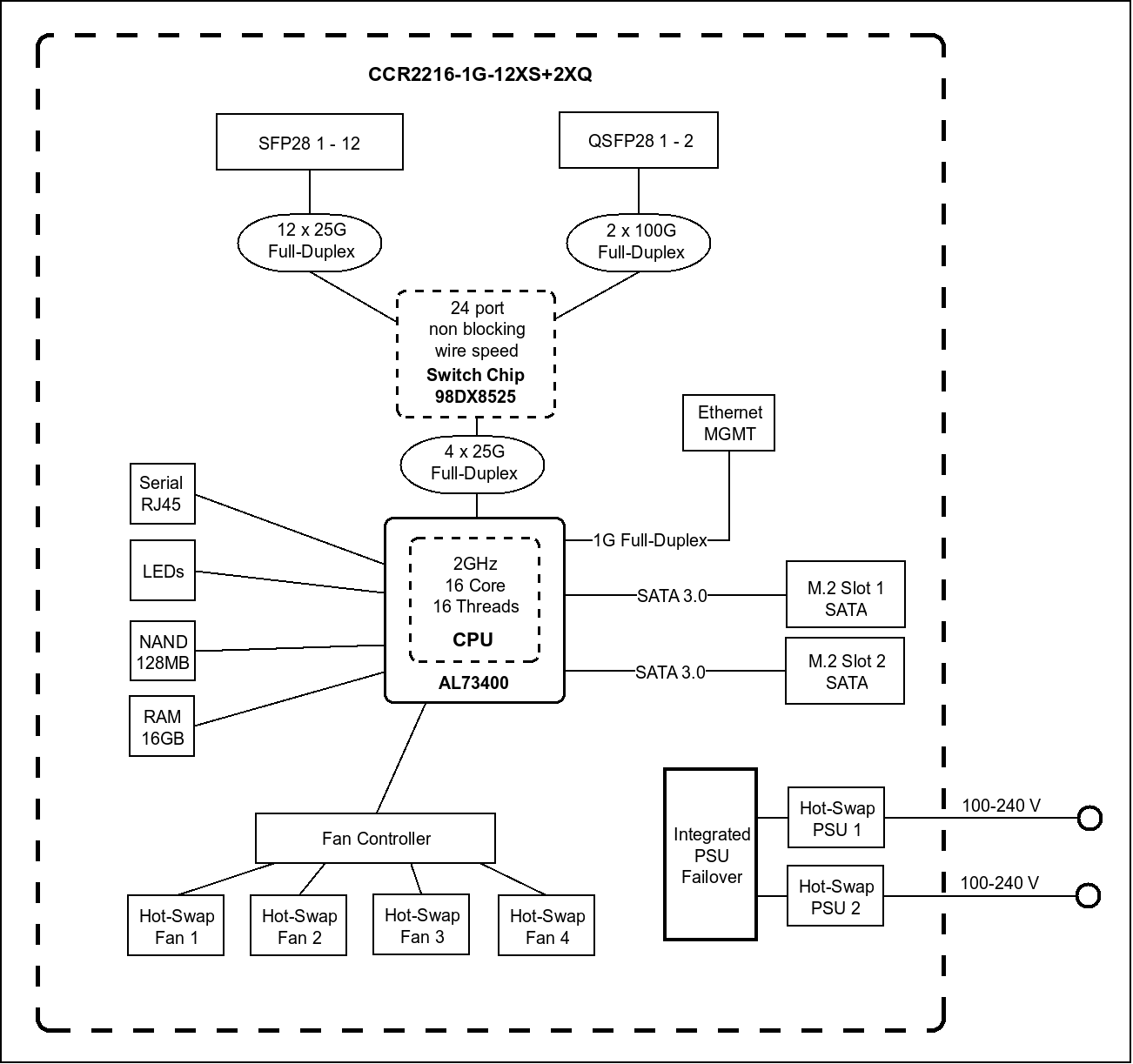
The port that should be used for management is the 1 Gbps ether port. It should not be added to the bridge.

See https://cdn.mikrotik.com/web-assets/product_files/CCR2216-1G-12XS-2XQ_220346.png

for why.

Also, what version of RoS are you using? Versions newer than 7.16 have made vlans a bit easier to configure, as it makes the connections from the switch to the routing block more "automatic" when adding vlan interfaces.

Although what you show using tagged vlan 1 between the router and the integrated switch chip possible, if you are going to do that, then to eliminate confusion, you should specify the pvid of the bridge to be something other than the default 1.

You can skim this thread Question related to “RouterOS bridge mysteries explained” which is a vlan diversion of RouterOS bridge mysteries explained

But if you want help, please upload your sanitized export. And at least a photo of a hand drawn sketch of what you are trying to do (with subnets, vlans, whether tagged or untagged, etc).

Creating a spreadsheet with a vlan per row and switch (bridge) port per colunm and showing if the vlan should be untagged on the port or if it should be tagged is well worth the time. It is a lot easier to make changes to the spreadsheet than the configuration, and once the spreasheet is complete, then the configuration of the router vlans will be much more straight forward.

Here is my sanitized config and a drawing of what I want to do:


# 2025-11-29 16:18:17 by RouterOS 7.21beta9

# software id = 9NNQ-BRU3

#

# model = CCR2216-1G-12XS-2XQ

# serial number = HJQ0ATJEZF8

/interface bridge

add name=bridge1

/interface ethernet

set [ find default-name=qsfp28-1-3 ] advertise="10M-baseT-half,10M-baseT-full,100M-baseT-half,100M-baseT-full,1G-baseT-half,1G-baseT-full,1G-baseX,2.5G-baseT,2.5G-baseX,5G-baseT,10G-baseT,10G-baseSR-LR,10G-baseCR,40G-baseSR4-LR4,40G-bas\

    eCR4,25G-baseSR-LR,25G-baseCR,50G-baseSR2-LR2,50G-baseCR2"

set [ find default-name=qsfp28-2-3 ] advertise="10M-baseT-half,10M-baseT-full,100M-baseT-half,100M-baseT-full,1G-baseT-half,1G-baseT-full,1G-baseX,2.5G-baseT,2.5G-baseX,5G-baseT,10G-baseT,10G-baseSR-LR,10G-baseCR,40G-baseSR4-LR4,40G-bas\

    eCR4,25G-baseSR-LR,25G-baseCR,50G-baseSR2-LR2,50G-baseCR2"

set [ find default-name=sfp28-1 ] fec-mode=fec91

set [ find default-name=sfp28-2 ] auto-negotiation=no speed=10G-baseCR

/interface list

add name=WAN

add name=LAN

/ip pool

add name=dhcp_pool1 ranges=10.0.0.100-10.0.0.254

/ip dhcp-server

add address-pool=dhcp_pool1 interface=bridge1 name=dhcp1

/interface bridge port

add bridge=bridge1 interface=qsfp28-1-1

add bridge=bridge1 interface=qsfp28-1-2

add bridge=bridge1 interface=qsfp28-1-3

add bridge=bridge1 interface=qsfp28-1-4

add bridge=bridge1 interface=qsfp28-2-1

add bridge=bridge1 interface=qsfp28-2-2

add bridge=bridge1 interface=qsfp28-2-3

add bridge=bridge1 interface=qsfp28-2-4

add bridge=bridge1 interface=sfp28-2

add bridge=bridge1 interface=sfp28-3

add bridge=bridge1 interface=sfp28-4

add bridge=bridge1 interface=sfp28-5

add bridge=bridge1 interface=sfp28-6

add bridge=bridge1 interface=sfp28-7

add bridge=bridge1 interface=sfp28-8

add bridge=bridge1 interface=sfp28-9

add bridge=bridge1 interface=sfp28-10

add bridge=bridge1 interface=sfp28-11

add bridge=bridge1 interface=sfp28-12

/ipv6 settings

set accept-router-advertisements=yes

/interface list member

add interface=sfp28-1 list=WAN

add interface=bridge1 list=LAN

/ip address

add address=10.0.0.1/24 interface=bridge1 network=10.0.0.0

add address=192.168.77.1/30 comment=management interface=ether1 network=192.168.77.0

/ip cloud

set update-time=no

/ip dhcp-client

add interface=sfp28-1

/ip dhcp-server network

add address=10.0.0.0/24 dns-server=10.0.0.1 gateway=10.0.0.1

/ip dns

set allow-remote-requests=yes verify-doh-cert=yes

/ip firewall filter

add action=accept chain=input comment="defconf: accept established,related,untracked" connection-state=established,related,untracked

add action=drop chain=input comment="defconf: drop invalid" connection-state=invalid

add action=accept chain=input comment="defconf: accept ICMP" protocol=icmp

add action=accept chain=input comment="defconf: accept to local loopback (for CAPsMAN)" dst-address=127.0.0.1

add action=accept chain=input comment="allow igmpv2" protocol=igmp

add action=accept chain=input comment="allow new TV7 MCast streams" dst-address=233.50.230.0/24 dst-port=5000 protocol=udp src-address=77.109.129.0/24

add action=drop chain=input comment="defconf: drop all not coming from LAN" in-interface-list=!LAN

add action=accept chain=forward comment="defconf: accept in ipsec policy" ipsec-policy=in,ipsec

add action=accept chain=forward comment="defconf: accept out ipsec policy" ipsec-policy=out,ipsec

add action=fasttrack-connection chain=forward comment="defconf: fasttrack" connection-state=established,related

add action=accept chain=forward comment="defconf: accept established,related, untracked" connection-state=established,related,untracked

add action=accept chain=forward comment="allow forwarding of IPTV TV7" dst-address=233.50.230.0/24 dst-port=5000 protocol=udp

add action=drop chain=forward comment="defconf: drop invalid" connection-state=invalid

add action=drop chain=forward comment="defconf: drop all from WAN not DSTNATed" connection-nat-state=!dstnat connection-state=new in-interface-list=WAN

/ip firewall nat

add action=masquerade chain=srcnat ipsec-policy=out,none out-interface-list=WAN

/ip service

set ftp disabled=yes

set telnet disabled=yes

set www disabled=yes

set www-ssl certificate=webfig disabled=no

/ip ssh

set strong-crypto=yes

/ipv6 address

add from-pool=v6pool interface=bridge1

/ipv6 dhcp-client

add add-default-route=yes default-route-tables=main interface=sfp28-1 pool-name=v6pool pool-prefix-length=56 request=address,prefix

/ipv6 dhcp-server

add address-pool=v6pool interface=bridge1 name=dhcpv6-1

/ipv6 firewall address-list

add address=::/128 comment="defconf: unspecified address" list=bad_ipv6

add address=::1/128 comment="defconf: lo" list=bad_ipv6

add address=fec0::/10 comment="defconf: site-local" list=bad_ipv6

add address=::ffff:0.0.0.0/96 comment="defconf: ipv4-mapped" list=bad_ipv6

add address=::/96 comment="defconf: ipv4 compat" list=bad_ipv6

add address=100::/64 comment="defconf: discard only" list=bad_ipv6

add address=2001:db8::/32 comment="defconf: documentation" list=bad_ipv6

add address=2001:10::/28 comment="defconf: ORCHID" list=bad_ipv6

add address=3ffe::/16 comment="defconf: 6bone" list=bad_ipv6

/ipv6 firewall filter

add action=accept chain=input comment="defconf: accept established,related,untracked" connection-state=established,related,untracked

add action=drop chain=input comment="defconf: drop invalid" connection-state=invalid

add action=accept chain=input comment="defconf: accept ICMPv6" protocol=icmpv6

add action=accept chain=input comment="defconf: accept UDP traceroute" dst-port=33434-33534 protocol=udp

add action=accept chain=input comment="defconf: accept DHCPv6-Client prefix delegation" dst-port=546 protocol=udp src-address=fe80::/10

add action=accept chain=input comment="defconf: accept IKE" dst-port=500,4500 protocol=udp

add action=accept chain=input comment="defconf: accept ipsec AH" protocol=ipsec-ah

add action=accept chain=input comment="defconf: accept ipsec ESP" protocol=ipsec-esp

add action=accept chain=input comment="defconf: accept all that matches ipsec policy" ipsec-policy=in,ipsec

add action=drop chain=input comment="defconf: drop everything else not coming from LAN" in-interface-list=!LAN

add action=fasttrack-connection chain=forward comment="defconf: fasttrack6" connection-state=established,related

add action=accept chain=forward comment="defconf: accept established,related,untracked" connection-state=established,related,untracked

add action=drop chain=forward comment="defconf: drop invalid" connection-state=invalid

add action=drop chain=forward comment="defconf: drop packets with bad src ipv6" src-address-list=bad_ipv6

add action=drop chain=forward comment="defconf: drop packets with bad dst ipv6" dst-address-list=bad_ipv6

add action=drop chain=forward comment="defconf: rfc4890 drop hop-limit=1" hop-limit=equal:1 protocol=icmpv6

add action=accept chain=forward comment="defconf: accept ICMPv6" protocol=icmpv6

add action=accept chain=forward comment="defconf: accept HIP" protocol=139

add action=accept chain=forward comment="defconf: accept IKE" dst-port=500,4500 protocol=udp

add action=accept chain=forward comment="defconf: accept ipsec AH" protocol=ipsec-ah

add action=accept chain=forward comment="defconf: accept ipsec ESP" protocol=ipsec-esp

add action=accept chain=forward comment="defconf: accept all that matches ipsec policy" ipsec-policy=in,ipsec

add action=drop chain=forward comment="defconf: drop everything else not coming from LAN" in-interface-list=!LAN

/ipv6 nd

set [ find default=yes ] advertise-dns=yes

/routing igmp-proxy

set quick-leave=yes

/routing igmp-proxy interface

add alternative-subnets=77.109.129.0/24 interface=sfp28-1 upstream=yes

add interface=bridge1

/system clock

set time-zone-autodetect=no time-zone-name=Europe/Zurich

/system ntp client

set enabled=yes

/system ntp client servers

add address=ntp.metas.ch

/system package update

set channel=testing

/system routerboard settings

set enter-setup-on=delete-key

/tool bandwidth-server

set enabled=no

/tool mac-server

set allowed-interface-list=none

/tool mac-server mac-winbox

set allowed-interface-list=none

/tool mac-server ping

set enabled=no


1 Like

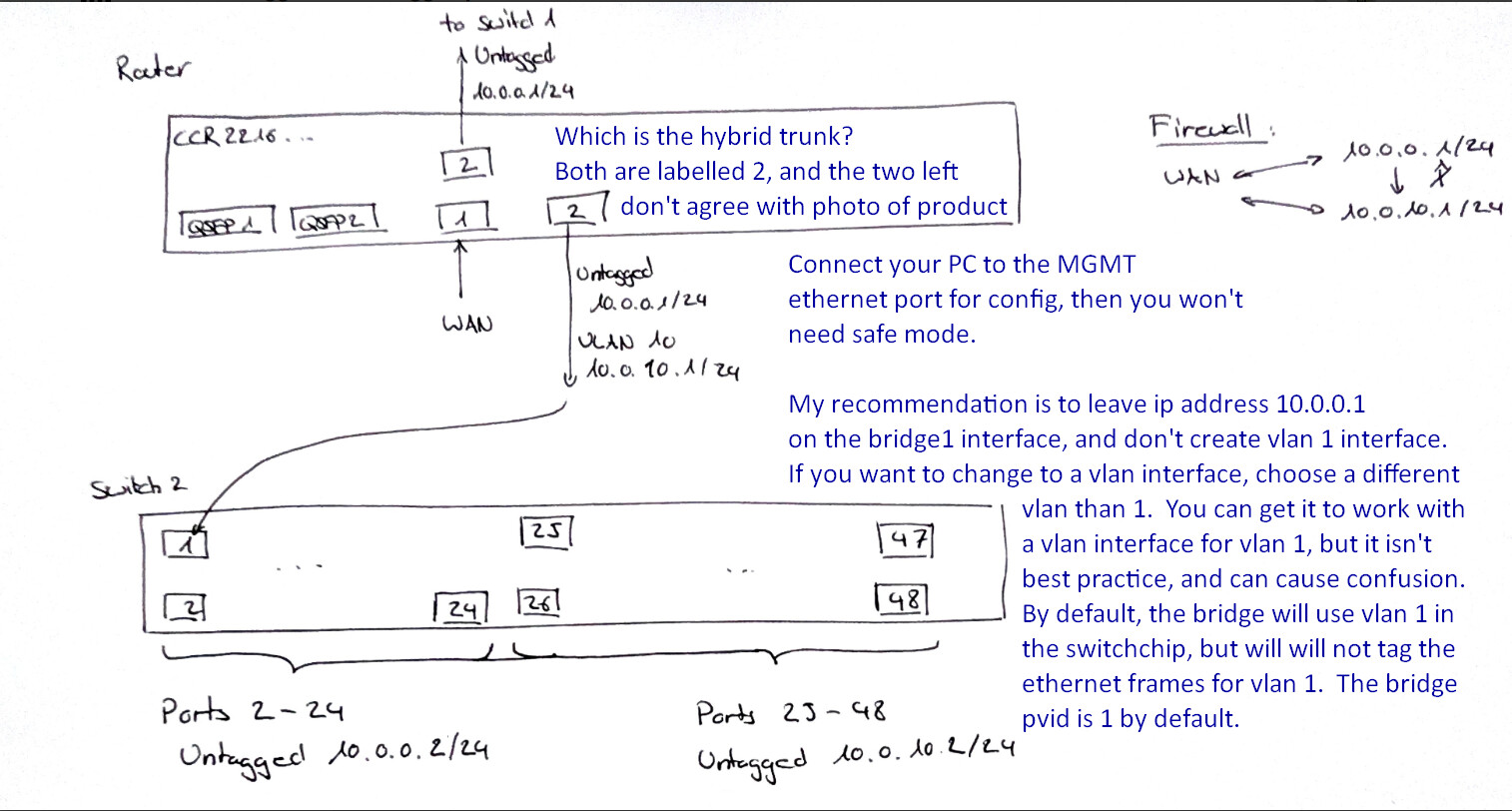
You have no infomation about switch2.

Are ports 1-12 currently working for 10.0.0.0/24? This assumes it will accept traffic for 10.0.0.0/24 as untagged into some vlan on the switch. Ideally you would use the same vlan on the CCR2216 bridge as the pvid on the external switch, this will avoid confusion. See https://www.practicalnetworking.net/stand-alone/vlans/#challenge for why you want to avoid mismatched vlans when connecting switches over the native untagged vlan.

If that's working, then you can turn on vlan-filtering on ther bridge, and it should change nothing visible to you as long as a single vlan is in use.

To add vlan 10 you will need a vlan interface for it and provide a name, ip address, and add an /interface/bridge/vlan entry for vlan 10 containing at least the hybrid trunk port connecting to the external switch2 as a tagged member. ROS will already have vlan1 untagged dynamically (for all ports in the bridge that don't explicitly set a pvid, pvid=1 will be used and this dynamically adds an untagged connection to vlan specified by the pvid, and vlan10 tagged dynamically (when you add the vlan10 interface).

If you enter the command /interface/bridge/vlan/print you will see the vlans and ports for which they are tagged and untagged. For example on my RB760iGS

[demo@MikroTik] > /interface/bridge/vlan/print 
Flags: D - DYNAMIC
Columns: BRIDGE, VLAN-IDS, CURRENT-TAGGED, CURRENT-UNTAGGED
#   BRIDGE  VLAN-IDS  CURRENT-TAGGED  CURRENT-UNTAGGED
0   bridge                                            
;;; added by pvid
1 D bridge  1                         bridge          
                                      ether5          
;;; added by vlan on bridge
2 D bridge  199-200   bridge                          
            210                                       
            999                                       
;;; added by pvid
3 D bridge  200                       ether2          
[demo@MikroTik] >

Create vlan 10 interface under bridge1 (give it a name, like vlan10)
Add ip address 10.0.10.1/24 to vlan10 interface.
Add dhcp server for vlan10 ( ip dhcp-server add address-pool... , ip dhcp-server network...)
Add vlan10 to address list LAN
Add new List names LAN1 for vlan1 and LAN10 for vlan10 so they can be used in firewall.

See this for the one-way firewall, which uses firewall state to allow return traffic - in forward chain, accept established,related)

/ip firewall filter
add action=fasttrack-connection chain=forward comment="defconf: fasttrack" connection-state=established,related hw-offload=yes
add action=accept chain=forward comment="defconf: accept established,related, untracked" connection-state=established,related,untracked

@anav will probably chime in with the rest, it is outlined in the referenced thread.

1 Like

Oh sorry I was careless the 2 on the bottom right of the router is supposed to be a 3 and I did not draw the other ports as they are not important right now. Port 3 is supposed to be the hybrid trunk. Ether1 is configured as management port as per the above suggestion. I connected a pc there.

This works perfectly. Thanks a lot. What I am confused about still is this: In order to create a LAN1 list with the vlan1 as a member I would have to add vlan1 as an interface, but if I understand right this should not be needed because it is dynamic?

Check the Rules of Mikrotik Club first :wink::

1 Like

Yes exactly. That is why I did not dare to add the vlan1 to the interfaces. But how can I use it then in firewall rules?

Configuration is a ten minute job tops, when all the requirements are articulated and the networking equipment is clearly identified, with needed traffic flows.

Simple bridge vlan filtering between MT router and other smart devices. Its not complicated and vlan1 is seen nowhere ( unless one actually looks at all the bridge settings LOL) , and not noted in any firewall rules.

TL;DR the bridge interface (bridge1) is the router interface currently connected to vlan 1 on the switch chip.

E.g.

/interface list add name=LAN1
/interface list member add interface=bridge1 list=LAN1

Here's an example from my lab RB760iGS

[demo@MikroTik] > interface/export
# 2025-11-30 15:35:22 by RouterOS 7.19.6
# software id = 
#
# model = RB760iGS
# serial number = *redacted*
/interface bridge
add admin-mac=*redacted* auto-mac=no name=bridge vlan-filtering=yes
/interface ethernet
set [ find default-name=ether5 ] poe-out=off
/interface vlan
add interface=bridge name=br.199 vlan-id=199
add interface=bridge name=br.200 vlan-id=200
add interface=bridge name=br.210 vlan-id=210
add interface=bridge name=br.999 vlan-id=999
/interface list
add comment=defconf name=WAN
add comment=defconf name=LAN
add name=MGMT
add include=LAN,MGMT name=LANandMGMT
add name=VLAN1
add name=LAN1
add name=LAN199
add name=LAN210
add name=LAN200
add include=LAN1,LAN199,LAN200,LAN210 name=VLANS
/interface bridge port
add bridge=bridge interface=ether2 pvid=200
add bridge=bridge comment=defconf interface=ether5
add bridge=bridge comment=defconf interface=sfp1
/interface bridge vlan
add bridge=bridge vlan-ids=""
/interface list member
add comment=defconf interface=bridge list=LAN
add comment=defconf interface=ether1 list=WAN
add interface=br.200 list=LAN
add interface=br.210 list=LAN
add interface=br.199 list=LAN
add interface=ether3 list=LAN
add interface=ether4 list=LAN
add interface=ether1 list=LAN
add interface=bridge list=LAN1
add interface=br.199 list=LAN199
add interface=br.200 list=LAN200
add interface=br.210 list=LAN210
[demo@MikroTik] > 


I am not sure exactly what "works perfectly". The first 12 ports on switch1? Everything?

Post your latest config export.

The details follow.

Once you turn on vlan-filtering, the taffic within the switch will be segregated by vlan id. In your case, vlan 1 will be carring traffic for 10.0.0.0/24 and vlan 10 will be carring traffic for 10.0.10.0/24
The router interfaces associated with the bridge can be "connected" to the a specific vlan "lane" in the switch.

If you only turn on vlan-filtering, without adding a vlan 10 interface, the traffic from 10.0.0.0/24 will be connected to vlan 1 on the switch and the router's interface connected to vlan 1 will be the bridge itself. Until you add the vlan interface and an ip address on the router, 10.0.10.0/24 is not defined on the router.

When you add a vlan interface with bridge=bridge1 that will do several things all at once.

  1. Create a router interface that can have an ip address applied.
  2. Add a "software vlan adapter" as a vlan compatibility layer shim between the new router interface and the internal connection to the switch chip. This is all within the linux kernel running on the CPU. This shim adds a vlan 10 tag when going from the router (in the AL73400 SoC) to the Marvell 98DX8525 switch chip, and removes it when traffic is going from switch to the router.
  3. Adds vlan 10 to the switch's vlan table (defines vlan 10 in the switch fabric)
  4. Adds the internal switch-port connecting the switch to the router as a member of vlan 10.
  5. Configures the router facing switch-port to use tagged traffic for vlan 10 on the switch-port to the router (this is so the traffic for vlan 10 between the CPU and switch will use tags in both directions, the CPU side tagging/untagging is done by the shim running on the CPU as part of the vlan 10 interface. The switch side is done by dedicated hardware in the switch once vlan-filtering is enabled.

The above things are all done so the router has a connection to vlan 10 on the switch. But it still has no ip address. And although vlan 10 is "defined" on the switch chip, there is only one switch-port that is a member of vlan 10; the router facing switch-port.

Then you add the ip address, dhcp server, and firewall rules. The interface lists are not necessary, but add a layer of abstraction to make changes to the configuration much easier.

1 Like

Here is what I did so far:


# 2025-12-01 01:07:41 by RouterOS 7.21beta11

# software id = 9NNQ-BRU3

#

# model = CCR2216-1G-12XS-2XQ

# serial number = HJQ0ATJEZF8

/interface bridge

add igmp-snooping=yes name=bridge1 vlan-filtering=yes

/interface ethernet

set [ find default-name=qsfp28-1-3 ] advertise="10M-baseT-half,10M-baseT-full,100M-baseT-half,100M-baseT-full,1G-baseT-half,1G-baseT-full,1G-baseX,2.5G-baseT,2.5G-baseX,5G-baseT,10G-baseT,10G-baseSR-LR,10G-baseCR,40G-baseSR4-LR4,40G-bas\

    eCR4,25G-baseSR-LR,25G-baseCR,50G-baseSR2-LR2,50G-baseCR2"

set [ find default-name=qsfp28-2-3 ] advertise="10M-baseT-half,10M-baseT-full,100M-baseT-half,100M-baseT-full,1G-baseT-half,1G-baseT-full,1G-baseX,2.5G-baseT,2.5G-baseX,5G-baseT,10G-baseT,10G-baseSR-LR,10G-baseCR,40G-baseSR4-LR4,40G-bas\

    eCR4,25G-baseSR-LR,25G-baseCR,50G-baseSR2-LR2,50G-baseCR2"

set [ find default-name=sfp28-1 ] fec-mode=fec91

set [ find default-name=sfp28-2 ] auto-negotiation=no speed=10G-baseCR

/interface vlan

add interface=bridge1 l3-hw-offloading=no name=vlan10 vlan-id=10

/interface list

add name=WAN

add name=LAN

/ip pool

add name=dhcp_pool1 ranges=10.0.0.100-10.0.0.254

add name=dhcp_pool10 ranges=10.0.10.100-10.0.10.254

/ip dhcp-server

add address-pool=dhcp_pool1 interface=bridge1 name=dhcp1

add address-pool=dhcp_pool10 interface=vlan10 name=dhcp10

/interface bridge port

add bridge=bridge1 interface=qsfp28-1-1

add bridge=bridge1 interface=qsfp28-1-2

add bridge=bridge1 interface=qsfp28-1-3

add bridge=bridge1 interface=qsfp28-1-4

add bridge=bridge1 interface=qsfp28-2-1

add bridge=bridge1 interface=qsfp28-2-2

add bridge=bridge1 interface=qsfp28-2-3

add bridge=bridge1 interface=qsfp28-2-4

add bridge=bridge1 interface=sfp28-2

add bridge=bridge1 interface=sfp28-3

add bridge=bridge1 interface=sfp28-4

add bridge=bridge1 interface=sfp28-5

add bridge=bridge1 interface=sfp28-6

add bridge=bridge1 interface=sfp28-7

add bridge=bridge1 interface=sfp28-8

add bridge=bridge1 interface=sfp28-9

add bridge=bridge1 interface=sfp28-10

add bridge=bridge1 interface=sfp28-11

add bridge=bridge1 interface=sfp28-12

/ipv6 settings

set accept-router-advertisements=yes

/interface bridge vlan

add bridge=bridge1 tagged=sfp28-6 vlan-ids=10

/interface list member

add interface=sfp28-1 list=WAN

add interface=bridge1 list=LAN

/ip address

add address=10.0.0.1/24 interface=bridge1 network=10.0.0.0

add address=192.168.77.1/30 comment=management interface=ether1 network=192.168.77.0

add address=10.0.10.1/24 interface=vlan10 network=10.0.10.0

/ip cloud

set update-time=no

/ip dhcp-client

add interface=sfp28-1

/ip dhcp-server network

add address=10.0.0.0/24 dns-server=10.0.0.1 gateway=10.0.0.1

add address=10.0.10.0/24 dns-server=10.0.10.1 gateway=10.0.10.1

/ip dns

set allow-remote-requests=yes verify-doh-cert=yes

/ip firewall filter

add action=accept chain=input comment="defconf: accept established,related,untracked" connection-state=established,related,untracked

add action=drop chain=input comment="defconf: drop invalid" connection-state=invalid

add action=accept chain=input comment="defconf: accept ICMP" protocol=icmp

add action=accept chain=input comment="defconf: accept to local loopback (for CAPsMAN)" dst-address=127.0.0.1

add action=accept chain=input comment="allow igmpv2" protocol=igmp

add action=accept chain=input comment="allow new TV7 MCast streams" dst-address=233.50.230.0/24 dst-port=5000 protocol=udp src-address=77.109.129.0/24

add action=drop chain=input comment="defconf: drop all not coming from LAN" in-interface-list=!LAN

add action=accept chain=forward comment="defconf: accept in ipsec policy" ipsec-policy=in,ipsec

add action=accept chain=forward comment="defconf: accept out ipsec policy" ipsec-policy=out,ipsec

add action=fasttrack-connection chain=forward comment="defconf: fasttrack" connection-state=established,related

add action=accept chain=forward comment="defconf: accept established,related, untracked" connection-state=established,related,untracked

add action=accept chain=forward comment="allow forwarding of IPTV TV7" dst-address=233.50.230.0/24 dst-port=5000 protocol=udp

add action=drop chain=forward comment="defconf: drop invalid" connection-state=invalid

add action=drop chain=forward comment="defconf: drop all from WAN not DSTNATed" connection-nat-state=!dstnat connection-state=new in-interface-list=WAN

/ip firewall nat

add action=masquerade chain=srcnat ipsec-policy=out,none out-interface-list=WAN

/ip service

set ftp disabled=yes

set telnet disabled=yes

set www disabled=yes

set www-ssl certificate=webfig disabled=no

/ip ssh

set strong-crypto=yes

/ipv6 address

add address=::401:0:0:0:1 from-pool=v6pool interface=bridge1

add address=::400:0:0:0:1 from-pool=v6pool interface=vlan10

/ipv6 dhcp-client

add add-default-route=yes default-route-tables=main interface=sfp28-1 pool-name=v6pool request=address,prefix

/ipv6 firewall address-list

add address=::/128 comment="defconf: unspecified address" list=bad_ipv6

add address=::1/128 comment="defconf: lo" list=bad_ipv6

add address=fec0::/10 comment="defconf: site-local" list=bad_ipv6

add address=::ffff:0.0.0.0/96 comment="defconf: ipv4-mapped" list=bad_ipv6

add address=::/96 comment="defconf: ipv4 compat" list=bad_ipv6

add address=100::/64 comment="defconf: discard only" list=bad_ipv6

add address=2001:db8::/32 comment="defconf: documentation" list=bad_ipv6

add address=2001:10::/28 comment="defconf: ORCHID" list=bad_ipv6

add address=3ffe::/16 comment="defconf: 6bone" list=bad_ipv6

/ipv6 firewall filter

add action=accept chain=input comment="defconf: accept established,related,untracked" connection-state=established,related,untracked

add action=drop chain=input comment="defconf: drop invalid" connection-state=invalid

add action=accept chain=input comment="defconf: accept ICMPv6" protocol=icmpv6

add action=accept chain=input comment="defconf: accept UDP traceroute" dst-port=33434-33534 protocol=udp

add action=accept chain=input comment="defconf: accept DHCPv6-Client prefix delegation" dst-port=546 protocol=udp src-address=fe80::/10

add action=accept chain=input comment="defconf: accept IKE" dst-port=500,4500 protocol=udp

add action=accept chain=input comment="defconf: accept ipsec AH" protocol=ipsec-ah

add action=accept chain=input comment="defconf: accept ipsec ESP" protocol=ipsec-esp

add action=accept chain=input comment="defconf: accept all that matches ipsec policy" ipsec-policy=in,ipsec

add action=drop chain=input comment="defconf: drop everything else not coming from LAN" in-interface-list=!LAN

add action=fasttrack-connection chain=forward comment="defconf: fasttrack6" connection-state=established,related

add action=accept chain=forward comment="defconf: accept established,related,untracked" connection-state=established,related,untracked

add action=drop chain=forward comment="defconf: drop invalid" connection-state=invalid

add action=drop chain=forward comment="defconf: drop packets with bad src ipv6" src-address-list=bad_ipv6

add action=drop chain=forward comment="defconf: drop packets with bad dst ipv6" dst-address-list=bad_ipv6

add action=drop chain=forward comment="defconf: rfc4890 drop hop-limit=1" hop-limit=equal:1 protocol=icmpv6

add action=accept chain=forward comment="defconf: accept ICMPv6" protocol=icmpv6

add action=accept chain=forward comment="defconf: accept HIP" protocol=139

add action=accept chain=forward comment="defconf: accept IKE" dst-port=500,4500 protocol=udp

add action=accept chain=forward comment="defconf: accept ipsec AH" protocol=ipsec-ah

add action=accept chain=forward comment="defconf: accept ipsec ESP" protocol=ipsec-esp

add action=accept chain=forward comment="defconf: accept all that matches ipsec policy" ipsec-policy=in,ipsec

add action=drop chain=forward comment="defconf: drop everything else not coming from LAN" in-interface-list=!LAN

/ipv6 nd

set [ find default=yes ] advertise-dns=yes disabled=yes

add advertise-dns=yes interface=bridge1

add advertise-dns=yes interface=vlan10

/routing igmp-proxy

set quick-leave=yes

/routing igmp-proxy interface

add alternative-subnets=77.109.129.0/24 interface=sfp28-1 upstream=yes

add interface=bridge1

/system clock

set time-zone-autodetect=no time-zone-name=Europe/Zurich

/system ntp client

set enabled=yes

/system ntp client servers

add address=ntp.metas.ch

/system package update

set channel=testing

/system routerboard settings

set enter-setup-on=delete-key

/tool bandwidth-server

set enabled=no

/tool mac-server

set allowed-interface-list=none

/tool mac-server mac-winbox

set allowed-interface-list=none

/tool mac-server ping

set enabled=no

I am not sure how you are pasting your configs, but it appears like you are pasting and then formatting after the format has already been "tainted".

If you press the </> icon in the ribbon, then paste the output from a winbox terminal directly into the forum, it should look more like the following:

# 2025-12-01 01:07:41 by RouterOS 7.21beta11
# software id = 9NNQ-BRU3
#
# model = CCR2216-1G-12XS-2XQ
# serial number = 
/interface bridge
add igmp-snooping=yes name=bridge1 vlan-filtering=yes
/interface ethernet
set [ find default-name=qsfp28-1-3 ] advertise="10M-baseT-half,10M-baseT-full,100M-baseT-half,100M-baseT-full,1G-baseT-half,1G-baseT-full,1G-baseX,2.5G-baseT,2.5G-baseX,5G-baseT,10G-baseT,10G-baseSR-LR,10G-baseCR,40G-baseSR4-LR4,40G-bas\
    eCR4,25G-baseSR-LR,25G-baseCR,50G-baseSR2-LR2,50G-baseCR2"
set [ find default-name=qsfp28-2-3 ] advertise="10M-baseT-half,10M-baseT-full,100M-baseT-half,100M-baseT-full,1G-baseT-half,1G-baseT-full,1G-baseX,2.5G-baseT,2.5G-baseX,5G-baseT,10G-baseT,10G-baseSR-LR,10G-baseCR,40G-baseSR4-LR4,40G-bas\
    eCR4,25G-baseSR-LR,25G-baseCR,50G-baseSR2-LR2,50G-baseCR2"
set [ find default-name=sfp28-1 ] fec-mode=fec91
set [ find default-name=sfp28-2 ] auto-negotiation=no speed=10G-baseCR
/interface vlan
add interface=bridge1 l3-hw-offloading=no name=vlan10 vlan-id=10
/interface list
add name=WAN
add name=LAN
/ip pool
add name=dhcp_pool1 ranges=10.0.0.100-10.0.0.254
add name=dhcp_pool10 ranges=10.0.10.100-10.0.10.254
/ip dhcp-server
add address-pool=dhcp_pool1 interface=bridge1 name=dhcp1
add address-pool=dhcp_pool10 interface=vlan10 name=dhcp10
/interface bridge port
add bridge=bridge1 interface=qsfp28-1-1
add bridge=bridge1 interface=qsfp28-1-2
add bridge=bridge1 interface=qsfp28-1-3
add bridge=bridge1 interface=qsfp28-1-4
add bridge=bridge1 interface=qsfp28-2-1
add bridge=bridge1 interface=qsfp28-2-2
add bridge=bridge1 interface=qsfp28-2-3
add bridge=bridge1 interface=qsfp28-2-4
add bridge=bridge1 interface=sfp28-2
add bridge=bridge1 interface=sfp28-3
add bridge=bridge1 interface=sfp28-4
add bridge=bridge1 interface=sfp28-5
add bridge=bridge1 interface=sfp28-6
add bridge=bridge1 interface=sfp28-7
add bridge=bridge1 interface=sfp28-8
add bridge=bridge1 interface=sfp28-9
add bridge=bridge1 interface=sfp28-10
add bridge=bridge1 interface=sfp28-11
add bridge=bridge1 interface=sfp28-12
/ipv6 settings
set accept-router-advertisements=yes
/interface bridge vlan
add bridge=bridge1 tagged=sfp28-6 vlan-ids=10
/interface list member
add interface=sfp28-1 list=WAN
add interface=bridge1 list=LAN
/ip address
add address=10.0.0.1/24 interface=bridge1 network=10.0.0.0
add address=192.168.77.1/30 comment=management interface=ether1 network=192.168.77.0
add address=10.0.10.1/24 interface=vlan10 network=10.0.10.0
/ip cloud
set update-time=no
/ip dhcp-client
add interface=sfp28-1
/ip dhcp-server network
add address=10.0.0.0/24 dns-server=10.0.0.1 gateway=10.0.0.1
add address=10.0.10.0/24 dns-server=10.0.10.1 gateway=10.0.10.1
/ip dns
set allow-remote-requests=yes verify-doh-cert=yes
/ip firewall filter
add action=accept chain=input comment="defconf: accept established,related,untracked" connection-state=established,related,untracked
add action=drop chain=input comment="defconf: drop invalid" connection-state=invalid
add action=accept chain=input comment="defconf: accept ICMP" protocol=icmp
add action=accept chain=input comment="defconf: accept to local loopback (for CAPsMAN)" dst-address=127.0.0.1
add action=accept chain=input comment="allow igmpv2" protocol=igmp
add action=accept chain=input comment="allow new TV7 MCast streams" dst-address=233.50.230.0/24 dst-port=5000 protocol=udp src-address=77.109.129.0/24
add action=drop chain=input comment="defconf: drop all not coming from LAN" in-interface-list=!LAN
add action=accept chain=forward comment="defconf: accept in ipsec policy" ipsec-policy=in,ipsec
add action=accept chain=forward comment="defconf: accept out ipsec policy" ipsec-policy=out,ipsec
add action=fasttrack-connection chain=forward comment="defconf: fasttrack" connection-state=established,related
add action=accept chain=forward comment="defconf: accept established,related, untracked" connection-state=established,related,untracked
add action=accept chain=forward comment="allow forwarding of IPTV TV7" dst-address=233.50.230.0/24 dst-port=5000 protocol=udp
add action=drop chain=forward comment="defconf: drop invalid" connection-state=invalid
add action=drop chain=forward comment="defconf: drop all from WAN not DSTNATed" connection-nat-state=!dstnat connection-state=new in-interface-list=WAN
/ip firewall nat
add action=masquerade chain=srcnat ipsec-policy=out,none out-interface-list=WAN
/ip service
set ftp disabled=yes
set telnet disabled=yes
set www disabled=yes
set www-ssl certificate=webfig disabled=no
/ip ssh
set strong-crypto=yes
/ipv6 address
add address=::401:0:0:0:1 from-pool=v6pool interface=bridge1
add address=::400:0:0:0:1 from-pool=v6pool interface=vlan10
/ipv6 dhcp-client
add add-default-route=yes default-route-tables=main interface=sfp28-1 pool-name=v6pool request=address,prefix
/ipv6 firewall address-list
add address=::/128 comment="defconf: unspecified address" list=bad_ipv6
add address=::1/128 comment="defconf: lo" list=bad_ipv6
add address=fec0::/10 comment="defconf: site-local" list=bad_ipv6
add address=::ffff:0.0.0.0/96 comment="defconf: ipv4-mapped" list=bad_ipv6
add address=::/96 comment="defconf: ipv4 compat" list=bad_ipv6
add address=100::/64 comment="defconf: discard only" list=bad_ipv6
add address=2001:db8::/32 comment="defconf: documentation" list=bad_ipv6
add address=2001:10::/28 comment="defconf: ORCHID" list=bad_ipv6
add address=3ffe::/16 comment="defconf: 6bone" list=bad_ipv6
/ipv6 firewall filter
add action=accept chain=input comment="defconf: accept established,related,untracked" connection-state=established,related,untracked
add action=drop chain=input comment="defconf: drop invalid" connection-state=invalid
add action=accept chain=input comment="defconf: accept ICMPv6" protocol=icmpv6
add action=accept chain=input comment="defconf: accept UDP traceroute" dst-port=33434-33534 protocol=udp
add action=accept chain=input comment="defconf: accept DHCPv6-Client prefix delegation" dst-port=546 protocol=udp src-address=fe80::/10
add action=accept chain=input comment="defconf: accept IKE" dst-port=500,4500 protocol=udp
add action=accept chain=input comment="defconf: accept ipsec AH" protocol=ipsec-ah
add action=accept chain=input comment="defconf: accept ipsec ESP" protocol=ipsec-esp
add action=accept chain=input comment="defconf: accept all that matches ipsec policy" ipsec-policy=in,ipsec
add action=drop chain=input comment="defconf: drop everything else not coming from LAN" in-interface-list=!LAN
add action=fasttrack-connection chain=forward comment="defconf: fasttrack6" connection-state=established,related
add action=accept chain=forward comment="defconf: accept established,related,untracked" connection-state=established,related,untracked
add action=drop chain=forward comment="defconf: drop invalid" connection-state=invalid
add action=drop chain=forward comment="defconf: drop packets with bad src ipv6" src-address-list=bad_ipv6
add action=drop chain=forward comment="defconf: drop packets with bad dst ipv6" dst-address-list=bad_ipv6
add action=drop chain=forward comment="defconf: rfc4890 drop hop-limit=1" hop-limit=equal:1 protocol=icmpv6
add action=accept chain=forward comment="defconf: accept ICMPv6" protocol=icmpv6
add action=accept chain=forward comment="defconf: accept HIP" protocol=139
add action=accept chain=forward comment="defconf: accept IKE" dst-port=500,4500 protocol=udp
add action=accept chain=forward comment="defconf: accept ipsec AH" protocol=ipsec-ah
add action=accept chain=forward comment="defconf: accept ipsec ESP" protocol=ipsec-esp
add action=accept chain=forward comment="defconf: accept all that matches ipsec policy" ipsec-policy=in,ipsec
add action=drop chain=forward comment="defconf: drop everything else not coming from LAN" in-interface-list=!LAN
/ipv6 nd
set [ find default=yes ] advertise-dns=yes disabled=yes
add advertise-dns=yes interface=bridge1
add advertise-dns=yes interface=vlan10
/routing igmp-proxy
set quick-leave=yes
/routing igmp-proxy interface
add alternative-subnets=77.109.129.0/24 interface=sfp28-1 upstream=yes
add interface=bridge1
/system clock
set time-zone-autodetect=no time-zone-name=Europe/Zurich
/system ntp client
set enabled=yes
/system ntp client servers
add address=ntp.metas.ch
/system package update
set channel=testing
/system routerboard settings
set enter-setup-on=delete-key
/tool bandwidth-server
set enabled=no
/tool mac-server
set allowed-interface-list=none
/tool mac-server mac-winbox
set allowed-interface-list=none
/tool mac-server ping
set enabled=no

I ran your text through awk 'NF' to remove the blank lines.
Currently traffic should be allowed between bridge1 and vlan10 (either side can establish new connection) because there is an implicit "accept" at the end of the built-in forward chain. for at least the the input and forward chains, anything not matching a rule that matches will be accepted (allowed). @anav will tell you how to change that to drop by default by adding a new "block all else" rule at the end. Then you will have to explicitly allow all routed traffic, including the inter-vlan traffic.

Currently vlan10 should not be able to reach the router, so you may want to temporarily add vlan10 to the LAN list. But I think dhcp will work even if not allowed, because it operates at raw socket layer (see BOOTP/DHCP bypasses NAT firewall)

After we are sure the underlying connection is working, then the firewall can be adjusted to implement the "one way" connection.

ok, at this point, if you plug a PC into one of ports 25-48 of the external switch, is it getting an ip address from the dhcp_pool10 ranges=10.0.10.100-10.0.10.254? First lease will probably be 10.0.10.254.

If not, then the switch1 config may be incorrect.

If that works, are you able to communicate with a device connected to the lower ports with an address from dhcp_pool1? If it does not work, then verify that there isn't a host based firewall (e.g. windows firewall by default blocks traffic from "foreign" networks, where foreign means "not connected route" that must use the default gateway) on the device in 10.0.0.0/24, because the current firewall on the CCR2216 isn't currently blocking traffic between any non-WAN interfaces. see Firewall - RouterOS - MikroTik Documentation and Firewall Rule Concept

1 Like