The port that should be used for management is the 1 Gbps ether port. It should not be added to the bridge.
See https://cdn.mikrotik.com/web-assets/product_files/CCR2216-1G-12XS-2XQ_220346.png
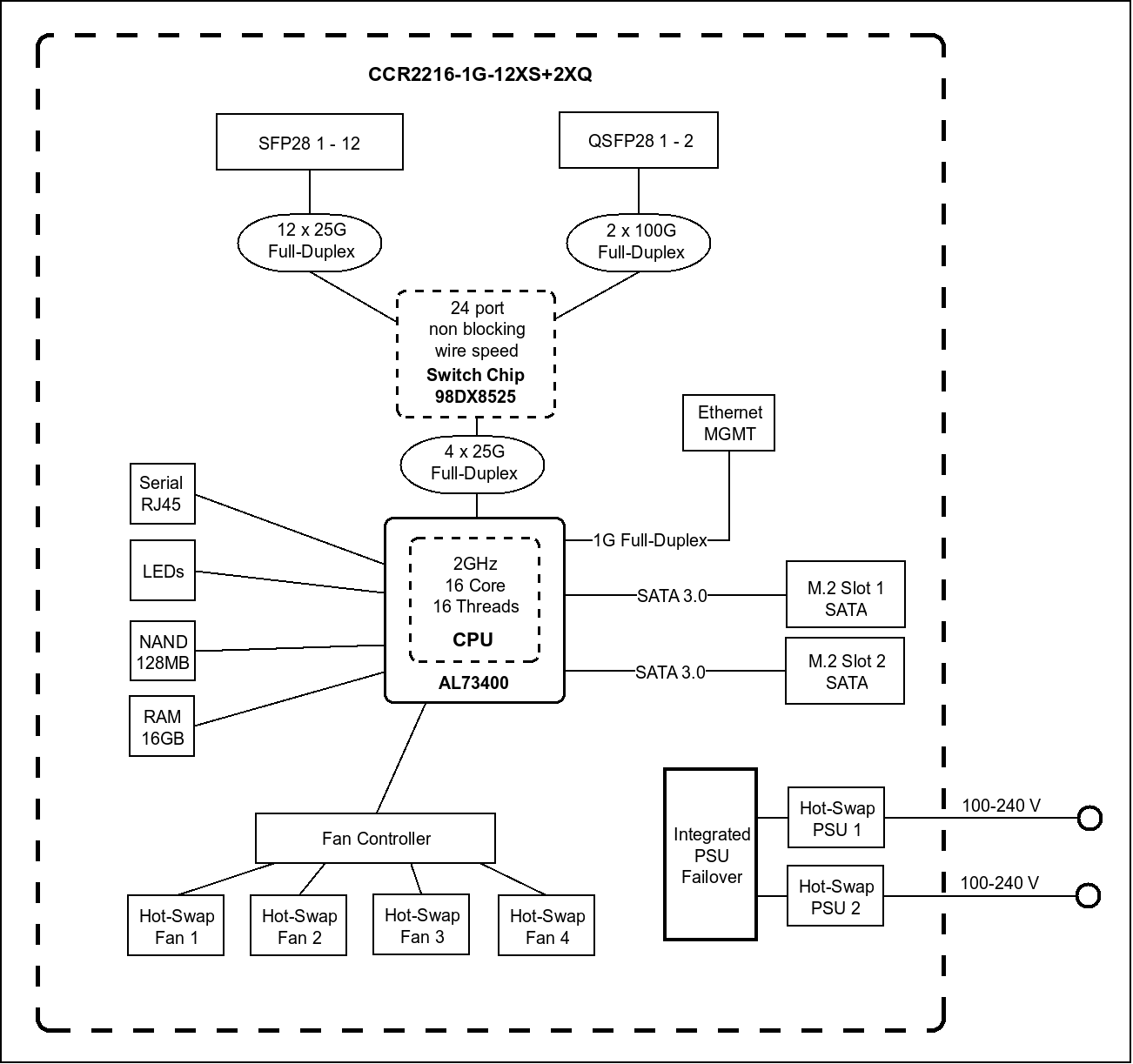

for why.
Also, what version of RoS are you using? Versions newer than 7.16 have made vlans a bit easier to configure, as it makes the connections from the switch to the routing block more "automatic" when adding vlan interfaces.
Although what you show using tagged vlan 1 between the router and the integrated switch chip possible, if you are going to do that, then to eliminate confusion, you should specify the pvid of the bridge to be something other than the default 1.
You can skim this thread Question related to “RouterOS bridge mysteries explained” which is a vlan diversion of RouterOS bridge mysteries explained
But if you want help, please upload your sanitized export. And at least a photo of a hand drawn sketch of what you are trying to do (with subnets, vlans, whether tagged or untagged, etc).
Creating a spreadsheet with a vlan per row and switch (bridge) port per colunm and showing if the vlan should be untagged on the port or if it should be tagged is well worth the time. It is a lot easier to make changes to the spreadsheet than the configuration, and once the spreasheet is complete, then the configuration of the router vlans will be much more straight forward.