hi guys, i have recently known the world of mikrotik.
I approached mikrotik because of my business.
I have several devices from my customers, I do remote assistance but the biggest obstacle to overcome is the configuration of the network or of the customers’ PCs. so I would like to get out of this thing.
I state that the management program of the device that I sell recognizes the device automatically when it is under the same network as the PC (same range of ip)
therefore mikrotik should give me the possibility to be plug and play, to network with mikrotik and in that moment my device becomes manageable via vpn.
For now I have tried in this way managing to ping the device, but not to see it with the management software, I will perhaps explain why. I also specify that there are 2 software, one so that uses port 5200, the other not so.
Let’s get to what I’ve tried so far.
I set up a CHR on amazon AWS, so I created a vpn sstp server with relative certificates on this.
I managed to create two vpns, from my pc to the chr, from the client’s mikrotik to the chr. I have created some routes (do I lose them every time the user vpn disconnects?), In short From my pc I can ping the device that is under the mikrotik but not recognize it.
Maybe because I’m under a different ip family, I’m under 192.168.5.x which is the ip of the chr vpn and the device is under 192.168.88.x, so maybe I can’t recognize it with the software.
Can you give me some help?
The only important thing about my project, to be as less intrusive as possible on the customer’s network (plug and play), to always be able to have remote access and control on the mikrotik and on the device - as if it were connected directly to my pc.
Thanks and sorry for the length
What you seem to ask for is an L2 tunnel between your support center and the customer’s LAN. This is possible, but it is a security nightmare, as any malware eventually squatting in one of your customers’ LANs can infect your support PC, and then it can spread to other customers’ LANs once you connect that PC there. So even if customers’ security administrators would accept such a solution, you should think about some other way to reach your devices for your own protection against eventual consequences. A software allowing you to access a PC in the customer’s LAN and run your management software on it, such as TeamViewer, AnyDesk, or even RDP if you don’t want to rely on a 3rd party cloud service, seems like a much safer approach to me.
Or the software of your device could contain a VPN client connecting to your CHR and get an internal management address from it, so you wouldn’t need the L2 tunnel.
Technically, the only VPN client to support L2 on a PC and be compatible with Mikrotik is OpenVPN. So if you want to stick with your L2 tunnel idea, I can imagine three approaches:
you create an OpenVPN account at your PC for each of the customers, so to connect to a given customer, you connect to the CHR using a corresponding account.
you create an SSID on your WiFi AP for each customer
you use a switch whose each port will represent one of the customers’ LANs
In all cases, the L2 tunnel between the CHR and the gateway Mikrotik in each customer’s LAN need not be an OpenVPN one - you may use EoIP or L2TP over IPsec or Wireguard.
Short of you telling us which “device” and which “management program” you mean, I offer this informed guess: one end sends out a broadcast or multicast “announce” message that the other receives and replies to. Both classes of traffic are normally blocked at a routing boundary, explaining your problem.
Solution if my guess is right: find out the announcement protocol details, then modify the firewall rules on the VPN to push those packets thru to the remote site, and to schlep the replies back.
I’dont know how software search the controller. I think that just be in the same local network.
I want to avoid the use of a client PC, so as to avoid software problems or problems external to my work.
my idea of the chr was born also for not always having the vpn connected. I turn off the chr and open it when I need it
from how I write you will understand that I am not a systems engineer. I hope you can address me.
the device I want to manage is a controller that manages led panels
Let’s put it another way - does the panel controller need to talk to other devices in the customers’ LAN, or is it enough that you can reach it “somehow”? I.e. do the customers provision the contents to show on the panels, or deliver it live, via LAN or do the customers tell you what to configure and you do that remotely?
In any case, the CHR in the cloud is not enough (but a single one common for all customers is sufficient), you need a Mikrotik at each customer given that you seem to have no possibility to affect the software in the panel controller itself, so the VPN connection to the CHR must be provided by something else, i.e. the Mikrotik colocated with the controller.
Then you’d best seek out an expert in that “controller.”
the device I want to manage is a controller that manages led panels
The lower bound on the number of possible solutions equals the number of manufacturers of network-controlled LED panels. It approaches the number of models in all product lines across all manufacturers at the upper end. Since you have withheld those details, were you wanting us to guess which combination of possibilities you had, or did you instead want a dump of every possible option so you could work through them one by one?
I didn’t specify the controllers because I use several that all have the same connection mode. They are recognized when in the same local network.
I don’t need to interface with other devices but they are mikrotik and controller.
I thought of the CHR to open the connection from inside the customer’s line to the outside without having the problem of touching the customer’s router. The vpn connection to the chr should be provided by the mikrotik to which I will connect the controller.
The goal to be achieved is to be in the same local network as the remote controller. controller connected to mikrotik with local ip 192.168.88.222 gateway 192.168.1.1 I must be below
From your last post it seems that the colocated Mikrotik may be placed between your panel controller and the rest of the customer’s LAN, i.e. only the Mikrotik would be directly connected to customer’s LAN, and the panel controller would be connected to another interface of the Mikrotik. Is that the case?
It’s speculation, since you continue to refuse to identify these “controllers,” but if the remote RouterOS boxes are ARM-based, ZeroTier might transmit the discovery messages.
It’d also obviate the need for the CHR in the middle.
I don’t refuse to say what controller I am, simply because the goal of this is to be in the same subnet via vpn. I’ll ask the controller problem later. am I wrong ?
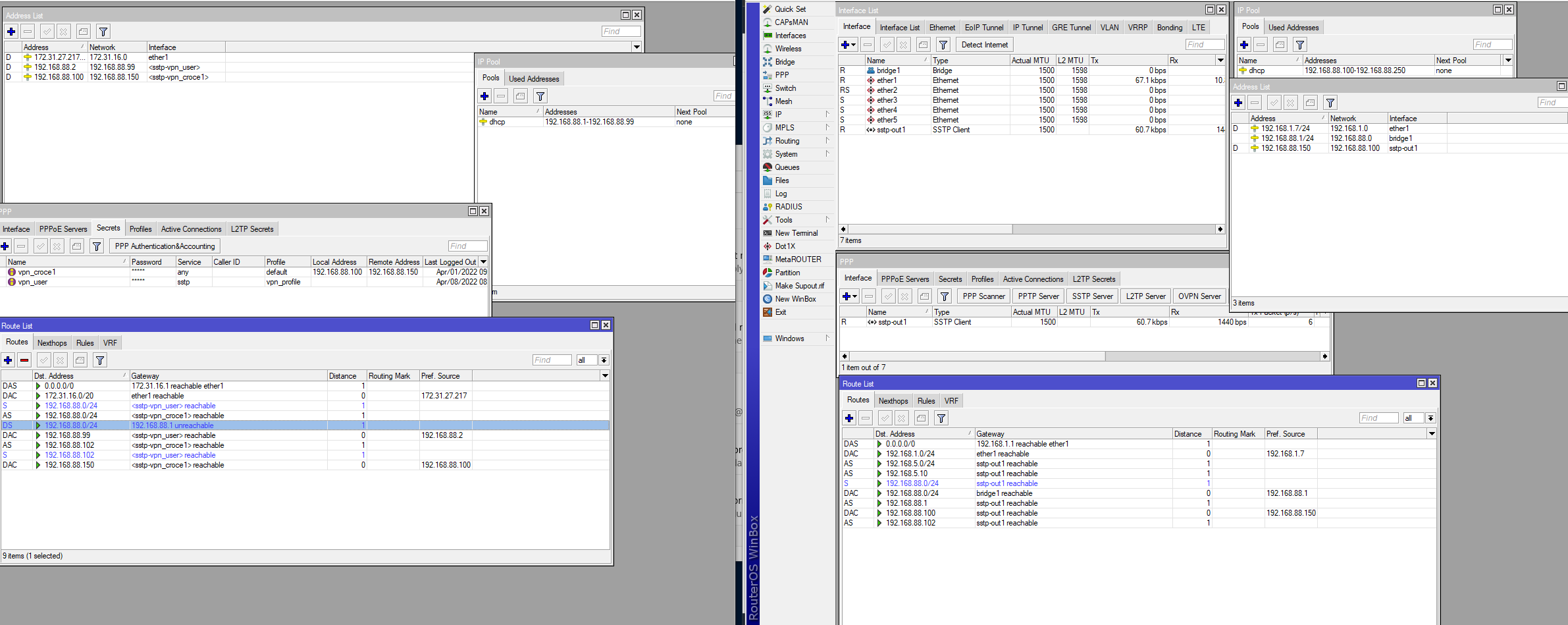
 ?
?  I think I can’t explain myself well in English