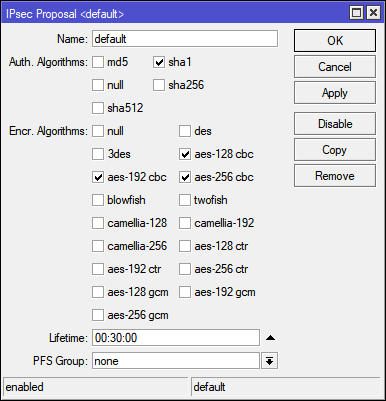
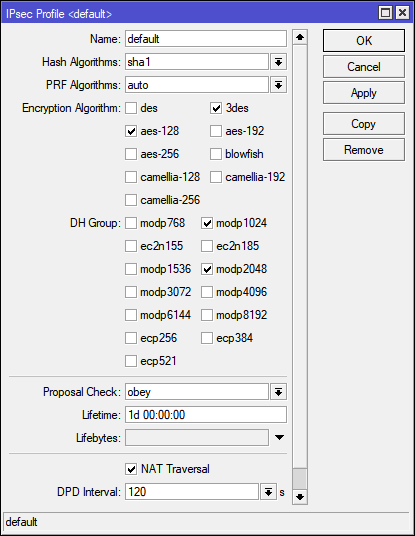
I have vpn L2TP Server, in settings I use IPSec - required. The problem is that the client does not connect from any Windows.
In the log on Mikrotik writes error: L2TP connection rejected no IPsec encryption while it was required.
On the windows the client writes error: Cannot connect to the remote computer, so the connection port is closed.
On Mikrotik I have permission rules Firewall: Input udp 500,1701, 4500 and 50 (ipsec-esp).
When I change - use IPSec: yes. Connection is working.
Tell me what could be the reason?
use-ipsec=yes permits use of IPsec to protect L2TP sessions, but does not enforce it, so if the client tries to establish the L2TP connection without previously establishing an IPsec security association, Mikrotik accepts that unprotected session.
By default, the Windows native VPN client has the same setting - it prefers an IPsec-protected connection but if it cannot be established, it connects using bare L2TP anyway.
Now there are two possible reasons - either the encryption and authentication algorithm sets (proposals) are incompatible between the client and the server, or your ISP is blocking IPsec ports (the dialect of English you use suggests it could be the case). But let’s be optimistic and belive it is just a configuration issue. As you say that “client does not connect from any Windows”, does it mean Android, Mikrotik, iOS, or Linux clients do connect successfully even if use-ipsec is set to required?
The default ones (which the L2TP server uses to generate the IPsec settings dynamically if use-ipsec is set to yes or required) normally do. So you have probably changed them to make the Android happy?
You should enable logging and see what is the strongest encryption and authentication algorithm offered by Windows. Also something is telling me that WIndows do not support pfs by default and you need PowerShell to tell them otherwise.
Then run /log print follow-only file=ipsec-start where topics~“ipsec”, make a single connection attempt from the client, stop the /log print …, download the file ipsec-start.txt and look for “proposal” in it.
Unfortunately you have to open the terminal window and use the text commands I gave. The GUI will not show you what you need as too many lines of log are generated to fit into the memory buffer.
In that case, @chechito is right and you haven’t configured the Windows to use IPsec (while still assuming that the ISP doesn’t interfere given that Android connects allright).
Well, rather you tell me how you’ve managed to configure it without IPsec
When I add a VPN connection the “new” (Win10) way, I can choose between “L2TP/IPsec with certificate” and “L2TP/IPsec with pre-shared key” (plus a few other possibilities not related to L2TP), but there’s no choice of bare L2TP. So I choose the “L2TP/IPsec with PSK”, fill in the PSK, and that’s it.
Is the Android client connecting from the same network like the Windows? I.e. could it be that connections to port 500 and 4500 are indeed blocked somewhere on the path between the Windows and the Mikrotik, but not on the path between the Android and the Mikrotik?
Can you run Wireshark on the Windows to see whether they are sending packets to UDP port 500 on the Mikrotik address?
Android is on the same network as Windows.
launched Wireshark, I see that during the connection attempt is used port 1701. I can’t find the port 500 in the list
Maybe I did not indicate an important detail, RouterOS is installed on a virtual machine. There is no such problem on the hardware Mikrotik.
And yet, the connection between routers with IPSec works, the policy is established. It turns out that IPSec does not work in the client-server version.
Does the Android client connect to this virtual RouterOS?
Could it be that there is an external firewall between the virtual RouterOS and the internet? The thing is that for a site-to-site IPsec, both routers actively initiate the connection, so the virtual RouterOS opens a pinhole in the external firewall and thus the firewall lets through packets from the remote router.