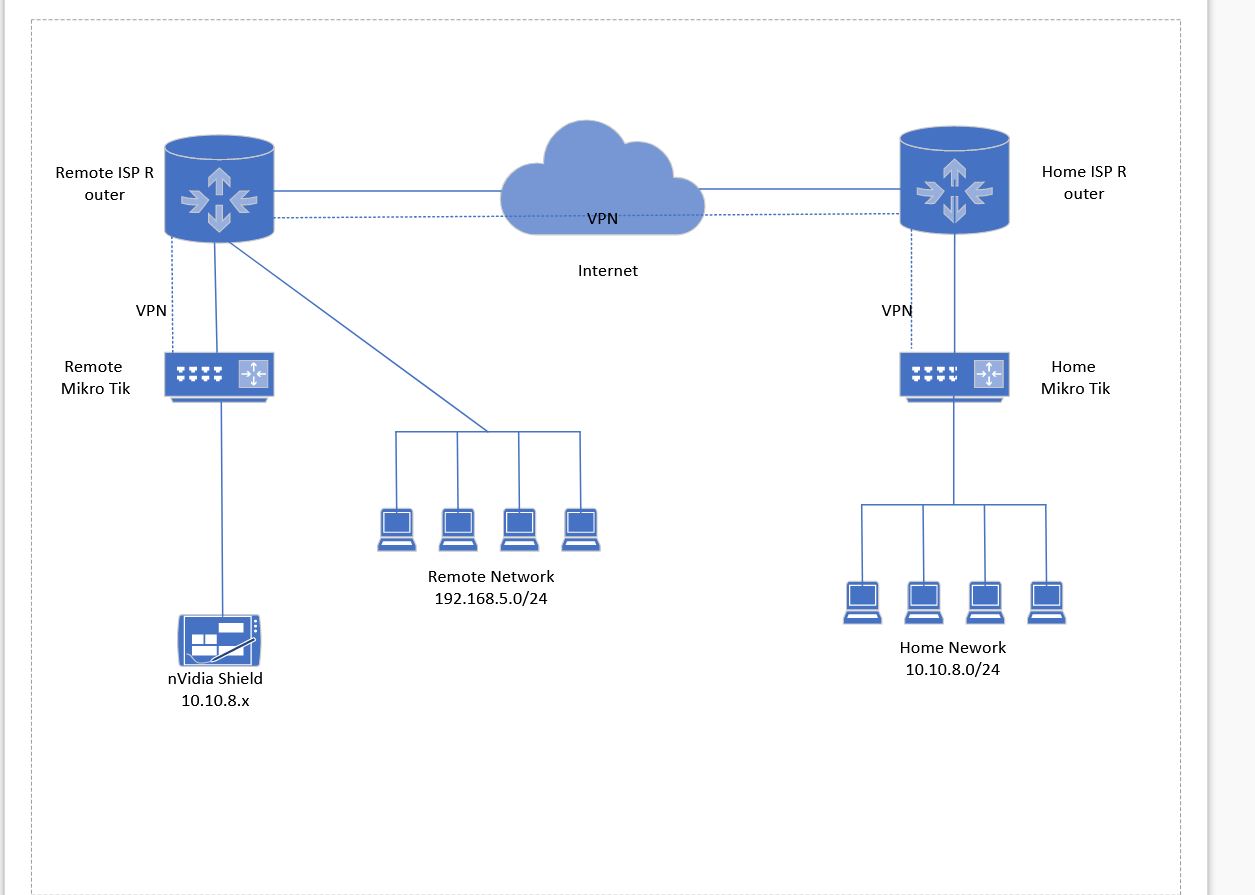
I have a basic level of networking knowledge and need some help setting up a site to site vpn with a little twist.
I travel quite a bit for work and would like to take a second mikro tik router with me to different sites and hotel rooms to use with my nVidia shield.
I want the shield to behave like it’s on my local home network and have access to my home NAS device, plus my streaming services as if it’s coming from my home ISP IP address, since activating streaming services at too many addresses causes issues..
I’ve done some searching on the forum and on the internet but can’t find any howto’s that fit this specific scenario.
I’ve attached a basic diagram of what I’m hoping to achieve.
Can anyone point me toward a good how to that fits this or offer some advice?
3 weeks later and many many hours of experimenting, researching numerous topis and watching/reading about 10 howtos…half of which were completely wrong..I finally got a workable solution, in testing at least, using EIOP.
I don’t think this will work where I have no control over the ISP router, but may need to build the EOIP tunnel on top of another VPN tunnel.
Going to continue to experiment and may post a definitive howto once I get a workable solution for multiple scenarios.