Hello. I have RB4011 and just upgraded from 7.13.5 to 7.14 and got very confusing issue.
I have a Wireguard interface which belongs to a VRF, and I have a route to 0.0.0.0/0 in vrf_table through that wg_tunnel. I tried to repeat the issue in a more clear environment with hap ac^2 and issue confirmed. That’s my config (everything other is just default):
And everything works as intended: wg_interface connects to a peer via ISP and provides access to /0 for vlan10, and other clients use dynamic route to 0.0.0.0/0 which is created from DHCP client (use ISP directly).
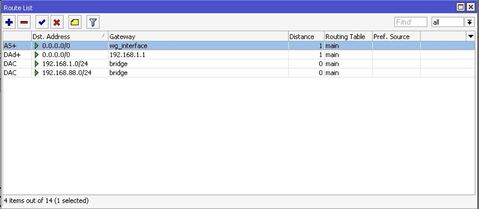
After updating to 7.14 I see that in the routing table:
When I export config, BUT in winbox this route is shown as belonged to the main table and also works that way! I have no internet access anymore fot anyone, router can’t check updates, wg_interface doesnt connect until I disable this rule. After reverting back to 7.13.5 everything goes back to normal.
Is that my config broken (this routing rule) or something wrong with the 7.14 update?
Probably, I shouldn’t specify vrf-interface option, so what is that option for and why everything is fine with 7.13.5 and not with 7.14?
Thanks.
Actually I think v7.14 creates several issues with interfaces and VRF.
I have issues in my config with IPIP interfaces not working properly after v7.14.
Basically the IPIP interface does not get installed in the VRF table, but it stays in the main routing table.
Also at startup I get an error that using VRF while setting the IPIP interface (in the remote address side) to check whether VRF is enabled, which it is.
And finally also IP service being set on VRF does not respond to requests anymore.
So I switched back to 7.13.5 for now and everything returned working fine as before.
I have reported this both to support and to 7.14 forum post (http://forum.mikrotik.com/t/v7-14-3-stable-is-released/174007/1); I can see others have the same issues with VRF and some type of interface.
In my case VLAN and L2TP worked fine with VRF and 7.14, but not IPIP tunnel.
I have re-installed again v7.14 so that now I was able to generate a supout to provide Mikrotik.
In my case once the router restarts I get these type of error messages related to the IPIP interfaces: failed to set vrf for interface ipip-if, please check if selected vrf instance is enabled
Hopefully Mikrotik will be able to reproduce it to find a fix for it.
I’m with you 100% experiencing the exact issue. I’ve had to downgrade all of my gear that I had initially upgraded until something is figured out. In my case the IP address route that is connected to the WG interface is dynamically assigned to the main routing table even when that interface belongs to my separate VRF and not to the main.
Also seems like when I remove vtf-interface parameter, everything gets fine on 7.14.
What is that option for, where can I find explaination? Didn’t see those in help.mikrotik.com, what changes when I leave that parameter empty? Considering that I specify gateway with vrf_table.
vrf-interface parameter is just another way to say in which vrf route will be added. VRF is then chosen based on which VRF interface belongs, but since after reboot IPIP tunnel is assigned to “main”, route is also moved to main.
7.14 completely breaks my VRF setup which has been working fine since 7.x. Wireguard connected route now goes to main instead of its associated VRF. And (maybe due to the first issue) one of my VRF default routes is automatically moved to main during the upgrade, breaking my Internet access.
after updating to 7.14, noticed that the addesses in EoIP interfaces members of the VRF were falling on main VRF instead of created VRF, thus causing the issue, as reported by others.
upgrading to 7.15 beta did not solve it.
the solution was deleting EoIP and creating again and putting it back in VRF.
I’ve just updated from 7.12 to 7.15.2 and it broke something on my VRF setup.
I have a lan_bridge in vlan 254 along with eth4 and I’ve created an interface vlan lan_bridge.254 with an IP address that usually was placed in a specific vrf along with a pope interface. The hosts on eth4 vlan 254 can not ping anymore if they lan_bridge.254 interface is in the VRF, while if I move the interface outside the VRF it can be pinged. Did you find any solution to the VRF problems related to 7.14 and 7.15?
My issue could be related to the following behavior change starting from 7.14:
Started from version 7.14 when interfaces are added in VRF - virtual VRF interface is created automatically. If it is needed to match traffic which belongs to VRF interface, VRF virtual interface should be used in firewall filters, for example:
This is totally nonsense IMHO, we should be able to match specific in/out interfaces even if they’re in VRF as always, without messing with mangle table
I can confirm that my vrf setup was broken due to the change in firewall filter table where you can no more match specific input/output interfaces if those interfaces are put within a VRF.
We have issues with certain interfaces working and others not within the same VRF. We have created a ticket [SUP-160981], but we have not yet received a response from Mikrotik.