Currently, RouterOS supports only Active-Backup setups. Active-Active is not supported.
Just curious, is this the Mellanox extension (MAGP) or a completely separate linux implementation with similar functionality?
Conntrackd is only a daemon that inter-exchange flow-based connection tracking to one or more routers via multicast protocol. With that technique you are able to setup a active/active/active/active NAT-Router.
Yes this is a Unix/BSD/Linux thing, but is a standard-library and nothing special.
With OSPF and ECMP you can split traffic with Layer3+4 rules between all available gateways. Each flow is fixed to one nat-gateway, but when one gateway fails, traffic can switch to another NAT-Gateway.
The NAT *n Gateway have always the same IP-Address on the LAN and WAN interface or even better on the loopback-interface.
Hi.
should I set the synchronization on each VRRP interface or is it enough on one?
both
Hi,
You need to set sync-connection-tracking=yes only on one VRRP interface (on both ends). If multiple VRRP interfaces are grouped together, enable sync on the group-master.
If multiple VRRP interfaces are grouped together, enable sync on the group-master.
can u elaborate more on this please
Check group-master description in MikroTik VRRP documentation
You need to set > sync-connection-tracking=yes > only on one VRRP interface (on both ends). If multiple VRRP interfaces are grouped together, enable sync on the group-master.
So only sync-connection-tracking=yes on group-master. Other VRRP in the group dont need to
exactly
is there any option to synchronize dhcp leases like sessions in contrack ?
Just to make sure that I’ve understood this thread correctly - I have two RB5009s with VLANs in VRRP configuration. I’ve enabled pre-emptive mode for all the VRRP interfaces, set one of the VLAN VRRPs as the Group Master, and then enabled Sync.Connection Tracking on the Group Master interface on both routers. Is this is indeed allowed and correct according to what I have read?
The reason I ask is that as I conduct fail over tests by removing the trunk cable from my primary router, I am able to cycle once or twice before I then see a vrrp warning message in my log that says: CTSYNC link down. At this point, the backup router never transitions from master to backup nor does my primary take over as master. It’s almost as if the sync communication between the two routers dies. If I disable the Sync. Connection Tracking on the backup router, this issue seems never to occur and I am able to fail over back and forth many times with no issues. Happy to post configs but wanted to see if anyone else (or Mikrotik staff) had observed the same issue.
Yes, that’s correct.
I’d like to see the network diagram to ensure we are on the same page.
Please remember that disconnecting the physical cable (LINK DOWN) transitions VRRP into the FAILURE (F) state because it can no longer serve as VRRP master (no link) nor as a backup (no CTSYNC connection). VRRP is a Layer 3 redundancy protocol. There are different mechanisms for redundancy on lower layers, such as MLAG.
Hi @raimondsp this is fairly old post but but your statement above confuses me.
And it contradicts what you are saying here:
Can you confirm: Must I remove preemption-mode=yes when I have sync-connection-tracking=yes ?
If so, why? Preemption mode is pretty important.
I am asking because I have a hard time getting connection tracking sync to work in the latest RouterOS version.
I have the following firewall rule:
chain=input action=accept protocol=udp dst-port=8275 log=no log-prefix=""
but the packet/bytes counters remain mostly at zero.
I am saying mostly because at the slave they are "sometimes" increasing but never at the master, not even when I switch master/slave. Also, I'd expect there to be packets consistently (because state needs to be sent continuously from master to slave) but that's not the case
Hi,
The initial sync-connection-tracking implementation didn't support preemption, so the latter had to be turned off.
Now, preemption is supported, so you can have both preemption-mode=yes and sync-connection-tracking=yes.
Thank you for confirming!
May I also ask how and what data in connection tracking is transferred?
For example, only entries related to a specific VRRP? Or the entire system table? Are any addresses translated?
I am trying to understand what is supposed to happen in a scenario where I have multiple VLANs (say vlan3, vlan99) with two routers in VRRP. Suppose I am not using group authority and for some reason Router1 is master for vlan3 but slave for vlan99 and Router2 is master for vlan99 but slave for vlan3.
In this case, a host from vlan3 accessing a host in vlan99 will send packet through Router1 ... but the return packet comes through Router2.
This is generally a perfectly valid (albeit asymmetric) routing. However, connections break in a weird way: At the time when Router2 becomes master for vlan99, a continuous ping keeps responding successfully but a new one (on the same machine!) times out. Similarly, no new (and old!) TCP connections are possible.
Can this be made working?
The question is, when Router1 is master for vlan3, but Router2 is master for vlan99, is this case desired or an issue?
If that's desired (e.g., for load balancing), set connection-tracking-mode=active-active and sync-connection-tracking=yes on both VRRP instances (and on both routers).
If you want all VRRP interfaces to be either the master or a backup (redundancy setup, no load balancing), leave connection-tracking-mode=passive-active (default) and set group-authority. In this case, sync-connection-tracking should be enabled only for the group-authority.
Note that the active-active setup might have issues with NAT, unless you have two public IP addresses, each for VLAN (-s) where the Router is the master.
Thanks again for clarifying! Is there a downside with mode=active-active then? It seems in this mode, conntrack is 100% (apart from local router addresses?) continuously synchronized both ways, right?
This is not what I am seeing though.
Example:
- Router2 is in vlan3 with 10.227.79.2 and vlan99 with 10.227.1.2
- Router1 is in vlan3 with 10.227.79.1 and vlan99 with 10.227.1.1
- There is VRRP between them in vlan99 (VIP 10.227.1.254) but not vlan3
- A host in vlan3 has Router2 (10.227.79.2) as default gateway
- A host in vlan99 has 10.227.1.254 as default gateway
- Preemption mode, Sync Conn Tracking and Conn Tracking Mode active/active is set on both routers for vrrp99
At the beginning, Router2 is VRRP master for vlan99 and everything works as expected.
Then I manually disable vrrp99 interface on Router2 such that Router1 becomes VRRP master for vlan99. Now Router2 is gateway for vlan3 (as before) and Router1 is gateway for vlan99.
The following happens: A ping from host 10.227.79.104 to 10.227.1.21 that I started before disabling vrrp99 in Router2 continues to work. However, if I interrupt and restart, I get timeout. Similarly if I start the same ping on the same host in parallel, I get timeouts.
Similarly, when host 10.227.79.104 connects to 10.227.1.21:8006 (TCP) I get a timeout.
On Router2, I can see the expected packet flow (received from vlan3, forwarded to vlan99) :

On Router1, I see the response packet from 10.227.1.21 entering via vlan99, as expected, but it is NOT forwarded to vlan3:
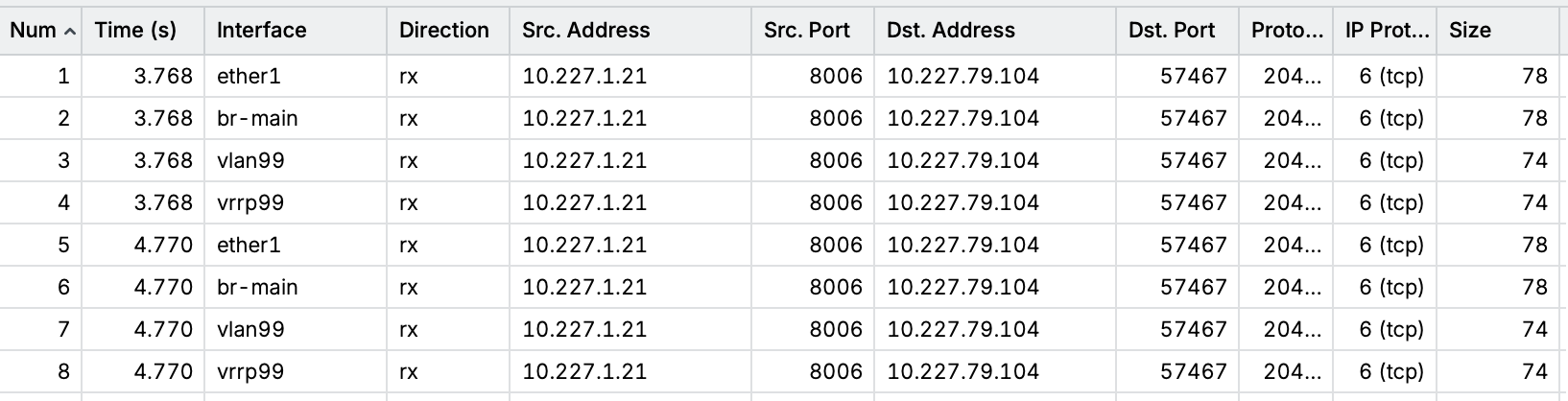
The log shows that the packet has been discarded by the firewall because connection-state is invalid:
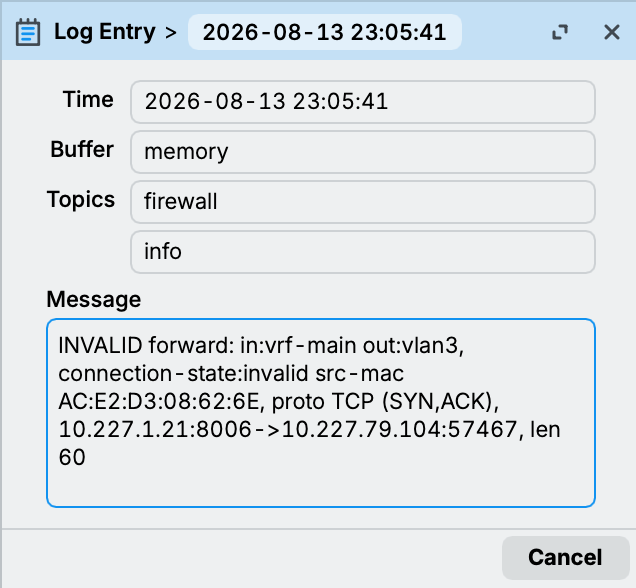
However, with proper connection track sync, the connection 10.227.79.102:SPT --> 10.227.1.21:8006 that was created on Router2 should have been synchronized to Router1. But this isn't the case, there is no such entry in the conntrack table:
Router2:

Router1:

From these screenshots it should be clear that the connection wasn't synchronized from Router2 to Router1.
Is this supposed to happen?